
Wstęp
Welcome to your new Gembird GHS-U-5.1-01 USB 5.1 Surround Headset. This manual provides essential information for setup, operation, and maintenance to ensure optimal performance and an immersive audio experience.
Zawartość opakowania
Przesyłka powinna zawierać następujące elementy:
- Gembird GHS-U-5.1-01 USB 5.1 Surround Headset

Image: Retail packaging for the Gembird GHS-U-5.1-01 USB 5.1 Surround Headset, showing the headset inside a clear window.
Produkt ponadview
The Gembird GHS-U-5.1-01 is a USB headset designed for immersive audio experiences with 5.1 surround sound. It features an adjustable microphone, built-in volume control, comfortable ear pads, and an adjustable headband for extended use.
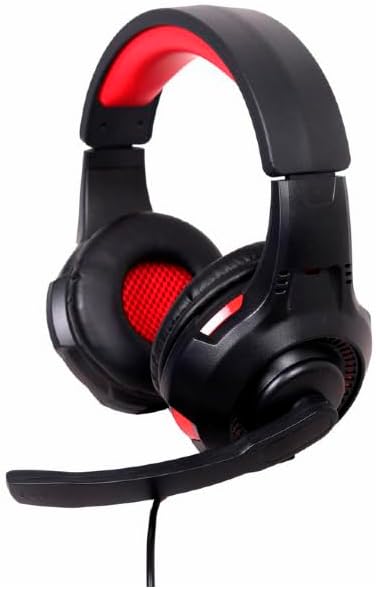
Obraz: kątowy view of the Gembird GHS-U-5.1-01 USB 5.1 Surround Headset, showcasing its black and red design with the microphone boom extended.
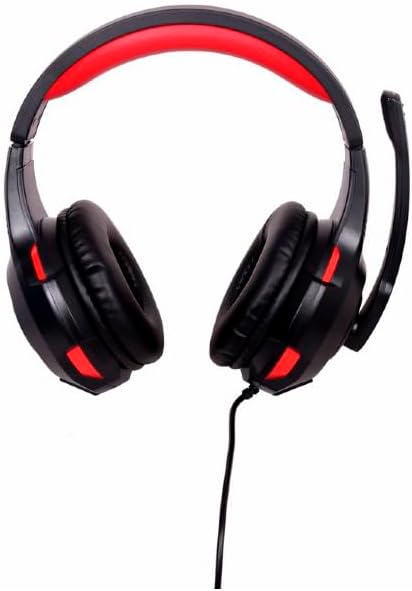
Obraz: Przód view of the Gembird GHS-U-5.1-01 USB 5.1 Surround Headset, highlighting the adjustable headband and earcups.

Image: Close-up of the in-line control unit for the Gembird GHS-U-5.1-01 headset, showing volume up/down and microphone mute buttons.
Organizować coś
Podłączanie zestawu słuchawkowego
The Gembird GHS-U-5.1-01 headset connects via a standard USB port.
- Znajdź dostępny port USB na swoim komputerze.
- Podłącz wtyczkę USB zestawu słuchawkowego do portu USB.
- Twój system operacyjny powinien automatycznie wykryć i zainstalować niezbędne sterowniki. Ten proces może potrwać chwilę.
- Once installed, the headset will be ready for use as an audio input and output device.
Audio Settings Configuration
For optimal 5.1 surround sound experience, you may need to configure your computer's audio settings.
- Okna: Go to "Sound Settings" (right-click speaker icon in taskbar) > "Sound Control Panel" > "Playback" tab. Select the Gembird headset, click "Configure," and choose "5.1 Surround."
- MacOS: Go to "System Preferences" > "Sound" > "Output" tab. Select the Gembird headset.
Instrukcja obsługi
Kontrola głośności
The headset features an in-line remote control for easy volume adjustment.
- Użyj "+" przycisk, aby zwiększyć głośność.
- Użyj "-" przycisk, aby zmniejszyć głośność.
Użycie mikrofonu
The adjustable microphone boom allows for precise positioning.
- Position the microphone approximately 1-2 inches from your mouth for clear voice capture.
- Use the microphone mute button on the in-line remote to toggle the microphone on or off.
Regulacja komfortu
Adjust the headband to fit comfortably on your head. The ear pads are designed for extended use.
Konserwacja
To ensure the longevity and performance of your headset, follow these maintenance guidelines:
- Czyszczenie: Use a soft, dry cloth to wipe the headset. Do not use harsh chemicals or abrasive cleaners.
- Składowanie: Store the headset in a clean, dry place away from extreme temperatures.
- Pielęgnacja kabli: Aby zapobiec uszkodzeniom kabla USB, należy unikać jego ostrego zginania i nadmiernego ciągnięcia.
Rozwiązywanie problemów
Brak dźwięku lub mikrofon nie działa
- Sprawdź połączenie USB: Upewnij się, że złącze USB jest całkowicie włożone do portu. Spróbuj użyć innego portu USB.
- Sprawdź poziom głośności: Verify that the volume on the in-line control, your computer's system volume, and application-specific volumes are not muted or set too low.
- Check Audio Settings: Confirm that the Gembird headset is selected as the default playback and recording device in your computer's sound settings.
- Restart komputera: Sometimes a simple restart can resolve driver or software conflicts.
Problemy z jakością dźwięku
- Aktualizacja sterownika: Upewnij się, że sterowniki Twojego systemu operacyjnego są aktualne.
- Jakość źródła: Poor audio quality may stem from the audio source itself. Test with different audio files lub aplikacji.
Specyfikacje
| Nazwa modelu | GHS-U-5.1-01 |
| Łączność | Przewodowy USB |
| Współczynnik kształtu | Na ucho |
| Kolor | Czarny |
| Tworzywo | Aluminum (Enclosure) |
| Waga | 0.4 kilograma |
| Dodatkowe funkcje | Adjustable microphone boom, Built-in volume control, Comfortable ear pads, Adjustable headband |
Informacje o gwarancji
This Gembird headset comes with a 24 Month Manufacturer Guarantee. Please retain your proof of purchase for warranty claims. For detailed warranty terms and conditions, refer to the documentation provided with your product or contact Gembird customer support.
Wsparcie
If you encounter issues not covered in this manual or require further assistance, please visit the official Gembird website or contact their customer support for technical assistance.