
1. Wprowadzenie
Dziękujemy za zakupasing the Yanmis HD Digital Video Camera Camcorder. This compact and versatile camcorder is designed for ease of use, making it suitable for capturing your precious moments in high definition. Please read this manual thoroughly before operating the device to ensure proper usage and optimal performance.
2. Zawartość opakowania
- Yanmis HD Digital Video Camera Camcorder
- Instrukcja obsługi
- Battery (x2, as per video review)
- Kabel ładujący USB
- Kabel wyjściowy AV
- Adapter ładowarki ściennej
- Pokrowiec na aparat
- Ściereczka do czyszczenia soczewek
3. Funkcje produktu
- Trwała konstrukcja: Built to withstand minor impacts, portable, lightweight, and easy to handle for various activities like cycling or hiking.
- Wielofunkcyjny: Supports up to 1080P video recording, features a 2-inch TFT LCD screen, 16X digital zoom, USB 2.0 connectivity, and allows for photography, video playback, and deletion.
- Funkcja pauzy: Easily pause and resume recording without creating new video files, simplifying post-production editing.
- Obsługa pamięci: Compatible with SD cards up to 32GB (Video-AVI / Photo-JPEG file format).
4. Physical Components and Controls
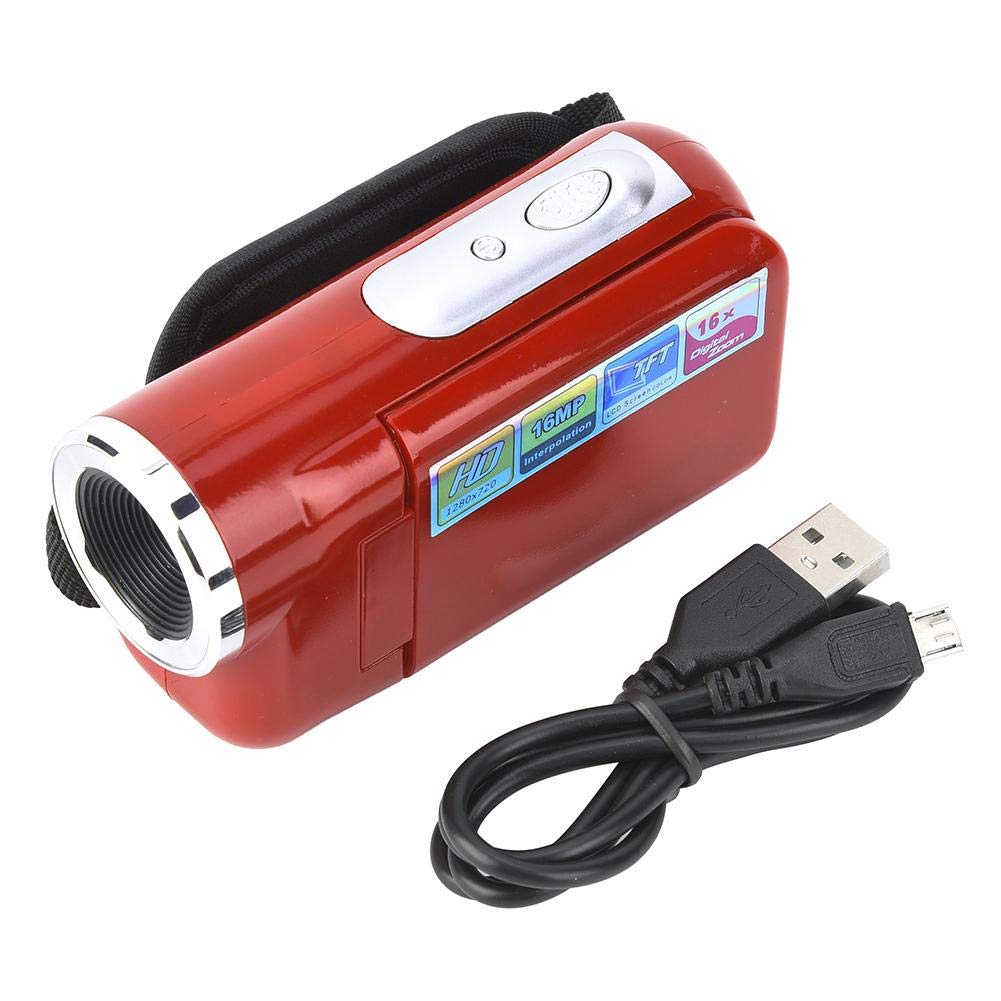
Figure 1: Yanmis Camcorder in an outdoor setting, demonstrating its compact size and ease of use.
- Obiektyw: Front-facing lens for capturing video and photos.
- Ekran TFT LCD o przekątnej 2 cala: Rotatable screen for viewna żywotage, navigating menus, and reviewmedia.
- Przycisk zasilania: Located near the screen hinge, used to turn the device on/off.
- Przycisk nagrywania/migawki: Typically located at the back or top, used to start/stop video recording or take photos.
- Sterowanie powiększeniem: Buttons or a rocker switch for 16X digital zoom.
- Menu/Mode Buttons: For accessing settings and switching between video/photo modes.
- Port USB: Micro USB port for charging and connecting to a computer.
- Port wyjściowy AV: Do podłączenia do telewizora.
- Gniazdo karty SD: Located in the battery compartment, supports up to 32GB SD cards.
- Mocowanie do statywu: Standard thread at the bottom for mounting on a tripod.
5. Konfiguracja
5.1 Wkładanie baterii
- Open the battery compartment cover, usually located at the bottom of the camcorder.
- Włóż dostarczoną baterię, zwracając uwagę na prawidłową biegunowość.
- Dokładnie zamknij pokrywę komory baterii.
5.2 Wkładanie karty SD
- Locate the SD card slot, typically inside the battery compartment.
- Insert a compatible SD card (up to 32GB) into the slot until it clicks into place.
- Aby wyjąć kartę, delikatnie naciśnij, aż wyskoczy.
5.3 Ładowanie akumulatora
- Connect the USB charging cable to the camcorder's Micro USB port.
- Plug the other end of the USB cable into the wall charger adapter and then into a power outlet.
- The charging indicator light will illuminate. Charging is complete when the light changes color or turns off.
6. Instrukcja obsługi
6.1 Włączanie/wyłączanie zasilania
- To power on, open the LCD screen or press and hold the Power button.
- To power off, close the LCD screen or press and hold the Power button.
6.2 Nagrywanie wideo
- Ensure the camcorder is in video mode (check the screen icon).
- Press the Record button to start recording. A red indicator light will usually show that recording is in progress.
- To pause recording, press the Record button briefly. Press again to resume.
- To stop recording, press the Record button firmly.
6.3 Robienie zdjęć
- Ensure the camcorder is in photo mode.
- Skadruj ujęcie korzystając z ekranu LCD.
- Press the Shutter button (often the same as the Record button) to take a photo.
6.4 Korzystanie z zoomu cyfrowego
- Use the zoom controls (buttons or rocker switch) to zoom in (T) or zoom out (W).
- Note: This camcorder features 16X digital zoom, which digitally enlarges the image and may affect image quality at higher zoom levels.
6.5 Nawigacja i ustawienia menu
- Naciśnij przycisk Menu, aby uzyskać dostęp do menu głównego.
- Use the Up/Down/Left/Right buttons (or joystick) to navigate through menu options.
- Naciśnij przycisk OK, aby wybrać opcję.
- Common settings include video resolution (up to 1080P), photo resolution, date/time stamp, and various scene modes.
6.6 Odtwarzanie
- In the main menu, select the Playback option to view nagrane filmy i zdjęcia.
- Use the navigation buttons to browse through your media.
- Press OK to play a video or view zdjęcie.
6.7 Podłączanie do komputera/telewizora
- Do komputera: Use the USB cable to connect the camcorder to your computer. The device should appear as a removable disk, allowing you to transfer files.
- Do telewizji: Use the provided AV output cable to connect the camcorder to your television for viewing media on a larger screen.
7. Integracja mediów
7.1 Zdjęcia produktów

Image: The Yanmis camcorder held in hand, capturing an outdoor scene with paragliders in the distance. This illustrates its portability and suitability for outdoor activities.

Image: The camcorder with its 2-inch TFT LCD screen open, displaying a child playing with bubbles. This highlights the screen's functionality for easy operation and review.

Image: A child happily holding the Yanmis camcorder, demonstrating its user-friendly design and appeal for younger users.

Image: Icons illustrating key features: HD lens (F3.1, f=6.5mm), 500 million pixels (interpolated 16 million pixels), HD picture quality (4x digital zoom), and night shooting (standby).

Image: A diagram showing the dimensions of the camcorder: 10cm/3.9inch length, 3.5cm/1.4inch width, and 5.5cm/2.2inch height, emphasizing its compact size.

Obraz: widok z góry view of the Yanmis camcorder with the screen folded, showing the lens and top controls.

Obraz: kątowy view of the Yanmis camcorder with the screen folded, highlighting its sleek design.
7.2 Oficjalne filmy o produktach
Video: An official product video from Muitune Direct showcasing the 2.7K Camcorder Video Camera. This video demonstrates the camera's features and capabilities.
8. Konserwacja
- Czyszczenie: Use the provided lens cleaning cloth to gently wipe the lens and screen. Avoid using harsh chemicals.
- Składowanie: Store the camcorder in its protective pouch in a cool, dry place away from direct sunlight and extreme temperatures.
- Pielęgnacja baterii: Wyjmij baterię, jeśli kamera nie będzie używana przez dłuższy czas.
9. Rozwiązywanie Problemów
- Kamera się nie włącza: Upewnij się, że bateria jest prawidłowo włożona i całkowicie naładowana.
- Karta SD nie została rozpoznana: Check if the SD card is inserted correctly and is not damaged. Ensure it is formatted to a compatible file system (FAT32).
- Słaba jakość obrazu/wideo: Ensure adequate lighting. Note that 16X digital zoom may reduce clarity.
- Brak dźwięku podczas odtwarzania: Check the volume settings on the camcorder or connected TV.
10. Specyfikacje
| Funkcja | Opis |
|---|---|
| Marka | Yanmis |
| Numer modelu | Yanmis016ucxth5n-02 |
| Waga przedmiotu | 4.2 uncji |
| Wymiary produktu | 3.94 x 2.17 x 1.38 cala |
| Kolor | Czerwony |
| Funkcja specjalna | Przenośny |
| Technologia czujnika fotograficznego | Inny |
| Rozdzielczość przechwytywania wideo | 480p, 720p |
| Typ pamięci flash | SD (do 32 GB) |
| Format przechwytywania wideo | Plik AVI |
| Obsługiwany format audio | AAC, MP3, PCM |
| Rozmiar ekranu | 2 cali |
| Technologia łączności | USB |
11. Gwarancja i wsparcie
For warranty information or technical support, please refer to the contact details provided with your purchase or visit the official Yanmis website. We are committed to providing quality after-sales service.