
1. Wprowadzenie
The FeiTian A4B USB Security Key is a hardware authenticator designed to enhance the security of your online accounts. It provides robust protection against phishing and unauthorized access by requiring a physical key for login. This manual provides instructions for setting up, operating, and maintaining your security key.

Obraz 1.1: Przód view of the FeiTian A4B USB Security Key. This image shows the USB-A connector and the circular touch button with a key icon.
2. Główne cechy
- FIDO2 + FIDO U2F Certified: Ensures broad compatibility and strong security standards.
- Praca bez kierowcy: Works in every browser without requiring additional driver installations.
- Uniwersalna kompatybilność: Supports desktops, laptops, tablets, and mobile devices via USB-A.
- Trwała konstrukcja: Constructed for long-lasting everyday use.
- Water-Resistant (IP67): Provides protection against water ingress.
- Wzmocniona ochrona konta: Helps safeguard your accounts from phishing and other cyber-attacks, preventing unauthorized device use.
- Wide Service Support: Compatible with numerous websites and applications including Windows Log-In, Twitter, Google Accounts, Microsoft Accounts, Facebook, Salesforce, Zoho, Dropbox, DUO Security, Microsoft Azure Entra ID, Microsoft Active Directory, Coinbase, Bank of America, Okta, Ping Identity, eBay, and many more.
Image 2.1: The FIDO Certified logo, indicating compliance with FIDO authentication standards.
3. Instrukcje konfiguracji
To begin using your FeiTian A4B USB Security Key, you will need to register it with your desired online services. The general process involves enabling two-factor authentication (2FA) or passkey support within the service's security settings and then following the on-screen prompts to register your physical key.
3.1 General Setup Steps:
- Dostęp do ustawień bezpieczeństwa: Navigate to the security or account settings section of the online service (e.g., Google, Microsoft, Facebook).
- Enable 2FA/Passkey: Look for options related to Two-Factor Authentication, Security Keys, or Passkeys and choose to add a new security key.
- Włóż klucz: When prompted, insert your FeiTian A4B USB Security Key into an available USB-A port on your computer or compatible device.
- Confirm Presence: The service will typically ask you to touch the key's button to confirm your presence. The key has an authentication indicator light that may flash during this process.
- Set PIN (if applicable): Some services or operating systems may require you to set a PIN for your security key. Follow the on-screen instructions to create a strong PIN.
- Name Key: You may be given the option to name your security key for easier identification.
- Pełna rejestracja: Follow any remaining prompts to finalize the registration process.
3.2 Kluczowe elementy:
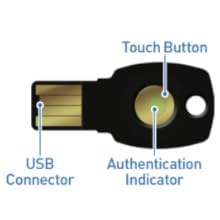
Image 3.1: Diagram illustrating the USB Connector, Touch Button, and Authentication Indicator on the FeiTian A4B USB Security Key.
3.3 Video Guide: Authenticate to a Web App using FIDO2
Video 3.1: This video demonstrates the process of authenticating to a web application using a FIDO2 security key, including PIN entry and touching the key.
3.4 Video Guide: Amazon Account Passkey Setup
Video 3.2: A step-by-step guide on how to set up a FIDO2 security key as a passkey for your Amazon account.
4. Instrukcja obsługi
Once your FeiTian A4B USB Security Key is registered with an online service, using it for login is straightforward:
- Rozpocznij logowanie: Go to the login page of the service you wish to access. Enter your username or email address as usual.
- Włóż klucz: When prompted for your second factor, insert your FeiTian A4B USB Security Key into an available USB-A port.
- Przycisk dotykowy: The service will instruct you to touch the circular button on your security key. The authentication indicator light will typically flash or illuminate to confirm the action.
- Enter PIN (if required): If you set a PIN during registration, you may be prompted to enter it on your device.
- Dostęp przyznany: Upon successful verification, you will be logged into your account.
The security key acts as a physical token, ensuring that only someone with physical possession of the key and knowledge of any associated PIN can access your account.

Image 4.1: The FeiTian A4B USB Security Key attached to a keychain, demonstrating its portability and integration with everyday items.
5. Konserwacja
To ensure the longevity and proper functioning of your FeiTian A4B USB Security Key, follow these maintenance guidelines:
- Zachowaj czystosc: Regularnie przecieraj klucz miękką, suchą ściereczką, aby usunąć kurz i zanieczyszczenia. Unikaj stosowania silnych środków chemicznych i materiałów ściernych.
- Chroń przed uszkodzeniem: While durable, avoid excessive force, bending, or dropping the key.
- Wodoodporność: The key is water-resistant (IP67), meaning it can withstand immersion in up to 1 meter of water for 30 minutes. However, it is not fully waterproof. Avoid prolonged submersion or exposure to high-pressure water jets. Ensure the USB connector is dry before inserting it into a device.
- Składowanie: Store the key in a cool, dry place away from extreme temperatures and direct sunlight.
6. Rozwiązywanie Problemów
If you encounter issues with your FeiTian A4B USB Security Key, try the following solutions:
- Klucz nie został rozpoznany:
- Ensure the key is fully inserted into a functional USB-A port.
- Try a different USB-A port on your device.
- Uruchom ponownie komputer lub urządzenie.
- Ensure your browser and operating system are up to date.
- Błąd uwierzytelniania:
- Make sure you are touching the circular button on the key when prompted.
- Verify that the security key is correctly registered with the online service you are trying to access.
- If a PIN is required, ensure you are entering the correct PIN.
- Lost or Damaged Key:
- It is highly recommended to register multiple security keys (e.g., a primary and a backup key) with your accounts to prevent lockout in case one is lost or damaged.
- If you only have one key and it is lost, you will need to use the recovery options provided by the online service (e.g., backup codes, alternative 2FA methods).
7. Specyfikacje
| Atrybut | Wartość |
|---|---|
| Numer modelu | A4B |
| Wymiary produktu | 3.94 x 1.18 x 3.94 cala |
| Waga przedmiotu | 0.096 uncji |
| Łączność | USB-A |
| Orzecznictwo | FIDO2, FIDO U2F |
| Odporność na wodę | IP67 |
| Producent | Technologie Feitian |
8. Gwarancja i pomoc techniczna
For warranty information and technical support, please refer to the official FeiTian Technologies webOdwiedź stronę internetową lub skontaktuj się bezpośrednio z działem obsługi klienta. Zachowaj paragon jako dowód zakupu na wypadek reklamacji.
Producent: Technologie Feitian
Aby uzyskać dalszą pomoc, odwiedź stronę: Oficjalny przedstawiciel Feitian Technologies Webstrona