
CYCLIQ CLQFLY6CEGEN3
Instrukcja obsługi CYCLIQ Fly 6 CE Generacja 3
Model: CLQFLY6CEGEN3
Wstęp
The CYCLIQ Fly 6 CE Generation 3 is an advanced rear-facing bicycle camera and safety light designed to enhance your cycling safety and provide peace of mind. This compact device records high-definition video, ensuring you capture important moments on the road, while its powerful light increases your visibility to others, day or night. With features like automatic looping, incident protection, and app control, the Fly 6 CE Gen 3 is an essential companion for every cyclist.
Co jest w pudełku
Please check the contents of your Fly 6 CE Generation 3 package. If any items are missing or damaged, please contact customer support.
- CYCLIQ Fly 6 CE Generation 3 Unit
- Kabel USB do transmisji danych i ładowania
- Seatpost Mounting Accessories
- 32 GB MicroSD Card (pre-installed or separate)
- Pasek bezpieczeństwa

Image: The main CYCLIQ Fly 6 CE Generation 3 unit, showing the camera lens and the bright red rear light.
Cechy produktu
- Nagrywanie w wysokiej rozdzielczości: Captures video at 1920 x 1080p @ 30 fps or 1280 x 720p @ 60 fps.
- Powerful Rear Light: Maximum output of 50 lumens for enhanced visibility.
- Długa żywotność baterii: Up to 4 hours with camera and light, or up to 5 hours in camera-only mode.
- Automatic Looping: Ensures continuous recording without running out of storage space.
- Incident Protection (Black Box Technology): Automatically locks video and audio footage before and after an impact.
- Obiektyw szerokokątny: Rejestruje szerokie pole view to record more of your surroundings.
- Cycliq Plus App Control: Zarządzaj ustawieniami, view żyćtage, and control the device via your smartphone.
- Kompaktowa i lekka konstrukcja: Weighs only 75.5 grams with dimensions of 71mm (H) x 35mm (W) x 40mm (D).
- Wodoodporność: Zaprojektowane tak, aby wytrzymać różne warunki atmosferyczne.

Image: The Fly 6 CE Generation 3 unit being splashed with water, illustrating its water-resistant design.
Organizować coś
1. Ładowanie urządzenia
Before first use, fully charge your Fly 6 CE Gen 3. Connect the supplied USB cable to the device's charging port and to a USB power source (e.g., computer USB port or wall adapter). The LED indicator will show charging status and turn off when fully charged. A full charge takes approximately 2 hours.
2. Instalacja karty MicroSD
The Fly 6 CE Gen 3 comes with a 32 GB MicroSD card. Ensure it is properly inserted into the MicroSD card slot. The device supports MicroSD cards up to 128 GB (Class 10 or higher recommended).
3. Montaż na rowerze
Use the provided seatpost mounting accessories to securely attach the Fly 6 CE Gen 3 to your bicycle's seatpost. Ensure the camera lens and light are facing directly backward and are not obstructed. The safety strap should be used as an additional security measure.
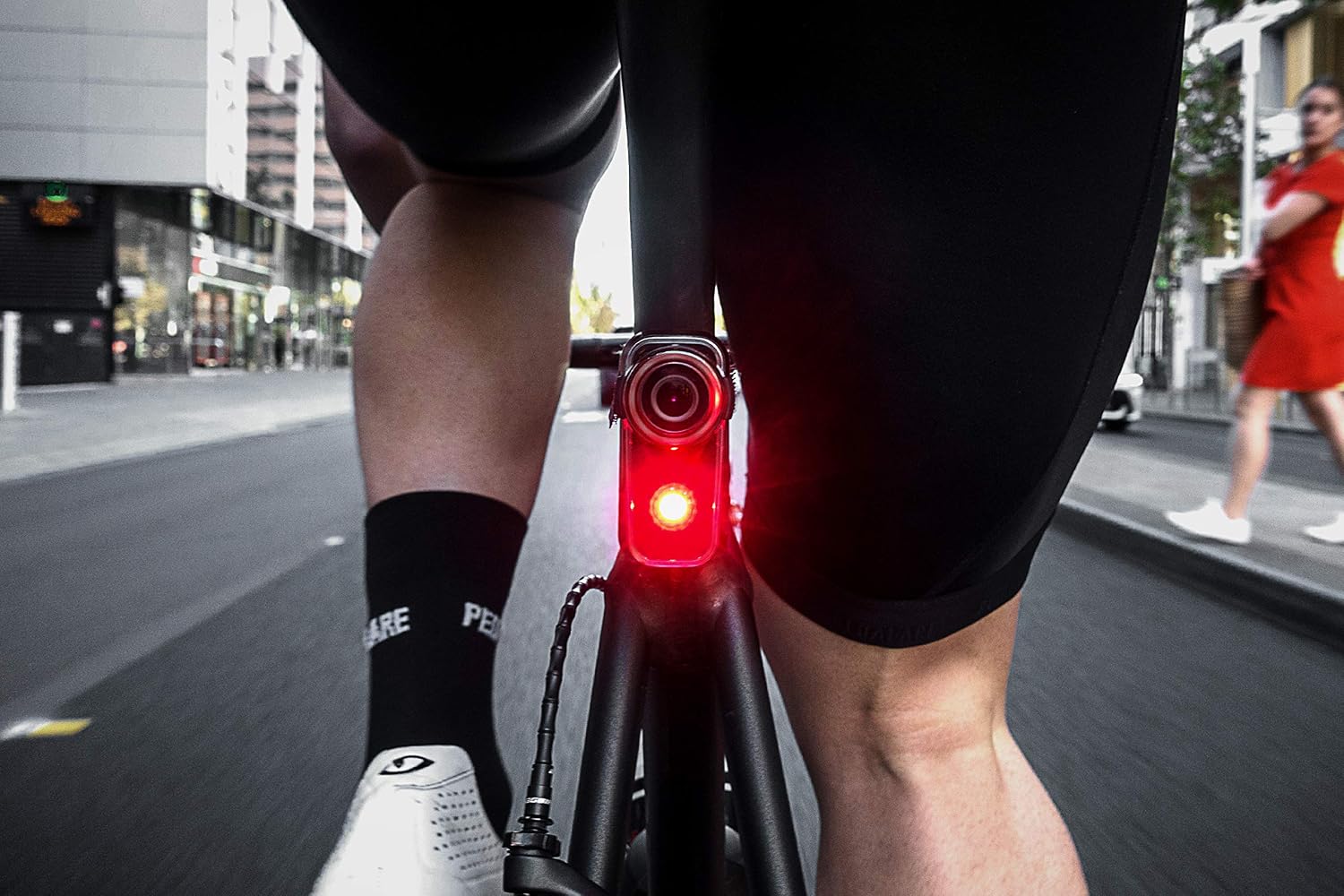
Image: The Fly 6 CE Generation 3 mounted on a bicycle seatpost from a rider's perspective, showing its position for rear-facing recording.
4. Connecting to the Cycliq Plus App
Download the Cycliq Plus app from your smartphone's app store. Turn on your Fly 6 CE Gen 3 and enable Bluetooth on your phone. Open the app and follow the on-screen instructions to pair your device. The app allows you to adjust settings, view żyćtage, and manage recorded files.

Image: Screenshot of the Cycliq Plus mobile application interface, displaying battery percentage, locked files, and options for settings and alarm.
Instrukcja obsługi
Włączanie/wyłączanie zasilania
- Włączanie: Press and hold the power button (usually located on the side) for 1-2 seconds until the device vibrates and the light/camera activates.
- Aby wyłączyć: Press and hold the power button for 2-3 seconds until the device vibrates and the light/camera turns off.

Obraz: Bok view of the Fly 6 CE Generation 3, highlighting the location of the power button.
Tryby nagrywania
The Fly 6 CE Gen 3 automatically begins recording when powered on. Video files are saved in segments (e.g., 5-minute clips) and loop automatically, overwriting the oldest files when the MicroSD card is full. You can adjust recording resolution and other settings via the Cycliq Plus app.
Tryby oświetlenia
The device offers multiple light modes to suit different riding conditions and preferences. Cycle through light modes by short-pressing the light mode button (if available, or via the app). Modes typically include constant, flash, and pulse patterns, with varying brightness levels up to 50 lumens.

Image: The bright red light of the Fly 6 CE Generation 3 illuminating the dark road behind a bicycle, demonstrating its visibility.
Incident Protection (Black Box Technology)
In the event of an impact or if the device detects it has been laid down, the Black Box technology automatically locks the current video segment and the preceding segment, preventing them from being overwritten. This ensures critical footage is preserved. You can also manually lock a file by pressing a designated button (refer to device specific button layout or app for details).
Using the Cycliq Plus App
The Cycliq Plus app provides comprehensive control over your Fly 6 CE Gen 3:
- Na żywo View: See what your camera is recording in real-time.
- Ustawienia: Adjust video resolution, frame rate, light modes, audio recording, and incident detection sensitivity.
- File Kierownictwo: View, download, and delete recorded videos. Lock important files aby zapobiec nadpisywaniu.
- Aktualizacje oprogramowania układowego: Update your device's firmware directly through the app.
- Alarm: Activate an alarm feature for added security when your bike is parked.
Konserwacja
Czyszczenie
Wipe the device, especially the lens and light, with a soft, damp cloth. Do not use harsh chemicals or abrasive materials. Ensure the charging port cover is securely closed to maintain water resistance.
Pielęgnacja baterii
To maximize battery life, avoid fully discharging the battery regularly. Store the device in a cool, dry place when not in use, and charge it periodically if stored for extended periods (e.g., every 3-6 months).
Aktualizacje oprogramowania układowego
Regularly check for firmware updates via the Cycliq Plus app. Updates often include performance improvements, bug fixes, and new features. Follow the app's instructions carefully during the update process.
Rozwiązywanie problemów
| Problem | Możliwa przyczyna / rozwiązanie |
|---|---|
| Urządzenie nie włącza się. | Bateria jest rozładowana. Naładuj urządzenie całkowicie. Device may be frozen. Perform a hard reset (refer to Cycliq support for specific reset instructions if standard power cycle fails). |
| Problemy z nagrywaniem (np. brak nagrywania, uszkodzone fileS). | MicroSD card is full or corrupted. Format the MicroSD card (via app or computer) or replace it. Incorrect MicroSD card type. Ensure it's Class 10 or higher. |
| Słaba jakość wideo. | Lens is dirty. Clean the camera lens. Low light conditions. Ensure adequate lighting for optimal recording. Incorrect resolution settings. Adjust resolution in the Cycliq Plus app. |
| Light not working or dim. | Battery is low. Charge the device. Light mode settings. Adjust light mode and brightness via the app. |
| Cannot connect to Cycliq Plus app. | Bluetooth is off on phone or device. Ensure both are enabled. Device is not in pairing mode. Follow app instructions for pairing. App needs update. Update the Cycliq Plus app. |
Specyfikacje
| Funkcja | Szczegół |
|---|---|
| Nazwa modelu | Fly 6 CE Generation 3 |
| Numer modelu | CLQFLY6CEGEN3 |
| Rozdzielczość wideo | 1920 x 1080p @ 30 fps, 1280 x 720p @ 60 fps |
| Moc światła | Max 50 Lumens |
| Żywotność baterii | Up to 4 hours (camera + light), up to 5 hours (camera only) |
| Typ baterii | 1 litowo-jonowy (w zestawie) |
| Czas ładowania | Około 2 godzin |
| Składowanie | MicroSD (32 GB included, supports up to 128 GB) |
| Wymiary (wys. x szer. x gł.) | 71 mm x 35 mm x 40 mm (2.8 x 1.4 x 1.6 cala) |
| Waga | 75.5 grama (2.66 uncji) |
| Typ soczewki | Szeroki kąt |
| Stabilizacja obrazu | NIE |
| Łączność | Bluetooth (for app control) |
Gwarancja i wsparcie
CYCLIQ products typically come with a manufacturer's warranty. Please refer to the warranty card included with your product or visit the official CYCLIQ website for detailed warranty terms and conditions. For technical support, troubleshooting assistance, or warranty claims, please contact CYCLIQ customer service directly through their official webstronę internetową lub dane kontaktowe znajdujące się na opakowaniu produktu.
Urzędnik Webstrona: cykliq.com
Ask a question about this manual
Ask about setup, troubleshooting, compatibility, parts, safety, or missing instructions. Manuals+ will review the question and use this page’s manual context to help answer it.