
1. Wprowadzenie
The ASUS L406MA-WH02 is a compact and lightweight 14-inch laptop designed for productivity and portability. It features an Intel Celeron N4000 processor, 4GB RAM, and 64GB eMMC flash storage, making it suitable for everyday tasks. This manual provides essential information for setting up, operating, maintaining, and troubleshooting your device.

Figure 1: ASUS L406MA-WH02 Laptop, Slate Gray
2. Co znajduje się w pudełku
Sprawdź, czy w opakowaniu znajdują się wszystkie elementy:
- ASUS L406MA-WH02 Laptop
- Zasilacz
- Instrukcja użytkownika
- Karta gwarancyjna
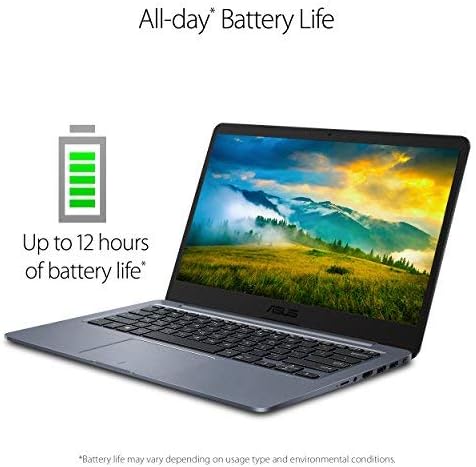
Figure 2: Laptop and accessories as packaged
3. Przewodnik konfiguracji
3.1 Pierwsze włączenie i ładowanie
- Wyjmij laptopa i zasilacz z pudełka.
- Podłącz zasilacz do portu ładowania laptopa, a następnie do gniazdka elektrycznego.
- Open the laptop lid. The laptop may power on automatically or you may need to press the power button.
- Postępuj zgodnie z instrukcjami wyświetlanymi na ekranie, aby ukończyć początkową konfigurację systemu Windows 10.
3.2 Windows 10 w trybie S
Your laptop comes with Windows 10 Home in S mode, which is designed for security and performance by exclusively using apps from the Microsoft Store. If you need to install apps from outside the Microsoft Store, you can switch out of S mode. This is a one-way process and cannot be reversed.
To switch out of S mode:
- Idź do Ustawienia > Aktualizacja i bezpieczeństwo > Aktywacja.
- W Switch to Windows 10 Home or Switch to Windows 10 Pro sekcja, wybierz Idź do sklepu.
- Na Switch out of S mode (or similar) page that appears in the Microsoft Store, select the Dostawać przycisk.
4. Instrukcja obsługi
4.1 Główne cechy
- Wyświetlacz: 14.0'' HD (1366x768) matte display with ASUS NanoEdge Bezel for an immersive viewzdobywania doświadczenia.
- Ruchliwość: Thin and lightweight design, measuring 0.7 inches thin and weighing 2.87 lbs, ideal for users on the go.
- Klawiatura: Ergonomic chiclet keyboard for comfortable typing.
- Łączność: Lightning-fast Wi-Fi 5 (802.11ac) ensures stable and quick internet access.
- Storage & Performance: 64GB eMMC flash storage and 4GB LPDDR4 RAM provide fast boot times and efficient application performance.

Figure 3: The thin and light design of the ASUS L406MA-WH02 laptop.
4.2 Aplikacja MyASUS
The MyASUS application provides a suite of features to enhance your laptop experience, including system updates, diagnostics, and customization options. It allows you to manage various settings such as battery health, fan profiles, display settings (Splendid Eye Care, Tru2Life), noise cancellation, and Wi-Fi SmartConnect.
Video 1: Official MyASUS Product Video. This video demonstrates the features and benefits of the MyASUS application, including system updates, diagnostics, and customization options for your ASUS laptop.
5. Konserwacja
5.1 Ogólna opieka
- Utrzymuj laptopa w czystości, regularnie przecierając ekran i klawiaturę miękką, niepozostawiającą włókien ściereczką.
- Unikaj wystawiania laptopa na działanie ekstremalnych temperatur, bezpośredniego światła słonecznego i wysokiej wilgotności.
- Nie kładź ciężkich przedmiotów na laptopie.
5.2 Pielęgnacja baterii
To maximize battery lifespan, avoid constantly keeping the laptop plugged in at 100% charge. Periodically discharge the battery and recharge it. The MyASUS application offers battery health management features to optimize battery longevity.

Figure 4: The ASUS L406MA-WH02 offers up to 10 hours of battery life, depending on usage.
6. Rozwiązywanie Problemów
6.1 Typowe problemy i rozwiązania
- Laptop się nie włącza: Upewnij się, że zasilacz jest prawidłowo podłączony, a bateria jest wystarczająco naładowana. Naciśnij i przytrzymaj przycisk zasilania przez 15–20 sekund.
- Niska wydajność: Close unnecessary applications, check for Windows updates, or consider switching out of Windows 10 S mode if you require more flexibility with software.
- Problemy z łącznością Wi-Fi: Uruchom ponownie router i laptopa. Upewnij się, że Wi-Fi jest włączone w ustawieniach systemu Windows.
- Problemy z ekranem: If the screen is blank or flickering, try connecting an external monitor to determine if the issue is with the laptop's display or graphics driver.
For more detailed troubleshooting or persistent issues, refer to the MyASUS application's diagnostic tools or contact ASUS support.
7. Specyfikacje
| Funkcja | Szczegół |
|---|---|
| Marka | ASUS |
| Nazwa modelu | ASUS Laptop L406 |
| Rozmiar ekranu | 14 cali |
| Kolor | Łupkowo-szary |
| Rozmiar dysku twardego | 64 GB eMMC |
| Model procesora | Intel Celeron N4000 (do 2.6 GHz) |
| Rozmiar zainstalowanej pamięci RAM | 4 GB pamięci LPDDR4 |
| System operacyjny | Windows 10 Home w trybie S |
| Koprocesor graficzny | Karta graficzna Intel UHD 600 |
| Waga przedmiotu | 2.9 funtów |
| Wymiary przedmiotu (dł. x szer. x grubość) | 12.8" dł. x 8.9" szer. x 0.7" gł. |
| Łączna liczba portów USB | 2 |
| Total Number of HDMI Ports | 1 |
| Maksymalna rozdzielczość wyświetlacza | 1366x768 pikseli |
| Żywotność baterii | Do 10 godzin |
| Technologia bezprzewodowa | Bluetooth, Wi-Fi (802.11ac) |
8. Gwarancja i pomoc techniczna
8.1 Informacje o gwarancji
This ASUS laptop comes with a 1-year International warranty, including a 30-Day Zero Bright Dot guarantee and 2-way FREE shipping for standard warranty repair. Please refer to the included Warranty Card for full terms and conditions.
8.2 Obsługa klienta
For technical assistance, product inquiries, or to submit a repair request, you can utilize the MyASUS application on your laptop. The application provides direct access to ASUS customer support and diagnostic tools.