
1. Wprowadzenie
The OWON HDS1021MN is a versatile handheld device combining the functionalities of a digital storage oscilloscope and a digital multimeter. It is designed for engineers, technicians, and hobbyists requiring portable and accurate measurement capabilities. This manual provides essential information for the safe and effective operation of your device.
Główne cechy:
- Model: HDS1021MN
- Sample Rate (real time): 500 MS/s
- Przepustowość łącza: 20MHz
- Horizontal Scale (s/div): 5ns/div to 100s/div, step by 1-2.5-5
- Kanał: Pojedynczy
- Waveform Record & Replay
- FFT Functions
- 3.7 inch color TFT display (640 × 480 pixels)
2. Informacje dotyczące bezpieczeństwa
Before using the OWON HDS1021MN, please read and understand all safety instructions. Failure to follow these instructions may result in electric shock, fire, or damage to the device or other equipment.
- Ogólne bezpieczeństwo: Zawsze używaj urządzenia w zakresie określonym dla niegotage and current limits. Do not use the device if it appears damaged or is not operating correctly.
- Zasilanie: Use only the specified power adapter and battery. Ensure the power source matches the device's requirements.
- Sondy i przewody: Use only probes and test leads rated for the voltage and current being measured. Inspect probes and leads for damage before each use.
- Środowisko: Nie używaj urządzenia w mokrym lub damp conditions, or in explosive atmospheres. Keep the device away from strong electromagnetic fields.
- Serwisowanie: Refer all servicing to qualified service personnel. Do not attempt to open or repair the device yourself.
3. Składniki produktu
The standard package for the OWON HDS1021MN typically includes the following items:
- OWON HDS1021MN Handheld Digital Storage Oscilloscope and Digital Multimeter Unit
- Oscilloscope Probe (1X/10X)
- Przewody pomiarowe multimetru
- Zasilacz
- Kabel USB
- Instrukcja obsługi (ten dokument)
- Soft Carrying Case (may vary by region/retailer)
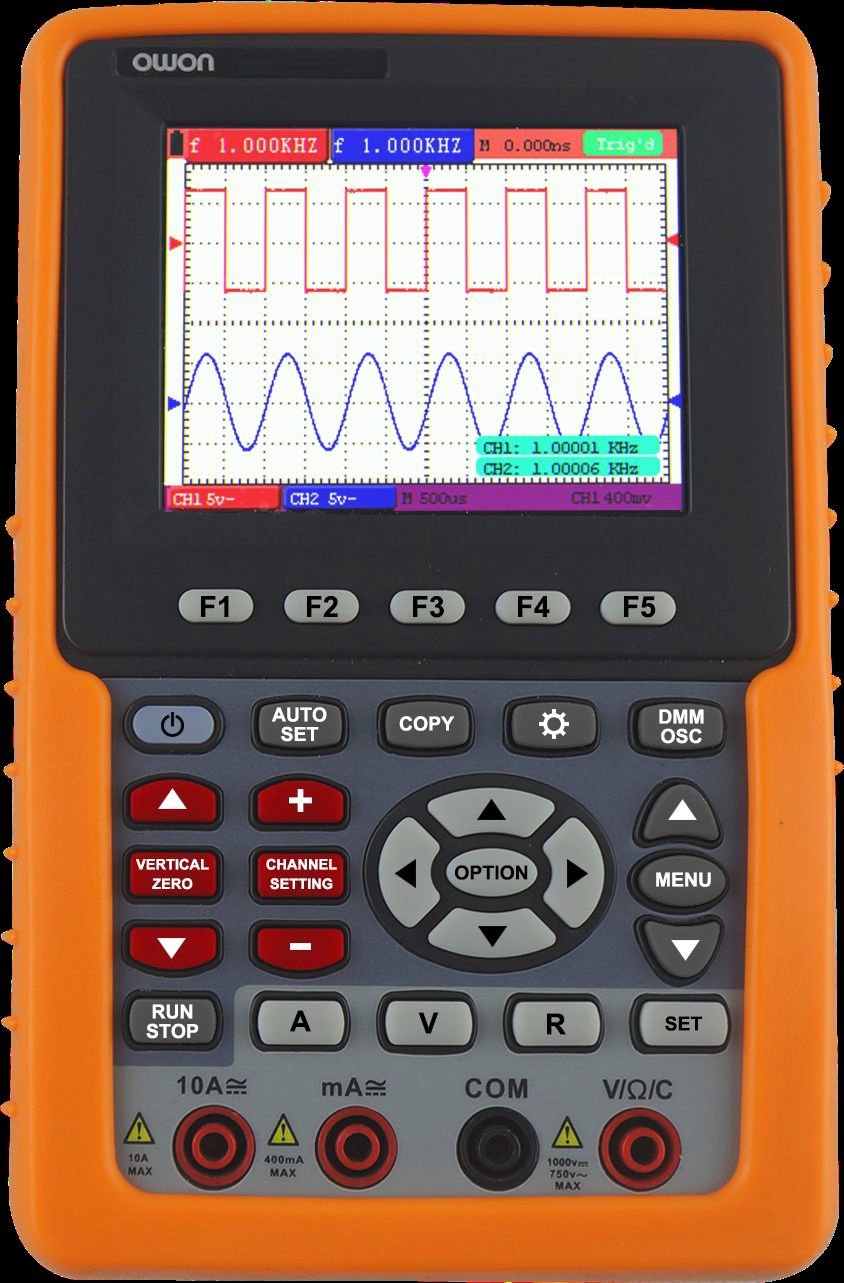
Przód view of the OWON HDS1021MN, showing the display screen, control buttons, and input jacks.
4. Konfiguracja
4.1 Instalacja i ładowanie akumulatora
- Znajdź komorę baterii z tyłu urządzenia.
- Insert the provided Li-ion battery (7.4V) into the compartment, ensuring correct polarity.
- Dokładnie zamknij pokrywę komory baterii.
- Connect the power adapter to the device's charging port and plug it into a suitable AC outlet (100V-240V AC, 50/60Hz). The battery indicator will show charging status.
- Allow the device to charge fully before initial use. A full charge provides approximately 6 hours of operation.
4.2 Podłączanie sond i przewodów pomiarowych
- Sonda oscyloskopowa: For oscilloscope functions, connect the BNC connector of the oscilloscope probe to the BNC input port on the device. Ensure the probe's attenuation setting (e.g., 1X or 10X) matches the setting on the oscilloscope menu.
- Przewody pomiarowe multimetru: For multimeter functions, insert the red test lead into the VΩmA input jack and the black test lead into the COM input jack. For high current measurements (e.g., 20A), use the dedicated current input jack if available and switch the function accordingly.
5. Instrukcja obsługi
5.1 Włączanie/wyłączanie zasilania
Press and hold the power button until the display illuminates to turn on the device. To power off, press and hold the power button again until the display shuts down.
5.2 Obsługa oscyloskopu
- Select Oscilloscope Mode: Use the function selection buttons to switch to oscilloscope mode.
- Podłącz sondę: Attach the oscilloscope probe to the circuit under test. Ensure the ground clip is connected to the circuit's ground.
- Adjust Vertical Scale (Volts/Div): Use the vertical control knob or buttons to adjust the voltage sensitivity per division, matching the ampjakość sygnału wejściowego.
- Adjust Horizontal Scale (Time/Div): Use the horizontal control knob or buttons to adjust the time base per division, suitable for viewing the signal's frequency.
- Set Trigger: Use the trigger controls to stabilize the waveform. Common trigger types include Edge, Video, and Alternate. Adjust the trigger level to a point on the waveform to ensure a stable display.
- Tryb akwizycji: Wybierz Sample, Peak Detect, or Average mode based on measurement needs.
- Waveform Record & Replay: Access the menu to enable waveform recording. Follow on-screen prompts to save and replay captured waveforms.
- Funkcja FFT: Activate the FFT (Fast Fourier Transform) function from the menu to analyze the frequency components of the signal.
5.3 Obsługa multimetru
- Wybierz tryb multimetru: Use the function selection buttons to switch to multimeter mode.
- Select Measurement Function: Rotate the rotary switch or press function buttons to select the desired measurement (e.g., VDC, VAC, Current DC, Current AC, Resistance, Diode, Continuity).
- Podłącz przewody pomiarowe: Connect the red and black test leads to the circuit or component being measured according to the selected function.
- Odczyt pomiaru: Wartość pomiaru zostanie wyświetlona na ekranie.
- Test diody: Connect leads across the diode. The forward voltagZostanie wyświetlona kropla.
- Test ciągłości: Connect leads across the circuit. An audible beep indicates continuity (<50Ω).
6. Konserwacja
6.1 Czyszczenie
Do czyszczenia urządzenia należy używać miękkiej szmatki dampCzyścić łagodnym detergentem i wodą. Nie używać środków czyszczących ani rozpuszczalników o działaniu ściernym. Przed czyszczeniem upewnić się, że urządzenie jest wyłączone i odłączone od wszystkich źródeł zasilania.
6.2 Pielęgnacja baterii
- Aby zachować sprawność baterii, ładuj ją regularnie, nawet jeśli nie używasz urządzenia często.
- Unikaj częstego całkowitego rozładowywania akumulatora.
- Jeśli urządzenie będzie przechowywane przez dłuższy czas, naładuj baterię do około 50% i przechowuj ją w chłodnym, suchym miejscu.
6.3 Przechowywanie
Store the device in a dry, dust-free environment, away from direct sunlight and extreme temperatures. Use the provided carrying case to protect it from physical damage.
7. Rozwiązywanie Problemów
This section addresses common issues you might encounter with your OWON HDS1021MN.
| Problem | Możliwa przyczyna | Rozwiązanie |
|---|---|---|
| Urządzenie nie włącza się | Low or dead battery; Power adapter not connected; Device fault | Charge the battery; Connect power adapter; Contact support if issue persists |
| No waveform displayed (Oscilloscope) | Probe not connected; Incorrect vertical/horizontal scale; Incorrect trigger settings; No input signal | Check probe connection; Adjust Volts/Div and Time/Div; Adjust trigger level/mode; Verify signal source |
| Incorrect multimeter reading | Incorrect function selected; Test leads improperly connected; Damaged test leads; Out of range measurement | Select correct function; Ensure leads are in correct jacks; Replace damaged leads; Check measurement range |
| Wyświetlacz jest przyciemniony lub migocze | Low battery; Environmental factors | Charge battery; Operate in recommended temperature range |
8. Specyfikacje
Detailed technical specifications for the OWON HDS1021MN.
Specyfikacja oscyloskopu:
- Przepustowość łącza: 20MHz
- Sample Rate (real time): 500 MS/s
- Horizontal Scale (s/div): 5ns/div to 100s/div, step by 1-2.5-5
- Rise Time (at input, typical): ≤ 17.5ns
- Wyświetlacz: 3.7 inch color TFT panel (640 × 480 pixels, 65535 colors)
- Kanał: Pojedynczy
- Impedancja wejściowa: 1MΩ ± 2%, in parallel with 20pF ± 5pF
- Długość rekordu: max 6K points on each channel
- Interpolation: sin (x) / x
- Probe Attenuation Factor: 1x, 10x, 100x, 1000x
- Sprzężenie wejściowe: DC, AC, and GND
- DC Accuracy (average): average >16 : ±(5% reading + 0.05div) for ΔV
- Czułość pionowa: 5mV/div to 5V/div (at input)
- Vertical Resolution (A/D): 8 bitów (2 kanały jednocześnie)
- Maksymalna objętość wejściowatage: 400V (PK - PK) (DC + AC, PK - PK, 1MΩ input impedance, probe attenuation 10:1), CAT II
- Typ wyzwalacza: Edge, Video, Alternate
- Tryb wyzwalania: Auto, Normalny, Pojedynczy
- Poziom wyzwalania: ±6 divisions from screen center
- Tryb akwizycji: Sample, Peak Detect, and Average
- Dokładność wzmocnienia DC: ±3%
- Pomiar automatyczny: Vpp, Vavg, Vrms, Freq, Period, Vmax, Vmin, Vtop, Vbase, Vamp, Overshoot, Pre-shoot, Rise Time, Fall Time, +Width, -Width, +Duty, -Duty, Delay A→B, Delay A→B
- Matematyka przebiegów: +, -, ×, ÷, invert, FFT
- Przechowywanie przebiegów: 4 przebiegów
- Lissajous Figure: Bandwidth full bandwidth, Phase Difference ±3 degrees
Specyfikacja multimetru:
- Full Scale Reading: 3 ¾ digit (max 4000-count)
- Dioda: 0 V-1.5 V
- Impedancja wejściowa: 10 MOhm
- On / Off Test: <50Ω (± 30Ω) beeping
- Tomtage VDC: 400mV, 4V, 40V, 400V, 1000V : ±(1% ± 1 digit); max input : DC 1000V
- Tomtagi odsysanie: 4V, 40V, 400V : ±(1% ± 3 digits), 750V : ±(2% ± 3 digits); Frequency : 40Hz - 400Hz; max input : AC 750V (virtual value)
- Current DC: 40mA, 400mA : ±(1.5% ± 1 digit), 20A : ±(3% ± 3 digits)
- Current AC: 40mA : ±(1.5% ± 3 digits), 400mA : ±(2% ± 1 digit), 20A : ±(5% ± 3 digits)
Dane ogólne:
- Interfejs komunikacyjny: USB
- Zasilanie: 100–240 V prądu przemiennego, 50/60 Hz
- Bateria litowo-jonowa: 7.4V, 6 hours operation
- Wymiary (szer. × wys. × głęb.): 180 × 115 × 40 (mm)
- Kolor: Pomarańczowy
9. Gwarancja i wsparcie
Produkty OWON są wytwarzane zgodnie z wysokimi standardami jakości. Informacje na temat gwarancji można znaleźć w karcie gwarancyjnej dołączonej do produktu lub na oficjalnej stronie OWON. website. For technical support, troubleshooting assistance beyond this manual, or service inquiries, please contact OWON customer support through their official channels.
Producent: OWON


