
Altec Lansing AL-5003
Altec Lansing AL-5003 Multimedia DJ Trolly Speaker User Manual
Modele: AL-5003
Wstęp
Dziękujemy za zakupasing the Altec Lansing AL-5003 Multimedia DJ Trolly Speaker. This speaker is designed to deliver powerful audio for various applications, including parties and surround sound systems. Featuring wireless connectivity, a built-in trolley for portability, and multiple input options, the AL-5003 offers a versatile audio experience. Please read this manual carefully to ensure proper setup, operation, and maintenance of your speaker.
Ważne instrukcje bezpieczeństwa
- Przed użyciem głośnika należy uważnie przeczytać niniejszą instrukcję.
- Zachowaj tę instrukcję do wykorzystania w przyszłości.
- Nie wystawiaj głośnika na działanie deszczu i wilgoci.
- Nie blokuj żadnych otworów wentylacyjnych.
- Nie należy instalować w pobliżu źródeł ciepła, takich jak grzejniki, kratki wentylacyjne, piece lub inne urządzenia (w tym amp(lifiers) wytwarzające ciepło.
- Chroń przewód zasilający przed deptaniem i przytrzaśnięciem, zwłaszcza przy wtyczkach, gniazdkach i miejscach, w których wychodzi z urządzenia.
- Stosować wyłącznie dodatki/akcesoria wskazane przez producenta.
- Odłączaj urządzenie od zasilania podczas burzy z piorunami lub jeśli nie używasz go przez dłuższy czas.
- Wszelkie prace serwisowe należy powierzać wykwalifikowanemu personelowi.
Zawartość opakowania
Proszę sprawdzić, czy w paczce znajdują się następujące elementy:
- Altec Lansing AL-5003 Multimedia DJ Trolly Speaker
- Przewód zasilający
- Zdalne sterowanie
- Instrukcja obsługi
- Auxiliary Cable (may vary by region)
Produkt ponadview
The AL-5003 speaker features a robust design with integrated wheels and a handle for easy transport. It includes a powerful 10-inch speaker and a 1-inch tweeter, providing clear and dynamic sound. The control panel is located on the top of the unit, offering easy access to various functions.
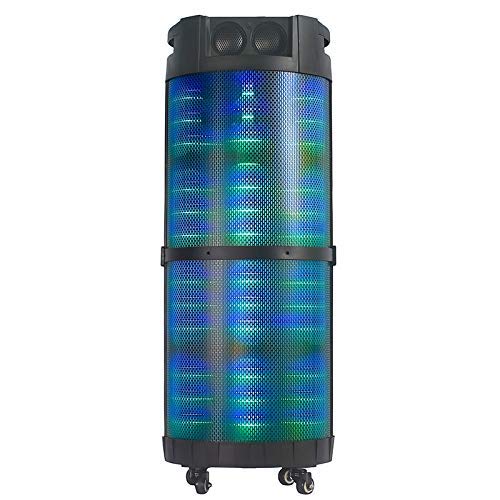
Obraz 1: Przód view of the Altec Lansing AL-5003 speaker, showcasing its cylindrical design and illuminated grille. The speaker features a sturdy build with integrated wheels at the base for portability.
Panel sterowania i połączenia
The top panel of the speaker houses the main controls and input/output ports.
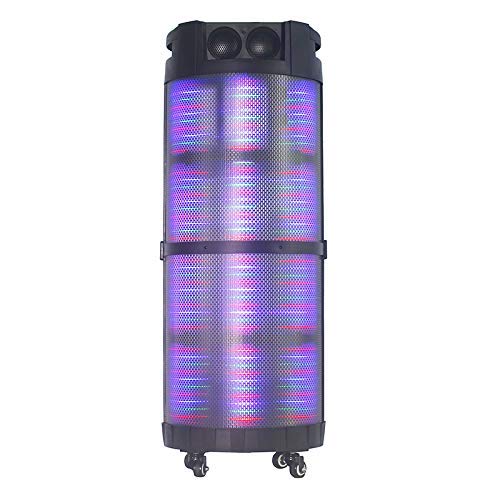
Obraz 2: Z góry na dół view of the AL-5003 speaker, highlighting the control panel with various buttons and knobs, along with the top-mounted speakers. This view also shows the integrated handle for easy transport.
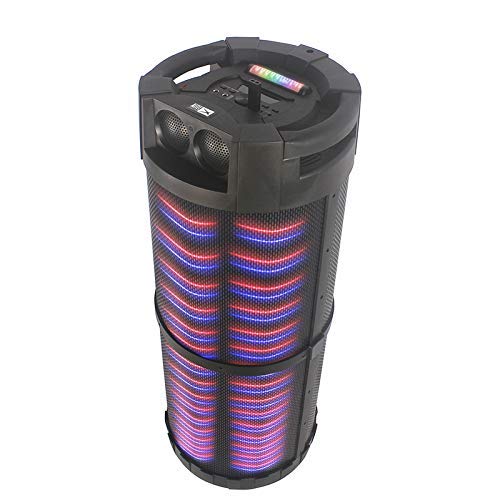
Obraz 3: Kątowy view of the AL-5003 speaker, providing a perspective of its overall structure, including the side grille and the top control area. The dynamic lighting effects are visible through the mesh.
Common controls include Power, Volume, Mode selection, Play/Pause, Track Skip, and inputs for USB, Auxiliary, and potentially Microphone (if available on the model).
Instrukcje konfiguracji
- Rozpakowywanie: Carefully remove the speaker and all accessories from the packaging. Retain the packaging for future transport or storage.
- Umieszczenie: Place the speaker on a stable, flat surface. Ensure there is adequate ventilation around the unit. For optimal sound, position the speaker in a central location within the listening area.
- Podłączenie zasilania: Connect the provided power cord to the AC input on the speaker and then plug it into a standard wall outlet (AC 100-240V, 50/60Hz).
- Opłata początkowa (jeśli dotyczy): If the speaker has an internal battery (Lead Acid battery mentioned in specs), it is recommended to fully charge it before first use. The charging indicator light will typically show charging status.
- Włączanie: Press the Power button on the control panel or remote control to turn on the speaker.
Instrukcja obsługi
1. Tryb Bluetooth
- Aktywuj Bluetooth: Turn on the speaker. Press the "Mode" button on the control panel or remote until "Bluetooth" or "BT" is displayed (or indicated by a blue LED). The speaker will enter pairing mode, indicated by a flashing light or audible prompt.
- Parowanie z urządzeniem: On your mobile device (smartphone, tablet, laptop), go to Bluetooth settings and enable Bluetooth. Szukaj available devices. You should see "AL-5003" or "Altec Lansing" in the list. Select it to pair.
- Potwierdzenie połączenia: Once successfully paired, the speaker will emit a confirmation sound, and the Bluetooth indicator light will become solid.
- Odtwarzanie nagranego dźwięku: Start playing audio on your connected device. Use the speaker's volume controls or your device's volume controls to adjust the sound level. Use the Play/Pause, Next, and Previous buttons on the speaker or remote to control playback.
2. Auxiliary (AUX) Mode
- Podłącz kabel AUX: Insert one end of a 3.5mm auxiliary cable into the AUX input port on the speaker. Connect the other end to the headphone jack or audio output of your external audio device (e.g., MP3 player, laptop).
- Wybierz tryb AUX: Press the "Mode" button on the speaker or remote until "AUX" is displayed or indicated.
- Odtwarzanie nagranego dźwięku: Play audio from your connected device. Adjust volume using both the speaker's controls and your device's volume.
3. Tryb odtwarzania USB
- Włóż dysk USB: Włóż dysk flash USB zawierający dźwięk w formacie MP3 filedo portu USB w głośniku.
- Wybierz tryb USB: The speaker may automatically switch to USB mode. If not, press the "Mode" button until "USB" is displayed or indicated.
- Odtwarzanie nagranego dźwięku: Głośnik automatycznie rozpocznie odtwarzanie dźwięku files from the USB drive. Use the Play/Pause, Next, and Previous buttons to control playback.
4. Karaoke Function (if applicable)
If your AL-5003 model includes a microphone input, you can use it for karaoke:
- Podłącz mikrofon: Plug a wired microphone into the designated microphone input jack.
- Dostosuj głośność: Use the dedicated Microphone Volume knob (if present) to adjust the microphone's volume.
- Kontrola echa: Some models may have an Echo knob to add an echo effect to the microphone audio.
5. Obsługa pilota zdalnego sterowania
The included remote control provides convenient access to all major functions:
- Moc: Włączanie/wyłączanie głośnika.
- Tryb: Switch between Bluetooth, AUX, USB, and other available modes.
- Głośność +/-: Dostosuj głośność główną.
- Odtwórz/Pauza: Rozpocznij lub wstrzymaj odtwarzanie.
- Poprzednie Następne: Przejdź do poprzedniego lub następnego utworu.
- EQ: Wybierz inne ustawienia korektora (jeśli są dostępne).
- Niemy: Mute or unmute the audio.
Konserwacja
- Czyszczenie: Do czyszczenia zewnętrznej części głośnika należy używać miękkiej, suchej ściereczki. Nie należy używać płynnych środków czyszczących ani materiałów ściernych.
- Składowanie: Jeśli głośnik nie będzie używany przez dłuższy czas, należy przechowywać go w chłodnym i suchym miejscu, z dala od bezpośredniego światła słonecznego i ekstremalnych temperatur.
- Pielęgnacja baterii: If the speaker has a built-in rechargeable battery, avoid fully discharging it frequently. For long-term storage, charge the battery to approximately 50-70% every few months to prolong its lifespan.
- Wentylacja: Aby zapobiec przegrzaniu, upewnij się, że otwory wentylacyjne nie są zablokowane.
Rozwiązywanie problemów
| Problem | Możliwa przyczyna | Rozwiązanie |
|---|---|---|
| Brak zasilania | Power cord not connected; Power outlet not working; Speaker is off; Battery drained. | Ensure power cord is securely connected. Try a different outlet. Press the Power button. Charge the battery. |
| Brak dźwięku | Volume too low; Incorrect mode selected; Device not connected properly; Mute function active. | Increase volume on speaker and source device. Select the correct input mode (Bluetooth, AUX, USB). Reconnect device. Check if mute is active on remote. |
| Błąd parowania Bluetooth | Speaker not in pairing mode; Device Bluetooth off; Speaker too far from device; Interference. | Ensure speaker is in Bluetooth pairing mode. Turn on Bluetooth on your device. Move device closer to speaker. Turn off other Bluetooth devices nearby. |
| Odtwarzanie USB nie działa | Dysk USB nie został prawidłowo włożony; niezgodny file format; dysk USB uszkodzony. | Włóż ponownie dysk USB. Upewnij się, filePliki są w formacie MP3. Spróbuj użyć innego dysku USB. |
| Pilot nie działa | Batteries drained; Obstruction between remote and speaker; Remote not pointed at sensor. | Replace remote control batteries. Remove any obstructions. Point remote directly at the speaker's IR sensor. |
Specyfikacje
| Funkcja | Szczegół |
|---|---|
| Nazwa modelu | Altec Lansing AL-5003 Multimedia DJ Trolly Speaker |
| Typ głośnika | Dźwięk przestrzenny |
| Funkcja specjalna | Bezprzewodowy |
| Zalecane zastosowania | For Surround Sound Systems, Party |
| Kompatybilne urządzenia | Gaming Console, Karaoke Machine, Laptop, MP3 Player, Smartphone, Tablet |
| Konfiguracja kanału dźwięku przestrzennego | 1.0 |
| Metoda kontroli | Zdalny |
| Technologia komunikacji bezprzewodowej | Bluetooth |
| Rozmiar głośnika | 10 cali |
| Źródło zasilania | Elektryczny przewodowy |
| Średnica głośnika wysokotonowego | 1 cali |
| Kompatybilne wejście audio | Pomocniczy, USB |
| Łączność głośników | Wired (for power), Wireless (Bluetooth) |
| Dźwięk Wattage | 100 watów |
| Skład ogniw baterii | Kwas ołowiowy |
| Typ montażu | Stały podłogowe |
Gwarancja i wsparcie
Altec Lansing products are manufactured to the highest quality standards. For information regarding warranty coverage, technical support, or service inquiries, please refer to the warranty card included with your product or visit the official Altec Lansing website. Please have your model number (AL-5003) and purchase details ready when contacting support.
Webstrona: www.alteclansing.com (This is a generic link, actual link might vary by region)
Ask a question about this manual
Ask about setup, troubleshooting, compatibility, parts, safety, or missing instructions. Manuals+ will review the question and use this page’s manual context to help answer it.