
Wstęp
Thank you for choosing the Xiaomi Mi Smart Standing Fan 2 Lite. This manual provides essential information for the safe and efficient operation, maintenance, and troubleshooting of your new smart fan. Please read this manual thoroughly before use and retain it for future reference.

Pełny view of the Xiaomi Mi Smart Standing Fan 2 Lite, showcasing its minimalist white design and standing structure.
Instrukcje bezpieczeństwa
Aby zapewnić bezpieczną obsługę, należy zawsze przestrzegać następujących środków ostrożności:
- Nie używaj tego wentylatora w damp environments such as bathrooms or near water sources.
- Sprawdź, czy przewód zasilający nie jest uszkodzony i jest prawidłowo podłączony do odpowiedniego gniazdka elektrycznego.
- Podczas pracy wentylatora należy trzymać palce, włosy i luźne elementy odzieży z dala od łopatek.
- Do not allow children to operate the fan unsupervised.
- Przed czyszczeniem lub jakąkolwiek konserwacją należy odłączyć wentylator od zasilania.
- Do not attempt to repair or modify the fan yourself. Contact qualified service personnel for assistance.
Zawartość opakowania
Sprawdź, czy w opakowaniu znajdują się wszystkie komponenty:
- 1 x Xiaomi Mi Smart Standing Fan 2 Lite
- 1 x kabel zasilający
- 1 x Worek śrub
- 1 x Instrukcja obsługi (ten dokument)
Konfiguracja i montaż
The Xiaomi Mi Smart Standing Fan 2 Lite is designed for easy assembly. Follow these general steps:
- Rozpakuj wszystkie elementy z pudełka.
- Attach the fan pole to the base using the provided screws.
- Mount the motor unit onto the top of the fan pole.
- Install the rear grille, fan blades, and front grille, securing them according to the visual instructions in the included quick start guide.
- Connect the power cable to the fan and then to a power outlet.
Obsługa wentylatora
Panel sterowania
The fan features an intuitive control panel located on the top of the motor unit. Refer to the image below for button identification:

Szczegółowy view of the fan's top-mounted control panel, featuring buttons for power on/off, oscillation, fan mode selection, and timer settings. LED indicators are also visible.
- Przycisk zasilania: Naciśnij, aby włączyć lub wyłączyć wentylator.
- Przycisk oscylacji: Naciśnij, aby włączyć lub wyłączyć funkcję oscylacji.
- Mode/Speed Button: Press to cycle through fan speeds or modes.
- Przycisk timera: Press to set a timer for automatic shutdown.
Fan Speeds and Airflow
The fan offers multiple speed settings to suit your comfort needs:

This image visually represents the three distinct fan speed settings. Speed 1 is depicted as a gentle breeze, Speed 2 as a cool and comfortable airflow, and Speed 3 as a powerful, invigorating air current.
- Prędkość 1: Gentle breeze, ideal for quiet environments or light air circulation.
- Prędkość 2: Cool and comfortable airflow for general use.
- Prędkość 3: Invigorating air current for maximum cooling.
Oscillation and Tilt
The fan features a wide oscillation angle and adjustable tilt for comprehensive air distribution:
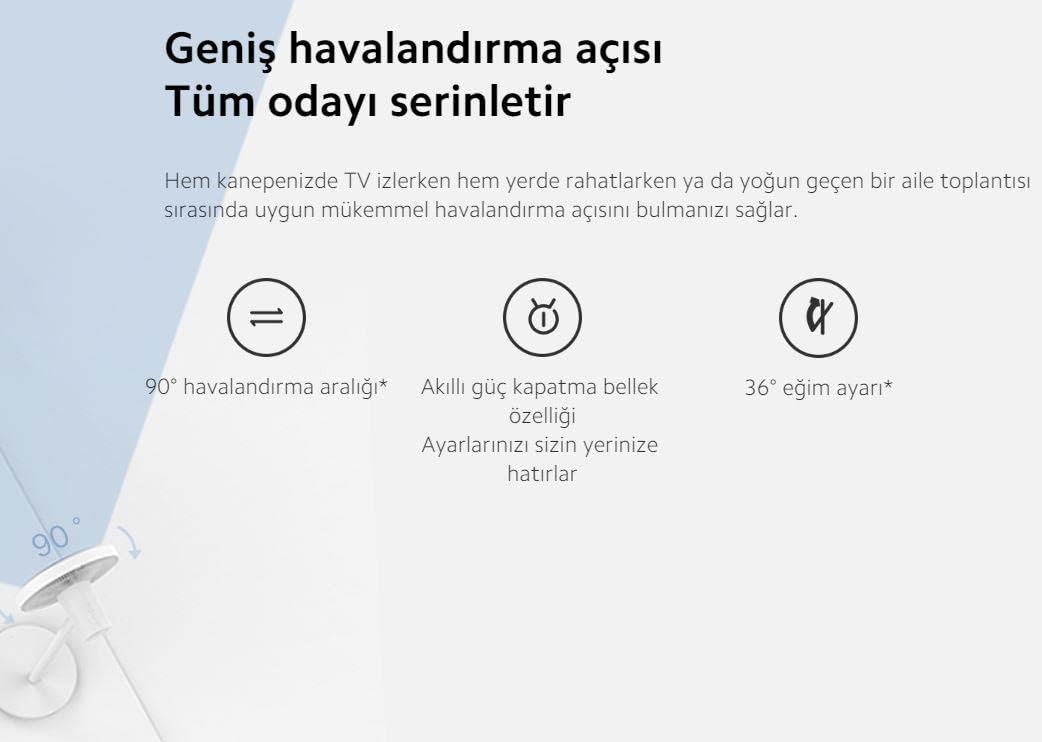
An illustration highlighting the fan's wide 90-degree oscillation range and 36-degree tilt adjustment capability. It also mentions a smart power-off memory feature that retains user settings.
- Oscylacja 90°: Distributes air across a wide area, cooling the entire room.
- Regulacja nachylenia 36°: Manually adjust the fan head vertically to direct airflow as needed.
- Smart Memory Feature: The fan remembers your last settings even after being powered off.
Smart Features (App & Voice Control)
Enhance your experience by connecting the fan to the Mi Home app or integrating with voice assistants:
- Aplikacja Mi Home: Download the Mi Home app to control the fan remotely, set schedules, and access additional features.
- Asystent Google i Alexa: The fan is compatible with Google Assistant and Amazon Alexa, allowing for voice control of basic functions like power on/off and speed adjustment.
Konserwacja
Regularne czyszczenie zapewnia optymalną wydajność i długą żywotność wentylatora.
Instrukcje czyszczenia
- Odłącz wentylator: Always disconnect the fan from the power outlet before cleaning.
- Czysty wygląd zewnętrzny: Przetrzyj zewnętrzne powierzchnie miękką, damp ściereczka. Nie należy używać środków czyszczących o właściwościach ściernych ani rozpuszczalników.
- Clean Fan Blades and Grilles: The fan can be disassembled for thorough cleaning of the blades and grilles. Carefully remove the front grille, then the fan blade assembly, and finally the rear grille. Use a soft cloth or brush to remove dust. Ensure all parts are completely dry before reassembling.
- Ponowny montaż: Reassemble the fan in reverse order, ensuring all parts are securely fastened.
Rozwiązywanie problemów
Jeśli masz problemy z wentylatorem, zapoznaj się z poniższymi typowymi problemami i rozwiązaniami:
| Problem | Możliwa przyczyna | Rozwiązanie |
|---|---|---|
| Wentylator nie włącza się | No power supply; Power cord not connected; Fan is off. | Sprawdź gniazdko elektryczne; Upewnij się, że przewód zasilający jest prawidłowo podłączony; Naciśnij przycisk zasilania. |
| Wentylator wydaje nietypowy dźwięk | Loose parts; Obstruction in fan blades; Fan not on a stable surface. | Check for loose components and tighten; Ensure nothing is blocking the blades; Place fan on a flat, stable surface. |
| Nie można połączyć się z aplikacją Mi Home | Wi-Fi issue; Incorrect pairing process; App version outdated. | Ensure Wi-Fi is active and fan is within range; Follow app pairing instructions carefully; Update Mi Home app to the latest version. |
| Słaby przepływ powietrza | Fan speed too low; Dust accumulation on blades/grilles. | Increase fan speed; Clean fan blades and grilles as per maintenance section. |
Specyfikacja produktu
Detailed technical specifications for the Xiaomi Mi Smart Standing Fan 2 Lite:
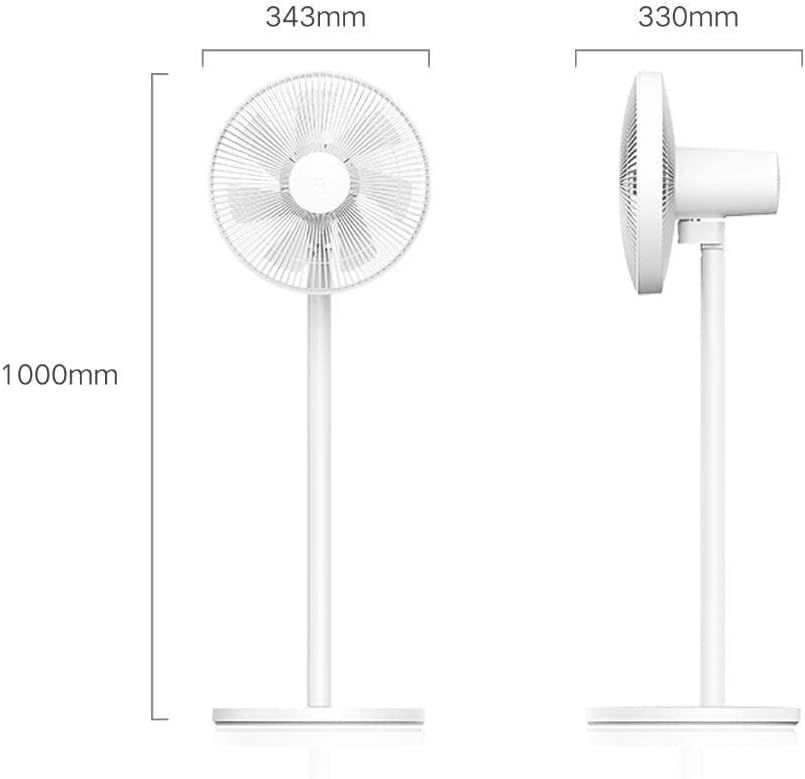
An illustration detailing the physical dimensions of the fan, including its height (1000mm), fan head width (343mm), and base depth (330mm).
| Funkcja | Szczegół |
|---|---|
| Marka | XIAOMI |
| Model | Mi Smart Standing Fan 2 Lite |
| Waga przedmiotu | 3.5 kilograma |
| Wymiary produktu | 33D x 34.3W x 100H centymetrów |
| Źródło zasilania | Elektryczny przewodowy |
| Projekt wentylatora elektrycznego | Blower / Pedestal |
| Cechy specjalne | Adjustable Height, Smart Control (App/Voice) |
| Wymagany montaż | Yes (Minor Assembly) |
| Zawarte komponenty | Fan unit, Power Cable, Screws, User Manual |
| Certyfikaty | CE |
Informacje o gwarancji
The Xiaomi Mi Smart Standing Fan 2 Lite comes with a 12 miesięcy gwarancji from the date of purchase. This warranty covers manufacturing defects under normal use. Please retain your proof of purchase for warranty claims. For specific terms and conditions, refer to the warranty card included with your product or contact customer support.
Obsługa klienta
If you require further assistance, have questions not covered in this manual, or need to make a warranty claim, please contact Xiaomi customer support through their official weblub dane kontaktowe podane na opakowaniu produktu. Kontaktując się z pomocą techniczną, prosimy o przygotowanie modelu produktu i danych zakupu.