
1. Wprowadzenie
Thank you for choosing the BolyGuard MG984G-36M Trail Camera. This manual provides detailed instructions for the setup, operation, and maintenance of your camera. Designed for outdoor surveillance, this camera captures high-resolution images and videos, offering 4G connectivity for cloud services and remote management via a dedicated application.
Please read this manual thoroughly before using the camera to ensure optimal performance and longevity.
2. Koniec produktuview
The BolyGuard MG984G-36M is a robust trail camera featuring a camouflage design for discreet outdoor placement. It is equipped with a high-resolution sensor, infrared LEDs for night vision, and an external antenna for reliable 4G communication.
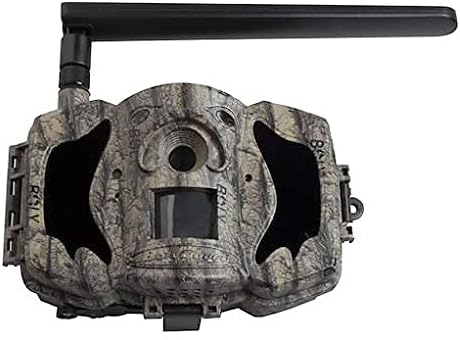
Rycina 1: Przód view of the BolyGuard MG984G-36M trail camera. This image displays the front view of the BolyGuard MG984G-36M trail camera. It features a camouflage pattern casing, a prominent external antenna on the top left, and the main lens and sensor area visible on the front. The camera is designed for outdoor use and blends with natural environments.
Kluczowe komponenty:
- Główny obiektyw: Przechwytuje obrazy i filmy.
- Czujnik PIR: Wykrywa ruch w celu uruchomienia nagrywania.
- Diody podczerwieni: Zapewnia oświetlenie umożliwiające widzenie nocne.
- Antena zewnętrzna: Ensures stable 4G network connectivity.
- Ekran LCD: For menu navigation and settings adjustment (located inside the camera).
- Komora baterii: Holds required batteries (not included).
- Gniazdo karty SD: Do przechowywania przechwyconych multimediów.
- Gniazdo karty SIM: For 4G network access.
3. Konfiguracja
3.1 Instalacja baterii
- Otwórz kamerę casinzatrzaski g.
- Zlokalizuj komorę baterii.
- Insert the required batteries (e.g., AA batteries, not included) according to the polarity indicators (+/-). Ensure all batteries are new and of the same type.
- Dokładnie zamknij komorę baterii.
3.2 Instalacja karty SIM i karty SD
- With the camera powered off, locate the SIM card slot. Insert a activated 4G SIM card into the slot until it clicks into place.
- Locate the SD card slot. Insert a compatible SD card (up to 32GB, Class 10 recommended, not included) into the slot until it clicks.
- Attach the external antenna to the designated port on the camera.
3.3 Initial Power-On and App Setup
- Switch the camera to the 'SETUP' mode. The internal LCD screen will power on.
- Follow the on-screen prompts to set the date, time, and other basic settings.
- Download the official BolyGuard app from your smartphone's app store.
- Register an account and add your camera to the app by following the in-app instructions, typically involving scanning a QR code or entering the camera's serial number.
- Ensure the camera has a stable 4G signal, indicated on the LCD screen.
4. Instrukcja obsługi
4.1 Podstawowe tryby pracy
- OFF: Kamera jest wyłączona.
- USTAWIAĆ: Allows access to the camera's menu for configuration and viewprzechwycone media.
- NA: Camera is in active surveillance mode, detecting motion and capturing media according to settings.
4.2 Konfiguracja ustawień
In 'SETUP' mode, use the navigation buttons to access and modify settings:
- Tryb: Wybierz opcję Zdjęcie, Wideo lub Zdjęcie+Wideo.
- Rozmiar obrazu: Set photo resolution (e.g., 36MP, 24MP).
- Rozmiar wideo: Set video resolution (e.g., 1080P, 720P).
- Czułość PIR: Adjust motion detection sensitivity (High, Normal, Low).
- Interwał wyzwalania: Ustaw opóźnienie pomiędzy kolejnymi wyzwalaczami.
- Upływ czasu: Configure time-lapse photography settings.
- Tryb wysyłania: Configure how media is sent via 4G (e.g., instant, daily report).
- Usługa chmury: Enable or disable cloud storage and app connectivity.
4.3 Zdalne zarządzanie za pomocą aplikacji
Once connected to the BolyGuard app, you can:
- Receive real-time notifications of detected activity.
- View captured photos and videos remotely.
- Change camera settings from your smartphone.
- Monitor camera status (battery level, signal strength, SD card capacity).
5. Konserwacja
- Czyszczenie: Regularly clean the camera lens and PIR sensor window with a soft, dry cloth. Avoid abrasive materials or harsh chemicals.
- Wymiana baterii: Replace all batteries when the low battery indicator appears or when performance degrades. Always use fresh batteries of the same type.
- Zarządzanie kartami SD: Periodically format the SD card in the camera's menu to maintain optimal performance and prevent data corruption. Back up important files przed formatowaniem.
- Aktualizacje oprogramowania układowego: Check the BolyGuard official website for any available firmware updates. Follow the provided instructions carefully for installation.
- Składowanie: Jeśli aparat nie będzie używany przez dłuższy czas, należy wyjąć baterie i przechowywać go w chłodnym, suchym miejscu, z dala od bezpośredniego światła słonecznego.
6. Rozwiązywanie Problemów
- Kamera nie włącza się: Ensure batteries are correctly inserted with correct polarity and are fully charged. Check if the power switch is in the 'SETUP' or 'ON' position.
- Brak sygnału 4G: Verify the SIM card is active and correctly inserted. Ensure the external antenna is securely attached. Move the camera to an area with better network coverage.
- Brak zdjęć/filmów: Check if the SD card is inserted and has sufficient free space. Verify PIR sensitivity settings and ensure the camera is in 'ON' mode.
- Słaba jakość obrazu/wideo: Clean the camera lens. Ensure the camera is securely mounted and not subject to excessive vibration. Check resolution settings.
- Problemy z łącznością aplikacji: Ensure the camera has a stable 4G connection. Verify your smartphone has internet access. Re-add the camera to the app if necessary.
7. Specyfikacje
| Funkcja | Szczegół |
|---|---|
| Numer modelu | MG984G-36M |
| Rozdzielczość obrazu | Do 36 megapikseli |
| Rozdzielczość wideo | Full HD (1080P) |
| Technologia łączności | Bezprzewodowe (4G) |
| Wymiary produktu | Wymiary 50 x 50 x 28 cm |
| Waga przedmiotu | 5.66 kilogramów |
| Baterie | Wymagane (brak w zestawie) |
| ASIN | B087V4SWGH |
| Data pierwszej dostępności | 7 lipca 2020 |
8. Gwarancja i wsparcie
For warranty information and technical support, please refer to the official BolyGuard webOdwiedź witrynę lub skontaktuj się z autoryzowanym dealerem. Zachowaj paragon jako dowód zakupu na wypadek roszczeń gwarancyjnych.
Online resources, including FAQs and additional troubleshooting guides, may be available on the manufacturer's support pages.