
Osa WPL308
Instrukcja obsługi drukarki kodów kreskowych Wasp WPL308 Desktop
Model: WPL308 | Marka: Wasp
Produkt ponadview
Drukarka kodów kreskowych Wasp WPL308 to wszechstronna drukarka kodów kreskowych o średniej wydajności, przeznaczona do różnych zastosowań. Charakteryzuje się wytrzymałą obudową z podwójnymi ściankami i 3.5-calowym kolorowym wyświetlaczem TFT z zegarem czasu rzeczywistego. Drukarka obsługuje zarówno druk termotransferowy, jak i termiczny, osiągając prędkość druku do 8 cali na sekundę przy rozdzielczości 203 DPI. Wyposażona jest w 128 MB pamięci Flash i 128 MB pamięci SDRAM, co umożliwia drukowanie wysokonakładowych etykiet wysyłkowych 4x6, znakowanie produktów w wysokiej rozdzielczości oraz rozwiązania graficzne, w tym etykiety do zastosowań elektronicznych.
Standardowe opcje łączności obejmują USB 2.0, host USB-A, Ethernet 10/100 Mb/s oraz interfejs szeregowy. Dostępny jest również opcjonalny interfejs Wi-Fi 802.11a/b/g/n.
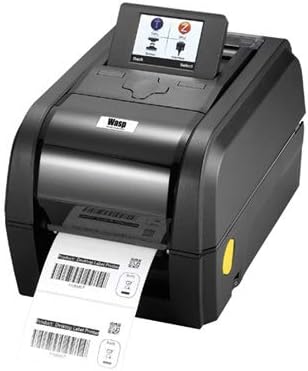
Zdjęcie: Drukarka kodów kreskowych Wasp WPL308, pokazana naasindzięki kompaktowej konstrukcji i umieszczeniu drukarki etykiet z przodu.
Główne cechy
- Prędkość drukowania do 203 mm (8 cali) na sekundę
- 128 MB pamięci Flash i 128 MB pamięci SDRAM
- Rozszerzenie pamięci flash microSD do 32 GB
- Przyjazna dla użytkownika konstrukcja typu clamshell
- Standardowe interfejsy szeregowe, wewnętrzny Ethernet USB 2.0 i hosta USB
- 3.5-calowy wyświetlacz TFT
- Pojemność etykiet do 127 mm (5 cali) średnicy zewnętrznej
- Pojemność wstęgi do 300 m (984 stóp)
- Oprogramowanie układowe WPL zapewniające łatwość podłączania i odtwarzania
- Kwalifikacja ENERGY STAR®
Zawartość opakowania
Przed rozpoczęciem instalacji należy sprawdzić, czy wszystkie elementy są obecne i nieuszkodzone:
- Drukarka kodów kreskowych Wasp WPL308
- Głowica drukująca termiczna 203 dpi (wstępnie zainstalowana)
- Kabel zasilający

Zdjęcie: Drukarka Wasp WPL308 z otwartą pokrywą, odsłaniającą wewnętrzny mechanizm ładowania rolki etykiet.
Przewodnik po konfiguracji
- Rozpakowywanie: Ostrożnie wyjmij drukarkę i wszystkie akcesoria z opakowania. Zachowaj opakowanie do transportu lub przechowywania w przyszłości.
- Podłączenie zasilania: Podłącz dołączony kabel zasilający do portu zasilania drukarki, a następnie do odpowiedniego gniazdka elektrycznego.
- Łącze danych: Podłącz drukarkę do komputera lub sieci za pomocą kabla USB, Ethernet lub szeregowego, zgodnie z wymaganiami konfiguracji. Upewnij się, że kabel jest prawidłowo podłączony zarówno do drukarki, jak i do urządzenia hosta.
- Instalacja sterownika: Zainstaluj niezbędne sterowniki drukarki i oprogramowanie od producenta webwitrynę lub dowolne dołączone media. Postępuj zgodnie z instrukcjami wyświetlanymi na ekranie, aby przeprowadzić pełną instalację.
- Ładowanie multimediów: Otwórz pokrywę drukarki. Załóż rolkę etykiet na wrzeciono podajnika nośnika, upewniając się, że płynnie przechodzi przez prowadnice i pod głowicą drukującą. W przypadku druku termotransferowego zamontuj taśmę zgodnie ze schematami wewnętrznymi drukarki, upewniając się, że jest napięta i prawidłowo ułożona. Zamknij pokrywę szczelnie.
Działanie
Po skonfigurowaniu i podłączeniu drukarki włącz ją. 3.5-calowy kolorowy wyświetlacz TFT zaświeci się, pokazując stan drukarki i opcje menu. Użyj wyświetlacza i przycisków sterujących do nawigacji po ustawieniach, przeprowadzania kalibracji i monitorowania zadań drukowania. Przed wysłaniem poleceń drukowania upewnij się, że etykiety i taśma barwiąca (jeśli dotyczy) są prawidłowo załadowane i wyrównane. Zainicjuj zadania drukowania z aplikacji komputerowej, upewniając się, że drukarka WPL308 jest wybrana jako drukarka docelowa.
Konserwacja
Regularna konserwacja jest niezbędna, aby wydłużyć żywotność drukarki WPL308 i zapewnić stałą jakość druku.
- Czyszczenie głowicy drukującej: Delikatnie przetrzyj szmatką niepozostawiającą włókienampDelikatnie przetrzyj powierzchnię głowicy drukującej alkoholem izopropylowym. Czyszczenie należy wykonywać regularnie, szczególnie po wymianie rolki etykiet lub taśmy.
- Czyszczenie wałka dociskowego: Wyczyść wałek dociskowy alkoholem izopropylowym, aby usunąć klej i nagromadzony kurz. Obróć wałek ręcznie, aby wyczyścić całą powierzchnię.
- Ogólne sprzątanie: Okresowo czyść zewnętrzną i wewnętrzną część drukarki miękką, suchą ściereczką, aby usunąć kurz i zanieczyszczenia. Unikaj stosowania środków czyszczących o właściwościach ściernych i rozpuszczalników.
- Wymiana materiałów eksploatacyjnych: Wymieniaj rolki etykiet i taśmy w miarę ich zużycia. Zawsze używaj materiałów eksploatacyjnych zatwierdzonych przez Wasp, aby zapewnić optymalną wydajność i zapobiec uszkodzeniu drukarki.
Rozwiązywanie typowych problemów
- Drukarka nie odpowiada: Sprawdź, czy kabel zasilający jest prawidłowo podłączony i czy drukarka jest włączona. Sprawdź, czy kabel danych (USB, Ethernet, szeregowy) jest prawidłowo podłączony do drukarki i komputera/sieci. Upewnij się, że sterowniki drukarki są poprawnie zainstalowane i zaktualizowane.
- Słaba jakość druku: Wyczyść głowicę drukującą zgodnie z opisem w sekcji Konserwacja. Sprawdź, czy etykiety i taśma barwiąca (jeśli są używane) są kompatybilne z drukarką i prawidłowo załadowane. W razie potrzeby dostosuj ustawienia intensywności wydruku.
- Etykiety nie są podawane prawidłowo: Upewnij się, że rolka etykiet jest prawidłowo osadzona na wrzecionie podającym nośnik i że etykiety są prawidłowo nawleczone przez prowadnice. Sprawdź, czy na ścieżce etykiety nie ma żadnych przeszkód.
- Komunikaty o błędach na wyświetlaczu: Szczegółowe kody błędów i komunikaty można znaleźć na 3.5-calowym wyświetlaczu TFT drukarki. Skontaktuj się z pomocą techniczną Wasp. webAby uzyskać szczegółowe wyjaśnienia i rozwiązania poszczególnych błędów, odwiedź witrynę lub pełną instrukcję obsługi.
Dane techniczne
| Specyfikacja | Szczegół |
|---|---|
| Marka | Osa |
| Nazwa modelu | Drukarka kodów kreskowych WPL308 |
| Technologia druku | Termiczne (bezpośrednie termiczne/termotransferowe) |
| Maksymalna prędkość drukowania (monochromatyczny) | 8 cali na sekundę (203 mm/s) |
| Wymiary produktu | 13.1 x 8.9 x 7.8 cala |
| Waga przedmiotu | 8.27 funta |
| Pojemność pamięci masowej | Pamięć Flash 128 MB, pamięć SDRAM 128 MB |
| Interfejs sprzętowy | Ethernet, interfejs szeregowy, USB |
| Technologia łączności | Możliwość pracy w sieci, USB |
| Zawarte komponenty | Głowica drukująca termiczna 203 dpi, kabel zasilający WPL308 |
| Media drukowane | Etykiety |
| Funkcja specjalna | Kwalifikacja Energy Star |
Gwarancja i wsparcie
Drukarka Wasp WPL308 objęta jest 2-letnią gwarancją producenta, obejmującą wady materiałowe. Aby zapewnić rozszerzoną ochronę i zakres ochrony wykraczający poza standardową gwarancję, dostępne są rozszerzone plany serwisowe WaspProtect, które mogą również obejmować przypadkowe uszkodzenia.
Aby uzyskać pomoc techniczną, rozwiązać problemy lub dowiedzieć się więcej o roszczeniach gwarancyjnych i planach WaspProtect, skontaktuj się z obsługą klienta Wasp Barcode Technologies. Odwiedź oficjalną stronę Wasp Barcode Technologies. webwitryna zawierająca najnowsze informacje dotyczące pomocy technicznej i dane kontaktowe.
Powiązane dokumentyWPL308


Ask a question about this manual
Ask about setup, troubleshooting, compatibility, parts, safety, or missing instructions. Manuals+ will review the question and use this page’s manual context to help answer it.