
1. Koniec produktuview
The Alecto WS-1560 is a wireless weather station designed to provide accurate indoor and outdoor environmental data. Featuring a clear color display and a remote outdoor sensor, it offers comprehensive weather information and additional useful functions for your home.
Główne cechy:
- Pomiar temperatury i wilgotności wewnątrz i na zewnątrz budynku.
- Long-range wireless outdoor sensor (up to 100 meters).
- 5.7-inch well-lit color display with animated weather forecast icons.
- Temperature and ice alarm functions.
- Budzik z funkcją drzemki.
- Memory function for latest and highest readings.
- Moon phase indicator, date, day, and time display.
- Battery-operated main unit and outdoor sensor with backup batteries.

Figure 1.1: Alecto WS-1560 Main Unit and Wireless Outdoor Sensor.
2. Zawartość opakowania
Upewnij się, że wszystkie elementy są obecne i w dobrym stanie po rozpakowaniu:
- Alecto WS-1560 Main Unit (Indoor Display)
- Bezprzewodowy czujnik zewnętrzny
- Instrukcja obsługi
- (Power adapter and batteries may be included depending on package)
Video 2.1: Illustrative video showing typical weather station components and basic setup. (Note: This video is for a related product and may not show the exact Alecto WS-1560 model.)
3. Konfiguracja i instalacja
3.1. Instalacja baterii
Both the main unit and the outdoor sensor require batteries for operation. Ensure you use the correct type and polarity.
- Czujnik zewnętrzny:
- Otwórz komorę baterii znajdującą się z tyłu bezprzewodowego czujnika zewnętrznego.
- Insert 2x AA batteries (not included) according to the polarity markings (+/-).
- Dokładnie zamknij komorę baterii.
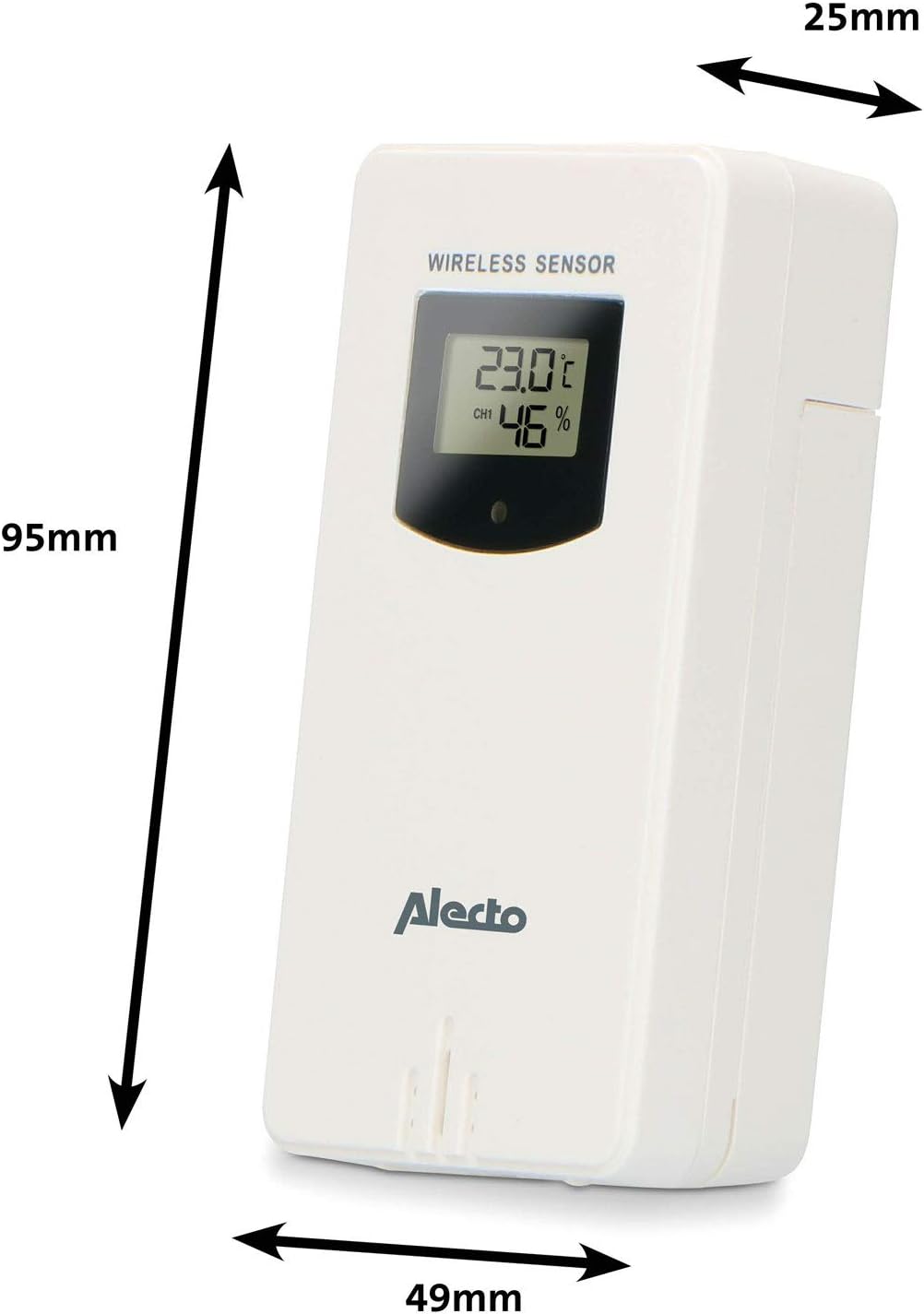
Figure 3.1: Wireless Outdoor Sensor dimensions and battery compartment location.
- Jednostka główna:
- Otwórz komorę baterii znajdującą się z tyłu jednostki głównej.
- Insert 2x AA batteries (not included) according to the polarity markings (+/-). These serve as backup batteries.
- Dokładnie zamknij komorę baterii.
- Connect the main unit to a power outlet using the provided power adapter (if included).

Figure 3.2: Main Unit dimensions and power input.
3.2. Umieszczenie czujnika
For accurate outdoor readings, proper placement of the wireless sensor is crucial:
- Place the sensor in a shaded area, away from direct sunlight, to prevent inaccurate temperature readings.
- Ensure good air circulation around the sensor.
- Mount the sensor vertically, approximately 1.5 to 2.5 meters (5 to 8 feet) above the ground.
- Avoid placing the sensor near heat sources (e.g., vents, windows) or moisture sources.
- The maximum transmission range is 100 meters (328 feet) in open air. Walls and other obstacles will reduce this range.

Rysunek 3.3: Example of outdoor sensor placement on a wall.
3.3. Parowanie czujnika z jednostką główną
The main unit and sensor should automatically pair once both are powered on. If pairing does not occur:
- Ensure both units have fresh batteries and are within range.
- Aby ręcznie wysłać sygnał, naciśnij przycisk „TX” znajdujący się w komorze baterii czujnika zewnętrznego.
- On the main unit, you may need to initiate a search for the outdoor sensor (refer to the "Operation" section for specific button functions).
4. Działanie
4.1. Układ wyświetlacza
5.7-calowy kolorowy wyświetlacz zapewnia wyraźny obrazview of all measured data. Key areas include:
- Temperatura i wilgotność na zewnątrz: Displays current outdoor conditions.
- Temperatura i wilgotność w pomieszczeniu: Wyświetla aktualne warunki panujące w pomieszczeniu.
- Animated Weather Forecast: Icons predict upcoming weather (sunny, partly cloudy, cloudy, rainy, snowy).
- Data i godzina: Aktualny czas, dzień i data.
- Ciśnienie barometryczne: Aktualne ciśnienie atmosferyczne.
- Faza Księżyca: Graficzna reprezentacja aktualnej fazy księżyca.
- Temperature/Ice Alarm Indicators: Alerts for specific temperature thresholds or potential ice conditions.

Rysunek 4.1: Szczegółowy view of the main unit's color display.
4.2. Funkcje przycisków
The main unit features several buttons for setting and adjusting functions. Common buttons include:
- ZESTAW: Przechodzi do trybu konfiguracji czasu, daty i innych ustawień.
- Sposób użycia: Switches between display modes or confirms settings.
- GÓRA/DÓŁ (lub +/-): Adjusts values during setup or cycles through channels.
- ALARM: Sets or activates the alarm function.
- PAMIĘĆ: Displays maximum/minimum temperature and humidity records. Long press to clear records.
- DRZEMKA/ŚWIATŁO: Włącza drzemkę podczas alarmu lub dostosowuje jasność podświetlenia.
Video 4.2: Illustrative video demonstrating various features and settings of a weather station. (Note: This video is for a related product and may not show the exact Alecto WS-1560 model.)
4.3. Ustawianie czasu i daty
- Press and hold the "SET" button until the time display starts flashing.
- Use the "UP" or "DOWN" buttons to adjust the hour, then press "SET" to confirm and move to minutes.
- Powtórz dla minut, roku, miesiąca i dnia.
- Press "SET" again to exit the setting mode.
4.4. Ustawienia alarmu
- Naciśnij przycisk „ALARM” jeden raz, aby view czas alarmu.
- Press and hold the "ALARM" button until the alarm time starts flashing.
- Use the "UP" or "DOWN" buttons to set the desired alarm hour and minute.
- Naciśnij „ALARM”, aby potwierdzić.
- Aby włączyć/wyłączyć alarm, naciśnij krótko przycisk „ALARM”, gdy wyświetlana jest godzina alarmu. Ikona alarmu pojawi się/zniknie.
4.5. Rekordy maks./min.
The weather station automatically records the maximum and minimum temperature and humidity values over a 24-hour period.
- Press the "MEM" button briefly to view the maximum recorded values.
- Press "MEM" again to view the minimum recorded values.
- Press "MEM" a third time to return to current readings.
- To clear the records, press and hold the "MEM" button for a few seconds.
5. Konserwacja
- Czyszczenie: Przetrzyj wyświetlacz i powierzchnię urządzenia miękką szmatką.amp ściereczka. Nie należy używać środków czyszczących o właściwościach ściernych ani rozpuszczalników.
- Wymiana baterii: Wymień baterie zarówno w jednostce głównej, jak i w czujniku zewnętrznym, gdy na wyświetlaczu pojawi się wskaźnik niskiego poziomu naładowania baterii. Zawsze wymieniaj wszystkie baterie jednocześnie na nowe tego samego typu.
- Pielęgnacja czujnika: Periodically check the outdoor sensor for debris or obstructions that might affect its readings. Ensure it remains in a shaded, well-ventilated area.
6. Rozwiązywanie Problemów
| Problem | Możliwa przyczyna | Rozwiązanie |
|---|---|---|
| No outdoor temperature/humidity reading (or "---" displayed) |
|
|
| Niedokładne odczyty temperatury/wilgotności |
|
|
| Wyświetlacz jest przyciemniony lub pusty |
|
|
7. Specyfikacje
| Numer modelu | WS-1560 |
| Marka | Alekto |
| Źródło zasilania (jednostka główna) | Power Adapter (if included) + 2x AA batteries (backup) |
| Źródło zasilania (czujnik zewnętrzny) | 2 baterie AA |
| Wymiary produktu (jednostka główna) | Wymiary 5.1 x 16.5 x 12.3 cm |
| Waga produktu | 440 gramów |
| Zasięg czujnika bezprzewodowego | Do 100 metrów (na otwartej przestrzeni) |
| Rozmiar wyświetlacza | 5.7 cali / 14.5 cm |
| Pochodzenie | Chiny |
8. Gwarancja i wsparcie
Aby uzyskać informacje dotyczące gwarancji, pomocy technicznej lub zapytań serwisowych, zapoznaj się z kartą gwarancyjną dołączoną do produktu lub odwiedź oficjalną stronę Alecto webZachowaj paragon jako dowód zakupu.
Alekto Webstrona: www.alecto.nl (General Alecto website, specific support page may vary)