
Wstęp
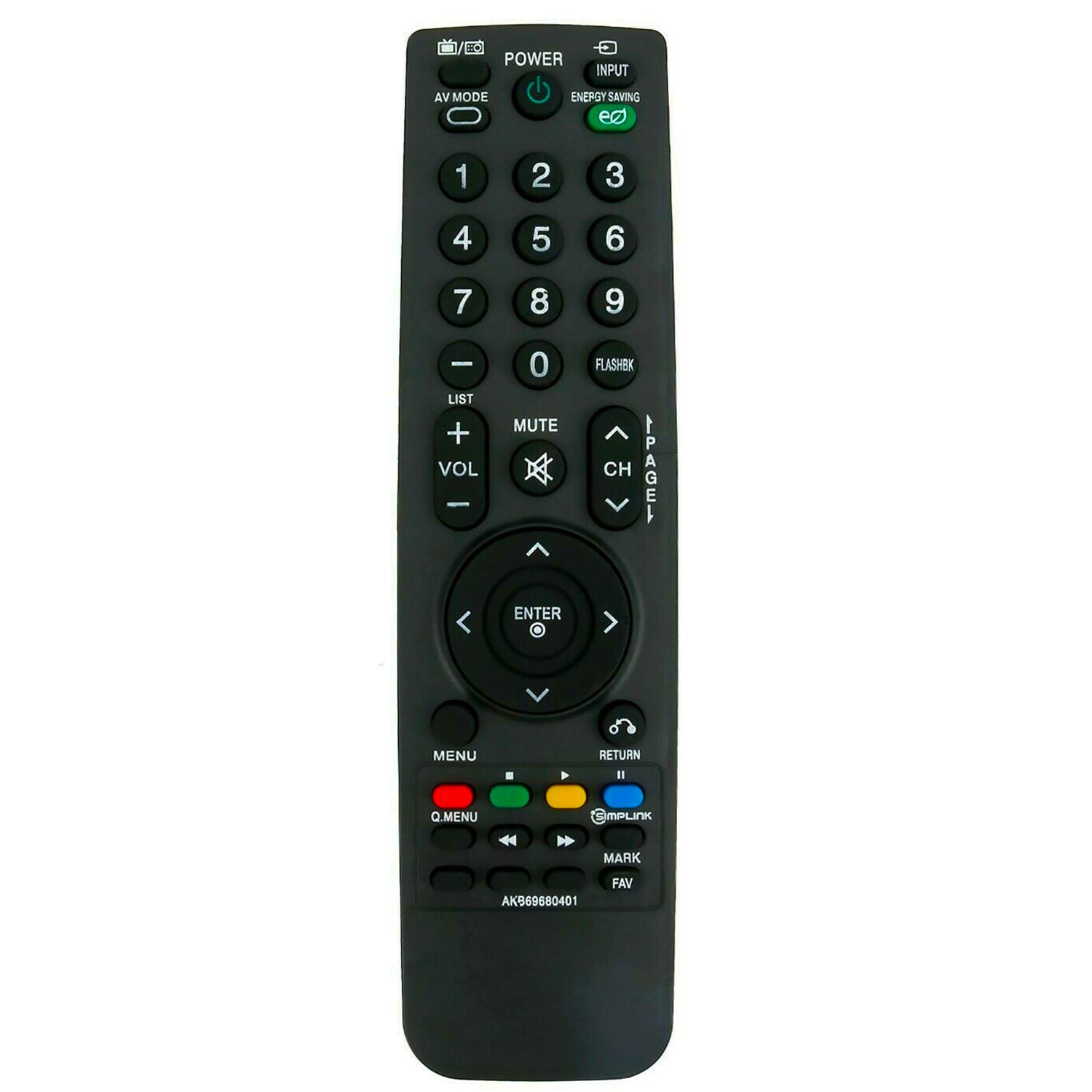
This manual provides instructions for the ALLIMITY AKB69680401 Replacement Remote Control, designed for use with various LG LCD TV models. This remote control functions as a direct replacement and requires no programming. Simply insert batteries to begin operation.
Organizować coś
Instalacja baterii
The remote control requires two AAA batteries for operation. Follow these steps to install the batteries:
- Znajdź komorę baterii z tyłu pilota.
- Przesuń pokrywę komory baterii w dół i podnieś ją.
- Włóż dwie nowe baterie AAA, upewniając się, że bieguny dodatni (+) i ujemny (-) są prawidłowo ustawione względem oznaczeń wewnątrz komory.
- Załóż pokrywę komory baterii, wsuwając ją z powrotem na miejsce, aż do zatrzaśnięcia.

Once batteries are installed, the remote control is ready for use without any additional programming.
Instrukcja obsługi
To operate your LG LCD TV with the ALLIMITY AKB69680401 remote control:
- Aiming the Remote: Point the remote control directly towards the infrared (IR) sensor on your television. Ensure there are no obstacles between the remote and the TV sensor that could block the signal.
- Funkcje przycisków: The remote features standard buttons for power, input selection, volume control, channel navigation, menu access, and numerical input. Press the corresponding button for the desired function.
- Technologia podczerwieni: This remote uses infrared technology, which requires a clear line of sight to the TV's sensor.
Zgodność
This replacement remote control is compatible with the following LG LCD TV models:
- 19LH20, 22LH20, 26LH20, 32LH20, 37LH20, 42LH20
- 19LU55, 22LU55, 26LU55
- 32LF11, 37LF11, 42LF11, 47LF11
- 32LH30, 37LH30, 42LH30, 47LH30
- 47LF21, 32CL20
- 22LH200C
- 19LH20-UA, 22LH20-UA, 26LH20-UA, 32LH20-UA, 37LH20-UA, 42LH20-UA
- 19LU55-UA, 22LU55-UA, 26LU55-UA
- 32LF11-UA, 37LF11-UA, 42LF11-UA, 47LF11-UA
- 32LH30-UA, 37LH30-UA, 42LH30-UA, 47LH30-UA
- 47LF21-UA, 32CL20-UA
- 22LH200C-UA
If your specific model is not listed, please contact ALLIMITY customer support for assistance in verifying compatibility.
Specyfikacje
| Numer modelu | AKB69680401 |
| Marka | WSZECHSTRONNOŚĆ |
| Tworzywo | Plastikowy |
| Technologia łączności | Podczerwieni (IR) |
| Źródło zasilania | Baterie 2 x AAA (brak w zestawie) |
| Maksymalny zasięg | 10 metrów |
| Kolor | Czarny |
| Typ kontrolera | Sterowanie przyciskami |
| Ilość przycisków | 20 |
| Waga przedmiotu | 0.07 kilograma |
Rozwiązywanie problemów
- Pilot nie odpowiada:
- Upewnij się, że nowe baterie zostały prawidłowo zainstalowane, z zachowaniem właściwej biegunowości.
- Sprawdź, czy baterie nie są wyczerpane i w razie potrzeby wymień je.
- Verify there are no obstructions between the remote control and the TV's infrared sensor.
- Confirm that the remote is pointed directly at the TV's sensor.
- Częściowa funkcjonalność: If some buttons work but others do not, ensure the remote is compatible with your specific TV model. Refer to the Compatibility section.
If issues persist after following these steps, please contact ALLIMITY customer support for further assistance.
Konserwacja
Aby zapewnić długowieczność i prawidłowe działanie pilota:
- Czyszczenie: Wipe the remote control with a soft, dry cloth. Do not use abrasive cleaners, solvents, or harsh chemicals.
- Składowanie: Przechowuj pilota w suchym miejscu, z dala od bezpośredniego światła słonecznego i ekstremalnych temperatur.
- Pielęgnacja baterii: Jeżeli pilot nie będzie używany przez dłuższy czas, wyjmij baterie, aby zapobiec wyciekowi.
- Unikaj kropli: Chroń pilota przed uderzeniami, gdyż upuszczenie go może spowodować uszkodzenie podzespołów wewnętrznych.
Wsparcie
For any questions, compatibility inquiries, or technical support regarding your ALLIMITY AKB69680401 Replacement Remote Control, please contact the seller or ALLIMITY customer service via email. Provide your product model number and a detailed description of your issue for prompt assistance.