
1. Koniec produktuview
The Baseus W09 TWS Wireless Earphones (Model: Encok W09) are designed for convenient audio playback and communication. These in-ear earphones feature touch control and connect wirelessly via Bluetooth, offering a stereo bass sound experience.

Image 1: The Baseus W09 TWS Wireless Earphones securely placed within their charging case. The case is open, revealing both earbuds.
2. Konfiguracja
2.1 Ładowanie słuchawek i etui
Before initial use, ensure both the earphones and the charging case are fully charged. The charging case contains a built-in Lithium Ion battery.
- Umieść słuchawki w etui ładującym.
- Connect the charging case to a power source using a compatible charging cable (not specified, assume USB).
- Pełne naładowanie trwa zazwyczaj około 1.5 godzin.
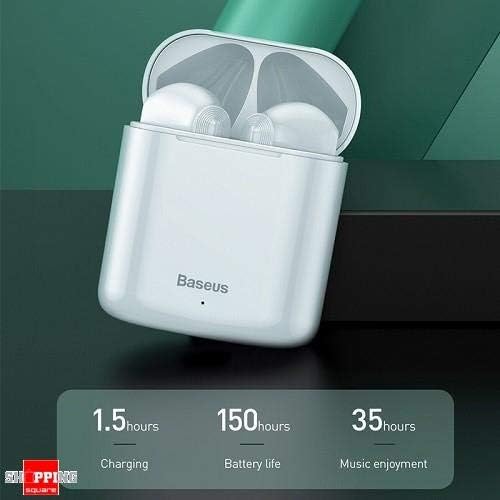
Image 2: The Baseus W09 charging case, illustrating its charging time of 1.5 hours, a standby battery life of 150 hours, and 35 hours of music enjoyment.
2.2 parowanie Bluetooth
The Baseus W09 earphones are designed for quick and instant connection.
- Sprawdź, czy słuchawki są naładowane.
- Otwórz etui ładujące.
- Wyjmij słuchawki z etui ładującego. Automatycznie przejdą w tryb parowania.
- Włącz Bluetooth na swoim urządzeniu (smartfonie, tablecie itp.) i wyszukaj dostępne urządzenia.
- Select "Baseus Encok W09" or a similar name from the list to connect.
- Po nawiązaniu połączenia usłyszysz komunikat dźwiękowy i słuchawki będą gotowe do użycia.
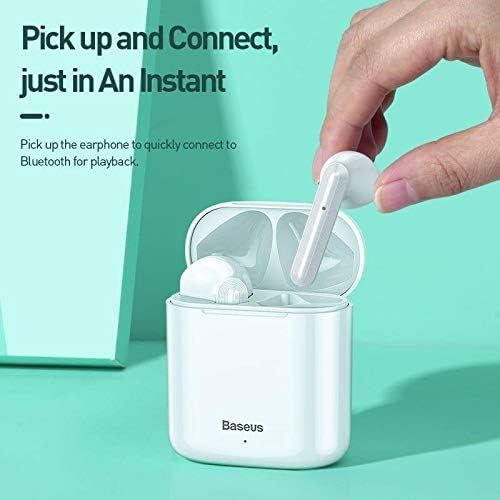
Image 3: A hand demonstrating the "Pick up and Connect" feature, showing an earphone being removed from its charging case, initiating quick Bluetooth connection.
3. Instrukcja obsługi
3.1 Noszenie słuchawek
Gently insert each earphone into the corresponding ear canal (L for left, R for right). Adjust them for a comfortable and secure fit to ensure optimal sound quality and stability.
3.2 Funkcje sterowania dotykowego
The Baseus W09 earphones feature intelligent touch controls for various functions. Specific gestures may vary; please refer to the product packaging or the official Baseus website for detailed touch control instructions.
- Odtwórz/Pauza: Typically a single tap on either earphone.
- Odbieranie/kończenie połączeń: Usually a single tap during an incoming call.
- Następny / poprzedni utwór: Often a double or triple tap on a specific earphone.
- Aktywuj asystenta głosowego: May involve a long press or specific tap sequence.
3.3 Żywotność baterii
The Baseus W09 earphones and charging case offer extended usage times:
- Przyjemność słuchania muzyki: Up to 35 hours (with charging case).
- Czas czuwania: Do 150 godzin.
4. Konserwacja
4.1 Czyszczenie
- Do czyszczenia słuchawek i etui ładującego należy używać miękkiej, suchej i niepozostawiającej włókien ściereczki.
- Nie należy używać środków czyszczących o właściwościach ściernych, alkoholu ani rozpuszczalników chemicznych.
- Ensure no moisture enters the earphone speakers or charging ports.
4.2 Przechowywanie
- Gdy nie używasz słuchawek, przechowuj je w etui ładującym, aby je chronić i utrzymać naładowanie.
- Przechowywać w chłodnym, suchym miejscu, z dala od bezpośredniego światła słonecznego i ekstremalnych temperatur.
5. Rozwiązywanie Problemów
If you encounter issues with your Baseus W09 earphones, try the following steps:
- Brak dźwięku: Ensure earphones are charged, connected to your device, and volume is up on both the earphones and your device.
- Nie można sparować: Make sure Bluetooth is enabled on your device and the earphones are in pairing mode. Try turning Bluetooth off and on again on your device.
- Połączenie przerywane: Ensure there are no obstructions between the earphones and your device. Try moving closer to your device.
- Problemy z ładowaniem: Check the charging cable and power adapter. Ensure the charging contacts on the earphones and case are clean.
- Reset: If issues persist, try resetting the earphones. Refer to the official Baseus website or product packaging for specific reset instructions.
6. Specyfikacje
| Funkcja | Szczegół |
|---|---|
| Marka | Baza |
| Numer modelu | Enkok W09 |
| Typ | W uchu |
| Technologia łączności | Bezprzewodowy (Bluetooth) |
| Metoda kontroli | Dotykać |
| Mikrofon w zestawie | Tak |
| Redukcja szumów | NIE |
| Typ baterii | Litowo-jonowy (w zestawie) |
| Czas ładowania | Około 1.5 godzin |
| Music Enjoyment Time | Do 35 godzin (z etui ładującym) |
| Czas czuwania | Do 150 godzin |
| Kompatybilny z | Wszystkie urządzenia obsługujące technologię Bluetooth |
| Kolor | Biały |
| Wymiary opakowania | Wymiary 14.6 x 11 x 4 cm |
| Waga przedmiotu | 170 gramów |
7. Gwarancja i wsparcie
For warranty information, technical support, or further assistance, please refer to the documentation included with your product or visit the official Baseus webZachowaj dowód zakupu na wypadek roszczeń gwarancyjnych.