
Wstęp
This manual provides essential instructions for the safe and efficient operation, maintenance, and troubleshooting of your Xiaomi Mijia Robot 2-in-1 Sweeping and Wet Mopping Robot Vacuum Cleaner. Please read this manual thoroughly before using the product and retain it for future reference.
Ważne informacje dotyczące bezpieczeństwa
To reduce the risk of injury or damage, read and follow all safety precautions. This appliance is for household use only.
- Nie pozwalaj dzieciom bawić się urządzeniem.
- Upewnij się, że stacja ładująca jest umieszczona na równej powierzchni, przy ścianie.
- Trzymaj włosy, luźne ubrania, palce i inne części ciała z dala od otworów i ruchomych części.
- Nie należy używać robota w obszarach, w których występuje otwarty ogień lub materiały wybuchowe.
- Nie używaj robota do zbierania dużych śmieci, płynów ani płonących przedmiotów.
- Always remove the water tank and dustbin before moving or cleaning the robot.
- Należy używać wyłącznie oryginalnego zasilacza i stacji ładującej dostarczonych przez producenta.
Zawartość opakowania
Sprawdź, czy w opakowaniu znajdują się wszystkie elementy:
- 1 x Xiaomi Mijia Sweeping Mopping Robot
- 1 x 2-in-1 Water Tank
- 2 x Szczotka boczna
- 1 x podstawa ładowania
- 1 x zasilacz
- 1 x Mop Bracket
- 2 x Wiper (Mopping Pad)
Produkt ponadview
Zapoznaj się z głównymi elementami odkurzacza robota.

Opis obrazu: Szczyt view of the Xiaomi Mijia Robot Vacuum Cleaner, showing the main body, the LDS laser navigation system dome, and the power/home buttons.
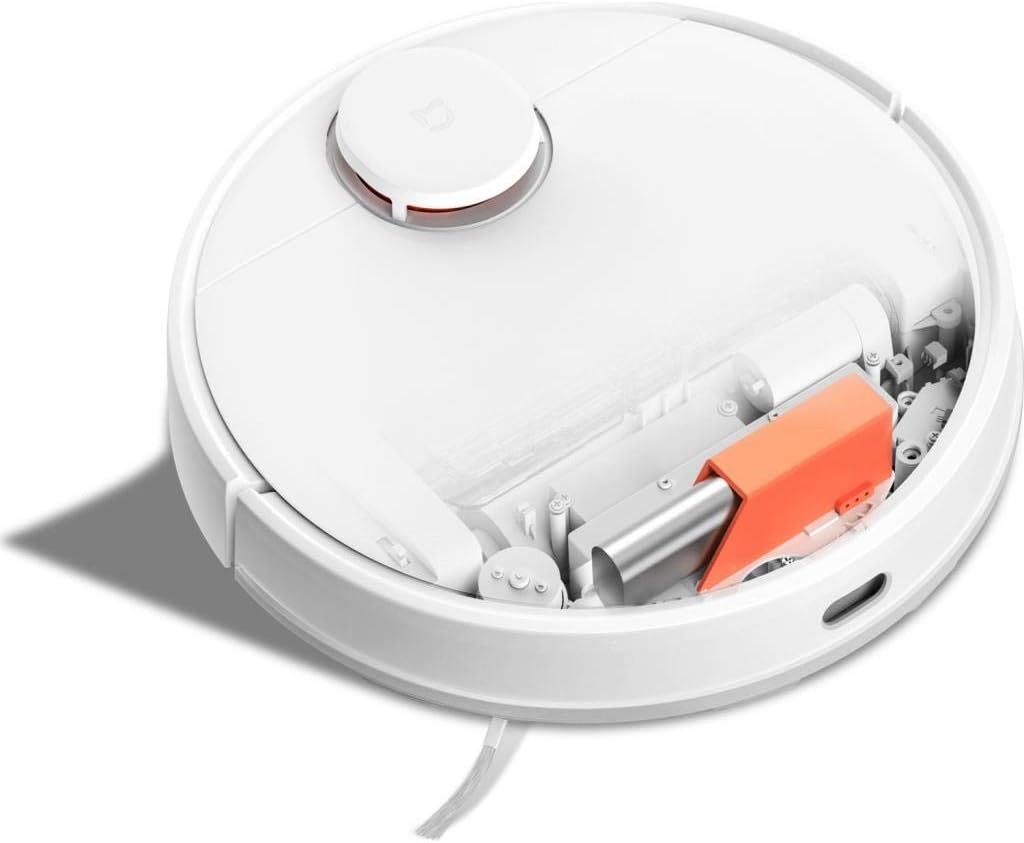
Opis obrazu: Szczyt view of the Xiaomi Mijia Robot Vacuum Cleaner with its top lid open, revealing the dustbin compartment and internal mechanisms, including an orange component.
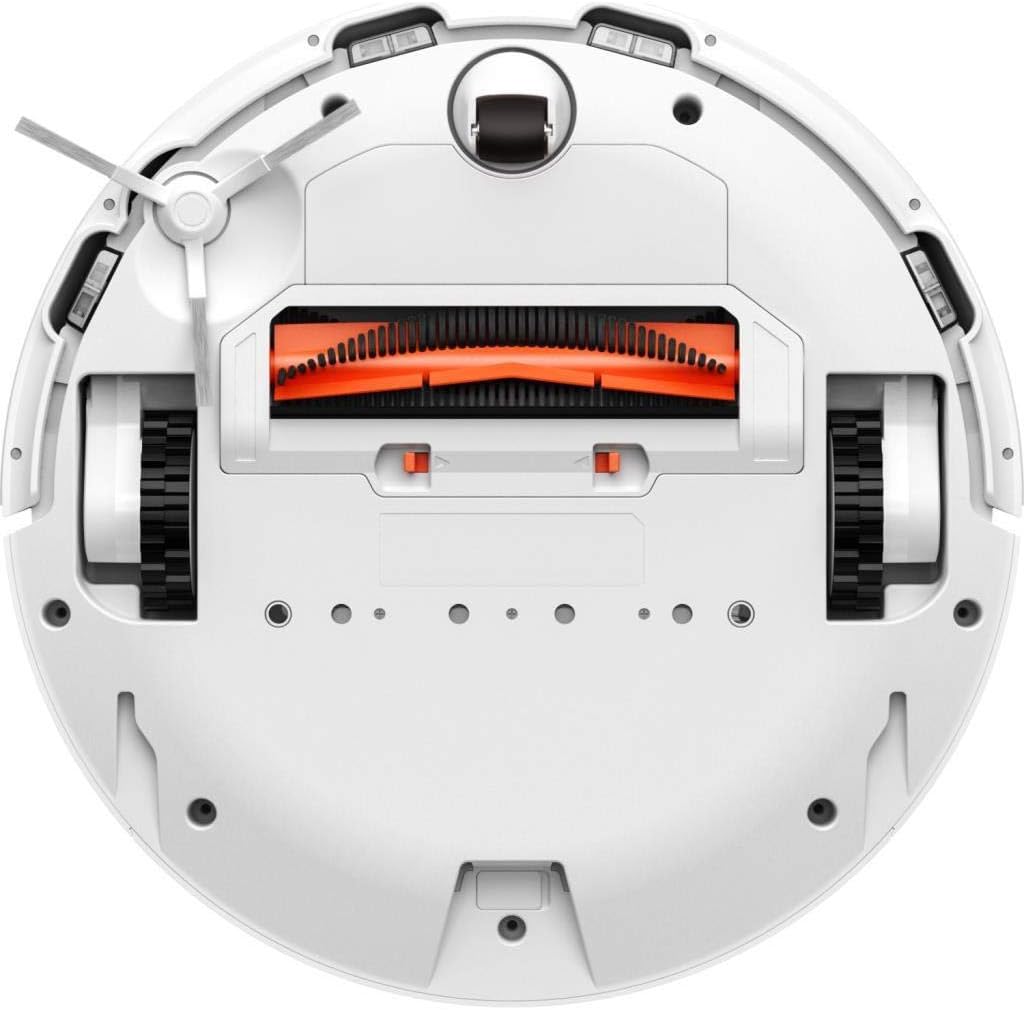
Opis obrazu: Spód view of the Xiaomi Mijia Robot Vacuum Cleaner, displaying the main roller brush (orange), side brushes, charging contacts, and various sensors.
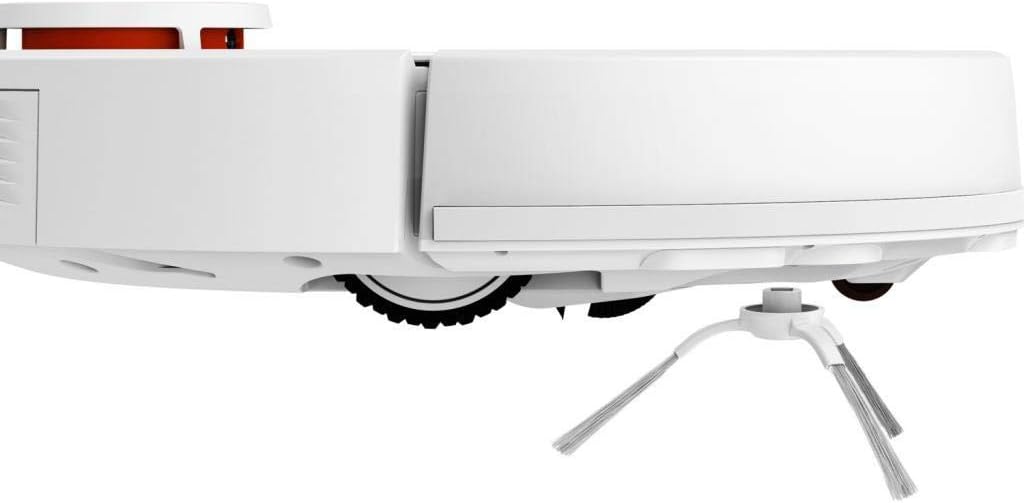
Opis obrazu: Strona profile of the Xiaomi Mijia Robot Vacuum Cleaner, highlighting one of the side brushes and a main wheel.
Organizować coś
1. Umiejscowienie stacji ładującej
Place the charging dock against a wall on a hard, level surface. Ensure there are no obstacles within 0.5 meters (1.6 feet) to either side and 1.5 meters (4.9 feet) in front of the dock. Connect the power adapter to the charging dock and plug it into a power outlet.

Opis obrazu: The Xiaomi Mijia Robot Vacuum Cleaner positioned next to its compact white charging dock, ready for charging.
2. Ładowanie początkowe
Place the robot onto the charging dock. The robot will automatically align itself and begin charging. For first-time use, ensure the robot is fully charged before operation. A full charge typically takes several hours.
3. Instalacja i połączenie aplikacji
Download the "Mi Home" app from your smartphone's app store. Follow the in-app instructions to add your Xiaomi Mijia Robot Vacuum Cleaner. This process involves connecting the robot to your home's 2.4 GHz Wi-Fi network. The app allows for remote control, scheduling, and map management.
Instrukcja obsługi
1. Tryby czyszczenia
The robot supports three cleaning modes:
- Sweeping and Mopping: The robot simultaneously vacuums and mops the floor. Ensure the 2-in-1 water tank with a mop pad is installed.
- Zamaszysty: The robot only vacuums. Use the dustbin for this mode.
- Wycieranie: The robot only mops. Ensure the 2-in-1 water tank with a mop pad is installed and the HEPA filter is removed from the water tank if only mopping is desired.
2. Rozpoczęcie cyklu czyszczenia
Press the power button on the robot or use the Mi Home app to start a cleaning cycle. The robot will automatically map its environment using its LDS laser navigation system and begin cleaning.

Opis obrazu: The Xiaomi Mijia Robot Vacuum Cleaner actively cleaning a modern room with light-colored flooring, demonstrating its compact size and ability to navigate open spaces.
3. Pausing and Stopping
Press the power button once to pause cleaning. Press it again to resume. To stop cleaning and send the robot back to its charging dock, press and hold the power button, or use the app.
4. Planowane czyszczenie
Use the Mi Home app to set up cleaning schedules. You can specify times and days for the robot to automatically start cleaning.
5. Zone Cleaning and Virtual Walls
Through the Mi Home app, you can define specific areas for cleaning (zone cleaning) or set up virtual walls and forbidden sweep areas to restrict the robot's access to certain zones.
6. Sterowanie głosowe
The robot supports voice interaction via the Mi Home app and is compatible with Amazon Echo (Alexa). Follow the instructions in the Mi Home app to link your robot with your voice assistant for hands-free control.
Konserwacja
Regularna konserwacja zapewnia optymalną wydajność i wydłuża żywotność robota odkurzającego.
1. Dustbin and Water Tank Cleaning
Empty the dustbin after each cleaning cycle. Remove the 2-in-1 water tank, empty any remaining water, and clean the mop pad. The mop pad can be washed and reused.
2. Czyszczenie szczotką główną i szczotką boczną
Periodically remove the main brush and side brushes to clear any tangled hair or debris. Use the cleaning tool provided (if any) or scissors to cut tangled hair.
3. Czyszczenie czujnika
Wipe the cliff sensors, wall sensors, and charging contacts with a soft, dry cloth to ensure they remain free of dust and debris. Clean the LDS laser navigation system dome as well.
4. Wymiana filtra
The HEPA filter in the dustbin should be cleaned regularly and replaced every 3-6 months, depending on usage. Refer to the Mi Home app for filter status and replacement reminders.
Rozwiązywanie problemów
Jeśli napotkasz problemy z robotem, zapoznaj się z poniższymi typowymi rozwiązaniami:
| Problem | Możliwa przyczyna | Rozwiązanie |
|---|---|---|
| Robot nie uruchamia się lub nie odpowiada. | Niski poziom naładowania baterii; przycisk zasilania nie został wciśnięty prawidłowo. | Ensure robot is fully charged. Press and hold the power button for a few seconds. |
| Robot nie może połączyć się z Wi-Fi. | Nieprawidłowe hasło Wi-Fi; używana sieć 5 GHz; robot znajduje się zbyt daleko od routera. | Ensure correct 2.4GHz Wi-Fi network and password. Move robot closer to router. Reset Wi-Fi on robot if necessary. |
| Słaba skuteczność czyszczenia. | Full dustbin; clogged brushes; dirty filter. | Opróżnij kosz na śmieci. Wyczyść szczotkę główną i szczotki boczne. Wyczyść lub wymień filtr. |
| Robot często się zacina. | Obstacles on the floor; high thresholds; dark surfaces (cliff sensors). | Clear floor of cables and small objects. Use virtual walls for problematic areas. Ensure sufficient lighting for dark floors. |
| Funkcja mopowania nie działa. | Water tank empty; mop pad not installed; water outlet clogged. | Fill water tank. Attach mop pad correctly. Clean water tank outlets. |
Specyfikacje
| Funkcja | Szczegół |
|---|---|
| Marka | XIAOMI |
| Nazwa modelu | 26200 |
| Funkcja specjalna | High Precision Sensors, LDS Laser Navigation |
| Kolor | Biały |
| Zawarte komponenty | Sweeping Mopping Robot, 2-in-1 Water Tank, Side Brushes, Charging Stand, Power Adapter, Mop Bracket, Wipers |
| Typ filtra | Tkanina (HEPA) |
| Żywotność baterii | Up to 130 minutes (Sweeping), 60 minutes (Mopping) |
| Tomtage | 240 V (wejście) |
| Pojemność pojemnika na śmieci | 0.3 litrów |
| Źródło zasilania | Zasilany bateryjnie |
| Metoda kontroli | App (Mi Home) |
| Kompatybilne urządzenia | Amazon Echo (Alexa) |
| Współczynnik kształtu | Robotyczny |
| Wymiary produktu | 13.58 x 13.58 x 3.78 cala (34.5 x 34.5 x 9.6 cm) |
| Waga przedmiotu | 4.4 funtów (2 kg) |
| Typ baterii | Lithium-ion (3200mAh capacity) |
| Możliwość wspinaczki | 2cm |
Gwarancja i wsparcie
For warranty information and technical support, please refer to the official XIAOMI webOdwiedź stronę internetową lub skontaktuj się z działem obsługi klienta. Zachowaj paragon jako dowód zakupu.