
1. Wprowadzenie
Dziękujemy za zakupasing the Media Tech MT-3333 3-in-1 Home Theater System. This manual provides essential information for the safe and efficient operation of your new audio system. Please read it thoroughly before use and retain it for future reference.
Zawartość opakowania:
- 1 x Media Tech MT-3333 Subwoofer Unit
- 3 x głośniki satelitarne
- 1 x Pilot zdalnego sterowania
- 1 x kabel audio/wideo
- 1 x Instrukcja obsługi
- Kabel optyczny 1 x

Rycina 1.1: Przód view of the Media Tech MT-3333 Home Theater System, showing the central subwoofer unit and two tall satellite speakers, along with a smaller center speaker.
2. Instrukcje bezpieczeństwa
Aby zapewnić bezpieczną obsługę i zapobiec uszkodzeniom, należy przestrzegać następujących środków ostrożności:
- Źródło zasilania: Connect the system only to a power outlet with the specified voltage (AC220-240V 50Hz).
- Wentylacja: Ensure adequate ventilation around the subwoofer and speakers. Do not block any ventilation openings.
- Woda i wilgoć: Do not expose the system to rain, moisture, or dripping/splashing liquids. Do not place objects filled with liquids, such as vases, on the apparatus.
- Źródła ciepła: Trzymaj system z dala od źródeł ciepła, takich jak grzejniki, kratki wentylacyjne, piece lub inne urządzenia (w tym amp(lifiers) wytwarzające ciepło.
- Umieszczenie: Place the system on a stable, flat surface. Avoid placing it in direct sunlight or in areas with excessive dust or vibrations.
- Czyszczenie: Unplug the system from the power outlet before cleaning. Use a dry cloth only.
- Serwisowanie: Nie próbuj samodzielnie naprawiać tego produktu. Wszelkie czynności serwisowe należy powierzyć wykwalifikowanemu personelowi serwisowemu.
- Dzieci: Keep packaging materials and small parts out of reach of children.
3. Konfiguracja
Follow these steps to set up your home theater system:
3.1 Rozpakowanie
- Ostrożnie wyjąć wszystkie elementy z opakowania.
- Check that all items listed in the "Package Contents" section are present.
- Zachowaj opakowanie, aby móc je później transportować lub przechowywać.
3.2 Połączenia głośników
Connect the satellite speakers to the corresponding output ports on the rear of the subwoofer unit. Ensure correct polarity (positive to positive, negative to negative) for optimal sound quality.
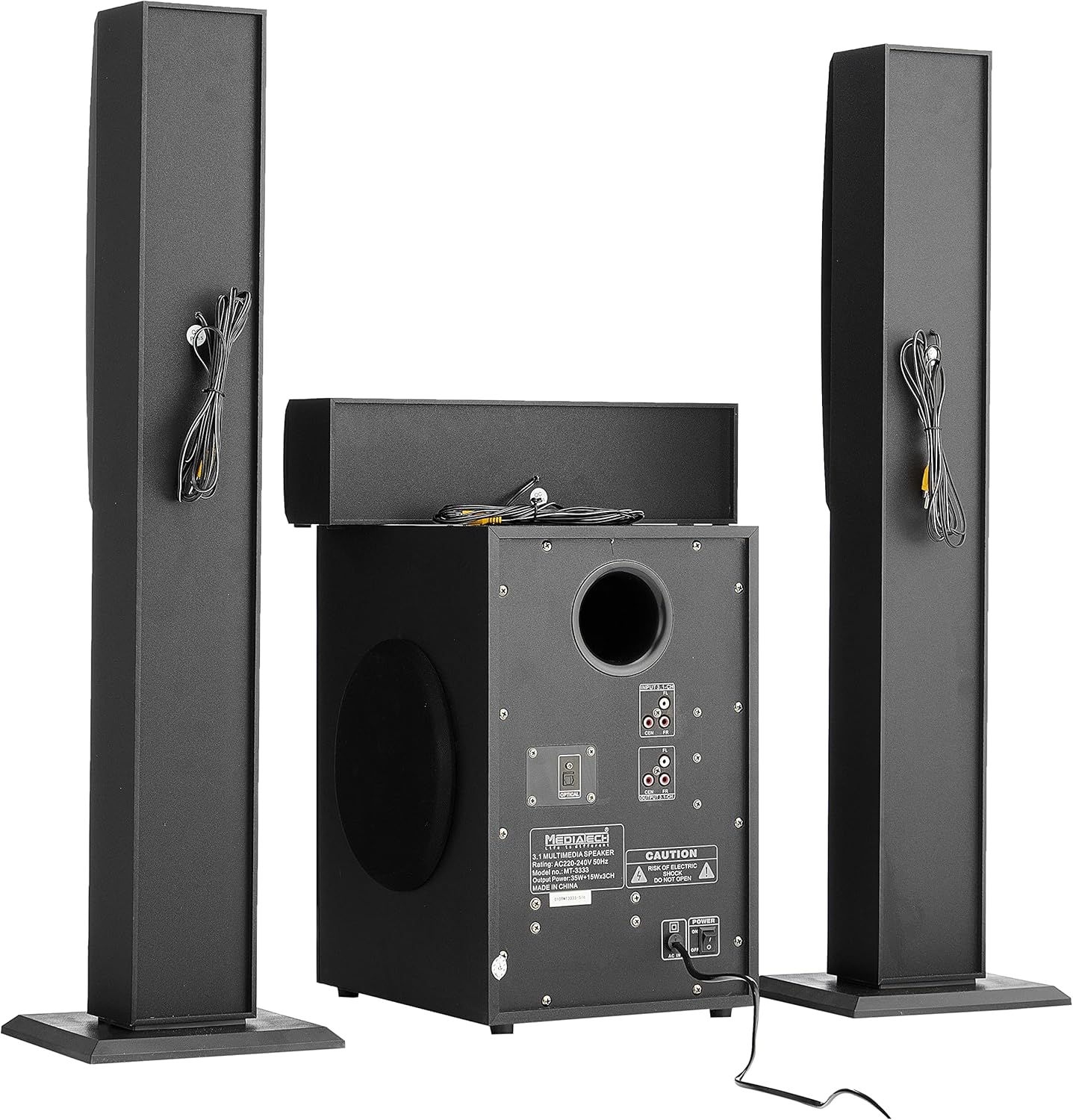
Rysunek 3.1: Tył view of the system, illustrating the subwoofer and satellite speakers connected via cables.
3.3 Połączenia źródeł dźwięku
The MT-3333 offers multiple input options. Choose the appropriate connection for your audio source:
- Wejście optyczne: For high-quality digital audio from TVs, game consoles, or Blu-ray players. Connect an optical cable from your source to the OPTICAL port on the subwoofer.
- AUX (MP3) Input: For connecting devices with a 3.5mm audio output (e.g., smartphones, tablets, laptops). Use the provided audio cable to connect to the MP3/AUX port.
- Wejście USB: Włóż dysk flash USB zawierający dźwięk files do portu USB.
- Wejście karty SD: Insert an SD memory card containing audio files do gniazda karty SD.
- Bluetooth: For wireless audio streaming from Bluetooth-enabled devices. (Refer to Section 4.3 for pairing instructions).

Rysunek 3.2: Szczegółowy view of the subwoofer's rear panel, highlighting the various input and output connections, including the Optical port and 3.1-channel audio inputs/outputs.
3.4 Połączenie zasilania
- Upewnij się, że wszystkie połączenia audio są bezpieczne.
- Connect the power cord to the AC IN port on the rear of the subwoofer.
- Plug the two-pin power plug into a suitable wall outlet.
4. Instrukcja obsługi
4.1 Włączanie/wyłączanie
Locate the power switch on the rear panel of the subwoofer. Flip it to the "ON" position to power on the system. Flip it to "OFF" to power off. You can also use the power button on the remote control or the front panel of the subwoofer.
4.2 Wybór wejścia
Press the "MODE" button on the remote control or the front panel to cycle through available input sources: Bluetooth, USB, SD, AUX, and Optical.
4.3 parowanie Bluetooth
- Switch the system to Bluetooth mode using the "MODE" button. The display will indicate "BT".
- Włącz Bluetooth w swoim urządzeniu mobilnym lub komputerze.
- Szukaj available devices and select "MT-3333" from the list.
- Once paired, you can stream audio wirelessly to the system.
4.4 Regulacja głośności, basów i tonów wysokich
- Tom: Use the "VOL+" and "VOL-" buttons on the remote or the main volume knob on the subwoofer to adjust the overall volume.
- Bas: Use the "BASS+" and "BASS-" buttons on the remote to adjust the bass level.
- Potroić: Use the "TRE+" and "TRE-" buttons on the remote to adjust the treble level.
4.5 Funkcje zdalnego sterowania
The remote control provides full functionality for your MT-3333 system:

Figure 4.1: The remote control for the Media Tech MT-3333, showing buttons for power, input selection (USB, SD, BT, AUX, OPTICAL), volume, bass, treble, equalizer presets (EQ1-EQ4), and media playback controls.
- Przycisk zasilania (czerwony): Włącza lub wyłącza system.
- Input Selection (USB, SD, BT, AUX, DIS, LED): Selects the desired audio source. 'DIS' might refer to display or another input. 'LED' controls lighting.
- Volume Control (VOL+, VOL-): Reguluje główną głośność.
- Bass Control (BASS+, BASS-): Adjusts the bass output.
- Treble Control (TRE+, TRE-): Adjusts the treble output.
- EQ (EQ1-EQ4): Wybiera wstępnie ustawione tryby korektora.
- Media Playback Controls (Play/Pause, Next, Previous, Repeat): For USB/SD card playback.
- Niemy: Wycisza dźwięk.
- Klawiatura numeryczna (0-9): For direct track selection on USB/SD.
- Lighting Control (LED): Activates or adjusts any integrated lighting features.
5. Konserwacja
Właściwa konserwacja gwarantuje długowieczność i optymalną wydajność Twojego systemu kina domowego.
5.1 Czyszczenie
- Przed czyszczeniem należy zawsze odłączyć system od gniazdka zasilania.
- Use a soft, dry cloth to wipe the surfaces of the subwoofer and speakers.
- Nie należy używać płynów czyszczących, aerozoli ani środków ściernych, gdyż mogą one uszkodzić wykończenie lub wewnętrzne elementy.
- Use a soft brush or compressed air to gently clean dust from speaker grilles and ventilation openings.
5.2 Przechowywanie
If you plan to store the system for an extended period:
- Disconnect all cables and power cords.
- Przechowuj system w chłodnym i suchym miejscu, z dala od bezpośredniego światła słonecznego i ekstremalnych temperatur.
- If possible, use the original packaging to protect the components from dust and physical damage.
6. Rozwiązywanie Problemów
If you encounter any issues with your Media Tech MT-3333, refer to the following table for common problems and solutions.
| Problem | Możliwa przyczyna | Rozwiązanie |
|---|---|---|
| Brak zasilania | Power cord not connected; Power switch off; Wall outlet faulty | Ensure power cord is securely plugged in; Turn power switch ON; Test wall outlet with another device. |
| Brak dźwięku | Incorrect input selected; Volume too low; Speaker cables loose; Mute function active | Press MODE to select correct input; Increase volume; Check speaker connections; Press MUTE on remote. |
| Słaba jakość dźwięku | Loose connections; Source audio quality low; Incorrect EQ setting | Check all cable connections; Try a different audio source; Adjust BASS/TREBLE or EQ settings. |
| Pilot nie działa | Batteries depleted; Obstruction between remote and system; Remote not pointed correctly | Replace remote control batteries; Remove any obstructions; Point remote directly at the subwoofer's sensor. |
| Błąd parowania Bluetooth | System not in BT mode; Device too far; Interference | Ensure system is in BT mode; Move device closer; Turn off other Bluetooth devices nearby. |
Jeśli po wypróbowaniu tych rozwiązań problem nadal występuje, skontaktuj się z obsługą klienta.
7. Specyfikacje
| Funkcja | Specyfikacja |
|---|---|
| Numer modelu | MT-3333 |
| Moc wyjściowa | Subwoofer: 35W, Satellite Speakers: 3 x 15W (Total 80W) |
| Rozmiar głośnika | Subwoofer: 6.5 inches, Satellite Speakers: 3 x 3 inches |
| Tworzywo | Wood and ABS Plastic |
| Wejścia | USB, AUX (MP3), SD Card, Bluetooth, Optical |
| Zasilacz | AC220-240V 50Hz |
| Approx. Shipping Dimensions | Wymiary 76 x 26 x 21 cm |
| Przybliżona waga wysyłkowa | 3.1 kilogramów |
8. Gwarancja i wsparcie
Media Tech products are designed for reliability and performance. This product comes with a standard manufacturer's warranty against defects in materials and workmanship under normal use.
For warranty claims, technical support, or service inquiries, please refer to the contact information provided on your purchase receipt or visit the official Media Tech webstrona.
Uwaga: The warranty may not cover damage caused by improper installation, accident, misuse, abuse, negligence, or unauthorized modification.