
Nerf NER0205
NERF Bulls-Eye Digital Target (Model NER0205) Instruction Manual
Brand: Nerf | Model: NER0205
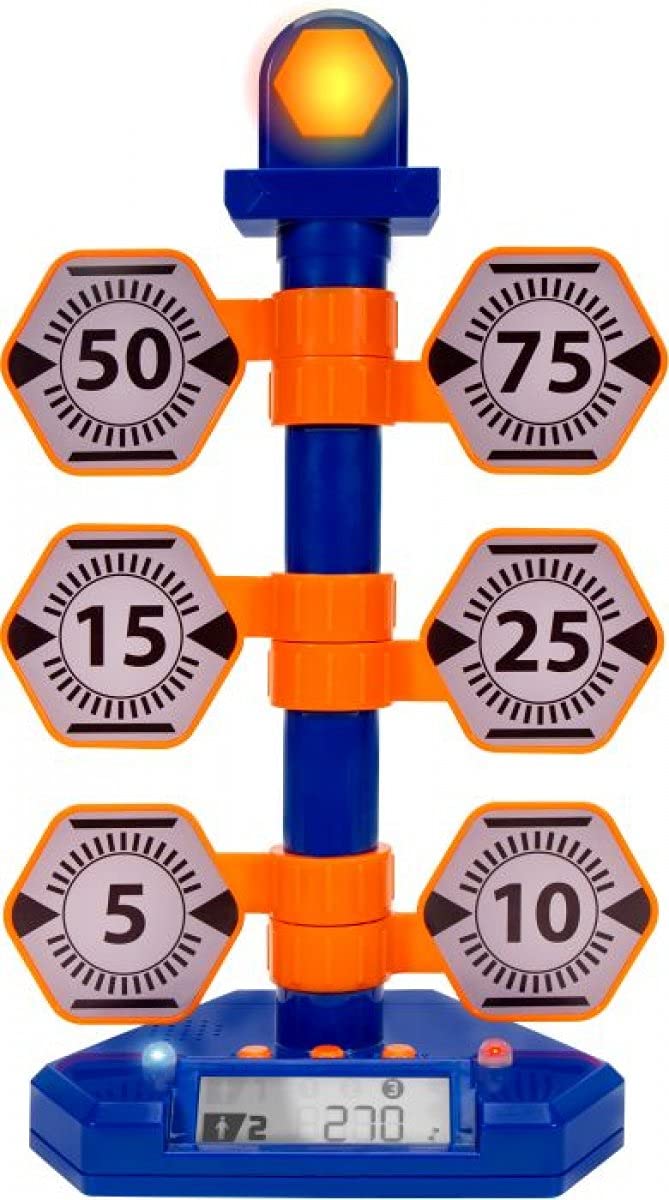
Obraz: Przód view of the NERF Bulls-Eye Digital Target, highlighting its design and target layout.
1. Koniecview
The Nerf Bulls-Eye Digital Target is designed to enhance dart-blasting accuracy and provide engaging gameplay. This free-standing target features six flip-back targets and a high-scoring bullseye, along with a score-tracking LCD screen. It supports both solo play and competitive multiplayer modes with three distinct game modes.
Główne cechy:
- Six flip-back targets and a central bullseye for varied aiming practice.
- Score-tracking LCD screen to monitor performance.
- Three distinct game modes: Point Counter, Stack 'Em, and Accuracy Test.
- Supports single-player and multiplayer gameplay.
- Durable, free-standing design for indoor or outdoor use.
2. Konfiguracja
2.1. Rozpakowanie i komponenty
Ostrożnie wyjmij wszystkie elementy z opakowania. Upewnij się, że wszystkie wymienione elementy są obecne:
- 1 Bulls-Eye Digital Target Unit
- 1 Base Attachment
- Instrukcja obsługi (ten dokument)
2.2. Instrukcja montażu
Follow these steps to assemble your Digital Target:
- Attach the main target unit to the base attachment, ensuring it is securely fastened.
- Verify that all six flip-back targets are correctly aligned and can move freely.
2.3. Instalacja baterii
The Digital Target requires 3 AA batteries (not included).
- Locate the battery compartment on the underside of the main target unit.
- Using a small Phillips-head screwdriver, open the battery compartment cover.
- Włóż 3 baterie AA, zwracając uwagę na prawidłową polaryzację (+/-).
- Załóż pokrywę komory baterii i zabezpiecz ją śrubą.
2.4. Visual Guide: Product Assembly and Features
Video: This video demonstrates the assembly process of a similar target system, including attaching the base and main unit, and shows the target in action with its rotating feature and different modes. It also illustrates battery installation.
3. Instrukcja obsługi
3.1. Włączanie/wyłączanie zasilania
To power on the target, locate the power button on the back or side of the main unit and press it. The LCD screen will illuminate. To power off, press the button again.
3.2. Tryby gry
The Nerf Bulls-Eye Digital Target offers three engaging game modes:
- Licznik punktów: Each hit on a target adds to your score. The bullseye typically offers higher points.
- Stack 'Em: Targets must be hit in a specific sequence or within a time limit to maximize points.
- Accuracy Test: Focus on precision. This mode may involve hitting specific targets or achieving a certain score within a set number of shots.
Refer to the on-screen prompts or the included quick-start guide for detailed instructions on selecting and playing each game mode.
3.3. Punktacja
The integrated LCD screen automatically tracks your score. When a target is hit, it will flip back, and points will be added to the display. The screen also indicates which player is currently leading in multiplayer modes.
4. Konserwacja
4.1. Czyszczenie
To clean the target, wipe it with a soft, dry cloth. Do not use abrasive cleaners or immerse the unit in water. Ensure the battery compartment is sealed before cleaning.
4.2. Przechowywanie
When not in use, store the Digital Target in a cool, dry place away from direct sunlight. If storing for an extended period, remove the batteries to prevent leakage.
5. Rozwiązywanie Problemów
5.1. Target Not Powering On
- Sprawdź, czy baterie są włożone prawidłowo, zachowując właściwą polaryzację.
- Wymień stare baterie na nowe.
- Sprawdź, czy przycisk zasilania jest wciśnięty do końca.
5.2. Targets Not Registering Hits
- Ensure darts are hitting the targets directly and with sufficient force.
- Check for any obstructions preventing the targets from flipping back.
- Verify that the target unit is stable and not wobbling.
5.3. Inaccurate Scoring
- Reset the target unit by turning it off and on again.
- Ensure all targets are in their upright position before starting a new game.
6. Specyfikacje
| Funkcja | Szczegół |
|---|---|
| Marka | Osłabić |
| Numer modelu | NER0205 |
| UPC | 191726009795 |
| Wymiary przedmiotu | 8.46 x 4.49 x 13.98 cala |
| Waga przedmiotu | 1.2 funtów |
| Typ materiału | Plastikowy |
| Źródło zasilania | Zasilany bateryjnie |
| Obsługiwane typy baterii | AA (Quantity: 3) |
| Liczba graczy | 1-2 |
| Opis przedziału wiekowego | Kid (Manufacturer Minimum Age: 60 months) |
7. Gwarancja i wsparcie
For warranty information, technical support, or to inquire about replacement parts, please refer to the official Nerf or Jazwares website, or contact their customer service directly. Specific warranty terms and conditions may vary by region and retailer.
Ask a question about this manual
Ask about setup, troubleshooting, compatibility, parts, safety, or missing instructions. Manuals+ will review the question and use this page’s manual context to help answer it.