
Wstęp
Thank you for choosing the Kaidi KD903 Wireless Bluetooth Earphones. This manual provides essential information for the safe and optimal use of your device. Please read it carefully before use and retain it for future reference.
Zawartość pudełka:
- 1 x Kaidi KD903 Wireless Earphones
- 2 x Pairs of Comfortable Ear Tips (different sizes)
- 1 x kabel ładujący USB
- 1 x Instrukcja obsługi

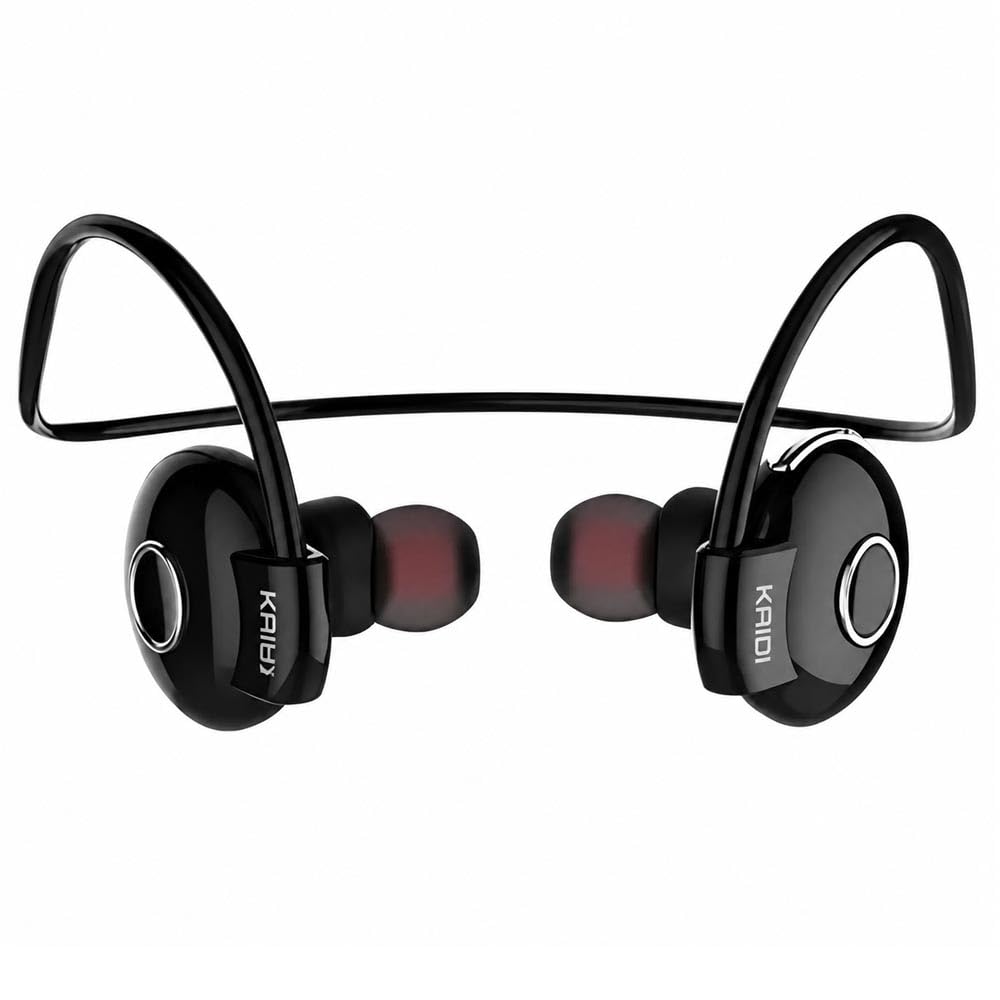
Image: Kaidi KD903 Wireless Earphones with included accessories, such as the charging cable and additional ear tips.
Produkt ponadview
The Kaidi KD903 earphones are designed for active lifestyles, offering a secure fit and resistance to sweat. They feature Bluetooth 4.1 for stable connectivity and clear audio.
Główne cechy:
- Bluetooth 4.1: Zapewnia stabilne i wydajne połączenie bezprzewodowe.
- Odporność na pot: Ideal for sports and workouts.
- CVC Intelligent Noise Reduction: Minimizes wind noise for clearer calls.
- Połączenie wielopunktowe: Łączy się z dwoma urządzeniami jednocześnie.
- Przypomnienie głosowe: Provides audio prompts for status updates.
- IOS Power Display: Shows battery level on iOS devices.
Obraz: Wybuch view illustrating the internal components and design of the Kaidi KD903 earphone.
Organizować coś
1. Ładowanie słuchawek
- Podłącz kabel ładujący USB do portu ładowania w słuchawkach.
- Podłącz drugi koniec kabla USB do kompatybilnego źródła zasilania USB (np. komputera, zasilacza sieciowego).
- The indicator light will illuminate to show charging status. A full charge typically takes approximately 2.5 hours.
- Po pełnym naładowaniu kontrolka zmieni kolor lub zgaśnie. Odłącz kabel ładujący.
2. Parowanie z urządzeniem Bluetooth
- Upewnij się, że słuchawki są wyłączone.
- Press and hold the multi-function button (usually the main button on the earphone) for approximately 5-7 seconds until the indicator light flashes red and blue alternately. This indicates the earphones are in pairing mode.
- Włącz Bluetooth na swoim smartfonie lub innym urządzeniu z obsługą Bluetooth i wyszukaj dostępne urządzenia.
- Select 'KD903' from the list of found devices.
- Once connected, a voice prompt will confirm successful pairing, and the indicator light will typically flash blue slowly.

Image: A person wearing the Kaidi KD903 wireless earphones, highlighting their suitability for sports and active use.
Instrukcja obsługi
Włączanie/wyłączanie zasilania
- Włączanie: Press and hold the multi-function button for approximately 3 seconds until the blue indicator light flashes and a voice prompt says "Power On".
- Wyłączone: Press and hold the multi-function button for approximately 3 seconds until the red indicator light flashes and a voice prompt says "Power Off".
Odtwarzanie muzyki
- Odtwórz/Pauza: Naciśnij raz przycisk wielofunkcyjny.
- Następny utwór: Naciśnij i przytrzymaj przycisk zwiększania głośności.
- Poprzedni utwór: Naciśnij i przytrzymaj przycisk głośności -.
- Zwiększenie głośności: Naciśnij krótko przycisk zwiększania głośności.
- Ściszanie: Naciśnij krótko przycisk głośności -.
Zarządzanie połączeniami
- Odbieranie/kończenie połączeń: Naciśnij raz przycisk wielofunkcyjny.
- Odrzuć połączenie: Naciśnij i przytrzymaj przycisk wielofunkcyjny przez około 2 sekundy.
- Ponowne wybieranie ostatniego numeru: Naciśnij dwukrotnie przycisk wielofunkcyjny.
Multipoint Connection (Connecting to Two Devices)
- Pair the earphones with the first device as described in the "Pairing" section.
- Po pomyślnym sparowaniu wyłącz Bluetooth na pierwszym urządzeniu.
- Put the earphones back into pairing mode (red and blue flashing light).
- Sparuj słuchawki z drugim urządzeniem.
- Once the second device is paired, re-enable Bluetooth on the first device. The earphones should now be connected to both devices simultaneously.
Konserwacja
Proper maintenance ensures the longevity and performance of your Kaidi KD903 earphones.
- Czyszczenie: Regularly clean the earphones with a soft, dry, lint-free cloth. Do not use abrasive cleaners, solvents, or harsh chemicals.
- Odporność na pot: While the earphones are sweat-resistant, avoid submerging them in water or exposing them to heavy rain. After intense workouts, wipe them dry.
- Składowanie: Gdy słuchawki nie są używane, należy je przechowywać w chłodnym i suchym miejscu, z dala od bezpośredniego światła słonecznego i ekstremalnych temperatur.
- Ładowanie: Charge the earphones using only the provided USB cable or a certified equivalent. Avoid overcharging.
Rozwiązywanie problemów
Jeśli masz problemy ze słuchawkami, zapoznaj się z poniższymi typowymi problemami i ich rozwiązaniami:
- Słuchawki nie włączają się:
Ensure the earphones are fully charged. Connect them to a power source and allow them to charge for at least 30 minutes before attempting to power on again. - Brak dźwięku lub niski poziom głośności:
Check the volume levels on both the earphones and your connected device. Ensure the earphones are properly paired and connected to your device. Try re-pairing the earphones. - Nie można sparować z urządzeniem:
Ensure the earphones are in pairing mode (red and blue indicator light flashing). Make sure Bluetooth is enabled on your device and it is within the 8-meter transmission range. Try restarting both the earphones and your device. - Connection is unstable or drops frequently:
Ensure there are no obstacles between the earphones and your device. Move closer to your device. Avoid environments with strong Wi-Fi or other wireless interference. - Problem z ładowaniem:
Verify that the charging cable is securely connected to both the earphones and the power source. Try using a different USB port or charging adapter.
Specyfikacje
| Funkcja | Specyfikacja |
|---|---|
| Wersja Bluetooth | 4.1 |
| Zawodowiecfile Wsparcie | HSP/HFP/A2DP/AVRCP |
| Czas czuwania | 200 godziny |
| Czas rozmowy | 10 godziny |
| Czas odtwarzania muzyki | 6 godziny |
| Czas ładowania | 2.5 godziny |
| Zakres częstotliwości | RF 2.40 GHz (2.402 G – 2.480 G) |
| Temperatura otoczenia | -20°C do +60°C |
| Odległość transmisji | Do 8 metrów |
| Pojemność baterii | Akumulator 100 mAh |
| Wymiary (dł. x szer. x wys.) | Wymiary 12.2 x 10.3 x 4.4 cm |
| Typ złącza | USB typu C |
| Kolor | Czarny |
Gwarancja i wsparcie
Informacje o gwarancji
This Kaidi KD903 product comes with a 30-dniowa gwarancja from the date of purchase. This warranty covers manufacturing defects. Please retain your proof of purchase (receipt or invoice) as it is required for any warranty claims.
Gwarancja nie obejmuje uszkodzeń powstałych na skutek niewłaściwego użytkowania, wypadków, nieautoryzowanych modyfikacji lub normalnego zużycia.
Obsługa klienta
For technical assistance, troubleshooting not covered in this manual, or warranty inquiries, please contact the retailer from whom you purchased the product. You may also visit the official Kaidi webwitrynę zawierającą dodatkowe zasoby wsparcia.