
Wstęp
This user manual provides comprehensive instructions for the setup, operation, maintenance, and troubleshooting of your G-MARK X320FM Wireless Microphones System. Please read this manual thoroughly before using the product to ensure optimal performance and longevity.
Produkt ponadview
Główne cechy
- Unique LED Light Design: Microphones feature an LED halo for visual feedback.
- Regulowana częstotliwość: Dual UHF technology with a selectable frequency range of 520 MHz to 560 MHz, allowing for frequency changes if interference occurs.
- Plug and Play, Auto Pairing: Automatic frequency synchronization between receiver and microphones upon power-on.
- Solidna konstrukcja: Microphones are constructed from metal for durability and impact resistance.
- Wyświetlacz LCD: Professional receiver features an LCD screen displaying channels and frequencies.
- Szerokie zastosowanie: Kompatybilny z amplifiers, speakers, audio mixers, and other PA systems, suitable for karaoke, DJ events, parties, church, weddings, speeches, conferences, and outdoor events.
Zawartość opakowania
The G-MARK X320FM Wireless Microphones System package includes the following items:
- 1 x pudełko odbiorcze
- 2 x bezprzewodowe mikrofony ręczne UHF
- Kabel audio 1 x 6.35 mm
- 1 x zasilacz
- 2 x Anteny
- 2 x Anti-skid Rings
- 1 x Instrukcja obsługi

Figure 1: Contents of the G-MARK X320FM package, including the receiver, two handheld microphones, power adapter, audio cable, antennas, and anti-skid rings.
Identyfikacja komponentów
Receiver Front and Rear Panels

Rycina 2: Przód view of the G-MARK X320FM receiver, showing the display, volume controls, and power switch. Rear view details XLR outputs, MIX OUT, power input, and antenna connections.
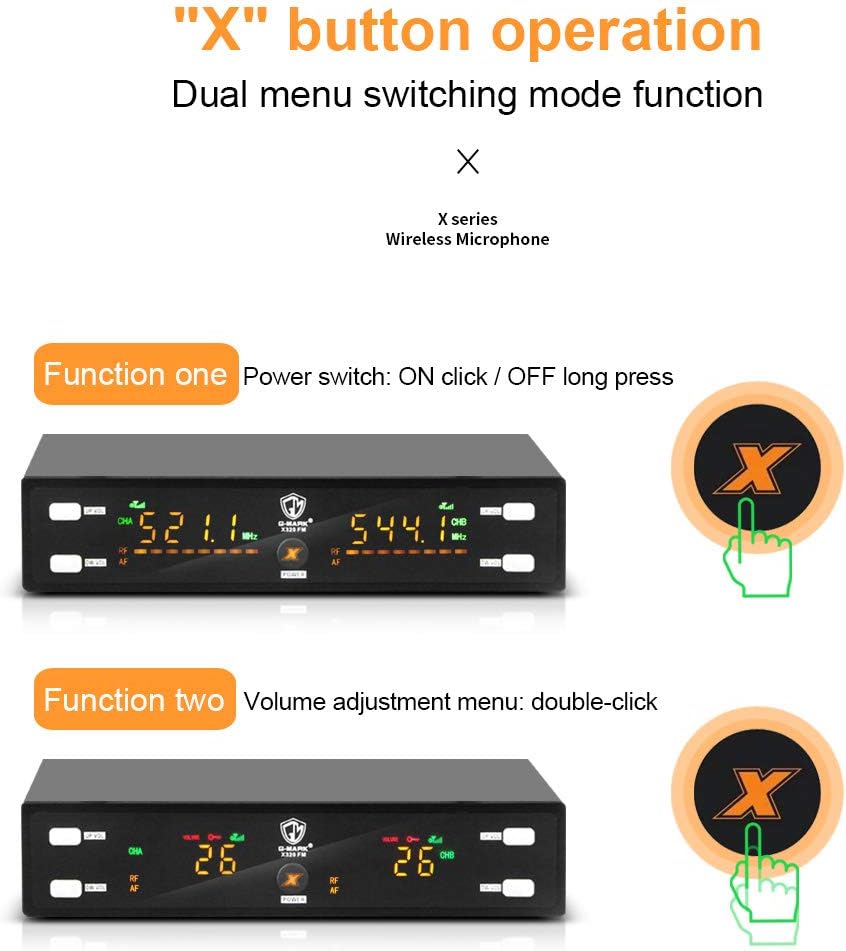
- Panel przedni: Features UP/VOL and DW/VOL buttons for channel A and B, CHA/CHB frequency displays, RF/AF indicators, and a central power switch.
- Tylny panel: Includes ANT-A and ANT-B antenna connectors, BALANCED OUT-A and BALANCED OUT-B XLR outputs, a MIX OUT (AF A+B) 6.35mm audio output, and a DC9-12V power input.
Handheld Microphone Details
Rysunek 3: Szczegółowy view of the G-MARK X320FM handheld microphone, showing the microphone head, internal components, battery compartment, and AFH switch for frequency selection.
- Głowica mikrofonu: Metal mesh grille for protection and clear sound quality.
- Ciało: Trwała konstrukcja metalowa.
- Wyświetlacz: Shows battery level and current frequency.
- Przycisk zasilania: For turning the microphone on/off.
- Komora baterii: Located at the bottom of the microphone for battery insertion.
- AFH Switch: Allows for channel selection (A, B, C, D) on the microphone.
Instrukcje konfiguracji
1. Instalacja baterii
To install batteries in the handheld microphones:
- Unscrew the bottom part of the microphone to reveal the battery compartment.
- Insert two AA batteries, ensuring correct polarity.
- Dokładnie przykręć dolną część.
Video 1: Demonstrates battery installation in the handheld microphone (0:54 - 1:02).
2. Podłączenie odbiornika
Connect the receiver to your audio system using the provided 6.35mm audio cable or XLR cables (not included for XLR). Ensure you connect to the Gniazdo MIC na twoim amplifier, speaker, or audio mixer, not the AUX jack.

Figure 4: Diagram illustrating how to connect the G-MARK X320FM receiver to various audio devices like a professional music mixer, amplifier, or karaoke machine. Note that connection to laptops, iPads, phones, or TVs is generally not compatible.
3. Podłączenie anteny
Screw the two antennas onto the ANT-A and ANT-B connectors on the rear panel of the receiver. Position them vertically for optimal signal reception.
4. Włączanie
Connect the power adapter to the DC9-12V input on the receiver and plug it into a power outlet. Press the central POWER button on the receiver to turn it on. Then, press the POWER button on each handheld microphone to turn them on.
Video 2: Shows the receiver powering on (0:19 - 0:23) and a microphone powering on (1:02 - 1:07).
Instrukcja obsługi
1. Automatic Pairing (Flash Match)
The G-MARK X320FM system features automatic frequency synchronization. Once the receiver and microphones are powered on, they will automatically pair and lock to an available frequency. The receiver's display will show the synchronized frequency.

Figure 5: Illustrates the 'Flash Match' feature where the microphone and receiver automatically lock frequency immediately after power on.
2. Regulacja częstotliwości
If you experience interference, you can manually adjust the frequency on the handheld microphone. The receiver's frequency for that channel will automatically change to match the microphone's new frequency.
- Locate the AFH switch inside the microphone's battery compartment.
- Use the switch to select a different channel (A, B, C, or D).
- Observe the receiver's display; the frequency for the corresponding channel will update.
Video 3: Demonstrates frequency adjustment on the handheld microphone and how the receiver's frequency changes accordingly (1:24 - 1:46).
3. Regulacja głośności
Adjust the volume for each microphone channel directly on the receiver:
- For Channel A, use the 'UP/VOL' and 'DW/VOL' buttons on the left side of the receiver.
- For Channel B, use the 'UP/VOL' and 'DW/VOL' buttons on the right side of the receiver.
- The volume level will be displayed on the receiver's LCD screen.
Video 4: Shows how to adjust the volume using the UP/VOL and DW/VOL buttons on the receiver (1:47 - 1:58).
4. Frequency Lock/Unlock
To prevent accidental frequency changes, you can lock the receiver's frequency. To unlock, double-click the UP/VOL and DW/VOL buttons simultaneously on the desired channel.
Video 5: Demonstrates how to lock and unlock the receiver's frequency by double-clicking two keys simultaneously (1:15 - 1:23).
Konserwacja
- Czyszczenie: Use a soft, dry cloth to clean the receiver and microphones. Avoid using liquid cleaners or solvents.
- Pielęgnacja baterii: Jeśli mikrofon nie będzie używany przez dłuższy czas, wyjmij z niego baterie, aby zapobiec wyciekowi.
- Składowanie: Przechowuj system w chłodnym, suchym miejscu, z dala od bezpośredniego światła słonecznego i ekstremalnych temperatur.
- Obsługiwanie: Handle microphones and receiver with care to avoid physical damage.
Rozwiązywanie problemów
| Problem | Możliwa przyczyna | Rozwiązanie |
|---|---|---|
| Brak dźwięku z mikrofonów | Microphone or receiver not powered on; low batteries; incorrect connection; mismatched frequency; receiver connected to AUX jack. | Ensure all devices are powered on. Check microphone batteries. Verify receiver is connected to the MIC input of your audio system. Check that microphone and receiver frequencies match. |
| Zakłócenia lub słaba jakość dźwięku | Other wireless devices operating on the same frequency; too far from receiver; obstacles blocking signal. | Adjust microphone frequency to an unused channel. Reduce distance between microphone and receiver. Ensure a clear line of sight between devices. |
| Niska głośność | Microphone volume too low; receiver volume too low; audio system volume too low. | Increase volume on the microphone, receiver, and your connected audio system. |
| Receiver display is locked | Frequency lock feature is active. | Double-click the UP/VOL and DW/VOL buttons simultaneously on the respective channel to unlock the frequency. |
Specyfikacje
| Funkcja | Szczegół |
|---|---|
| Numer modelu | G320FMus |
| Marka | Znak G |
| Współczynnik kształtu mikrofonu | Ręczny |
| Tworzywo | Metal |
| Częstotliwość mikrofonu bezprzewodowego | 520 MHz - 560 MHz (Adjustable UHF) |
| Odpowiedź częstotliwościowa | 18 kHz |
| Czułość audio | 60 decybeli |
| Wzór biegunowy | Jednokierunkowy |
| Źródło zasilania | Battery Powered (Microphones) |
| Waga przedmiotu | 3.08 funta (system) |
| Wymiary produktu (dł. x szer. x wys.) | 15.74 x 12.99 x 2.75 cala |
| Technologia łączności | XLR, gniazdo 6.35 mm |
| Kompatybilne urządzenia | Amplifier, Audio Mixer, Karaoke Machine |
Gwarancja i wsparcie
For warranty information, technical support, or any inquiries regarding your G-MARK X320FM Wireless Microphones System, please contact G-MARK customer service through the official channels provided at the point of purchase or on the G-MARK webStrona. Zachowaj dowód zakupu na wypadek roszczeń gwarancyjnych.