
Wstęp
The Sangean FMT-02 (GoTune 200) is a versatile DAB+ and FM-TX car radio adapter designed to enhance your in-car audio experience. It allows you to receive digital DAB+ radio stations and transmit them via FM to your existing car radio. Additionally, it features integrated Bluetooth for wireless audio streaming from your compatible devices and an auxiliary input for wired connections. This manual provides detailed instructions for installation, operation, and maintenance of your FMT-02.
Główne cechy
- 20 preset stations (10 DAB, 10 FM TX) for quick access to your favorite channels.
- FM transmitter with Radio Power Scan (RPS) function to automatically find an available FM frequency.
- Integrated Bluetooth for wireless audio streaming from smartphones, tablets, and other compatible devices.
- Auxiliary input for connecting external audio sources via a 3.5mm cable.
- DAB reception supports TA (Traffic Announcement) and SF (Service Following) functions for enhanced navigation and listening.
- Easy connection via cigarette lighter socket or USB port.
Produkt ponadview
Familiarize yourself with the main components and controls of your Sangean FMT-02.

Obraz 1: Przód view of the Sangean FMT-02 showing the display, rotary knob, and control buttons including MODE ON/OFF, PAIR PRESET, INFO MENU, and BACK/SF AUTOTUNE.

Obraz 2: Tył view of the Sangean FMT-02 displaying the connection ports: Ext. Ant. (External Antenna), Aux In, Line Out, and DC In (Power Input).
Sterownica:
- Pokrętło: Turn to navigate menus or adjust volume. Press to confirm selections.
- MODE ON/OFF: Press to switch between modes (DAB, FM-TX, Bluetooth, Aux In). Press and hold to power the device on or off.
- PAIR PRESET: Press to access preset stations. Press and hold to initiate Bluetooth pairing.
- INFO MENU: Press to display information. Press and hold to enter the system menu.
- BACK/SF AUTOTUNE: Press to go back in menus. Press and hold to initiate FM Radio Power Scan (RPS) or DAB autotune.
Konfiguracja i instalacja
Follow these steps to properly install your Sangean FMT-02 in your vehicle.
1. Montaż urządzenia:

Obraz 3: The Sangean FMT-02 attached to its adjustable suction cup mount.
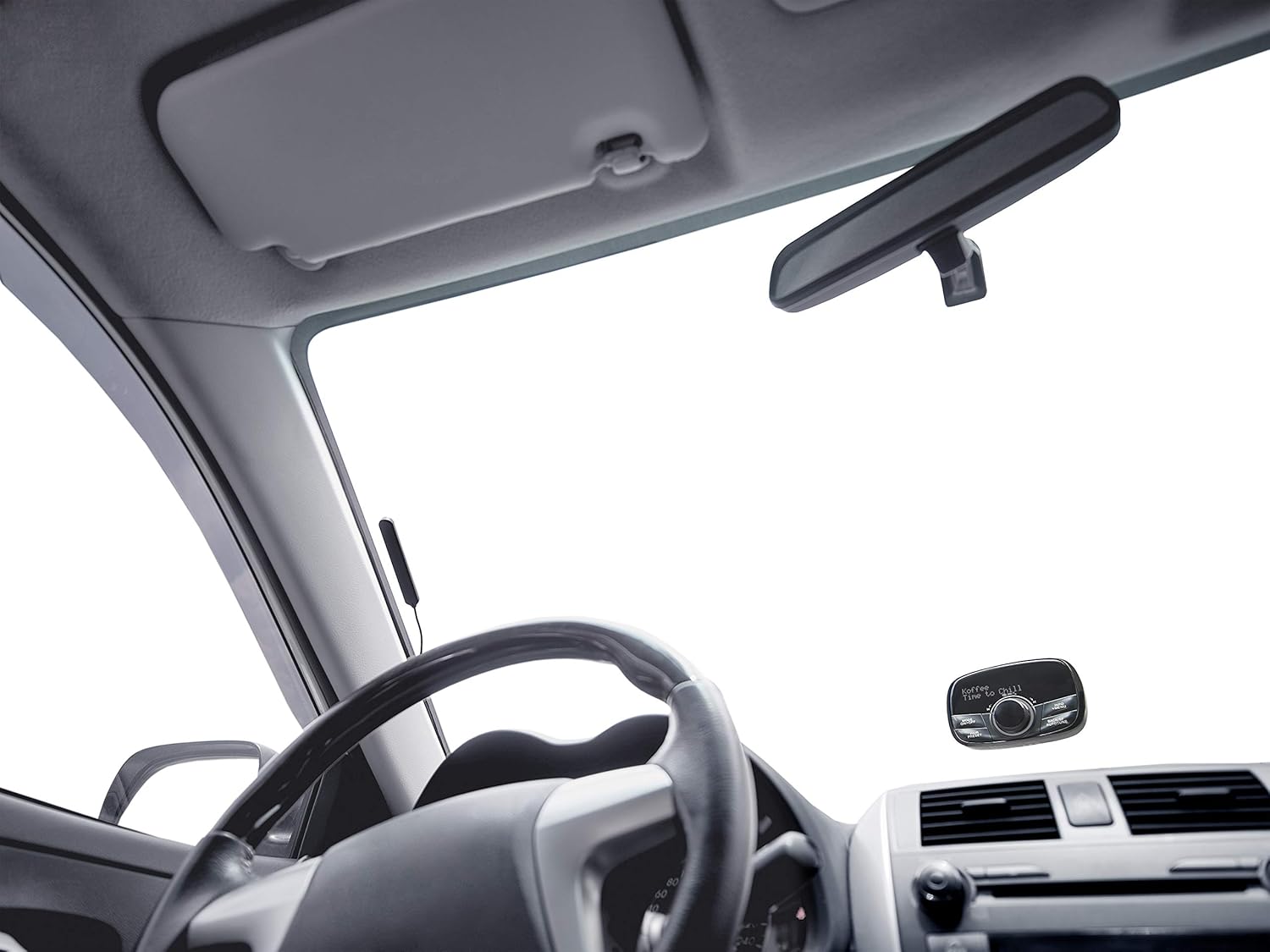
Obraz 4: The Sangean FMT-02 mounted on the lower right corner of a car windshield, visible from the driver's perspective.
- Attach the provided suction cup mount to the back of the FMT-02 unit.
- Choose a suitable location on your car's windshield or dashboard that does not obstruct your view lub zakłócać działanie poduszek powietrznych.
- Clean the chosen surface thoroughly.
- Dociśnij przyssawkę mocno do powierzchni i zablokuj ją za pomocą mechanizmu blokującego.
- Adjust the angle of the FMT-02 for optimal viewwchodzenia i dostępu.
2. Podłączenie zasilania:
Connect the FMT-02 to your car's power supply using one of the following methods:
- Gniazdo zapalniczki: Plug the provided car charger into your vehicle's 12V cigarette lighter socket and connect the other end to the DC In port on the FMT-02.
- Port USB: If your vehicle has a USB power port, connect the FMT-02 using a compatible USB cable to the DC In port.
3. Instalacja anteny:
For optimal DAB+ reception, install the external antenna provided.
- Connect the antenna cable to the 'Ext. Ant.' port on the rear of the FMT-02.
- Carefully route the antenna cable along the edges of your windshield or dashboard to a location that provides clear reception, typically near the top of the windshield or on a side window. Avoid placing it near metal objects that could cause interference.
- Secure the antenna in place using adhesive clips or tape if necessary.
Instrukcja obsługi
Włączanie/wyłączanie:
- Aby włączyć, naciśnij i przytrzymaj TRYB WŁ./WYŁ Naciskaj przycisk, aż wyświetlacz się zaświeci.
- Aby wyłączyć, naciśnij i przytrzymaj TRYB WŁ./WYŁ przycisk, aż wyświetlacz się wyłączy.
DAB+ Radio Operation:
- Naciśnij TRYB WŁ./WYŁ button repeatedly until 'DAB' mode is selected.
- Upon first use or if stations are not found, the device will automatically perform a full scan for available DAB+ stations. To manually initiate a scan, press and hold the BACK/SF AUTOTUNE przycisk.
- Turn the rotary knob to browse through the list of available stations. Press the rotary knob to select a station.
- Zapisywanie ustawień wstępnych: Podczas słuchania stacji naciśnij i przytrzymaj PAIR PRESET button. Use the rotary knob to select a preset number (1-10) and press the knob to confirm.
- Przywoływanie ustawień wstępnych: Naciśnij PAIR PRESET button. Use the rotary knob to select a preset and press the knob to tune in.
- TA (Traffic Announcement) and SF (Service Following): These functions are automatically supported by the FMT-02 when available from the DAB+ broadcast.
FM-TX Operation:
The FMT-02 transmits DAB+ audio to your car's FM radio. Ensure your car radio is tuned to the selected FM frequency.
- Naciśnij TRYB WŁ./WYŁ button repeatedly until 'FM-TX' mode is selected.
- Radio Power Scan (RPS): Naciśnij i przytrzymaj BACK/SF AUTOTUNE button. The device will scan for the clearest available FM frequency.
- Manually adjust the FM transmitting frequency by turning the rotary knob.
- Tune your car's FM radio to the same frequency displayed on the FMT-02.
- Zapisywanie ustawień wstępnych: While on an FM-TX frequency, press and hold the PAIR PRESET button. Use the rotary knob to select a preset number (1-10) and press the knob to confirm.
- Przywoływanie ustawień wstępnych: Naciśnij PAIR PRESET button. Use the rotary knob to select a preset and press the knob to tune in.
Parowanie i przesyłanie strumieniowe Bluetooth:
- Naciśnij TRYB WŁ./WYŁ button repeatedly until 'Bluetooth' mode is selected.
- The device will enter pairing mode automatically, indicated by a flashing Bluetooth icon or message on the display. If not, press and hold the PAIR PRESET przycisk, aby rozpocząć parowanie.
- On your smartphone, tablet, or other Bluetooth-enabled device, go to the Bluetooth settings and search for available devices.
- Select 'Sangean FMT-02' (or similar name) from the list to pair.
- Once paired, you can stream audio wirelessly from your device to the FMT-02. The audio will then be transmitted via FM-TX to your car radio.
Wejście pomocnicze:
To connect an external audio source via cable:
- Connect a 3.5mm audio cable from your external audio device (e.g., MP3 player) to the 'Aux In' port on the rear of the FMT-02.
- Naciśnij TRYB WŁ./WYŁ button repeatedly until 'Aux In' mode is selected.
- Play audio from your connected device. The audio will be transmitted via FM-TX to your car radio.
Konserwacja
- Czyszczenie: Do czyszczenia zewnętrznej części urządzenia należy używać miękkiej, suchej ściereczki. Nie należy używać środków czyszczących o właściwościach ściernych ani rozpuszczalników.
- Składowanie: Jeśli przechowujesz urządzenie przez dłuższy czas, odłącz je od zasilania i przechowuj w chłodnym, suchym miejscu.
- Pielęgnacja anteny: Ensure the antenna cable is not kinked or damaged. A damaged antenna can affect reception quality.
Rozwiązywanie problemów
| Problem | Możliwa przyczyna | Rozwiązanie |
|---|---|---|
| Brak zasilania / Urządzenie się nie włącza | Loose power connection; Blown fuse in car charger; Faulty power source. | Check power cable connection. Ensure car's cigarette lighter or USB port is functional. Try a different power source. |
| No DAB+ reception or poor signal | Antenna not connected; Poor antenna placement; Weak DAB+ signal in area. | Ensure antenna is securely connected. Reposition antenna for better reception. Perform a full DAB+ scan. Check DAB+ coverage in your area. |
| No audio from car radio | Car radio not tuned to correct FM frequency; FMT-02 not transmitting. | Ensure your car radio is tuned to the exact FM frequency displayed on the FMT-02. Perform an FM Radio Power Scan (RPS) on the FMT-02 to find a clear frequency. Increase volume on both FMT-02 and car radio. |
| Urządzenie Bluetooth nie łączy się | FMT-02 not in pairing mode; Bluetooth on source device is off; Device too far. | Ensure FMT-02 is in Bluetooth pairing mode (flashing icon). Turn Bluetooth on your source device off and on again. Move devices closer. |
| Aux In not working | Cable not connected properly; Incorrect mode selected; Faulty cable. | Ensure 3.5mm cable is fully inserted into both devices. Select 'Aux In' mode on the FMT-02. Try a different audio cable. |
Specyfikacje
- Marka: Sangeański
- Numer modelu: A500430
- Kolor: Czarny
- Technologia łączności: Bluetooth
- Technologia tunera: UKF, DAB+
- Źródło zasilania: Car cigarette lighter (12V), USB
- Obsługiwane pasma radiowe: DAB+, FM-TX
- Cechy szczególne: Built-In Bluetooth wireless audio streaming, Radio Power Scan (RPS), TA/SF functions
- Zgodne urządzenia: MP3 Player, Laptop, Smartphone, Tablet
- Zawartość zestawu: 1 x Sangean FMT-02 (GoTune 200) unit, Suction cup mount, Power cable, Antenna
Gwarancja i wsparcie
Sangean products are manufactured to high-quality standards. For warranty information, please refer to the warranty card included with your product or visit the official Sangean webW celu uzyskania pomocy technicznej lub zapytania serwisowego prosimy o kontakt z działem obsługi klienta Sangean za pośrednictwem oficjalnych kanałów.