Wstęp
Thank you for choosing the TOPTECH Jet-4 Portable Bluetooth Speaker. This manual provides essential information for setting up, operating, and maintaining your speaker to ensure optimal performance and longevity. Please read this manual thoroughly before using the product.

Image: The TOPTECH Jet-4 Bluetooth Speaker, showcasing its compact design and vibrant LED lighting.
Informacje dotyczące bezpieczeństwa
To prevent fire or shock hazards, always follow basic safety precautions when using this product:
- Nie wystawiaj głośnika na działanie deszczu i wilgoci.
- Nie rozmontowuj ani nie modyfikuj głośnika. Wszelkie prace serwisowe powierzaj wykwalifikowanemu personelowi.
- Keep the speaker away from direct sunlight, heat sources, and extreme temperatures.
- Unikaj upuszczania głośnika i narażania go na silne uderzenia.
- Należy używać wyłącznie wskazanego kabla ładującego i zasilacza.
Zawartość opakowania
- TOPTECH Jet-4 Bluetooth Speaker
- Kabel ładujący USB
- Instrukcja obsługi
Produkt ponadview
Elementy sterujące i porty
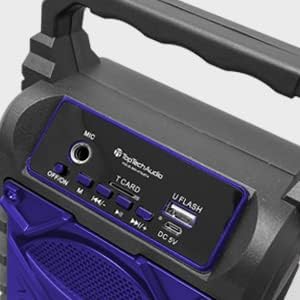
Obraz: Szczegółowy view of the speaker's top control panel, showing various buttons and input ports.
- Wejście mikrofonowe: Connect an external microphone for karaoke.
- Przełącznik WYŁ./WŁ.: Włączanie i wyłączanie głośnika.
- Przycisk M (tryb): Switch between Bluetooth, AUX, USB, and TF Card modes.
- Previous / Volume Down Button: Krótkie naciśnięcie powoduje przejście do poprzedniego utworu, długie naciśnięcie powoduje zmniejszenie głośności.
- Przycisk Odtwórz / Wstrzymaj: Odtwórz lub wstrzymaj odtwarzanie dźwięku.
- Next / Volume Up Button: Krótkie naciśnięcie spowoduje przejście do następnego utworu, długie naciśnięcie zwiększy głośność.
- T CARD Slot: Włóż kartę TF (MicroSD) w celu bezpośredniego odtwarzania dźwięku.
- U FLASH (USB) Port: Podłącz dysk flash USB, aby móc bezpośrednio odtwarzać dźwięk.
- Port DC 5 V: Connect the USB charging cable to power and charge the speaker.
Główne cechy

Image: An infographic showing the TOPTECH Jet-4 speaker with icons representing its key features: easy portability, mic port, mode karaoke, disco light, TF card port, and USB port.
- Potężny dźwięk: Dual-driver stereo output delivers crisp highs and deep bass for a premium audio experience.
- Odtwarzanie w wielu trybach: Supports Bluetooth, AUX, USB, and TF card input for versatile music streaming.
- Gotowe do karaoke: Built-in karaoke mode with light effects and mic support makes any party more fun.
- TWS Pairing Support: Connect two speakers wirelessly for immersive, room-filling sound.
- Długa żywotność baterii: Enjoy up to 6 hours of playtime with a rechargeable battery, perfect for all-day events.
Organizować coś
Opłata początkowa
Before first use, fully charge the speaker. Connect the provided USB charging cable to the DC 5V port on the speaker and the other end to a USB power adapter (not included) or a computer USB port.

Image: A visual representation of a fully charged battery, symbolizing the speaker's long battery life.
The charging indicator light will illuminate during charging and turn off or change color when fully charged. A full charge typically takes a few hours.
Instrukcja obsługi
Parowanie Bluetooth
- Turn on the speaker by sliding the OFF/ON switch to the 'ON' position. The speaker will enter Bluetooth pairing mode automatically, indicated by a flashing LED light and an audible prompt.
- Włącz Bluetooth w swoim smartfonie, tablecie lub innym urządzeniu obsługującym technologię Bluetooth.
- Szukaj available Bluetooth devices and select "JET-4" from the list.
- Po nawiązaniu połączenia głośnik wyda dźwięk potwierdzający połączenie, a dioda LED przestanie migać.
- Teraz możesz odtwarzać dźwięk ze swojego urządzenia przez głośnik.
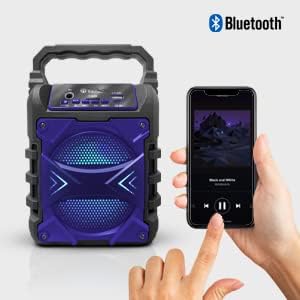
Image: The TOPTECH Jet-4 speaker positioned next to a smartphone, illustrating the seamless Bluetooth connection process.
Playback Modes (AUX, USB, TF Card)
Press the 'M' (Mode) button to cycle through available playback modes:
- Tryb AUX: Podłącz zewnętrzne urządzenie audio za pomocą kabla audio 3.5 mm (brak w zestawie) do wejścia AUX.
- Tryb USB: Insert a USB flash drive into the 'U FLASH' port. The speaker will automatically detect and play compatible audio files.
- Tryb karty TF: Insert a TF (MicroSD) card into the 'T CARD' slot. The speaker will automatically detect and play compatible audio files.
Tryb karaoke
To use the karaoke function, connect a microphone (not included) to the 'MIC' input port. Adjust the microphone volume as needed. The speaker's built-in light effects will enhance the karaoke experience.
TWS Pairing (True Wireless Stereo)
For an enhanced stereo sound experience, you can pair two TOPTECH Jet-4 speakers together:
- Ensure both Jet-4 speakers are powered on and not connected to any Bluetooth device.
- On one speaker (this will be the primary speaker), long press the 'M' (Mode) button until you hear a pairing tone.
- Oba głośniki połączą się ze sobą automatycznie. Po połączeniu usłyszysz dźwięk potwierdzający.
- Now, connect your Bluetooth device to the primary speaker as described in the 'Bluetooth Pairing' section. Audio will play through both speakers in stereo.

Image: Two TOPTECH Jet-4 speakers wirelessly connected to a smartphone, demonstrating the True Wireless Stereo (TWS) pairing feature for expanded sound.
Konserwacja
- Czyść głośnik miękką, suchą ściereczką. Nie używaj środków czyszczących o właściwościach ściernych ani rozpuszczalników.
- Gdy głośnik nie jest używany, przechowuj go w chłodnym i suchym miejscu.
- Avoid prolonged exposure to extreme temperatures or humidity.
Rozwiązywanie problemów
| Problem | Rozwiązanie |
|---|---|
| Głośnik nie włącza się. | Upewnij się, że bateria jest naładowana. Podłącz głośnik do źródła zasilania za pomocą kabla USB. |
| Brak dźwięku z głośnika. | Sprawdź poziom głośności zarówno na głośniku, jak i na podłączonym urządzeniu. Upewnij się, że wybrano prawidłowy tryb odtwarzania. |
| Parowanie Bluetooth nie powiodło się. | Ensure the speaker is in pairing mode. Turn off Bluetooth on your device and turn it back on. Try restarting both the speaker and your device. Make sure no other devices are connected to the speaker. |
| Niska jakość dźwięku. | Move the speaker closer to your Bluetooth device to reduce interference. Ensure the audio source is of good quality. |
Specyfikacje
| Funkcja | Szczegół |
|---|---|
| Marka | TOPTECH |
| Numer modelu | JET-4-BLUE |
| Źródło zasilania | Zasilany bateryjnie |
| Technologia łączności | Bluetooth, USB |
| Wejście audio | Guitar Input, Karaoke Input, USB |
| Liczba kanałów | 2 |
| Tworzywo | Plastik, Metal |
| Waga przedmiotu | 1.54 funta |
| Wymiary opakowania | 9.29 x 6.38 x 4.17 cala |
| UPC | 689259338593 |
Gwarancja i wsparcie
For warranty information and customer support, please refer to the contact details provided on the product packaging or visit the official TOPTECH webZachowaj paragon jako dowód zakupu na wypadek ewentualnych roszczeń gwarancyjnych.