
Electron Microscopy Sciences TP1050
User Manual: Activated Carbon Filter
Model: TP1050
Brand: Electron Microscopy Sciences
Produkt ponadview
This document provides essential information for the proper use and maintenance of the Electron Microscopy Sciences Activated Carbon Filter, Model TP1050. This filter is designed to effectively absorb a wide range of organic and inorganic vapors in laboratory environments.
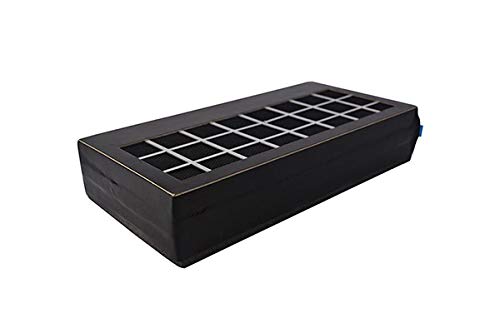
Rysunek 1: The Electron Microscopy Sciences Activated Carbon Filter, Model TP1050. This image shows the rectangular filter unit with a grid-like top surface, indicating the filtration area. The filter is black with white grid lines on top.
Główne cechy
- Contains high-grade activated carbon for efficient vapor absorption.
- Effective against a broad spectrum of organic and inorganic vapors, including xylene, formalin, methanol, toluene, and isopropyl alcohol.
- Designed for use with tissue processors, specifically compatible with the Leica TP1020 for formaldehyde applications.
Konfiguracja i instalacja
The Activated Carbon Filter TP1050 is intended for integration into compatible laboratory equipment. Follow the specific instructions provided by the manufacturer of your tissue processor for proper installation.
- Identify the filter compartment within your tissue processor (e.g., Leica TP1020).
- Ensure the equipment is powered off and disconnected from the main power supply before proceeding.
- Carefully remove the old filter, if present, following the equipment manufacturer's guidelines for safe disposal of hazardous waste.
- Insert the new Electron Microscopy Sciences Activated Carbon Filter TP1050 into the designated compartment, ensuring it is seated correctly and securely.
- Close the filter compartment and secure any latches or covers.
- Reconnect the equipment to power and power it on.
Notatka: Refer to your specific tissue processor's user manual for detailed, model-specific installation procedures.
Instrukcja obsługi
The activated carbon filter operates passively within the tissue processor's ventilation system. No direct user interaction is required for its operation once installed.
- Ensure the tissue processor's ventilation system is functioning correctly as per its operational manual.
- The filter continuously absorbs vapors during the equipment's operation.
Konserwacja
Regular replacement of the activated carbon filter is crucial for maintaining effective vapor absorption and ensuring a safe laboratory environment.
- Częstotliwość wymiany: The Activated Carbon Filter TP1050 should be replaced every 3 miesięcy w normalnych warunkach pracy.
- Signs of Saturation: If a noticeable odor of chemicals becomes present in the laboratory despite the filter's presence, it indicates that the filter may be saturated and requires immediate replacement, regardless of the 3-month interval.
- Sprzedaż: Dispose of used filters according to local regulations for hazardous waste, as they will contain absorbed chemical vapors.
Rozwiązywanie problemów
| Problem | Możliwa przyczyna | Rozwiązanie |
|---|---|---|
| Chemical odors present in the lab. | Filter is saturated or improperly installed. | Replace the filter. Ensure proper installation as per the "Setup and Installation" section. Check the tissue processor's ventilation system. |
| Filter does not fit into equipment. | Incorrect filter model or incompatible equipment. | Verify that the filter model (TP1050) is compatible with your specific tissue processor (e.g., Leica TP1020). Contact your supplier if unsure. |
Specyfikacje
| Atrybut | Szczegół |
|---|---|
| Nazwa produktu | Filtr z węglem aktywnym |
| Numer modelu | TP1050 |
| Producent | Electron Microscopy Sciences (EMS) |
| Numer części producenta | 62654-03 |
| Zgodność | Tissue Processor TP1020 (for formaldehyde) |
| Zalecana wymiana | Co 3 miesiące |
| Funkcja podstawowa | Absorption of organic and inorganic vapors (e.g., xylene, formalin, methanol, toluene, isopropyl alcohol) |
Gwarancja i wsparcie
For specific warranty information and technical support regarding the Activated Carbon Filter TP1050, please contact Electron Microscopy Sciences (EMS) directly or your authorized distributor.
Manufacturer: EMS
Zapoznaj się z oficjalną instrukcją producenta webAktualne dane kontaktowe i warunki gwarancji można znaleźć na stronie internetowej lub opakowaniu produktu.
Ask a question about this manual
Ask about setup, troubleshooting, compatibility, parts, safety, or missing instructions. Manuals+ will review the question and use this page’s manual context to help answer it.