
Andoer HDV-201LM
Andoer HDV-201LM 1080p Digital Video Camera User Manual
Model: HDV-201LM
1. Wprowadzenie
This manual provides detailed instructions for the safe and effective use of your Andoer HDV-201LM Digital Video Camera. Please read this manual thoroughly before operating the device and retain it for future reference.
The Andoer HDV-201LM is a 1080p Full HD digital video camera featuring a 5-megapixel CMOS sensor, capable of capturing video at 1920x1080p at 30 frames per second and still images up to 24 megapixels (interpolated). It includes a 16X digital zoom, a 3.0-inch TFT-LCD screen with 270-degree rotation, and supports external accessories via a hot shoe mount.
2. Zawartość opakowania
Sprawdź, czy wszystkie wymienione poniżej elementy znajdują się w Twojej paczce. Jeśli brakuje któregokolwiek z nich lub jest on uszkodzony, skontaktuj się ze sprzedawcą.
- 1 x Andoer HDV-201LM Digital Video Camera
- 1 x torba na aparat
- 2 x Rechargeable 3.7V 800mAh Batteries (one pre-installed)
- 1 x kabel USB
- Kabel 1 x AV
- 1 x Pilot zdalnego sterowania
- 1 x Camera User Manual (English)
- 1 x 0.39X Wide-Angle Lens
- 1 x Mikrofon zewnętrzny
- 1 x Microphone Connection Cable
- 1 x Microphone User Manual (Chinese)
Note: A memory card is not included. A Class 10 or higher SD card (up to 32GB) is strongly recommended for optimal performance.
3. Identyfikacja części
Familiarize yourself with the various components of your digital video camera.

Rycina 3.1: Przód view of the Andoer HDV-201LM camera with attached wide-angle lens and external microphone.

Rysunek 3.2: Szczegółowy views highlighting the hot shoe mount, control buttons, battery compartment, and 1/4-inch tripod thread.
- Obiektyw: Główny element optyczny do robienia zdjęć i nagrywania filmów.
- Ekran LCD: 3.0-inch TFT-LCD display for viewing and menu navigation. Rotates 270 degrees.
- Przycisk zasilania: Włącza lub wyłącza kamerę.
- Record/Stop Button: Rozpoczyna lub zatrzymuje nagrywanie wideo.
- Przycisk zdjęć: Rejestruje nieruchome obrazy.
- Dźwignia zoomu (W/T): Reguluje zoom cyfrowy (szeroki kąt/teleobiektyw).
- Przycisk menu: Dostęp do ustawień aparatu.
- Przyciski nawigacyjne: Służy do nawigacji po menu i dokonywania wyborów.
- Mocowanie stopki gorącej: Do mocowania zewnętrznych akcesoriów, np. mikrofonów lub oświetlenia LED.
- Gwint statywu: 1/4-inch thread for mounting the camera on a tripod.
- Komora baterii: Mieści akumulator.
- Gniazdo karty SD: Do wkładania karty pamięci.
- Port USB: Do podłączenia do komputera i ładowania.
- Wyjście AV: Do podłączenia do telewizora.
- Światło wypełniające LED: Zapewnia dodatkowe oświetlenie w warunkach słabego oświetlenia.
4. Konfiguracja
4.1. Ładowanie akumulatora
- Otwórz pokrywę komory baterii.
- Insert the provided 3.7V 800mAh battery, ensuring correct polarity. If an insulator tab is present, remove it before insertion.
- Zamknij pokrywę komory baterii.
- Connect the camera to a power source using the USB cable. The charging indicator will illuminate.
- Po pełnym naładowaniu kontrolka zmieni kolor lub zgaśnie.
4.2. Wkładanie karty pamięci
- Sprawdź, czy kamera jest wyłączona.
- Znajdź gniazdo karty SD.
- Insert a Class 10 or higher SD card (up to 32GB) into the slot until it clicks into place.
- Aby wyjąć kartę, delikatnie naciśnij ją, aż wyskoczy.
4.3. Attaching the Wide-Angle Lens
- Remove the protective cap from the camera lens.
- Carefully screw the 0.39X wide-angle lens onto the camera's main lens thread until secure.

Figure 4.1: The camera with the 0.39X super wide-angle lens attached, demonstrating its expanded field of view.
4.4. Podłączanie mikrofonu zewnętrznego
- Slide the external microphone into the hot shoe mount on top of the camera.
- Connect the microphone cable to the camera's external microphone input port.
5. Obsługa aparatu
5.1. Włączanie/wyłączanie zasilania
- To power on, open the LCD screen or press the Moc przycisk.
- To power off, close the LCD screen or press and hold the Moc przycisk.
5.2. Nagrywanie filmów
- Ensure the camera is in video mode (indicated on the LCD screen). If not, press the Tryb przycisk, aby przełączyć.
- Naciśnij Nagrywaj/Zatrzymaj button to start recording. A red indicator will typically flash.
- Naciśnij Nagrywaj/Zatrzymaj ponownie, aby zatrzymać nagrywanie.
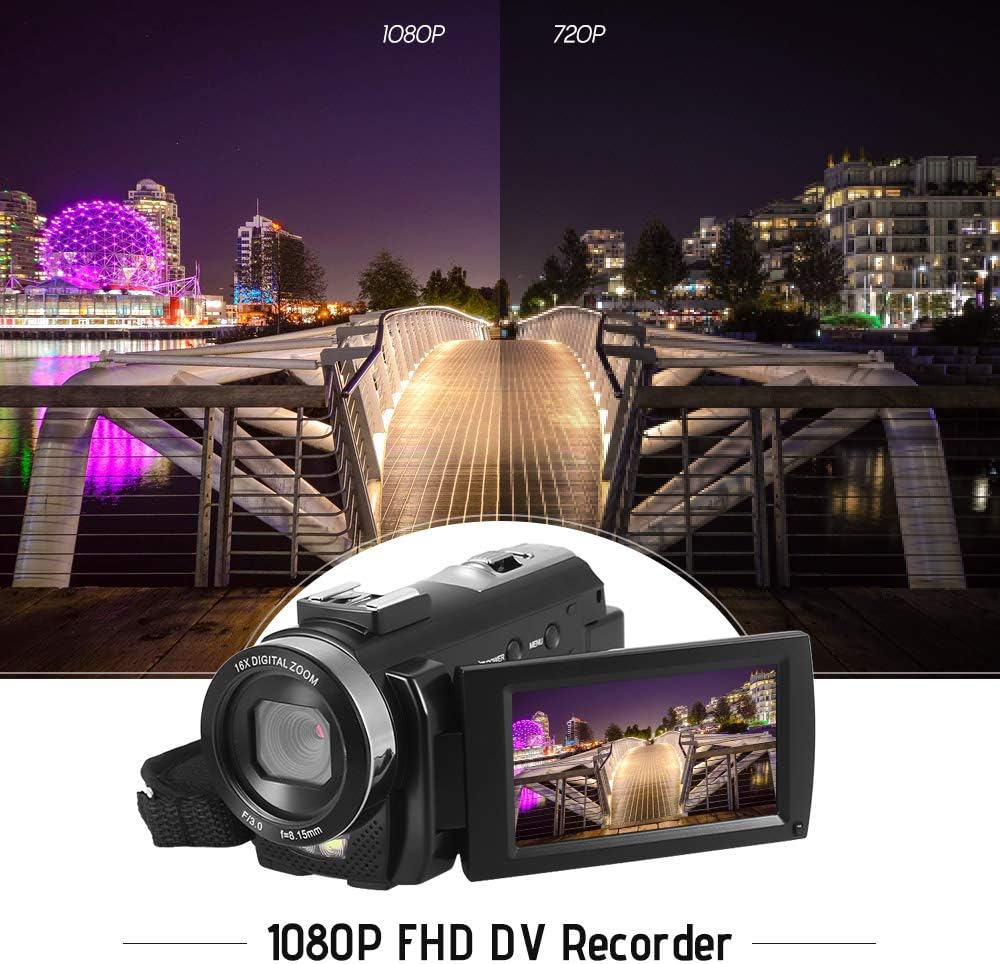
Figure 5.1: The camera is capable of recording in 1080p Full HD and 720p HD resolutions.
5.3. Robienie zdjęć
- Ensure the camera is in photo mode. If not, press the Tryb przycisk, aby przełączyć.
- Skadruj ujęcie korzystając z ekranu LCD.
- Naciśnij Zdjęcie button to capture an image.
5.4. Korzystanie z zoomu cyfrowego
- Użyj W (szeroki) I T (teleobiektyw) lever to adjust the 16X digital zoom.

Figure 5.2: The camera's 16X digital zoom allows for closer views of subjects.
5.5. Ustawienia menu
- Naciśnij Menu przycisk umożliwiający dostęp do ustawień.
- Use the navigation buttons to scroll through options such as:
- Balans bieli: Auto, Daylight, Cloudy, Fluorescent, Tungsten.
- Tryb sceny: Auto, Night, Portrait, Landscape, Backlight, Sport, Party, Beach, High Sensitivity.
- Tryb fotografowania: Single, Continuous.
- Narażenie: Adjust ±3.0EV.
- Samowyzwalacz: Off, 2s, 5s, 10s.
- Automatyczne wyłączanie: Off, 1min, 3min, 5min.
- Język: English, German, French, Spanish, Italian, Turkish, Russian, Portuguese, Dutch, Simplified Chinese, Traditional Chinese, Japanese, Polish.
- Inne funkcje: Face Detection, Smile Capture, Beauty Face, Anti-Shake.
- Naciśnij OK or Nagrywaj/Zatrzymaj przycisk, aby potwierdzić wybór.
- Naciśnij Menu ponownie, aby wyjść.
5.6. Podłączanie do telewizora
- Use the provided AV cable to connect the camera's AV output to your television's AV input.
- Select the correct AV input channel on your TV to view camera content.
6. Konserwacja
6.1. Czyszczenie aparatu
- Do czyszczenia korpusu aparatu należy używać miękkiej, suchej ściereczki.
- Do czyszczenia obiektywu i ekranu LCD należy używać specjalnej ściereczki i płynu do czyszczenia obiektywów. Unikać silnych środków chemicznych.
6.2. Przechowywanie
- Przechowuj kamerę w chłodnym, suchym miejscu, z dala od bezpośredniego światła słonecznego i ekstremalnych temperatur.
- Wyjmij baterię, jeśli aparat nie będzie używany przez dłuższy czas.
7. Rozwiązywanie Problemów
| Problem | Możliwa przyczyna | Rozwiązanie |
|---|---|---|
| Kamera się nie włącza. | Bateria jest rozładowana lub nieprawidłowo włożona. | Charge the battery fully. Ensure the battery is inserted with correct polarity and the insulator tab is removed. |
| Nie można nagrywać filmów ani robić zdjęć. | Karta pamięci jest pełna, nie została włożona lub jest uszkodzona. | Włóż kartę pamięci. Usuń niepotrzebne files lub sformatuj kartę (spowoduje to usunięcie wszystkich danych). Wymień kartę, jeśli jest uszkodzona. |
| Słaba jakość obrazu/wideo. | Niewystarczające oświetlenie, brudny obiektyw lub nieprawidłowe ustawienia. | Ensure adequate lighting. Use the LED fill light if necessary. Clean the lens. Adjust white balance and scene mode settings. |
| Kamera zawiesza się lub przestaje reagować. | Błąd oprogramowania lub niski poziom naładowania baterii. | Remove and reinsert the battery to reset the camera. Ensure the battery is charged. |
8. Specyfikacje
| Funkcja | Specyfikacja |
|---|---|
| Marka | Andoer |
| Model | HDV-201LM |
| Czujnik obrazu | Matryca CMOS o rozdzielczości 5 megapiksela |
| Rozdzielczość wideo | 1920x1080P (FHD 30fps), 1280x720 (HD 30fps), 640x480 (VGA 30fps), 320x240 (VGA 30fps) |
| Format wideo | Plik AVI |
| Rozdzielczość obrazu | 24MP (Interpolated), 20MP (Interpolated), 16MP (Interpolated), 12MP (Interpolated), 10MP (Interpolated), 7M Wide (Interpolated), 5MP, 3MP, 2M Wide, VGA |
| Format obrazu | Plik JPG |
| Zoom cyfrowy | 16X |
| Obiektyw | ff (F/3.0 f=8.15mm) |
| Przysłona maksymalna | 8.15 stopni Fahrenheita |
| Ekran LCD | 3.0-inch TFT-LCD (16:9), 270-degree rotation |
| Składowanie | SD Card (up to 32GB, Class 10 recommended) |
| Łączność | USB 2.0, AV Output (NTSC/PAL) |
| Zasilacz | 1 x akumulator 3.7 V 800 mAh |
| Bateria do pilota zdalnego sterowania | 1 x 3V CR2025 Battery |
| Wsparcie systemu operacyjnego | Windows XP/Vista/7/8/10 |
| Cechy specjalne | Anti-shake, Face Detection, Smile Capture, Beauty Face, Self-Timer, LED Fill Light, Hot Shoe Mount |
| Wymiary | 13.5 x 5.5 x 6.5 cm (5.3 x 2.2 x 2.6 cala) |
| Waga | 273g (9.6oz) with battery |
| Kolor | Czarny |
9. Gwarancja i wsparcie
Aby uzyskać informacje o gwarancji i pomocy technicznej, zapoznaj się z dokumentacją dołączoną do zakupu lub skontaktuj się ze sprzedawcą. Zachowaj dowód zakupu na wypadek roszczeń gwarancyjnych.
Ask a question about this manual
Ask about setup, troubleshooting, compatibility, parts, safety, or missing instructions. Manuals+ will review the question and use this page’s manual context to help answer it.