
1. Wprowadzenie
This manual provides detailed instructions for the installation, operation, and maintenance of your BINIZE Android 13 Car Stereo. This 9-inch touchscreen head unit is designed for Toyota Camry models from 2006 to 2011, offering advanced features such as Wireless CarPlay, Android Auto, GPS navigation, WiFi connectivity, and support for a backup camera.
Przed użyciem produktu należy dokładnie przeczytać instrukcję, aby zagwarantować jego prawidłowe działanie i bezpieczeństwo.
2. Konfiguracja i instalacja
Prawidłowa instalacja jest kluczowa dla optymalnej wydajności. W razie wątpliwości co do któregokolwiek kroku, zalecamy skorzystanie z pomocy fachowca.
2.1 Zawartość opakowania
Sprawdź, czy w opakowaniu znajdują się wszystkie komponenty:
- BINIZE Android 13 Car Stereo Head Unit (9-inch)
- Kabel zasilający
- Kable wejściowe/wyjściowe RCA
- 2 kable USB
- Antena GPS
- Instrukcja obsługi (ten dokument)
- Kabel wejściowy kamery
- Kamera cofania

Figure 2.1: Included components of the BINIZE Android 13 Car Stereo.
2.2 Zgodność pojazdu
This head unit is specifically designed for Toyota Camry models manufactured between 2006 and 2011.

Figure 2.2: BINIZE Car Stereo installed in a compatible Toyota Camry dashboard.

Figure 2.3: Before and after installation view of the BINIZE Car Stereo in a Toyota Camry.
2.3 Okablowanie i połączenia
Connect the power harness, RCA cables, USB cables, GPS antenna, and backup camera input as per the wiring diagram provided with your unit. Ensure all connections are secure to prevent malfunctions.
Notatka: If the provided wiring harness is incompatible with your vehicle, contact customer service for an appropriate replacement.
2.4 Pierwsze włączenie zasilania
After installation, turn on your vehicle's ignition. The head unit should power on automatically. Follow any on-screen prompts for initial setup.
3. Instrukcja obsługi
3.1 Ekran główny i nawigacja
The home screen provides access to all main functions and applications. Swipe left or right to navigate through app pages. Tap on an icon to launch the corresponding application.

Figure 3.1: Main interface of the BINIZE Android 13 Car Stereo.
3.2 Bezprzewodowy CarPlay i Android Auto
The unit supports both Wireless CarPlay and Wireless Android Auto for seamless smartphone integration. Connect your phone via Bluetooth and Wi-Fi to access navigation, music, calls, and messaging apps directly on the car stereo.

Rysunek 3.2: Funkcjonalność bezprzewodowego CarPlay i Android Auto.
3.3 Funkcja łącza lustrzanego
For apps not supported by CarPlay or Android Auto, use the Mirror Link function to display your smartphone screen (both iOS and Android) on the car stereo. This allows for viewfilmów wideo i innych treści.

Figure 3.3: Mirror Link feature in action.
Video 3.1: Demonstration of the Binize car stereo's features, including screen mirroring.
3.4 Nawigacja GPS
The unit features a built-in GPS receiver and antenna. You can use pre-installed navigation apps or download others from the Play Store. Both online and offline maps are supported.

Rysunek 3.4: Interfejs nawigacji GPS.
3.5 Radio FM
Access FM radio stations with a tuning range of 87.5-108 MHz. Save your favorite stations for quick access.
Rysunek 3.5: Interfejs radia FM.
3.6 Odtwarzanie muzyki i wideo
Enjoy lossless music playback and high-definition video. The unit supports various audio and video formats. You can download media apps from the Play Store.
Figure 3.6: Music and Video playback interfaces.
3.7 Cyfrowy procesor sygnałowy (DSP) i korektor
Customize your audio experience with the built-in DSP. Adjust multi-band EQ settings, equal loudness, and sound field to achieve true stereo surround sound through the 6-speaker output.

Figure 3.7: DSP and Equalizer settings.
Wideo 3.2: Ponadview of the Binize 10 Inch Double Din Touchscreen Android Car Stereo features.
3.8 Funkcjonalność kamery cofania
The unit supports AHD HD reversing cameras. When the vehicle is in reverse, the screen automatically displays the camera feed with reversing guidelines for safer parking.
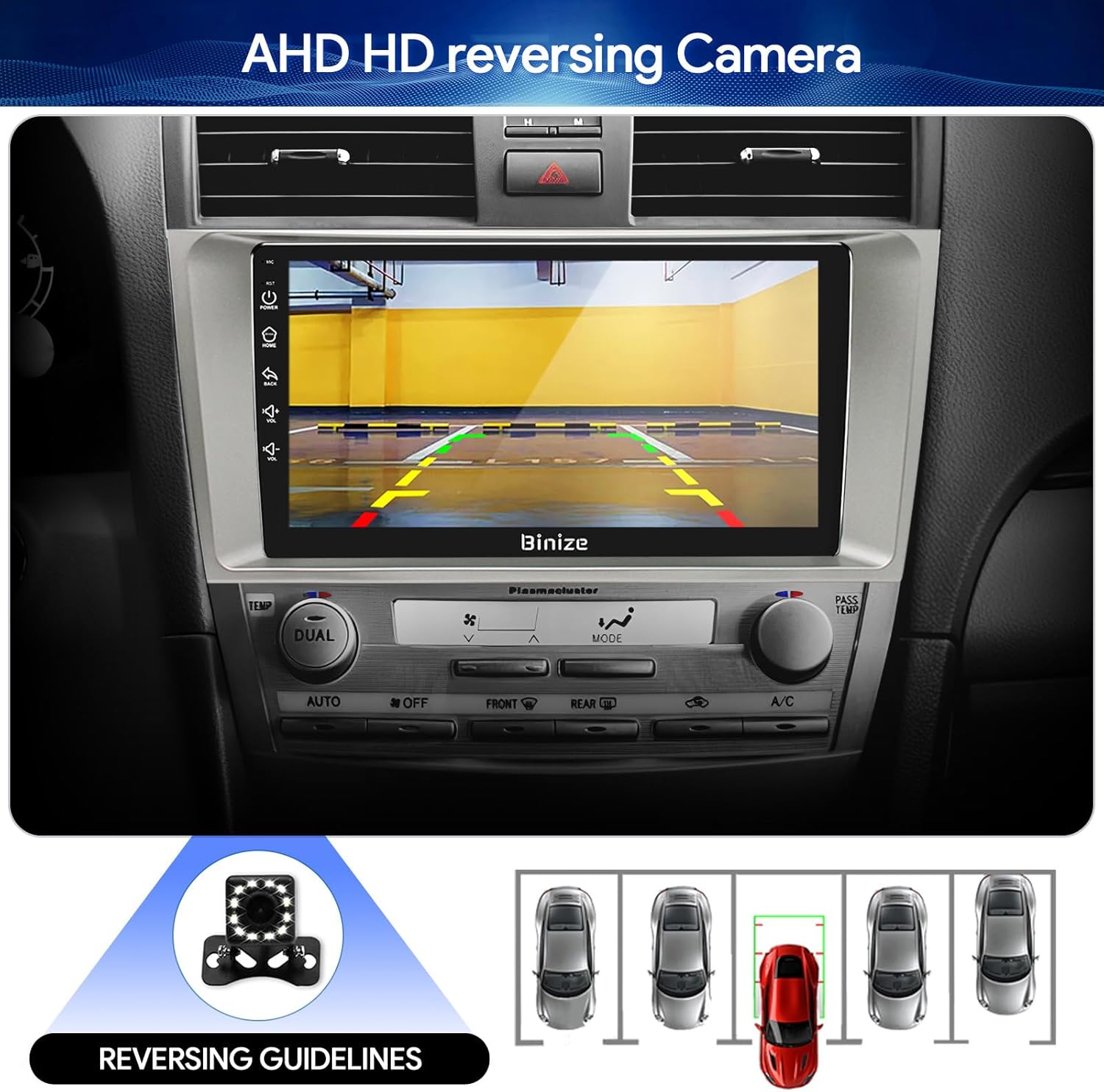
Figure 3.8: Backup camera display with reversing guidelines.
3.9 Bluetooth 5.0 for Hands-Free Calling
Connect your phone via Bluetooth 5.0 for faster network transmission and hands-free calling. Dial, answer, or receive calls directly from the head unit.
Rysunek 3.9: Interfejs głośnomówiący Bluetooth.
4. Konserwacja
4.1 Czyszczenie ekranu
Delikatnie przetrzyj ekran dotykowy miękką, niepozostawiającą włókien ściereczką. Unikaj środków czyszczących o działaniu ściernym i silnych środków chemicznych, które mogłyby uszkodzić wyświetlacz.
4.2 Aktualizacje oprogramowania
Periodically check for software updates to ensure optimal performance and access to new features. Updates can typically be performed via Wi-Fi or USB.
5. Rozwiązywanie Problemów
- Brak zasilania: Sprawdź wszystkie połączenia zasilania i skrzynkę bezpieczników pojazdu. Upewnij się, że zapłon jest włączony.
- Brak dźwięku: Verify speaker connections, volume levels, and EQ settings. Check if the unit is muted.
- Problemy z sygnałem GPS: Upewnij się, że antena GPS jest prawidłowo zainstalowana i ma zapewnioną przejrzystość. view nieba.
- Problemy z połączeniem Bluetooth: Upewnij się, że Bluetooth jest włączony zarówno w urządzeniu głównym, jak i w telefonie. Spróbuj rozparować i ponownie sparować urządzenia.
- Sterowanie na kierownicy nie działa: Refer to the "SW Learning" or "Steering Wheel Setting" in the unit's settings menu to configure the controls.
- Screen Lag/Unresponsiveness: Restart the unit. If issues persist, consider a factory reset (note: this will erase personal data).
- Wiring Harness Incompatibility: If the provided wiring harness does not fit your vehicle, contact BINIZE customer service for assistance.
6. Specyfikacje
| Funkcja | Specyfikacja |
|---|---|
| Waga przedmiotu | 2.84 funta |
| Wymiary opakowania | 11.2 x 7.2 x 3.7 cala |
| Rozmiar wyświetlacza | 10.1 cali |
| Polecenie głosowe | Przyciski, mikrofon, ekran dotykowy |
| Marka | BINIZE |
| Typ serwisu pojazdu | Samochód |
| Funkcja specjalna | Bluetooth, ekran dotykowy |
| Technologia łączności | Bluetooth, USB, Wi-Fi |
| Typ mapy | Online i offline |
| Tryb wyjścia audio | Głośnik, stereo |
| Typ montażu | Montaż na desce rozdzielczej |
| Rezolucja | 1024x600 |
| System operacyjny | Android |
7. Gwarancja i wsparcie
BINIZE offers top-notch customer service. If you encounter any problems before or after sale, please contact the BINIZE customer service team via Amazon email. They are committed to assisting you with any issues and can provide support for online updates and warranty information.
For further assistance, please refer to the contact information provided with your purchase or visit the official BINIZE store on Amazon.