
1. Wprowadzenie
Thank you for choosing the Amcrest 1080P WiFi Pan/Tilt Indoor Security Camera (Model: ASH21-W). This manual provides essential information for setting up, operating, and maintaining your device. This camera offers advanced features such as 1080P Full-HD video, pan/tilt functionality, human and pet detection, motion tracking, two-way audio, and various storage options to ensure comprehensive monitoring of your indoor spaces.
2. Co znajduje się w pudełku
- Amcrest ASH21-W 1080P WiFi Pan/Tilt Camera
- Zasilacz
- Kabel zasilający USB
- Płyta montażowa
- Śruby montażowe i kotwy
- Szybki przewodnik
Notatka: A MicroSD card (up to 256GB) for local storage is not included and must be purchased separately.
3. Konfiguracja
3.1 Włączanie
- Podłącz kabel zasilający USB do portu zasilania aparatu.
- Podłącz zasilacz do standardowego gniazdka elektrycznego.
- The camera will power on, and the indicator light will begin to flash.
3.2 Pobieranie aplikacji i rejestracja konta
- Pobierz Amcrest SmartHome aplikację ze sklepu App Store (iOS) lub Google Play Store (Android).
- Otwórz aplikację i zarejestruj nowe konto lub zaloguj się, jeśli już je posiadasz.
3.3 Parowanie urządzeń
- In the Amcrest SmartHome app, tap the "Add Device" icon (usually a '+' symbol).
- Select your camera model or choose to scan the QR code.
- Zeskanuj kod QR znajdujący się na spodzie aparatu.
- Follow the on-screen prompts to connect the camera to your 2.4GHz Wi-Fi network and set a device password.
- Name your device (e.g., "Living Room Camera", "Baby's Room").
3.4 Opcje montażu
The camera can be placed on a tabletop or mounted on a wall or ceiling. Use the provided mounting plate, screws, and anchors for secure installation if mounting is desired.

Obraz 1: Amcrest ASH21-W camera on a table, showcasinze względu na kompaktową konstrukcję.
4. Instrukcja obsługi
4.1 Na żywo View & Sterowanie panoramowaniem/pochyleniem
Once connected, access the live video feed through the Amcrest SmartHome app. Use the on-screen controls to remotely pan (355°) and tilt (80°) the camera lens to view różnych obszarów Twojego pokoju.

Obraz 2: Amcrest ASH21-W camera demonstrating pan and tilt motion with blue arrows, indicating its auto-tracking capability.
4.2 Dźwięk dwukierunkowy
The camera features a built-in microphone and speaker, enabling two-way communication. Tap the "Talk" button in the app to speak through the camera, and tap "Listen" to hear audio from the camera's location.

Obraz 3: A person using a smartphone to engage in two-way talk through the Amcrest camera, showing the live feed on the phone screen.
4.3 Baby Monitor Mode
Activate Baby Monitor Mode in the app to receive notifications based on adjustable sound thresholds (VOX alarm). This feature is ideal for monitoring infants or pets, alerting you to sounds like crying or barking without requiring constant visual monitoring.
Obraz 4: Amcrest ASH21-W camera with a smartphone displaying the baby monitor interface, showing a baby in a crib and audio level graphs.
4.4 Motion Detection & Smart Tracking
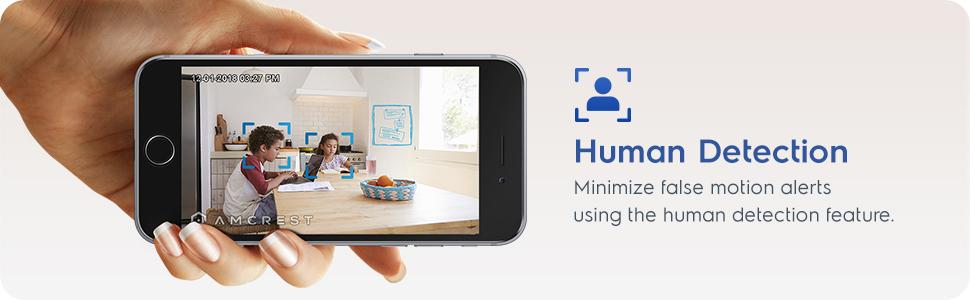
Enable motion detection to receive alerts and record footage when movement is detected. Utilize the human detection filter to reduce false alarms. With Smart Tracking enabled, the camera will automatically pan and tilt to follow detected human movement across the room.

Obraz 5: Amcrest ASH21-W camera on a table, with a smartphone showing a human detection alert and a 93-degree viewing angle graphic.
4.5 Widzenie nocne
The camera provides clear night vision up to 33 feet in absolute darkness, ensuring continuous monitoring even in low-light conditions.
4.6 Nagrywanie i przechowywanie
Nagrania można przechowywać na kilka sposobów:
- Karta MicroSD: Insert a MicroSD card (up to 256GB, not included) into the camera's slot for local storage.
- Chmura Amcrest: Utilize optional cloud storage services for remote access to recordings.
- Oprogramowanie innych firm: Compatible with Amcrest NVRs and third-party surveillance software like Blue Iris, Synology, QNAP NAS, Zoneminder, and RTSP.

Obraz 6: Amcrest ASH21-W camera highlighting the MicroSD card slot and showing icons for Amcrest Smart Home Cloud and MicroSD Card storage options.
4.7 Alerts & Notifications
Receive instant notifications on your smartphone when motion or human detection events occur. Review event playback directly from the app.
Wideo 1: Official Amcrest video demonstrating the Smart Home WiFi Pan/Tilt Baby Monitor Camera's features, including setup, app interface, baby monitor mode, human detection, smart tracking, night vision, and storage options.
5. Konserwacja
- Czyszczenie: Do czyszczenia obiektywu i korpusu aparatu używaj miękkiej, suchej ściereczki. Unikaj stosowania silnych środków chemicznych i materiałów ściernych.
- Aktualizacje oprogramowania układowego: Regularly check the Amcrest SmartHome app for firmware updates to ensure optimal performance and security.
- Umieszczenie: Ensure the camera is placed in a location with good Wi-Fi signal strength and away from direct heat sources or extreme temperatures.
6. Rozwiązywanie Problemów
- Problemy z łącznością: Ensure your Wi-Fi network is 2.4GHz. Check your router's signal strength and try restarting both the camera and your router.
- Nie na żywo View: Verify the camera is powered on and connected to Wi-Fi. Check the app for any error messages.
- Fałszywe alarmy: Adjust motion detection sensitivity settings in the app. Utilize human detection filters to minimize alerts from non-human movement.
- Słaba jakość obrazu: Upewnij się, że obiektyw aparatu jest czysty. Sprawdź prędkość swojego połączenia internetowego.
- Problemy z dwukierunkową transmisją dźwięku: Check volume settings on your phone and in the app. Ensure there is no obstruction to the camera's microphone or speaker.
7. Specyfikacje
| Funkcja | Szczegół |
|---|---|
| Rozdzielczość przechwytywania wideo | 1080p |
| Zakres obrotu/pochylenia | Pan 355 °, pochylenie 80 ° |
| Viewing kąt | 93 stopni |
| Zakres noktowizora | Do 33 stóp |
| Opcje przechowywania | MicroSD (up to 256GB), Amcrest Cloud, NVR/3rd Party Software |
| Łączność | Wi-Fi (2.4 GHz) |
| Dwukierunkowy dźwięk | Tak (wbudowany mikrofon i głośnik) |
| Wykrywanie ruchu | Yes (Human & Pet Detection, Motion-Tracking) |
| Kompatybilne urządzenia | Amazon Alexa |
| Źródło zasilania | Przewodowy elektryczny (5 V DC, 5 W) |
| Wymiary (dł. x szer. x wys.) | 4.17 x 3.04 x 3.04 cala |
| Waga przedmiotu | 0.53 funta (8.4 uncji) |
| Tworzywo | Plastikowy |
| Zastosowanie wewnątrz/na zewnątrz | Wnętrz |
8. Gwarancja i wsparcie
The Amcrest ASH21-W camera comes with a full 1-year US Warranty. For any technical assistance or support, please contact Amcrest directly. Lifetime technical support is provided by Amcrest, a United States-based company headquartered in Houston, TX.
For further assistance, please refer to the Amcrest SmartHome app's support section or visit the official Amcrest webstrona.