
1. Wprowadzenie
Thank you for choosing the Tolsen TL35074 Laser Distance Meter. This device is designed for precise and efficient distance measurement, offering various functions including single measurement, continuous measurement, area, volume, Pythagorean calculation, and angle measurement. Please read this manual carefully before using the device to ensure safe and optimal operation.
2. Informacje dotyczące bezpieczeństwa
This device emits a Class 2 laser. Adherence to safety guidelines is crucial to prevent injury.
- Nie patrz bezpośrednio w wiązkę lasera. Direct eye exposure can cause permanent eye damage.
- Unikaj kierowania wiązki laserowej w stronę ludzi i zwierząt.
- Do not disassemble or modify the device. Unauthorized modifications can lead to hazardous laser radiation exposure.
- Przechowywać urządzenie w miejscu niedostępnym dla dzieci.
- Używaj urządzenia wyłącznie zgodnie z jego przeznaczeniem opisanym w niniejszej instrukcji.
- Nie należy używać urządzenia w otoczeniu zagrożonym wybuchem ani w pobliżu materiałów łatwopalnych.
3. Koniec produktuview
The Tolsen TL35074 is a compact and durable laser distance meter. It features an easy-to-read display and intuitive controls. The device is rated IP40 for resistance against dust and splashes, making it suitable for various indoor and light outdoor applications.
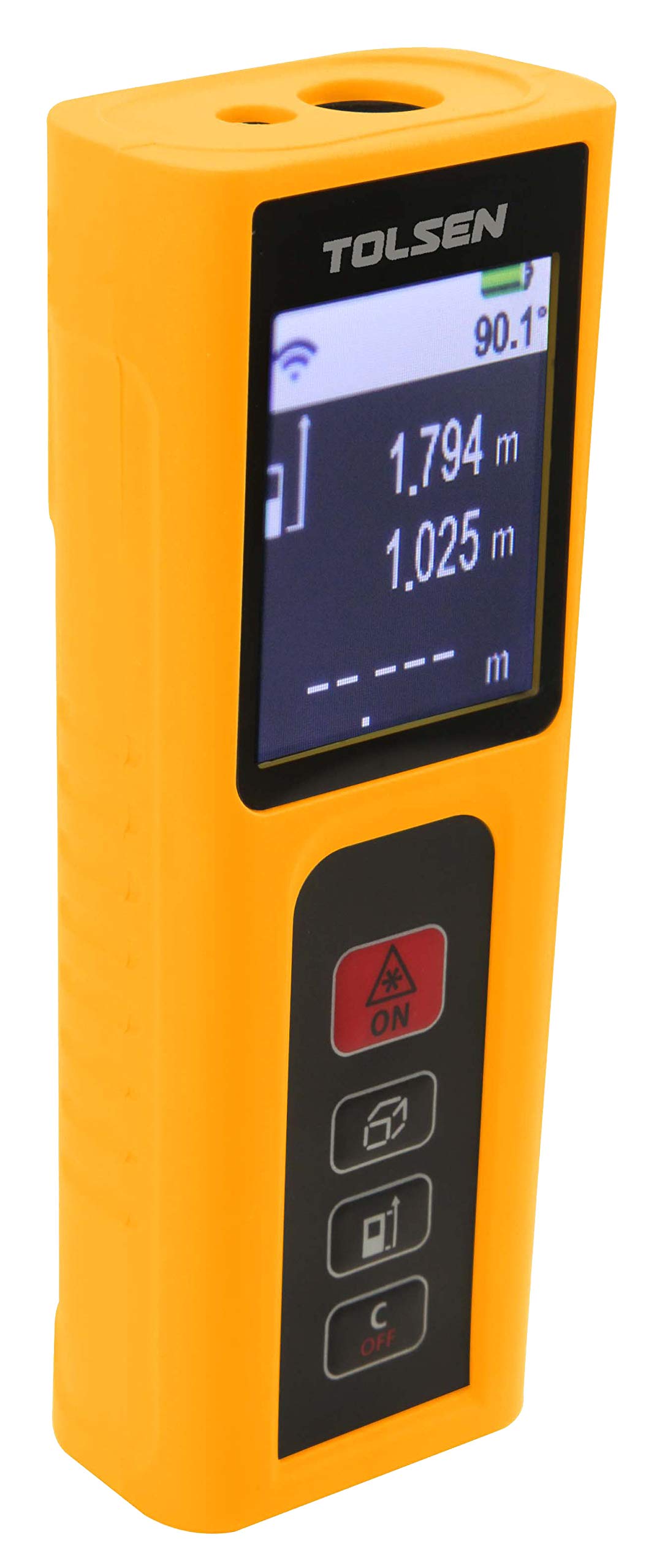
Rycina 1: Przód view of the Tolsen TL35074 Laser Distance Meter, showing the display, control buttons, and laser aperture.
3.1 Składniki
- Nadajnik/odbiornik laserowy: Located at the top of the device, responsible for sending and receiving laser signals.
- Wyświetlacz LCD: Shows measurement results, mode indicators, battery status, and other relevant information.
- Przyciski sterujące: For power on/off, measurement activation, mode selection, and unit conversion.
- Komora baterii: Located at the rear, for AAA batteries.
4. Konfiguracja
4.1 Instalacja baterii
- Znajdź pokrywę komory baterii z tyłu urządzenia.
- Otwórz pokrywę.
- Insert two (2) AAA alkaline batteries, ensuring correct polarity (+/-). The device includes batteries.
- Dokładnie zamknij pokrywę komory baterii.
5. Instrukcja obsługi
5.1 Włączanie/wyłączanie zasilania
- Włączanie: Naciśnij [MEAS] przycisk. Laser zostanie aktywowany.
- Aby wyłączyć: Naciśnij i przytrzymaj [OFF] Naciśnij przycisk przez kilka sekund. Urządzenie wyłączy się automatycznie po pewnym okresie bezczynności, aby oszczędzać baterię.
5.2 Tryby pomiaru
Naciśnij [FUNKCJA] button to cycle through the different measurement modes.
5.2.1 Pojedynczy pomiar
- Skieruj urządzenie na cel.
- Naciśnij [MEAS] Naciśnij przycisk raz, aby aktywować laser.
- Naciśnij [MEAS] button again to take a single measurement. The result will appear on the display.
5.2.2 Pomiar ciągły (śledzenie)
- Select continuous measurement mode using the [FUNKCJA] przycisk.
- Naciśnij [MEAS] button. The device will continuously measure and display the distance as you move it.
- Naciskać [MEAS] ponownie, aby zatrzymać pomiar ciągły.
5.2.3 Pomiar powierzchni
- Select area measurement mode.
- Zmierz pierwszy bok (np. długość) naciskając [MEAS].
- Zmierz drugą stronę (np. szerokość) naciskając [MEAS] Ponownie.
- Urządzenie automatycznie obliczy i wyświetli powierzchnię.
5.2.4 Pomiar objętości
- Select volume measurement mode.
- Zmierz długość, szerokość i wysokość sekwencyjnie, naciskając [MEAS] po każdym pomiarze.
- Urządzenie obliczy i wyświetli objętość.
5.2.5 Pythagorean Calculation (Indirect Measurement)
Tryb ten umożliwia pośredni pomiar wysokości lub odległości przy użyciu twierdzenia Pitagorasa.
- Select Pythagorean mode (e.g., for two-point or three-point measurement).
- Postępuj zgodnie z instrukcjami wyświetlanymi na ekranie, aby zmierzyć wymagane boki (np. przeciwprostokątną i jedną z przyprostokątnych, aby określić wysokość).
- Urządzenie obliczy i wyświetli nieznaną stronę.
5.2.6 Pomiar kąta
This mode allows for the measurement of angles, often in conjunction with indirect height measurements.
- Select angle measurement mode.
- Follow the on-screen instructions to position the device and take the necessary measurements.
- The angle will be displayed.
6. Konserwacja
- Czyszczenie: Użyj miękkiego, damp cloth to clean the device. Do not use abrasive cleaners or solvents. Pay special attention to keeping the laser lens clean.
- Składowanie: Przechowuj urządzenie w suchym i chłodnym miejscu, z dala od bezpośredniego światła słonecznego i ekstremalnych temperatur. W przypadku dłuższego przechowywania wyjmij baterie, aby zapobiec wyciekowi.
- Wymiana baterii: Wymień baterie, gdy na wyświetlaczu pojawi się wskaźnik niskiego poziomu naładowania baterii.
7. Rozwiązywanie Problemów
| Problem | Możliwa przyczyna | Rozwiązanie |
|---|---|---|
| Urządzenie nie włącza się | Niski poziom naładowania baterii lub rozładowane baterie; nieprawidłowa polaryzacja baterii | Wymień baterie; sprawdź orientację baterii |
| Niedokładne pomiary | Dirty laser lens; unstable measurement surface; extreme environmental conditions | Clean lens; ensure stable measurement; avoid extreme conditions |
| Laser niewidoczny | Bright ambient light; laser not activated | Measure in dimmer conditions; press [MEAS] to activate laser |
| Komunikat o błędzie na wyświetlaczu | Measurement out of range; internal error | Ensure target is within 0.2m-60m range; restart device. If error persists, contact support. |
8. Specyfikacje
- Marka: Tolsena
- Model: TL35074
- Zakres pomiarowy: 0.2 m - 60 m
- Dokładność pomiaru: ±2.0 mm
- Stopień ochrony IP: IP40 (odporność na kurz i zachlapanie)
- Funkcje: Single measurement, Continuous measurement, Area, Volume, Pythagorean calculation, Angle measurement
- Typ baterii: 2 x AAA Alkaline batteries (Included)
- Przybliżone wymiary produktu: 18 x 12 x 6 cm (Shipping dimensions, actual product may be smaller)
- Przybliżona waga produktu: 250g (Shipping weight, actual product may be lighter)
- Pochodzenie: Chiny
9. Gwarancja i wsparcie
Aby uzyskać informacje o gwarancji lub pomocy technicznej, zapoznaj się z dokumentacją dołączoną do zakupu lub skontaktuj się ze sprzedawcą. Zachowaj dowód zakupu na wypadek roszczeń gwarancyjnych.