
1. Wprowadzenie
Thank you for choosing the Waykar 34-Pint Dehumidifier. This appliance is designed to efficiently remove excess moisture from your indoor environment, improving air quality and comfort. It is suitable for spaces up to 2000 square feet, including basements, homes, offices, and other areas prone to high humidity. This manual provides essential information for the safe and effective operation, maintenance, and troubleshooting of your dehumidifier.

Rycina 1: Przód view of the Waykar 34-Pint Dehumidifier.
2. Informacje dotyczące bezpieczeństwa
Przed użyciem urządzenia należy uważnie przeczytać wszystkie instrukcje bezpieczeństwa, aby uniknąć obrażeń lub uszkodzeń. Zachowaj tę instrukcję do wykorzystania w przyszłości.
- Always operate the unit on a level surface to prevent water spillage.
- Sprawdź, czy przewód zasilający nie jest uszkodzony i jest prawidłowo uziemiony.
- Nie blokuj wlotu ani wylotu powietrza. Zachowaj co najmniej 8 cm wolnej przestrzeni wokół urządzenia.
- Przed czyszczeniem lub jakąkolwiek konserwacją osuszacza powietrza należy go odłączyć od zasilania.
- Do not use the appliance near flammable gases or combustible materials.
- Przechowywać w miejscu niedostępnym dla dzieci.
- If the unit is damaged or malfunctions, do not attempt to repair it yourself. Contact customer support.
3. Koniec produktuview
3.1. składniki
- Panel sterowania: Cyfrowy wyświetlacz i przyciski dotykowe do obsługi.
- Wylot powietrza: Regulowane żaluzje umożliwiające kierowanie przepływem powietrza.
- Wlot powietrza: Located at the rear, with a washable filter.
- Zbiornik na wodę: Removable 0.66-gallon (2.5 L) capacity for collected water.
- Podłączenie węża spustowego: Port do ciągłego odprowadzania wody.
- Uchwyty ergonomiczne: For easy lifting and portability.
- 360° Rotatable Wheels: Dla wygodnego przemieszczania się.

Figure 2: Key components and dimensions of the dehumidifier.
3.2. Panel sterowania
The control panel features an intuitive interface for managing your dehumidifier's settings:

Rysunek 3: Szczegółowy view panelu sterowania.
- Przycisk PRĘDKOŚCI: Reguluje prędkość wentylatora (niska/wysoka).
- Przycisk TIMERA: Sets the auto-start or auto-stop time (1-24 hours).
- WYLOT POWIETRZA: Rotatable outlet for multi-directional air output.
- FULL Indicator: Lights up when the water tank is full, and the unit automatically shuts off.
- Przycisk USTAWIENIA: Allows customization of desired humidity level (30%-80%).
- Przycisk zasilania: Włącza lub wyłącza urządzenie.
4. Konfiguracja
- Rozpakowywanie: Ostrożnie wyjmij osuszacz powietrza z opakowania.
- Umieszczenie: Place the unit on a firm, level surface in the desired location. Ensure there is at least 8 inches of space around the unit for proper airflow. Avoid placing it near heat sources or in direct sunlight.
- Podłączenie zasilania: Podłącz przewód zasilający do uziemionego gniazdka elektrycznego.
- Kontrola wstępna: Ensure the water tank is correctly inserted and the air outlet is fully open before operating.
5. Instrukcja obsługi
5.1. Włączanie/wyłączanie zasilania
Naciśnij MOC button once to turn the unit on. Press it again to turn it off.
5.2. Setting Desired Humidity (Auto Mode)
When the unit is on, the digital display will show the current room humidity. Press the USTAWIENIE button to adjust your desired humidity level between 30% and 80%. The dehumidifier will operate until the room humidity reaches the set level, then automatically stop. It will restart when the humidity rises above the set point.
5.3. Regulacja prędkości wentylatora
Naciśnij PRĘDKOŚĆ button to toggle between Low and High fan speeds. Higher speeds will remove moisture more aggressively.
5.4. Funkcja timera
Naciśnij REGULATOR CZASOWY button to set an auto-start or auto-stop time from 1 to 24 hours. This allows for preset operation and can help reduce energy consumption.
5.5. Funkcja wahadłowa
The air outlet features a swing function to distribute dehumidified air more evenly. This helps circulate air across the room, preventing moisture from concentrating in one spot.
Video 1: Demonstrates the Waykar Dehumidifier's controls and features, including the swing function and water tank removal.
6. Opcje odwodnienia
Your Waykar dehumidifier offers two methods for water removal:

Figure 4: Illustration of manual and automatic drainage methods.
6.1. Manual Drainage (Water Tank)
The unit collects water in its 0.66-gallon (2.5 L) removable water tank. When the tank reaches maximum capacity, the "Full Tank" indicator will light up, and the dehumidifier will automatically shut off. To empty:
- Ostrożnie wyciągnij zbiornik na wodę z przodu urządzenia.
- Ostrożnie przenieś zbiornik do zlewu lub odpływu.
- Opróżnij zebraną wodę.
- Wsuń pusty zbiornik z powrotem do osuszacza, aż zatrzaśnie się na swoim miejscu. Urządzenie wznowi pracę.
Wideo 2: Review of the Waykar Dehumidifier, demonstrating the water tank removal and control panel functions.
6.2. Continuous Drainage (Drain Hose)
For continuous operation without needing to empty the water tank, you can use the included 6.56-foot drain hose for automatic gravity draining:
- Locate the drain pipe hole at the back of the unit.
- Connect one end of the drain hose to this hole, ensuring a secure fit.
- Direct the other end of the hose to a suitable drain (e.g., floor drain, sink, sump pump). Ensure the hose is sloped downwards to allow for gravity drainage.
7. Konserwacja
7.1. Czyszczenie filtra powietrza
The dehumidifier is equipped with a reusable and washable filter to maintain air quality and unit efficiency. A "Clean Filter" indicator may illuminate to remind you to clean the filter.

Figure 5: The dehumidifier features ergonomic handles and 360° rotatable wheels for easy mobility.
- Wyłącz osuszacz powietrza i odłącz go od zasilania.
- Wyjmij filtr z tyłu urządzenia.
- Umyj filtr ciepłą wodą z mydłem. Dokładnie wypłucz.
- Przed ponownym włożeniem filtra należy odczekać, aż całkowicie wyschnie.
- Ponownie zamontuj suchy filtr w urządzeniu.
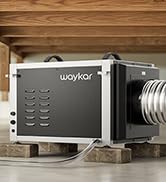
Figure 6: The washable air filter helps maintain air quality.
7.2. Przechowywanie
Jeżeli osuszacz powietrza nie będzie używany przez dłuższy czas:
- Opróżnij zbiornik na wodę i upewnij się, że jest czysty i suchy.
- Wyczyść filtr powietrza.
- Przechowywać urządzenie w pozycji pionowej, w chłodnym i suchym miejscu.
8. Rozwiązywanie Problemów
| Problem | Możliwa przyczyna | Rozwiązanie |
|---|---|---|
| Osuszacz powietrza nie włącza się. | No power, water tank full or incorrectly inserted. | Check power connection. Empty and reinsert water tank correctly. |
| Nie zebrano wody. | Room humidity too low, temperature too low, or continuous drainage is active. | Ensure room conditions are suitable for dehumidification. Check if drain hose is connected. |
| Urządzenie jest głośne. | Jednostka nie stoi na równej powierzchni, filtr powietrza jest zatkany. | Place on a level surface. Clean the air filter. |
| Włączony jest wskaźnik „Wyczyść filtr”. | Filtr powietrza wymaga czyszczenia. | Clean the air filter as described in Section 7.1. |
Wideo 3: Krótki przeglądview of the dehumidifier's features and quiet operation.
9. Specyfikacje
| Funkcja | Szczegół |
|---|---|
| Marka | Wajkar |
| Nazwa modelu | PD160B |
| Wydajność osuszania | 34 Pints per Day (under 95°F, 90%RH) |
| Obszar zasięgu | Do 2000 mkw. Ft. |
| Pojemność zbiornika na wodę | 0.66 galona (2.5 litrów) |
| Wymiary produktu | 9" gł. x 12.2" szer. x 20.9" wys. |
| Waga przedmiotu | 28.1 funta |
| Tomtage | 120 wolty |
| Cotage | 230 watów |
| Tryby pracy | Auto Mode, Continuous Mode |
| Cechy specjalne | Automatic Defrost, Automatic Moisture Removal, Automatic Restart, Automatic Shutoff, Ergonomic Handle, Overheat Protection, Portable, Removable Tank, Washable Filter, 24-hour Timer, 360° Rotatable Wheels |
| Certyfikat Energy Star | 2025 Energy Star Certified |
10. Gwarancja i wsparcie
Waykar dehumidifiers come with the following support:
- 30-dniowa gwarancja zwrotu pieniędzy: Jeśli nie jesteś zadowolony z produktu.
- Gwarancja 1-letnia: Standard product warranty.
- 2nd Year Guarantee Extension: Available upon registration.
- Dożywotnie wsparcie techniczne ekspertów: Assistance for any technical questions or issues.
For any questions or concerns, please do not hesitate to contact Waykar customer support. They aim to reply within 24 hours and assist in resolving any problems.