
HOCO BS31 - Army green
Hoco BS31 Bright Sound Sports Wireless Speaker – Instrukcja obsługi
1. Wprowadzenie
Thank you for choosing the Hoco BS31 Bright Sound Sports Wireless Speaker. This manual provides essential information for the proper setup, operation, and maintenance of your device. Please read it thoroughly before use to ensure optimal performance and longevity.
2. Koniec produktuview i funkcje
The Hoco BS31 is a compact and portable wireless speaker designed for versatile audio playback. It features robust connectivity options and a durable design, making it suitable for various environments.
- Wireless V4.2 JLAC6928B for stable and efficient connection.
- Integrated 53mm speaker for clear audio output.
- Class A polymer battery with 500mAh capacity for extended playback.
- Multiple playback modes: Wireless (Bluetooth), TF card, and AUX input.
- Compact and lightweight design, weighing only 140g.
- Supports A2DP, AVRCP, HFP, HSP protocols for broad compatibility.

Obraz: Przód view of the Hoco BS31 speaker in army green, showcasing its compact design and front controls.

Image: The Hoco BS31 speaker held in a hand, demonstrating its small, palm-sized, and portable nature.
3. Zawartość opakowania
Proszę sprawdzić, czy w paczce znajdują się następujące elementy:
- Głośnik bezprzewodowy Hoco BS31
- Kabel ładujący USB
- Instrukcja obsługi
4. Sterowanie i interfejsy
Familiarize yourself with the speaker's buttons and ports for proper operation.
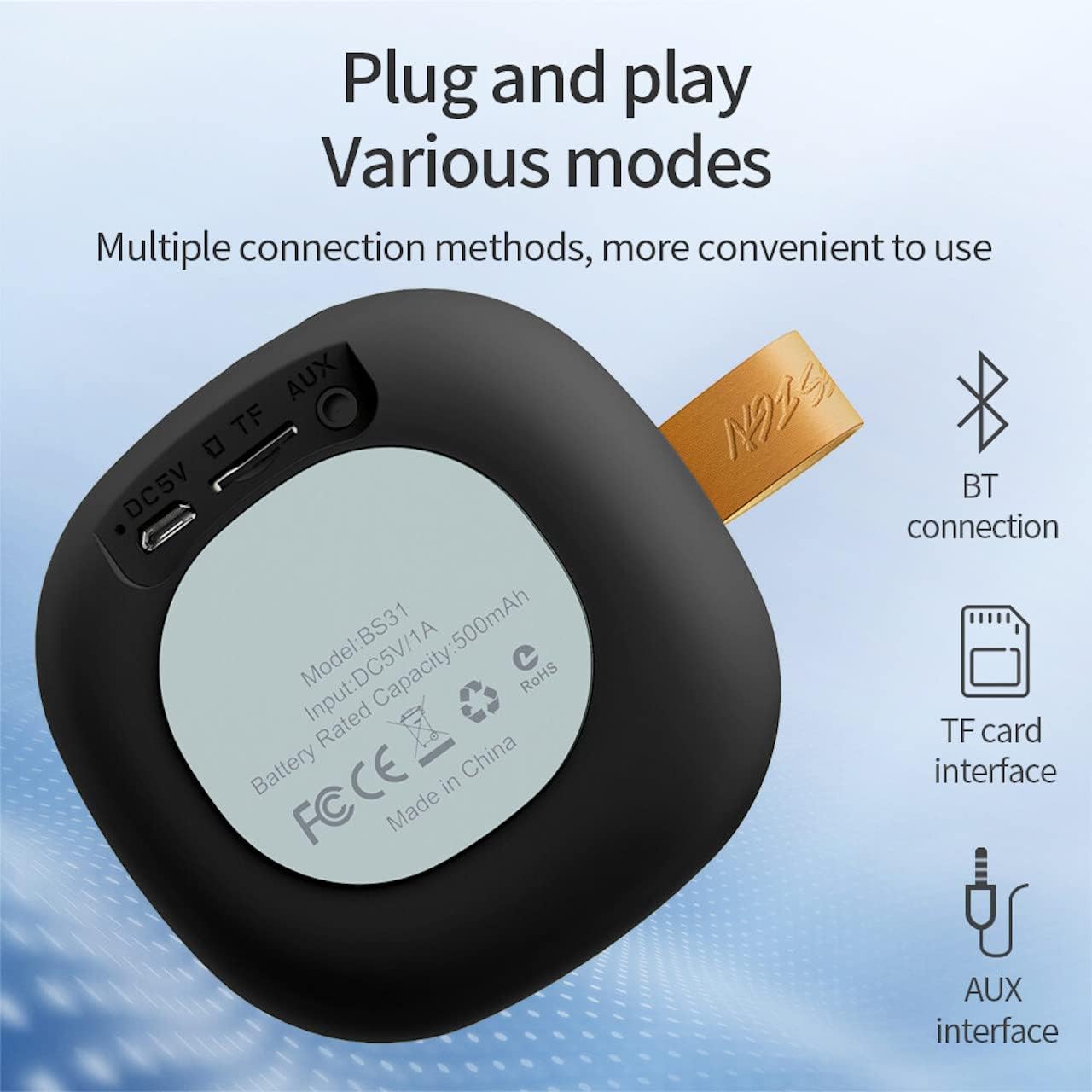
Image: A diagram illustrating the functions of the control buttons on the Hoco BS31 speaker.
- Przycisk zasilania (⏻): Press and hold to switch on/off. Short press to play/pause music or answer/end calls.
- Previous Song / Volume Up (⏮): Short press for previous song. Long press to increase volume.
- Next Song / Volume Down (⏭): Short press for next song. Long press to decrease volume.
- Mode Button (⏸): Krótkie naciśnięcie umożliwia przełączanie między trybami Bluetooth, karty TF i AUX.

Obraz: Tył view of the Hoco BS31 speaker, highlighting the DC 5V charging port, TF card slot, and AUX input.
- Port DC 5 V: Do ładowania głośnika przy użyciu dołączonego kabla USB.
- Gniazdo karty TF: Włóż kartę TF (MicroSD) w celu bezpośredniego odtwarzania muzyki.
- Port AUX: Podłącz zewnętrzne urządzenia audio za pomocą kabla audio 3.5 mm.
5. Konfiguracja
5.1. Ładowanie głośnika
Before first use, fully charge the speaker. Connect the provided USB charging cable to the DC 5V port on the speaker and the other end to a USB power adapter (not included) or a computer's USB port. The charging time is approximately 2 hours. The indicator light will show charging status (e.g., red for charging, off when fully charged).
5.2. Włączanie/wyłączanie zasilania
To power on the speaker, press and hold the Power button (⏻) until you hear an audible prompt. To power off, press and hold the Power button again until the speaker shuts down.
6. Instrukcja obsługi
6.1. Parowanie Bluetooth
- Ensure the speaker is powered on and in Bluetooth pairing mode (indicated by a flashing blue light or audible prompt). If not, short press the Mode button (⏸) to switch to Bluetooth mode.
- Na swoim urządzeniu mobilnym (smartfonie, tablecie itp.) włącz Bluetooth i wyszukaj dostępne urządzenia.
- Wybierz „Hoco BS31” z listy znalezionych urządzeń.
- Po sparowaniu głośnik poinformuje o pomyślnym nawiązaniu połączenia (np. za pomocą niebieskiego światła lub sygnału dźwiękowego).
- You can now play audio from your device through the Hoco BS31 speaker.
6.2. Tryb karty TF
Włóż kartę TF (MicroSD) z dźwiękiem MP3 files into the TF card slot. The speaker will automatically detect the card and switch to TF card playback mode. Use the Previous/Next Song buttons to navigate tracks.
6.3. Tryb AUX
Connect one end of a 3.5mm audio cable (not included) to the AUX port on the speaker and the other end to the audio output jack of your external device (e.g., MP3 player, computer). The speaker will automatically switch to AUX mode. Control playback from your external device.

Image: Visual representation of the Hoco BS31's multiple connection methods, including Bluetooth, TF card, and AUX.
6.4. Music Playback and Call Functions
- Odtwórz/Pauza: Naciśnij krótko przycisk zasilania (⏻).
- Następna piosenka: Short press the Next Song button (⏭).
- Poprzednia piosenka: Short press the Previous Song button (⏮).
- Zwiększenie głośności: Long press the Previous Song button (⏮).
- Ściszanie: Long press the Next Song button (⏭).
- Odbieranie/kończenie połączeń: Short press the Power button (⏻) when a call comes in.
- Odrzuć połączenie: Press and hold the Power button (⏻) when a call comes in.

Image: The Hoco BS31 speaker positioned next to a smartphone, demonstrating its use for music playback.
7. Konserwacja i pielęgnacja
- Utrzymuj głośnik w suchości. Nie wystawiaj go na działanie wody ani nadmiernej wilgoci.
- Czyść głośnik miękką, suchą ściereczką. Nie używaj środków czyszczących o właściwościach ściernych ani rozpuszczalników.
- Unikaj ekstremalnych temperatur. Nie przechowuj głośnika w bardzo gorącym lub zimnym otoczeniu.
- Do not attempt to disassemble or repair the speaker yourself. This will void the warranty and may cause damage.
- Aby zachować sprawność akumulatora, ładuj głośnik regularnie, nawet jeśli go nie używasz.
8. Rozwiązywanie Problemów
| Problem | Możliwa przyczyna | Rozwiązanie |
|---|---|---|
| Głośnik nie włącza się. | Niski poziom naładowania baterii. | Ładuj głośnik przez co najmniej 30 minut. |
| Nie można sparować z urządzeniem Bluetooth. | Głośnik nie jest w trybie parowania; Bluetooth w urządzeniu wyłączony; zbyt duża odległość między urządzeniami. | Ensure speaker is in pairing mode. Turn Bluetooth on/off on device. Move devices closer. |
| Brak dźwięku. | Zbyt niska głośność; nieprawidłowy tryb; urządzenie nie odtwarza. | Increase speaker/device volume. Check correct mode (BT, TF, AUX). Ensure audio is playing on source device. |
| Karta TF nie została rozpoznana. | Card inserted incorrectly; unsupported format; corrupted card. | Włóż ponownie kartę TF. Upewnij się, że files are MP3 format. Try a different TF card. |
9. Specyfikacje
| Funkcja | Szczegół |
|---|---|
| Model | BS31 |
| Rozmiar głośnika | 53mm |
| Wymiary | Wymiary: 86 x 86 x 44 mm |
| Waga | 140g |
| Wersja bezprzewodowa | V4.2 (JLAC6928B) |
| Obsługiwane protokoły | A2DP, AVRCP, HFP, HSP |
| Pojemność baterii | 500mAh (Class A polymer battery) |
| Objętość ładowaniatage | Prąd stały 5 V |
| Czas ładowania | Około 2 godzin |
| Muzyka/Czas połączenia | Około 3 godzin |
| Opcje łączności | Wireless (Bluetooth), TF card, AUX |
| Maksymalna moc wyjściowa | 5 watów |
10. Gwarancja i wsparcie
Hoco products are manufactured to high quality standards. For warranty information and technical support, please refer to the warranty card included with your product or visit the official Hoco webstrona.
Urzędnik Webstrona: www.hocotech.com