
Wstęp
The Power Dynamics PDM25 is a compact and versatile 100V amplifier designed for small installations such as shops, restaurants, and offices. It offers easy operation, reliable performance, and a range of features including Bluetooth connectivity, an integrated MP3 player, USB input, AUX input, and a wireless remote control. This manual provides essential information for the safe and efficient use of your PDM25 ampliyfikator.
Instrukcje bezpieczeństwa
- Przeczytaj uważnie niniejszą instrukcję przed użyciem produktu.
- Zachowaj tę instrukcję do wykorzystania w przyszłości.
- Należy przestrzegać wszystkich ostrzeżeń i postępować zgodnie ze wszystkimi instrukcjami.
- Nie należy używać tego urządzenia w pobliżu wody.
- Czyścić wyłącznie suchą szmatką.
- Nie zasłaniaj żadnych otworów wentylacyjnych. Montaż należy wykonać zgodnie z instrukcją producenta.
- Nie należy instalować w pobliżu źródeł ciepła, takich jak grzejniki, kratki wentylacyjne, piece lub inne urządzenia (w tym amp(lifiers) wytwarzające ciepło.
- Nie lekceważ celu bezpieczeństwa wtyczki spolaryzowanej lub uziemiającej. Wtyczka spolaryzowana ma dwa bolce, z których jeden jest szerszy od drugiego. Wtyczka uziemiająca ma dwa bolce i trzeci bolec uziemiający. Szeroki bolec lub trzeci bolec są dostarczane dla Twojego bezpieczeństwa. Jeśli dostarczona wtyczka nie pasuje do Twojego gniazdka, skonsultuj się z elektrykiem w celu wymiany przestarzałego gniazdka.
- Chroń przewód zasilający przed deptaniem i przytrzaśnięciem, zwłaszcza przy wtyczkach, gniazdkach i miejscach, w których wychodzi z urządzenia.
- Stosować wyłącznie dodatki/akcesoria wskazane przez producenta.
- Odłączaj urządzenie od zasilania podczas burzy z piorunami lub jeśli nie używasz go przez dłuższy czas.
- Wszelkie prace serwisowe należy zlecać wykwalifikowanemu personelowi serwisowemu. Serwisowanie jest wymagane, gdy urządzenie zostało w jakikolwiek sposób uszkodzone, np. przewód zasilający lub wtyczka są uszkodzone, płyn został wylany lub przedmioty wpadły do urządzenia, urządzenie zostało wystawione na działanie deszczu lub wilgoci, nie działa normalnie lub zostało upuszczone.
- OSTRZEŻENIE: Aby ograniczyć ryzyko pożaru lub porażenia prądem, nie należy narażać urządzenia na działanie deszczu i wilgoci.
- OSTROŻNOŚĆ: Do not open the cover. No user-serviceable parts inside. Refer servicing to qualified personnel only.
Produkt ponadview
The PDM25 amplifier features a user-friendly front panel with controls for various audio sources and volume adjustments, along with a clear digital display. The rear panel provides all necessary connections for speakers, external audio sources, and power.

Rysunek 1: Panel przedni z góryview of the PDM25 Ampliyfikator.

Figure 2: Rear Panel Connections of the PDM25 Ampliyfikator.
Organizować coś
1. Rozpakowywanie
Ostrożnie usuń amplifier from its packaging. Inspect the unit for any signs of damage during transit. Retain the original packaging for future transport or storage.
2. Umieszczenie
Umieść amplifier on a stable, flat surface. Ensure adequate ventilation around the unit to prevent overheating. Avoid placing it near heat sources or in direct sunlight.
3. Połączenie głośnika
The PDM25 supports both 100V line speakers and low impedance (4-16 Ohm) speakers.
- For 100V Line Speakers: Connect the positive (+) terminal of your 100V speaker system to the "100V" terminal on the amplifier's rear panel. Connect the negative (-) terminal to the "COM" terminal.
- For Low Impedance Speakers (4-16 Ohm): Connect the positive (+) terminal of your speaker to the "4-16 Ohm" terminal on the amplifier's rear panel. Connect the negative (-) terminal to the "COM" terminal.
Ensure correct polarity (+ to + and - to -) for optimal sound quality. Do not connect both 100V and low impedance speakers simultaneously to the same output.
4. Podłączenie źródła dźwięku
- Wejście AUX: Connect external audio devices (e.g., CD player, mixer) to the RCA "AUX" input jacks on the rear panel using an RCA cable.
- Wejście mikrofonowe: Connect a microphone to the 6.3mm jack on the front panel.
- Wejście USB: Włóż dysk flash USB zawierający plik MP3 filedo portu USB na panelu przednim.
5. Podłączenie zasilania
Connect the supplied power cable to the AC inlet on the rear panel of the amplifier and then to a suitable mains power outlet (230 Vac/50 Hz).
Instrukcja obsługi
1. Włączanie/wyłączanie zasilania
Press the "ON/OFF" switch on the front panel to power on or off the ampliyfikator.
2. Wybór źródła
Use the "MODE" button on the front panel or the remote control to cycle through available input sources: Bluetooth, USB/MP3, AUX, and Radio. The selected mode will be displayed on the digital screen.

Figure 3: Front Panel Controls and USB Input.
3. Regulacja głośności
- Głośność: Adjust the main output volume using the large "VOLUME" knob on the front panel.
- Individual Source Volume: Adjust the volume for MP3, AUX, and MIC inputs using their respective smaller "VOLUME" knobs.
4. Kontrola tonów
Use the "TREBLE" and "BASS" knobs on the front panel to adjust the high and low frequencies of the audio output.
5. Obsługa Bluetooth
- Select "Bluetooth" mode using the "MODE" button. The display will show "BLUE".
- On your Bluetooth-enabled device (smartphone, tablet, etc.), search for available devices and select "PDM25".
- Po sparowaniu możesz przesyłać strumieniowo dźwięk bezprzewodowo do ampliyfikator.
6. USB/MP3 Player Operation
- Insert a USB flash drive into the USB port. The amplifier will automatically switch to USB mode and begin playing MP3 files.
- Use the play/pause, next, and previous track buttons on the front panel or remote control to manage playback.
7. Obsługa radia
In Radio mode, use the control buttons to scan for and select radio stations.
8. Pilot zdalnego sterowania
The included remote control provides convenient access to power, mode selection, volume, track control, and equalizer presets.
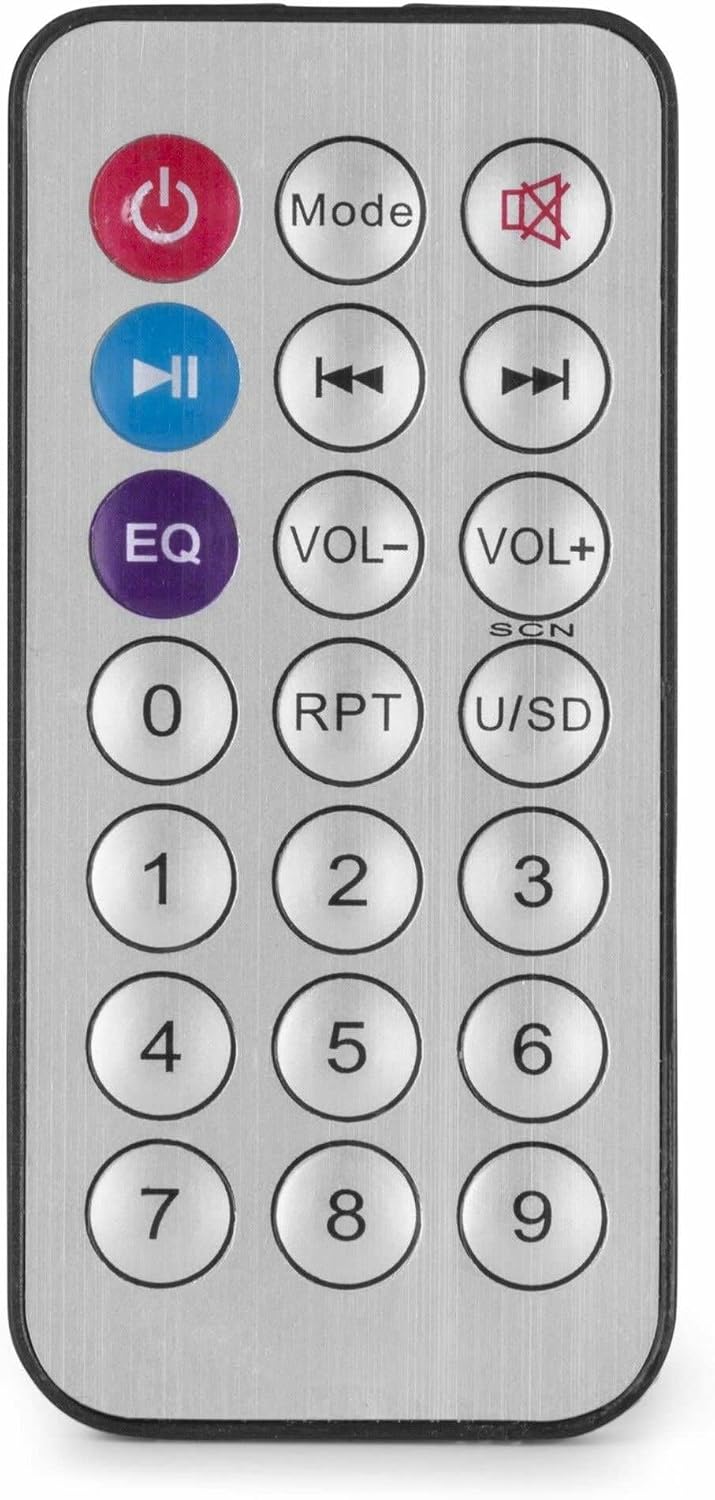
Rysunek 4: Bezprzewodowy pilot zdalnego sterowania.
Konserwacja
- Czyszczenie: Przed czyszczeniem odłącz zasilanie. Do przetarcia zewnętrznej części urządzenia użyj miękkiej, suchej ściereczki. amplifier. Nie używaj płynnych środków czyszczących ani aerozoli.
- Wentylacja: Aby zapewnić właściwy przepływ powietrza, należy upewnić się, że otwory wentylacyjne są wolne od kurzu i zanieczyszczeń.
- Składowanie: Jeśli urządzenie będzie przechowywane przez dłuższy czas, należy odłączyć je od zasilania i przechowywać w chłodnym, suchym miejscu, najlepiej w oryginalnym opakowaniu.
Rozwiązywanie problemów
| Problem | Możliwa przyczyna | Rozwiązanie |
|---|---|---|
| Brak zasilania | Kabel zasilający nie jest podłączony; Gniazdo zasilania jest uszkodzone; Ampwyłączenie lifiera. | Check power cable connection; Test power outlet; Ensure amplifier switch is ON. |
| Brak dźwięku | Incorrect source selected; Volume too low; Speaker connections faulty; Mute activated. | Select correct input source; Increase master and source volume; Check speaker wiring; Deactivate mute function on remote. |
| Bluetooth nie łączy się | Amplifier nie jest w trybie Bluetooth; Urządzenie jest za daleko; Urządzenie jest już sparowane z innym urządzeniem. | Zapewnić amplifier is in Bluetooth mode ("BLUE" displayed); Move device closer; Disconnect from other devices and try again. |
| Problemy z odtwarzaniem przez USB | Dysk USB nie jest poprawnie sformatowany; niezgodny file format; dysk USB uszkodzony. | Upewnij się, że dysk USB jest sformatowany w formacie FAT32; użyj formatu MP3 files; Spróbuj użyć innego dysku USB. |
| Zniekształcony dźwięk | Volume too high; Incorrect impedance matching for speakers; Faulty audio source. | Reduce volume; Verify speaker impedance matches amplifier output; Test with a different audio source. |
Specyfikacje
- Moc wyjściowa: 25 W
- Wyjście głośnika: 100V and 4-16 Ohm
- Zakres częstotliwości: 50 Hz - 18 kHz
- Stosunek sygnału do szumu: >75dB
- Objętość połączeniatage: 230 V prądu przemiennego/50 Hz
- Wymiary (dł. x szer. x wys.): Wymiary: 205 x 285 x 65 mm
- Waga: 1.5 kilogramów
- Cechy: Bluetooth, USB MP3 Player, Radio, AUX Input, Microphone Input, Bass/Treble Control, Integrated Equalizer, Remote Control
- Numer modelu: PDM25
- Producent: Tronios BV
Gwarancja i wsparcie
For warranty information and technical support, please refer to the documentation provided with your purchase or visit the official Power Dynamics webZachowaj dowód zakupu na wypadek roszczeń gwarancyjnych.
Producent: Tronios BV
Webstrona: www.power-dynamics.eu