
EARISE M37
EARISE M37 Wooden Box PA System User Manual
Model: M37
1. Koniec produktuview
The EARISE M37 is a portable 100W PA system designed for various audio applications, including home parties, small events, and karaoke. It features a wooden cabinet for enhanced acoustics, built-in Bluetooth connectivity, and comes with two wireless microphones for immediate use. The system supports multiple audio inputs including AUX and USB, offering versatile playback options.

Image: The EARISE M37 PA system, showcasing its wooden box design and two included wireless microphones.
2. Informacje dotyczące bezpieczeństwa
- Aby uniknąć pożaru lub porażenia prądem, nie wystawiaj urządzenia na działanie deszczu i wilgoci.
- Do not open the cabinet. There are no user-serviceable parts inside. Refer all servicing to qualified personnel.
- Zapewnij odpowiednią wentylację wokół urządzenia. Nie blokuj otworów wentylacyjnych.
- Unikaj umieszczania urządzenia w pobliżu źródeł ciepła, takich jak grzejniki, kratki wentylacyjne, piece lub inne urządzenia (w tym amp(lifiers) wytwarzające ciepło.
- Chroń przewód zasilający przed deptaniem i przytrzaśnięciem, zwłaszcza przy wtyczkach, gniazdkach i miejscach, w których wychodzi z urządzenia.
- Odłączaj urządzenie od zasilania podczas burzy z piorunami lub jeśli nie używasz go przez dłuższy czas.
3. Zawartość opakowania
Proszę sprawdzić, czy w paczce znajdują się następujące elementy:
- EARISE M37 PA System Unit
- 2 x mikrofony bezprzewodowe
- Pilot zdalnego sterowania
- Zasilacz
- Instrukcja obsługi (ten dokument)

Image: A visual representation of key features and included accessories: wireless microphone, Bluetooth 4.2, USB auto-play, and remote controller.
4. Cechy i komponenty produktu
Familiarize yourself with the main components and controls of your EARISE M37 PA System.

Image: The control panel of the EARISE M37, showing various inputs and adjustment knobs. Key controls include: Mode, Previous/Next Track, Play/Pause, Record, EQ, Light, Mic 1/2 inputs, AUX In/Out, USB, TF card slot, DC Power In, ON/OFF switch, Charging indicator, ECHO, DELAY, MIC VOL, MASTER VOL, TREBLE, EXTRA BASS, and BASS.
Funkcje panelu sterowania:
- Sposób użycia: Przełącza między trybami wejściowymi (Bluetooth, AUX, USB, karta TF).
- Poprzedni/następny utwór: Umożliwia nawigację pomiędzy utworami podczas odtwarzania multimediów.
- Odtwórz/Pauza: Steruje odtwarzaniem multimediów.
- Nagrywać: Initiates or stops recording (requires USB/TF storage).
- EQ: Dostosowuje ustawienia korektora.
- Światło: Steruje zintegrowanym oświetleniem LED.
- Mikrofon 1 / Mikrofon 2: Inputs for wired microphones (if used).
- AUX IN / AUX OUT: Audio input and output jacks for external devices.
- USB: USB port for media playback or recording.
- TF: TF (MicroSD) card slot for media playback or recording.
- DC Power IN: Wejście zasilania umożliwiające ładowanie i obsługę.
- WŁ. / WYŁ .: Wyłącznik zasilania urządzenia.
- Wskaźnik ładowania: Kontrolka wskazująca stan ładowania.
- ECHO: Dostosowuje efekt echa dla mikrofonów.
- OPÓŹNIENIE: Dostosowuje efekt opóźnienia dla mikrofonów.
- GŁOŚNOŚĆ MIKROFONU: Reguluje głośność mikrofonów.
- GŁOŚNOŚĆ MASTER: Controls the overall master volume of the system.
- POTROIĆ: Dostosowuje wyjście audio o wysokiej częstotliwości.
- DODATKOWY BAS: Poprawia jakość dźwięku o niskiej częstotliwości.
- GITARA BASOWA: Dostosowuje wyjście audio o niskiej częstotliwości.
5. Konfiguracja
5.1 Ładowanie systemu nagłośnieniowego
Before first use, fully charge the PA system. Connect the provided power adapter to the "DC Power IN" port on the unit and plug it into a standard wall outlet. The charging indicator light will show the charging status. A full charge provides up to 7 hours of play time.

Image: Illustration highlighting the 3600mAh battery capacity, providing up to 7 hours of continuous play time.
5.2 Konfiguracja mikrofonu bezprzewodowego
The two wireless microphones are pre-paired with the PA system. Insert AA batteries (not included) into each microphone. Turn on the microphones using their respective power switches. They should automatically connect to the PA system.
5.3 Podłączanie źródeł dźwięku
Połączenie Bluetooth:
- Turn on the EARISE M37 PA system.
- Naciśnij TRYB button until the display shows "Bluetooth" or a Bluetooth icon.
- Na swoim urządzeniu mobilnym (smartfonie, tablecie itp.) włącz Bluetooth i wyszukaj dostępne urządzenia.
- Select "EARISE M37" from the list. Once connected, you will hear a confirmation sound.

Image: A hand holding a smartphone displaying a Bluetooth connection screen, indicating the ease of pairing with the EARISE M37 PA system.
Odtwarzanie z USB/karty TF:
Włóż dysk flash USB lub kartę TF (MicroSD) zawierającą dźwięk MP3 files into the respective port. The system will automatically detect and begin playing music. Use the Previous/Next Track and Play/Pause buttons to control playback.
Wejście AUX:
Podłącz zewnętrzne urządzenie audio (np. odtwarzacz MP3, komputer) do AUX IN port using a 3.5mm audio cable (not included). Press the TRYB button until AUX input is selected.
6. Instrukcja obsługi
6.1 Włączanie/wyłączanie zasilania
To turn the unit on or off, use the WŁ./WYŁ. przełącznik znajdujący się na panelu sterowania.
6.2 Regulacja głośności i efektów
- GŁOŚNOŚĆ MASTER: Rotate this knob to adjust the overall volume of the PA system.
- GŁOŚNOŚĆ MIKROFONU: Reguluje głośność podłączonych mikrofonów.
- ECHO / DELAY: Use these knobs to add or reduce echo and delay effects to the microphone sound.
- TREBLE / BASS / EXTRA BASS: Adjust these knobs to fine-tune the high and low frequencies of the audio output.
6.3 Using Microphones
Once the wireless microphones are powered on and connected, speak into them. Adjust the GŁOŚNOŚĆ MIKROFONU, ECHO, I OPÓŹNIENIE knobs on the PA system to achieve the desired sound. For optimal performance, hold the microphone a few inches from your mouth.

Image: Two individuals enjoying karaoke with the EARISE M37 PA system and its wireless microphones, demonstrating typical usage.
6.4 Funkcja nagrywania
To record audio (e.g., microphone input or music playback), ensure a USB flash drive or TF card is inserted into the corresponding slot. Press the NAGRYWAĆ button to start recording. Press it again to stop. Recorded files will be saved to the inserted storage device.
7. Konserwacja
- Czyść urządzenie miękką, suchą ściereczką. Nie używaj środków czyszczących o właściwościach ściernych ani rozpuszczalników.
- Przechowuj system nagłośnieniowy w chłodnym, suchym miejscu, z dala od bezpośredniego światła słonecznego i ekstremalnych temperatur.
- If the unit will not be used for an extended period, fully charge the battery before storage and recharge it every few months to maintain battery health.
8. Rozwiązywanie Problemów
| Problem | Możliwa przyczyna | Rozwiązanie |
|---|---|---|
| Brak zasilania | Bateria jest rozładowana; kabel zasilający nie jest podłączony. | Charge the unit; Ensure power cable is securely connected. |
| Brak dźwięku z mikrofonów | Microphones off; Batteries low/dead; MIC VOL too low. | Turn on microphones; Replace batteries; Increase MIC VOL. |
| Bluetooth nie łączy się | PA system not in Bluetooth mode; Device too far; Interference. | Press MODE button to select Bluetooth; Move device closer; Restart both devices. |
| Karta USB/TF nie działa | Błędny file format; Karta/napęd nieprawidłowo włożony; Uszkodzony files. | Zapewnić files are MP3; Reinsert card/drive; Try different files/device. |
9. Specyfikacje
| Funkcja | Szczegół |
|---|---|
| Marka | USZY |
| Model | M37 |
| Moc wyjściowatage | 100 watów |
| Źródło zasilania | Zasilany bateryjnie |
| Technologia łączności | Bluetooth, USB, AUX |
| Wersja Bluetooth | 4.2 (from image) |
| Wejście audio | Wireless Microphone, AUX |
| Liczba kanałów | 2 |
| Waga przedmiotu | 11.62 funta |
| Wymiary opakowania | 18.7 x 12 x 11.9 cala |
| Wymiary produktu (w przybliżeniu) | 32.5 cm (12.8 cala) wys. x 25.5 cm (10 cala) szer. x 23.8 cm (9.4 cala) gł. |
| Kolor | Czarny |
| Typ montażu | Blat stołu |
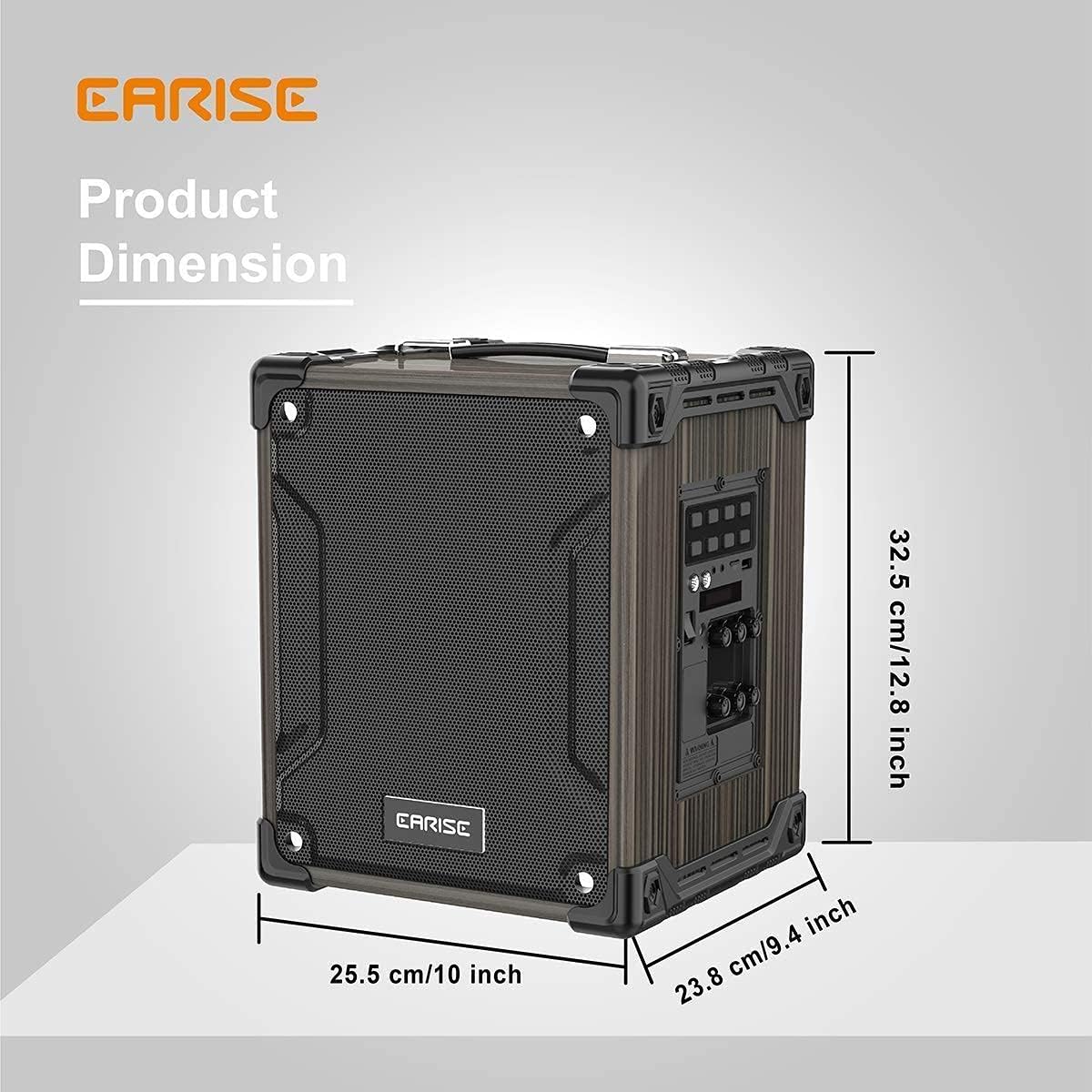
Image: Product dimensions of the EARISE M37, measuring approximately 32.5 cm (12.8 inches) in height, 25.5 cm (10 inches) in width, and 23.8 cm (9.4 inches) in depth.
10. Gwarancja i wsparcie
For warranty information or technical support, please refer to the contact details provided with your purchase or visit the official EARISE webZachowaj dowód zakupu na wypadek roszczeń gwarancyjnych.