
Produkt ponadview
The Rocketek RT-CC801 is a versatile car charger splitter designed to expand your vehicle's power capabilities. It converts a single cigarette lighter socket into two additional sockets and three USB charging ports, including Quick Charge 3.0. This device is suitable for powering and charging multiple electronic devices simultaneously in your vehicle.

Image: The Rocketek RT-CC801 car charger splitter, highlighting its two cigarette sockets, two Quick Charge 3.0 USB ports, one Smart USB port, and LED voltage wyświetlacz.
Konfiguracja i instalacja
- Włóż do gniazda samochodowego: Plug the Rocketek RT-CC801 into your vehicle's 12V/24V cigarette lighter socket.
- Dostosuj kąt: The device features a 180° adjustable angle swivel plug. Adjust the angle to ensure a secure fit and to avoid obstructing other controls in your vehicle.
- Włączanie: Once plugged in, the LED voltage display will illuminate, indicating the device is receiving power.

Image: The car charger splitter shown in a vehicle, demonstrating its universal fit and compact design.
Instrukcja obsługi
Korzystanie z portów ładowania USB
- The device includes two Quick Charge 3.0 (QC 3.0) ports and one Smart USB port.
- Connect your USB-powered devices (smartphones, tablets, etc.) to the appropriate USB ports using their charging cables.
- The QC 3.0 ports provide faster charging for compatible devices. The Smart USB port delivers optimal charging for other devices.

Image: A smartphone and tablet connected to the USB ports of the car charger splitter, illustrating simultaneous charging capabilities.
Using Cigarette Lighter Sockets
- The two 12V/24V DC outlets can power car electronics such as GPS, dash cams, portable air pumps, or car refrigerators.
- Ensure the total power consumption of devices connected to these sockets does not exceed 120W.
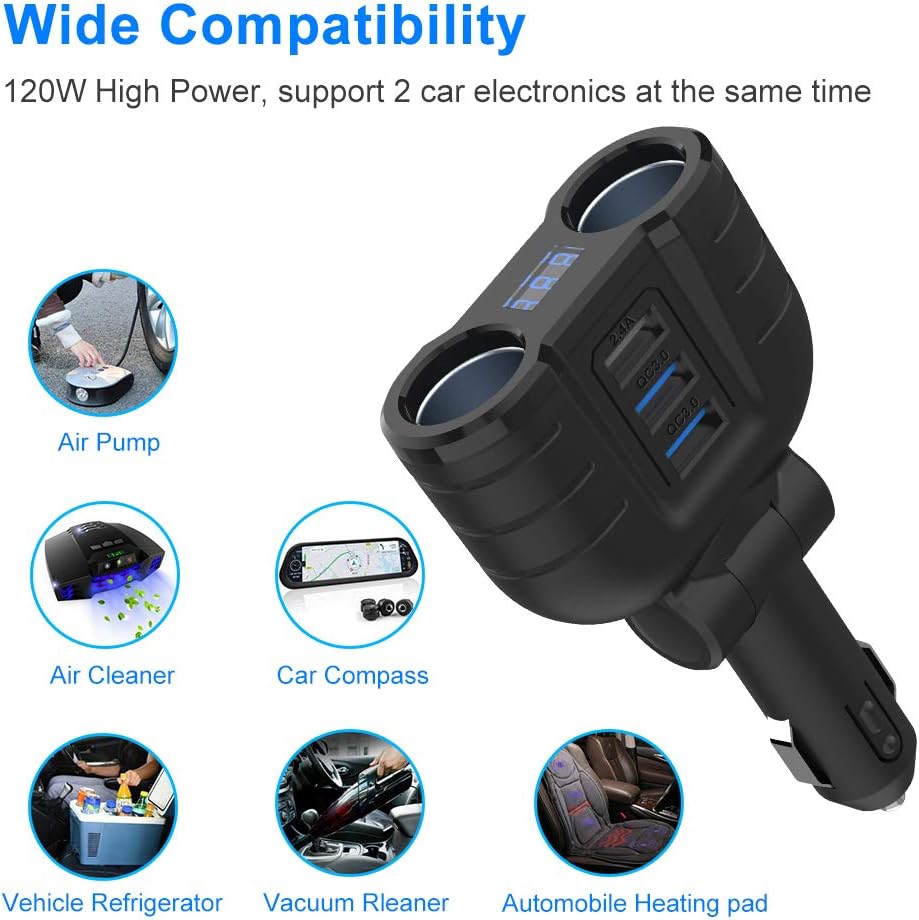
Obraz: Byłyamples of compatible car electronics that can be powered by the splitter's cigarette lighter sockets.
Objętość LEDtage Wyświetlacz
- The integrated LED display shows your car battery's voltage w czasie rzeczywistym.
- This feature helps monitor your vehicle's battery health.

Image: The car charger splitter in use, displaying the car battery voltage on its LED screen while a phone charges.
Funkcje bezpieczeństwa i ochrony
The Rocketek RT-CC801 is equipped with multiple intelligent protection mechanisms to ensure safe operation for both the device and your connected electronics:
- Zabezpieczenie przed przegrzaniem: Zapobiega przegrzaniu.
- Zabezpieczenie przed zwarciem: Zabezpiecza przed zwarciami elektrycznymi.
- Przełączniki włączania/wyłączania: Allows manual control over power to the sockets.
- USB Intelligent Identification: Automatically detects and delivers optimal charging current for connected USB devices.
- Ochrona przed przeładowaniem: Chroni urządzenia przed przeładowaniem.
- Built-in 10A Fuse: Provides an additional layer of protection against overcurrent.
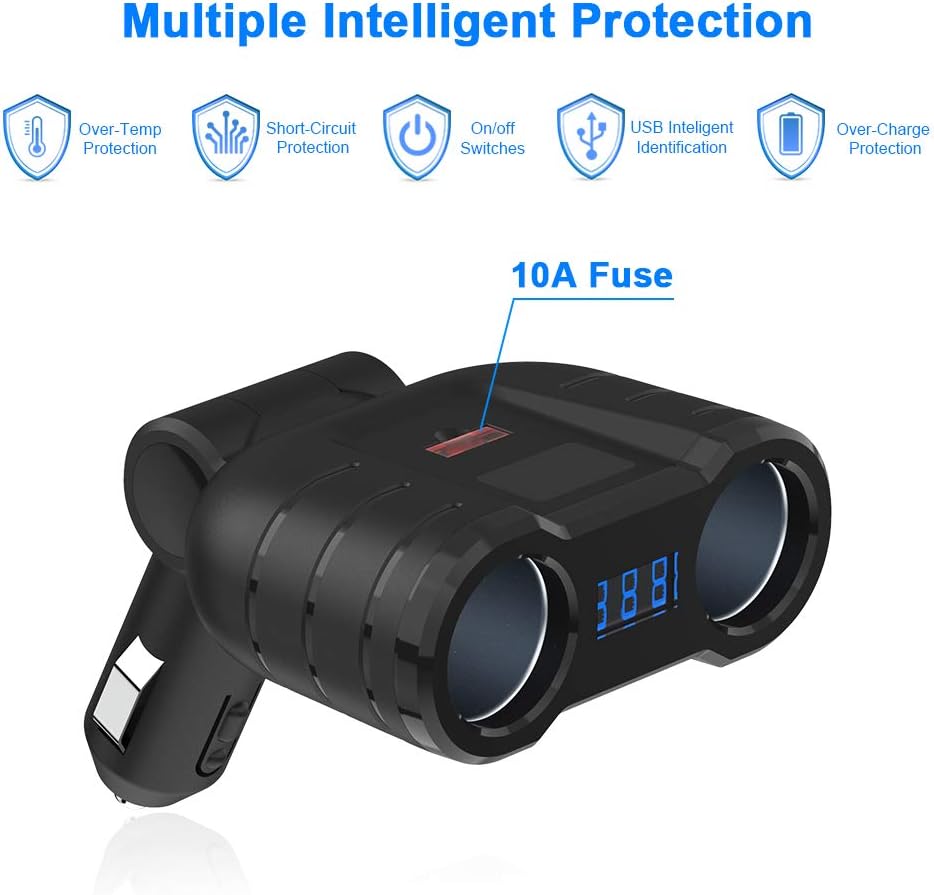
Image: Visual representation of the safety features integrated into the device, such as over-temperature and short-circuit protection.
Specyfikacje
| Funkcja | Specyfikacja |
|---|---|
| Wejście Voltage | Prąd stały 12V-24V |
| Cigarette Sockets Power (MAX) | 120 W |
| Porty USB | 2 x Quick Charge 3.0, 1 x Smart USB (2.4A) |
| Wyjście QC 3.0 | 18 W |
| Inteligentne wyjście USB | Prąd stały 5 V-2.4 A |
| Bezpiecznik | 10A |
| Regulowany kąt | 180° Swivel Plug |
| Numer modelu | RT-CC801 |
| Waga przedmiotu | 0.16 kilograma |
Rozwiązywanie problemów
Tomtage Display Readings
- 13.4 V - 14.8 V: Normalna objętośćtage po uruchomieniu samochodu.
- 12 V - 12.8 V: Normal static voltage of the car battery when the car is off.
- 11.4 V - 12 V: Indicates the car battery voltage is low. Consider checking your car battery or the charger tube.
- 12V or less (flashing): Jeśli objętośćtage is less than or equal to 11.3V, the screen will flash to alarm, indicating a critically low battery.

Image: A visual guide to understanding the car battery voltage wyświetlane na urządzeniu.
General Charging Issues
- Urządzenie się nie ładuje: Ensure the car charger is firmly seated in the cigarette lighter socket. Check if your device's charging cable is functional and properly connected.
- Powolne ładowanie: Verify that your device supports Quick Charge 3.0 for faster charging from the QC 3.0 ports. Ensure you are using a high-quality charging cable.
- No power to sockets: Check the built-in 10A fuse. If blown, it may need replacement. Ensure the total wattagMoc podłączonych urządzeń nie przekracza 120W.
Konserwacja
- Czyszczenie: Use a dry, soft cloth to clean the exterior of the device. Avoid using liquid cleaners or solvents.
- Wymiana bezpiecznika: If the device stops working, the 10A fuse might be blown. Carefully open the fuse compartment (usually located on the tip of the plug) and replace it with a new 10A fuse of the same type.
- Składowanie: Gdy nie jest używane, przechowuj urządzenie w chłodnym, suchym miejscu, z dala od bezpośredniego światła słonecznego i ekstremalnych temperatur.
Gwarancja i wsparcie
For warranty information or technical support, please refer to the documentation included with your purchase or contact Rocketek customer service directly. Keep your purchase receipt for warranty claims.