
Wstęp
This manual provides detailed instructions for the safe and efficient use of your FONESTAR DOTS-N Bluetooth TWS Speaker. Please read this manual thoroughly before operating the device and retain it for future reference.
The FONESTAR DOTS-N is a portable Bluetooth TWS speaker featuring Bluetooth 4.2 and NFC connectivity. It offers powerful sound with enhanced bass, playback controls, and hands-free calling. Equipped with a rechargeable Li-Ion battery providing up to 10 hours of autonomy, it also includes a 3.5mm auxiliary input. Its compact design makes it suitable for home use.
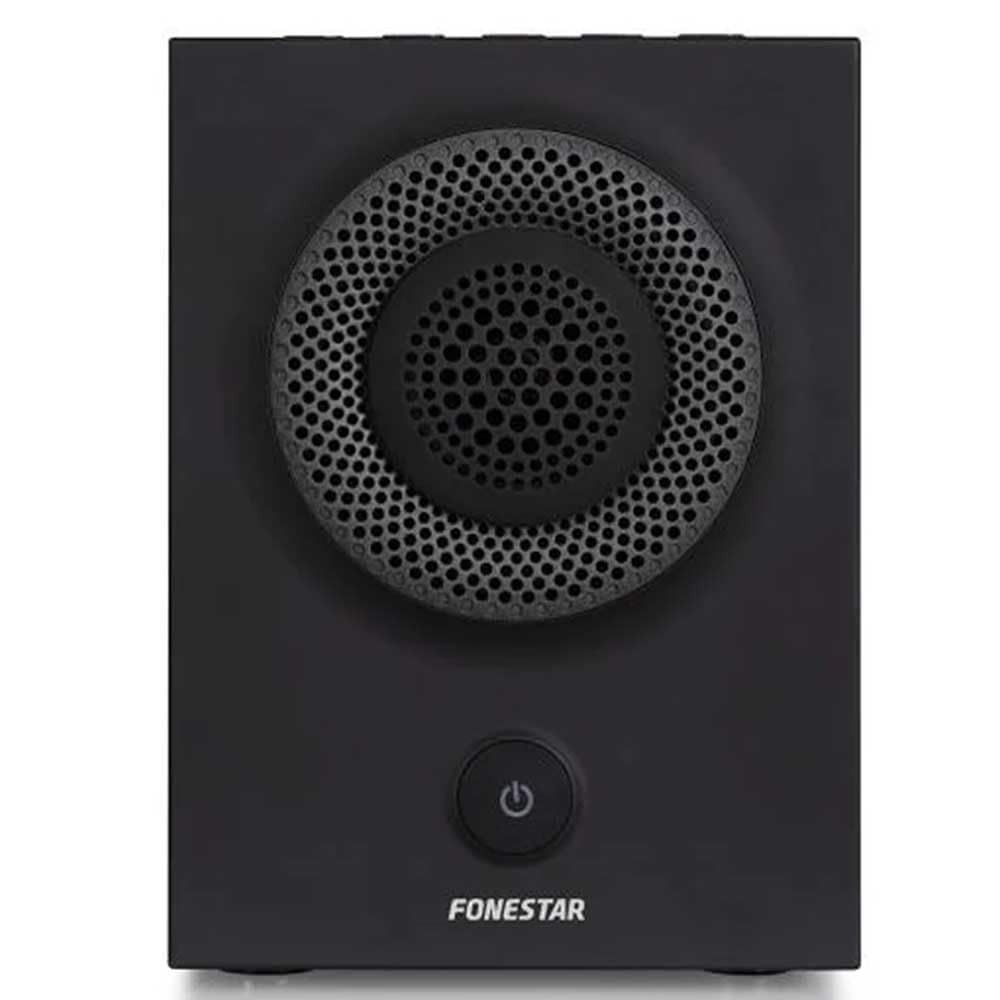
Rycina 1: Przód view of the FONESTAR DOTS-N Bluetooth TWS Speaker.
Organizować coś
1. Rozpakowywanie
Ostrożnie wyjmij wszystkie elementy z opakowania. Upewnij się, że wszystkie wymienione poniżej elementy są obecne:
- FONESTAR DOTS-N Bluetooth TWS Speaker
- Kabel ładujący USB do Micro USB
- Kabel audio stereo 3.5 mm
- Instrukcja obsługi (ten dokument)
2. Ładowanie głośnika
Before first use, fully charge the speaker. Connect the Micro USB end of the charging cable to the speaker's charging port and the USB-A end to a compatible USB power adapter (not included) or a computer's USB port.
- Podczas ładowania zaświeci się kontrolka ładowania.
- Czas ładowania do pełnego naładowania wynosi około 3 godzin.
- Po zakończeniu ładowania kontrolka zmieni kolor lub zgaśnie.
3. Włączanie/wyłączanie zasilania
To power on the speaker, press and hold the power button (usually indicated by a ⏻ symbol) for a few seconds until you hear an audible prompt or see an indicator light. To power off, repeat the process.
Instrukcja obsługi
1. Parowanie Bluetooth
Głośnik obsługuje technologię Bluetooth 4.2 umożliwiającą bezprzewodowe przesyłanie dźwięku.
- Ensure the speaker is powered on and in pairing mode (usually indicated by a flashing LED). If not, press the Bluetooth pairing button or power button briefly to enter pairing mode.
- Na smartfonie, tablecie lub innym urządzeniu z obsługą technologii Bluetooth przejdź do ustawień Bluetooth.
- Szukaj available devices and select "FONESTAR DOTS-N" from the list.
- Once paired, the speaker will emit an audible confirmation, and the LED indicator will typically become solid.
2. Parowanie NFC (komunikacja bliskiego zasięgu)
For devices with NFC, pairing can be done quickly:
- Sprawdź, czy w urządzeniu włączona jest funkcja NFC i czy głośnik jest włączony.
- Tap your NFC-enabled device gently against the NFC area on the speaker (refer to product diagram for exact location, if available).
- Potwierdź prośbę o sparowanie na swoim urządzeniu.
3. Funkcja True Wireless Stereo (TWS)
The TWS function allows you to pair two FONESTAR DOTS-N speakers together for a stereo sound experience.
- Ensure both DOTS-N speakers are powered on and not connected to any other Bluetooth device.
- On one speaker (this will be the primary speaker), press and hold the TWS button (if available) or a designated button for TWS pairing.
- Główny głośnik rozpocznie wyszukiwanie dodatkowego głośnika. Po połączeniu oba głośniki wyemitują dźwięk potwierdzenia.
- Now, connect your Bluetooth device to the primary speaker as described in the "Bluetooth Pairing" section. Audio will play in stereo through both speakers.
4. Wejście pomocnicze (AUX)
For non-Bluetooth devices, use the included 3.5mm stereo audio cable.
- Podłącz jeden koniec kabla audio 3.5 mm do portu AUX-in w głośniku.
- Podłącz drugi koniec do gniazda słuchawkowego lub wyjścia audio w urządzeniu.
- The speaker will automatically switch to AUX mode or may require manual selection via a mode button.
5. Playback Control and Hands-Free Calls
The speaker features integrated controls for music playback and managing calls:
- Odtwórz/Pauza: Press the Play/Pause button (often combined with the power button or a dedicated button).
- Zwiększanie/zmniejszanie głośności: Use the volume buttons (+ / -) on the speaker.
- Następny / poprzedni utwór: Long press or double-press the volume buttons, or use dedicated track skip buttons if present.
- Odbieranie/kończenie połączeń: Press the Play/Pause button during an incoming call to answer, and again to end the call.
- Odrzuć połączenie: Naciśnij i przytrzymaj przycisk Odtwórz/Pauza podczas połączenia przychodzącego.
Konserwacja
1. Czyszczenie
- Zawsze wyłączaj głośnik przed czyszczeniem.
- Do przecierania powierzchni zewnętrznych należy używać miękkiej, suchej i niepozostawiającej włókien ściereczki.
- Nie należy używać środków czyszczących o działaniu ściernym, wosków ani rozpuszczalników, gdyż mogą one uszkodzić powłokę.
- Unikaj dostania się wilgoci do otworów.
2. Przechowywanie
- Przechowuj głośnik w chłodnym, suchym miejscu, z dala od bezpośredniego światła słonecznego i ekstremalnych temperatur.
- Jeśli akumulator będzie przechowywany przez dłuższy okres, należy ładować go do około 50% co kilka miesięcy, aby zachować jego sprawność.
3. Pielęgnacja baterii
- Nie wystawiaj akumulatora na działanie nadmiernego ciepła, ognia lub bezpośredniego światła słonecznego.
- Unikaj częstego całkowitego rozładowywania akumulatora, ponieważ może to skrócić jego żywotność.
- Należy używać wyłącznie dołączonego kabla ładującego lub certyfikowanego odpowiednika.
Rozwiązywanie problemów
| Problem | Możliwa przyczyna | Rozwiązanie |
|---|---|---|
| Głośnik nie włącza się. | Bateria jest rozładowana. | Naładuj głośnik za pomocą dostarczonego kabla USB. |
| Nie można sparować przez Bluetooth. | Głośnik nie jest w trybie parowania; urządzenie jest zbyt daleko; występują zakłócenia. | Ensure speaker is in pairing mode. Move device closer (within 10m). Turn off other Bluetooth devices. |
| Brak dźwięku lub niski poziom głośności. | Volume too low on speaker or source device; incorrect input mode. | Zwiększ głośność zarówno na głośniku, jak i urządzeniu źródłowym. Sprawdź, czy wybrano prawidłowe wejście (Bluetooth/AUX). |
| Parowanie TWS nie powiodło się. | Speakers are already paired to another device; incorrect TWS pairing procedure. | Upewnij się, że oba głośniki są odłączone od innych urządzeń. Postępuj zgodnie z instrukcjami parowania TWS. |
| Zniekształcenie dźwięku. | Zbyt wysoka głośność, słaba bateria, słaby sygnał. | Reduce volume. Charge the speaker. Move source device closer to the speaker. |
Dane techniczne

Figure 2: Dimensions of the FONESTAR DOTS-N Bluetooth TWS Speaker.
| Nazwa modelu | DOTS-N |
| Marka | FONESTAR |
| Technologia łączności | Bluetooth 4.2, NFC, 3.5mm AUX |
| Zasięg bezprzewodowej | Do 10 metrów (33 stóp) |
| Tryb wyjścia audio | Stereo (z TWS) |
| Typ głośnika | 3" Coaxial Woofer with Tweeter, 3" Subwoofer, 4" Passive Radiator |
| Maksymalna moc wyjściowa głośnika | 12 W RMS |
| Odpowiedź częstotliwościowa | 80 - 20,000 Hz |
| Stosunek sygnału do szumu | ≥ 75 dB |
| Źródło zasilania | Zasilany bateryjnie (akumulator litowo-jonowy) |
| Pojemność baterii | 2200 mAh, 7.4 V |
| Autonomia baterii | Do 10 godzin (przy 50% głośności) |
| Czas ładowania | Około 3 godzin |
| Metoda kontroli | Dotyk (dotyk) |
| Cechy specjalne | High-res audio, Bluetooth, Integrated microphone, USB port (for charging) |
| Kompatybilne urządzenia | Smartfony, tablety |
| Zalecane zastosowanie | Do domu |
| Kolor | Czarny |
| Wymiary (szer. x wys. x gł.) | 125 x 175 x 158 mm (około 4.9 x 6.9 x 6.2 cala) |
| Waga przedmiotu | 1.82 kg (ok. 4.01 funta) |
| Wodoodporny | NIE |
Note: Specifications are subject to change without prior notice. Battery autonomy may vary depending on usage, volume level, and music type.
Informacje o gwarancji
FONESTAR products are designed and manufactured to the highest quality standards. This product is covered by a limited warranty against manufacturing defects from the date of purchase. The specific terms and duration of the warranty may vary by region and retailer.
Please retain your proof of purchase (receipt or invoice) as it will be required for any warranty claims. The warranty does not cover damage caused by misuse, accident, unauthorized modification, or normal wear and tear.
For detailed warranty terms and conditions, please refer to the warranty card included with your product or contact your local FONESTAR distributor or retailer.
Obsługa klienta
If you encounter any issues that are not resolved by the troubleshooting guide, or if you require further assistance, please contact FONESTAR customer support or your authorized retailer.
Kontaktując się z pomocą techniczną, przygotuj następujące informacje:
- Product Model: FONESTAR DOTS-N
- Data zakupu
- opis problemu
- Twoje dane kontaktowe
For the most up-to-date support information, including contact details and FAQs, please visit the official FONESTAR webstrona.