
MIUFLY EH15-128G
MIUFLY 1296P Police Body Camera User Manual
Model: EH15-128G
Wstęp
This manual provides comprehensive instructions for the operation and maintenance of your MIUFLY 1296P Police Body Camera. Please read this manual thoroughly before using the device to ensure proper functionality and to maximize its lifespan. This body camera is designed for security professionals, offering high-definition video recording, night vision capabilities, and integrated GPS for reliable evidence collection.
Zawartość opakowania
- MIUFLY Body Camera (128GB Built-in Memory)
- Universal Metal Clip
- Epaulet Clip
- Stacja ładująca
- Kabel USB
- Instrukcja obsługi
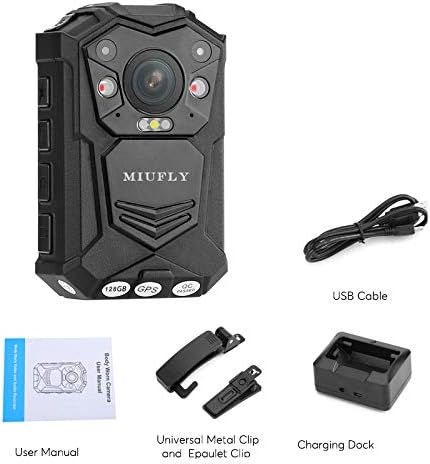
Image: Contents of the MIUFLY Body Camera package, including the camera, clips, charging dock, USB cable, and user manual.
Produkt ponadview
Familiarize yourself with the various components of your MIUFLY Body Camera.
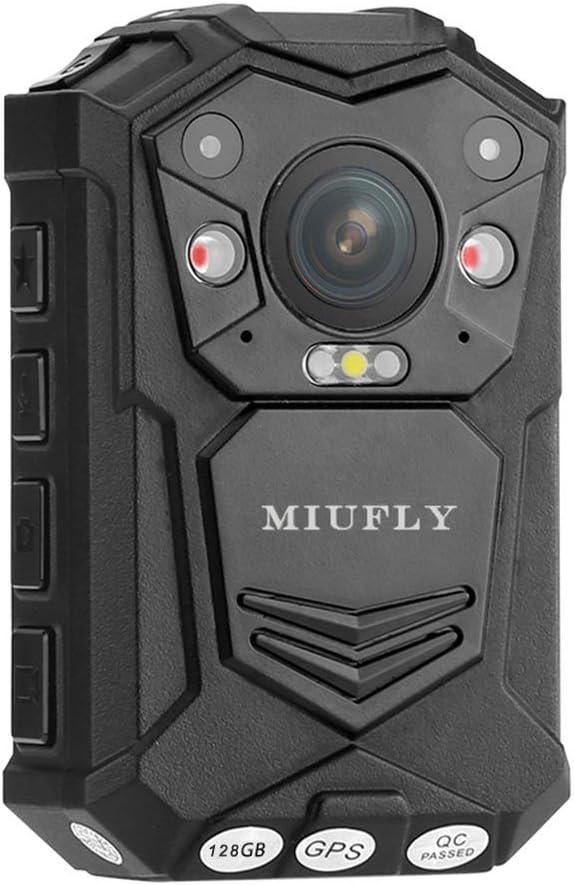
Obraz: Przód view of the MIUFLY Body Camera, showing the main lens, infrared LEDs, and indicator lights. The brand name "MIUFLY" is visible, along with "128GB", "GPS", and "QC PASSED" labels at the bottom.

Obraz: Bok view of the MIUFLY Body Camera, highlighting the USB port cover and control buttons.

Obraz: Tył view of the MIUFLY Body Camera, showing the 2-inch LCD screen and the attached 360-degree rotatable clip for versatile mounting.

Image: The MIUFLY Body Camera placed securely in its dedicated charging dock.
Organizować coś
1. Ładowanie urządzenia
Before first use, fully charge the camera. Connect the USB cable to the charging dock, then connect the other end to a power adapter or computer USB port. Place the camera into the charging dock. The charging indicator light will show the charging status. A full charge can take several hours.
2. Włączanie/wyłączanie zasilania
To power on, press and hold the Power button for approximately 3 seconds until the screen lights up. To power off, press and hold the Power button until the device shuts down.
3. Ustawienia początkowe (data, godzina, język)
Upon first power-on or after a factory reset, you may need to set the date, time, and preferred language. Navigate through the menu using the control buttons and confirm selections. Supported languages include English, Russian, Polish, Spanish, French, Japanese, and Portuguese.
4. Ochrona hasłem
For security, it is highly recommended to set a password for the device. This prevents unauthorized access to recorded files and device settings. Refer to the on-screen menu for password setup instructions.
Instrukcja obsługi
1. Nagrywanie wideo
Press the dedicated Record button to start video recording. Press it again to stop. The camera supports various resolutions including 2304x1296 30fps, 1920x1080 30fps, 1440x1080 30fps, 1280x720 30/60fps, and 848x480 30/60fps. Video encoding is H.264, and the format is MPEG4.
2. Robienie zdjęć
While recording video, you can capture still photos. Press the Photo button to take a snapshot. Images are saved in JPEG format.
3. Nagrywanie dźwięku
The camera has a built-in microphone for audio recording. Audio is saved in WAV format. You can also record audio independently without video.
4. Wizja nocna
The camera is equipped with 2 infrared LEDs for night vision, providing clear images up to 10 meters, even with visible facial recognition. Activate night vision through the camera's menu settings.
5. Funkcjonalność GPS
The integrated GPS module records location data during video recording. This data can be viewed on a GPS player, allowing you to track the movement path associated with the footage.
6. Detekcja ruchu
Enable motion detection to automatically start recording when movement is detected within the camera's field of viewFunkcja ta pomaga oszczędzać baterię i miejsce w pamięci.
7. Car DVR Mode
The camera supports a Car DVR mode with automatic recording upon ignition. This allows the camera to function as a dashcam when mounted in a vehicle.
8. Odtwarzanie
Use the 2-inch LCD screen to instantly review nagrane filmy i zdjęcia. Poruszaj się po files using the playback controls.
9. Znak wodny
Nagrane footage includes a watermark with user ID, timestamp, and date/time for authenticity and evidence integrity. The unique ID includes a 5-digit device ID and a 6-digit police ID.
Konserwacja
1. Czyszczenie
Wipe the camera body and lens with a soft, dry cloth. Do not use harsh chemicals or abrasive cleaners. Ensure the USB port cover is securely closed to maintain IP65 waterproof rating.
2. Przechowywanie
Store the camera in a cool, dry place away from direct sunlight and extreme temperatures. For long-term storage, ensure the battery is partially charged (around 50%) to preserve battery health.
3. Pielęgnacja baterii
The built-in 3200mAh Li-polymer battery provides up to 10 hours of continuous use (with IR closed, screen saver open, and 848x480p 30fps video resolution). Avoid fully discharging the battery frequently. Recharge the camera when the battery level is low.
Rozwiązywanie problemów
| Problem | Rozwiązanie |
|---|---|
| Cannot turn on the camera. | Press and hold the power button for approximately 3 seconds to turn it on. Do not release the button even if you see the red and green lights flashing, continue holding until the screen lights up. Ensure the battery is charged. |
| Odtwarzanie wideo jest przerywane lub zawiesza się. | Ensure your computer meets the minimum system requirements for playing high-resolution videos. Try using a different media player. Transfer files directly to your computer instead of playing from the camera. |
| Dane GPS nie są zapisywane lub są niedokładne. | Upewnij się, że kamera ma wyraźny obraz view of the sky for GPS signal acquisition. Avoid using the camera indoors or in areas with heavy obstruction. Check GPS settings in the camera menu. |
| Camera is not recognized by computer. | Try a different USB cable or USB port. Ensure the camera is powered on and in the correct USB mode (e.g., Mass Storage). Restart both the camera and the computer. |
Specyfikacje
| Funkcja | Szczegół |
|---|---|
| Marka | MIASTA |
| Model | EH15-128G |
| Rozdzielczość wideo | 2304x1296 30fps, 1920x1080 30fps, 1440x1080 30fps, 1280x720 30/60fps, 848x480 30/60fps |
| Kodowanie wideo | H.264 |
| Format wideo | MPEG4 |
| Format obrazu | Plik JPEG |
| Format audio | WAV |
| Składowanie | 128 GB wbudowanej pamięci |
| Ekran wyświetlacza | 2-calowy wyświetlacz LCD (rozdzielczość 240x320) |
| Przysłona obiektywu | F2.0 |
| Viewing kąt | 140 stopnia |
| Zoom cyfrowy | 16x |
| Wizja nocna | 2 Infrared LEDs, up to 10 meters with visible face image |
| Bateria | Wbudowana bateria litowo-polimerowa 3200mAh |
| Żywotność baterii | Up to 10 hours (fully charged, IR closed, screen saver open, 848x480p 30fps) |
| Dodatkowe światło | Biała latarka |
| Stopień wodoodporności | IP65 |
| Unikalny identyfikator | 5-digit device ID, 6-digit police ID |
| Bezpieczeństwo | Ochrona hasłem |
| Wymiary (dł. x szer. x wys.) | Wymiary 9.4 x 3.05 x 5.59 cm |
| Waga | 159 gram |
| Kompatybilne urządzenia | Laptop |
| Technologia łączności | Przewodowy (USB) |
| Stabilizacja obrazu | Cyfrowy |
| Typ fokusu | Autofokus |
| Obsługiwane języki | English, Russian, Polish, Spanish, French, Japanese, Portuguese |
Gwarancja i wsparcie
MIUFLY products are designed for reliability and performance. For specific warranty details, please refer to the warranty card included with your product or visit the official MIUFLY website. If you encounter any issues not covered in this manual, or require technical assistance, please contact MIUFLY customer support through their official channels. Keep your purchase receipt as proof of purchase for warranty claims.
Ask a question about this manual
Ask about setup, troubleshooting, compatibility, parts, safety, or missing instructions. Manuals+ will review the question and use this page’s manual context to help answer it.