
Wstęp
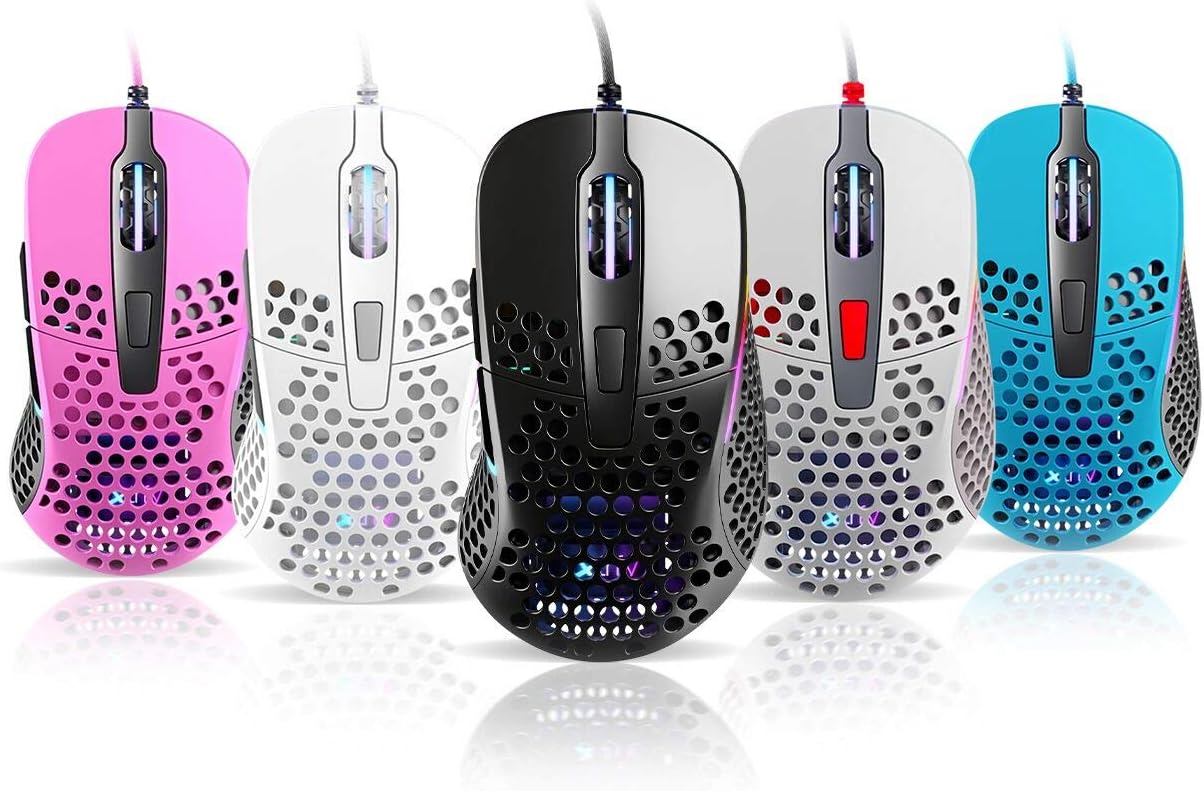
Thank you for choosing the Xtrfy M4 RGB Ultralight Gaming Mouse. This manual provides essential information for setting up, operating, and maintaining your new gaming mouse. The Xtrfy M4 is designed for high-performance gaming, featuring an ultralight design, customizable RGB illumination, and an ergonomic shape for comfortable use.
Przed użyciem produktu należy uważnie przeczytać instrukcję, aby zapewnić optymalną wydajność i trwałość.
Zawartość opakowania
Sprawdź, czy w przesyłce znajdują się wszystkie elementy:
- Xtrfy M4 RGB Ultralight Gaming Mouse
- Instrukcja obsługi (ten dokument)

Instrukcje konfiguracji
- Rozpakuj mysz: Carefully remove the Xtrfy M4 mouse from its packaging.
- Połącz z komputerem: Podłącz złącze USB myszy do dostępnego portu USB w komputerze.
- Instalacja sterownika: The mouse is plug-and-play and typically does not require additional drivers. Your operating system should automatically detect and install the necessary drivers.
- Test wstępny: Move the mouse and click the buttons to ensure it is functioning correctly.

Instrukcja obsługi
Funkcje przycisków
The Xtrfy M4 features 6 programmable buttons:
- Lewy przycisk myszy: Działanie podstawowe.
- Kliknij prawym przyciskiem myszy: Secondary action.
- Kółko przewijania (kliknięcie): Środkowy przycisk myszy/uniwersalne przewijanie.
- Przycisk do przodu: Default for navigating forward in web przeglądarki/aplikacje.
- Przycisk Wstecz: Default for navigating backward in web przeglądarki/aplikacje.
- Przycisk DPI: Cycles through DPI settings (located behind the scroll wheel).
Ustawienia DPI
The DPI (Dots Per Inch) button allows you to adjust the mouse sensitivity on the fly. Press the DPI button to cycle through preset DPI levels. The RGB lighting on the mouse may change color to indicate the current DPI setting.
Refer to the official Xtrfy website or software (if available) for detailed information on specific DPI levels and their corresponding LED colors.
Podświetlenie RGB
The Xtrfy M4 features customizable RGB lighting. Specific controls for lighting effects and colors are typically managed through dedicated software provided by Xtrfy. Please visit the official Xtrfy support page to download any available software for advanced customization.

Konserwacja
Proper maintenance ensures the longevity and performance of your Xtrfy M4 mouse.
- Czyszczenie: Do przecierania powierzchni myszy użyj miękkiej, suchej ściereczki. W przypadku uporczywych zabrudzeń delikatnie przetrzyjampPrzetrzyj ściereczkę wodą lub delikatnym środkiem czyszczącym. Unikaj stosowania silnych środków chemicznych i materiałów ściernych.
- Konserwacja czujnika: Utrzymuj czujnik optyczny na spodzie myszy w czystości i bez kurzu i zanieczyszczeń. W razie potrzeby użyj wacika lub sprężonego powietrza.
- Pielęgnacja kabli: Aby zapobiec uszkodzeniom, należy unikać ostrego zginania i nadmiernego ciągnięcia kabla myszy.
- Składowanie: Gdy nie używasz myszy, przechowuj ją w czystym i suchym miejscu, chroniąc ją przed ekstremalnymi temperaturami.
Rozwiązywanie problemów
If you encounter issues with your Xtrfy M4 mouse, try the following solutions:
- Mysz nie odpowiada:
- Sprawdź, czy kabel USB jest prawidłowo podłączony do działającego portu USB.
- Spróbuj podłączyć mysz do innego portu USB.
- Uruchom ponownie komputer.
- Ruch kursora jest nieregularny lub skokowy:
- Wyczyść czujnik optyczny znajdujący się na spodzie myszy.
- Upewnij się, że używasz myszy na czystej, nieodbijającej światła powierzchni lub podkładce pod mysz.
- Check for any software conflicts or outdated drivers (though typically not required, ensure your OS is up to date).
- Oświetlenie RGB nie działa:
- Sprawdź, czy mysz jest prawidłowo podłączona.
- If using Xtrfy software, check its settings to ensure lighting is enabled and configured correctly.
If these steps do not resolve the issue, please contact Xtrfy customer support for further assistance.
Specyfikacje
| Funkcja | Szczegół |
|---|---|
| Marka | Xtrfy |
| Model | M4 |
| Kolor | Niebieski (w zależności od wariantu produktu) |
| Technologia łączności | USB |
| Funkcja specjalna | Ergonomic Design, Ultralight, RGB Illumination |
| Liczba przycisków | 6 |
| Waga | 69 grams (Ultralight) |
Gwarancja i wsparcie
Xtrfy products are manufactured to the highest quality standards. For information regarding warranty coverage, please refer to the warranty card included with your product or visit the official Xtrfy webstrona.
For technical support, FAQs, driver downloads, or further assistance, please visit the Xtrfy support page: