1. Wprowadzenie
This manual provides instructions for the BESTEK MRJ6008 Travel Power Strip. This device is designed to expand your power access with multiple AC outlets and USB charging ports, incorporating surge protection for your electronic devices. It is suitable for both home and travel use.
2. Funkcje
- Wiele gniazdek: Equipped with 6 standard AC outlets (125V, 15A, 1875W) to power various devices simultaneously.
- Porty ładowania USB: Includes 1 Quick Charge 3.0 (QC 3.0) USB port and 3 USB-A ports (Auto 0-2.4A) for efficient charging of smartphones, tablets, and other USB-powered devices.
- Ochrona przeciwprzepięciowa: Provides 200 joules of surge protection to safeguard connected electronics from voltage spikes and lightning. A dedicated indicator light confirms active protection.
- Projektowanie kołowe: The compact, circular layout with 1.5 inches of space between AC outlets accommodates larger power adapters without blocking adjacent ports.
- Przedłużacz 6-stopowy: A durable 6-foot cord offers flexibility in placement, featuring a flat plug design for use in tight spaces and a Velcro strap for cable management.
- Przycisk zasilania: A master ON/OFF switch controls power to all outlets and USB ports, allowing for energy saving and easy power cycling.
- Możliwość montażu na ścianie: Two keyhole slots on the back allow for convenient wall mounting.

Image: The BESTEK Travel Power Strip showing its 6 AC outlets, 4 USB ports, and power switch.

Image: Diagram highlighting the 1.5-inch wide spacing between AC outlets for accommodating bulky plugs.
3. Instrukcje bezpieczeństwa
OSTRZEŻENIE: Aby zminimalizować ryzyko porażenia prądem, pożaru lub obrażeń, należy zawsze przestrzegać poniższych środków ostrożności.
- Use this device only indoors and in dry locations. Do not expose to moisture or liquids.
- Do not plug this power strip into another relocatable power tap or extension cord. Plug directly into a wall outlet.
- Do not exceed the maximum load of 1875W (15A at 125V).
- The power strip features a UL94 V-0 PC+ABS flame-retardant housing (rated up to 1382°F) and provides overload, short circuit, overcurrent, overvoltage, oraz zabezpieczenie przed przegrzaniem.
- Outlets are equipped with safety shutters to prevent accidental contact.
- The integrated phosphor bronze and UL Certified Strong Copper Wire (SJT 3x14AWG) ensure low-loss, low-heat, and enhanced safety.
- If the surge protection indicator light is off, the surge protection feature may no longer be active.
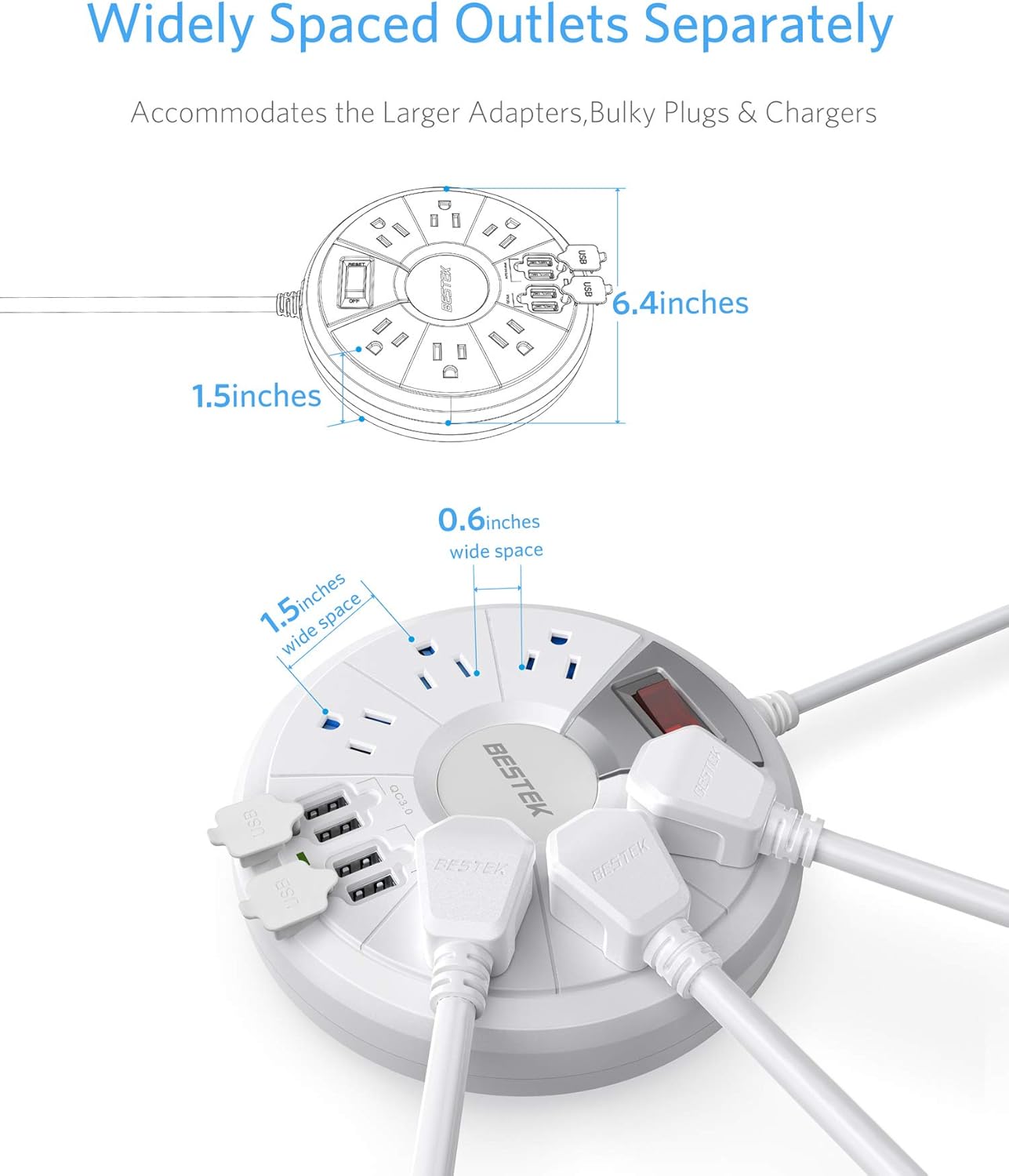
Image: Illustration of the power strip's internal safety features, including flame-retardant material, safety shutters, and power surge protection.
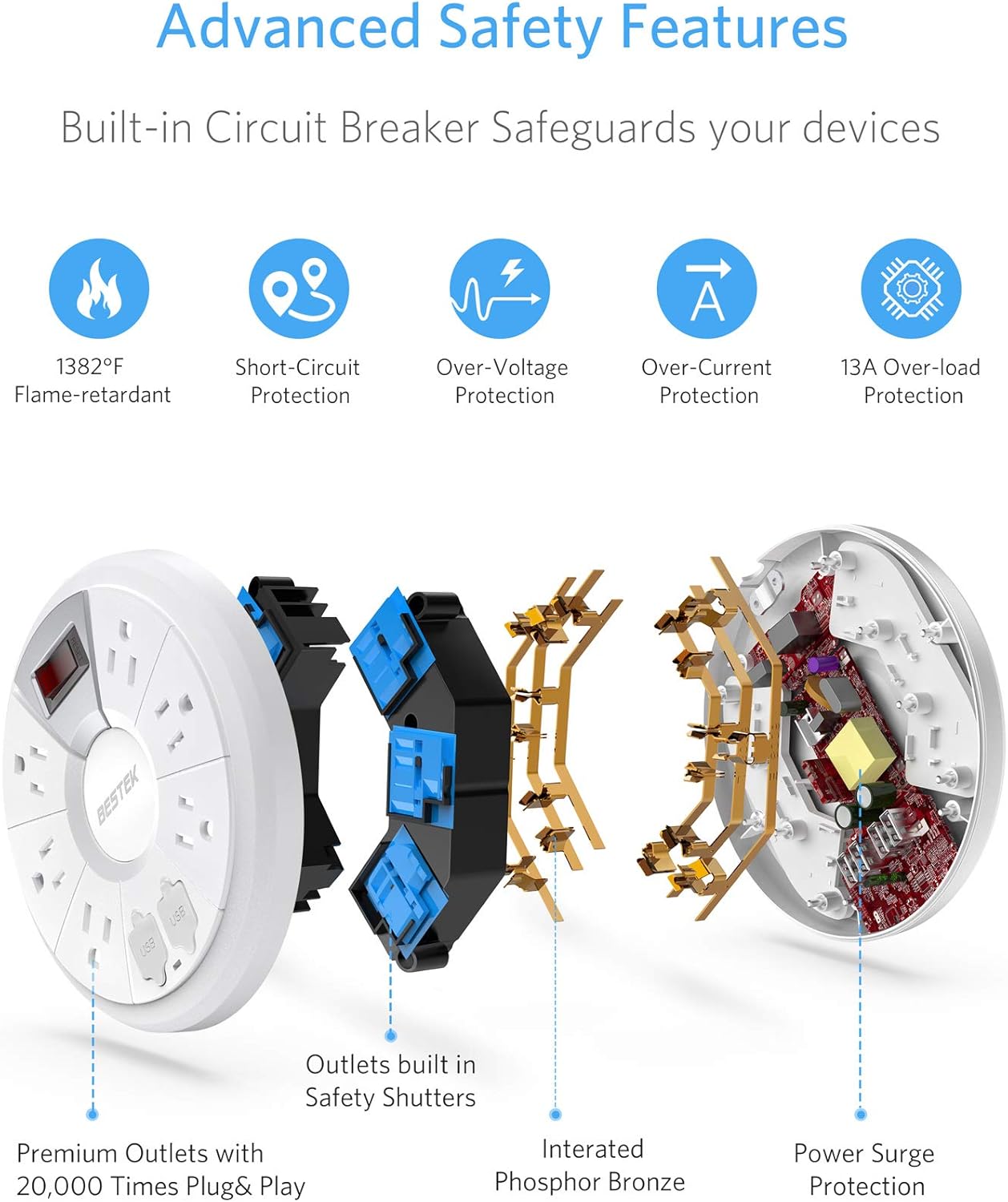
Image: Diagram detailing the UL Certified Strong Copper Wire, emphasizing its thickness and safety benefits.
4. Konfiguracja
- Rozpakować: Ostrożnie wyjmij listwę zasilającą z opakowania.
- Umieszczenie: Place the power strip on a stable, dry surface, or mount it to a wall using the integrated keyhole slots.
- Włączać do kontaktu: Insert the power strip's flat plug directly into a grounded 3-prong wall outlet.
- Zarządzanie kablami: Use the attached Velcro strap to manage any excess cord length, keeping your area tidy.
- Włączanie: Press the master ON/OFF switch. The switch will illuminate red, and a green indicator light for the USB ports will turn on, indicating the unit is powered and ready for use.

Image: The power strip shown mounted on a wall, demonstrating its space-saving capability.
5. Instrukcja obsługi
- Podłącz urządzenia prądu zmiennego: Plug your electronic devices into any of the 6 AC outlets. The wide spacing allows for larger adapters.
- Podłącz urządzenia USB: Open the protective covers for the USB ports. Plug your USB-powered devices into the available USB-A ports or the QC 3.0 port for faster charging of compatible devices.
- Regulacja mocy: Use the master ON/OFF switch to turn power to all connected devices on or off. This helps conserve energy when devices are not in use.
- Wskaźnik ochrony przeciwprzepięciowej: The red light on the power switch indicates that the power strip is receiving power and the surge protection is active.

Image: The power strip in use, demonstrating multiple devices connected to both AC outlets and USB ports.

Image: Close-up details of the power strip, including the power switch, flat plug, and USB ports with protective covers.
6. Konserwacja
- Czyszczenie: Disconnect the power strip from the wall outlet before cleaning. Wipe the exterior with a dry, soft cloth. Do not use liquid cleaners or abrasive materials.
- Składowanie: When not in use, store the power strip in a cool, dry place. Use the Velcro strap to keep the cord neatly coiled.
- Ochrona portu USB: Keep the protective covers over the USB ports when not in use to prevent dust and debris accumulation.
7. Rozwiązywanie Problemów
- Brak zasilania urządzeń:
- Ensure the power strip's master ON/OFF switch is in the 'ON' position (red light illuminated).
- Verify that the power strip is securely plugged into a functioning wall outlet.
- Sprawdź, czy gniazdko ścienne działa, podłączając do niego inne urządzenie.
- If the surge protection light is off, the surge protection may have been compromised. Discontinue use and replace the unit.
- Porty USB nie ładują się:
- Sprawdź, czy listwa zasilająca jest włączona.
- Confirm that your USB cable is not damaged and is properly connected to both the power strip and your device.
- Some devices may require specific charging protocols; ensure compatibility with the QC 3.0 or standard USB-A ports.
- Zabezpieczenie przed przeciążeniem: If the power strip automatically shuts off, it may be due to an overload. Disconnect some devices, then press the reset button (if available, typically integrated with the power switch) or cycle the power switch to restore functionality.
8. Specyfikacje
| Numer modelu | MRJ6008 |
| Marka | NAJLEPSZY |
| Gniazda prądu przemiennego | 6 |
| Porty USB | 4 (1 x QC 3.0, 3 x Auto 0-2.4A) |
| Wejście Voltage | 125 wolty |
| Maksymalny prąd | 15 Amps |
| Maksymalna moc | 1875 watów |
| Ochrona przeciwprzepięciowa | 200 dżuli |
| Długość przewodu | 6 stóp |
| Wymiary produktu | 6 x 6 x 0.1 cala |
| Waga przedmiotu | 1.68 funta |
| Materiał obudowy | UL94 V-0 PC+ABS Flame-Retardant |
9. Gwarancja i wsparcie
Specific warranty information for the BESTEK MRJ6008 Travel Power Strip is not provided in this document. Please refer to the product packaging or the official BESTEK webSzczegółowe warunki gwarancji można znaleźć na naszej stronie.
For technical support or customer service inquiries, please visit the official BESTEK webodwiedź witrynę lub skontaktuj się z ich kanałami obsługi klienta.