
Wstęp
Thank you for choosing the Zelotes F-35 2.4GHz Vertical Wireless Rechargeable Gaming Mouse. This ergonomic mouse is designed to provide a comfortable and efficient user experience, reducing wrist strain during extended use. Featuring multiple connectivity options and customizable buttons, it is ideal for both productivity and gaming on various devices.
Cechy produktu
- Ergonomiczna konstrukcja pionowa: Positions the hand in a natural handshake posture to minimize wrist and forearm strain.
- Łączność wielomodowa: Supports 2.4GHz wireless via USB dongle, Bluetooth 1, and Bluetooth 2 for versatile device pairing.
- Akumulator: Built-in rechargeable battery for convenience.
- Regulowane DPI: Up to 2400 DPI for precise cursor control, suitable for various tasks and gaming.
- 6 programowalnych przycisków: Includes left/right click, scroll wheel, DPI button, and forward/backward buttons for enhanced functionality.
- Czujnik optyczny: Reliable and accurate tracking on most surfaces.
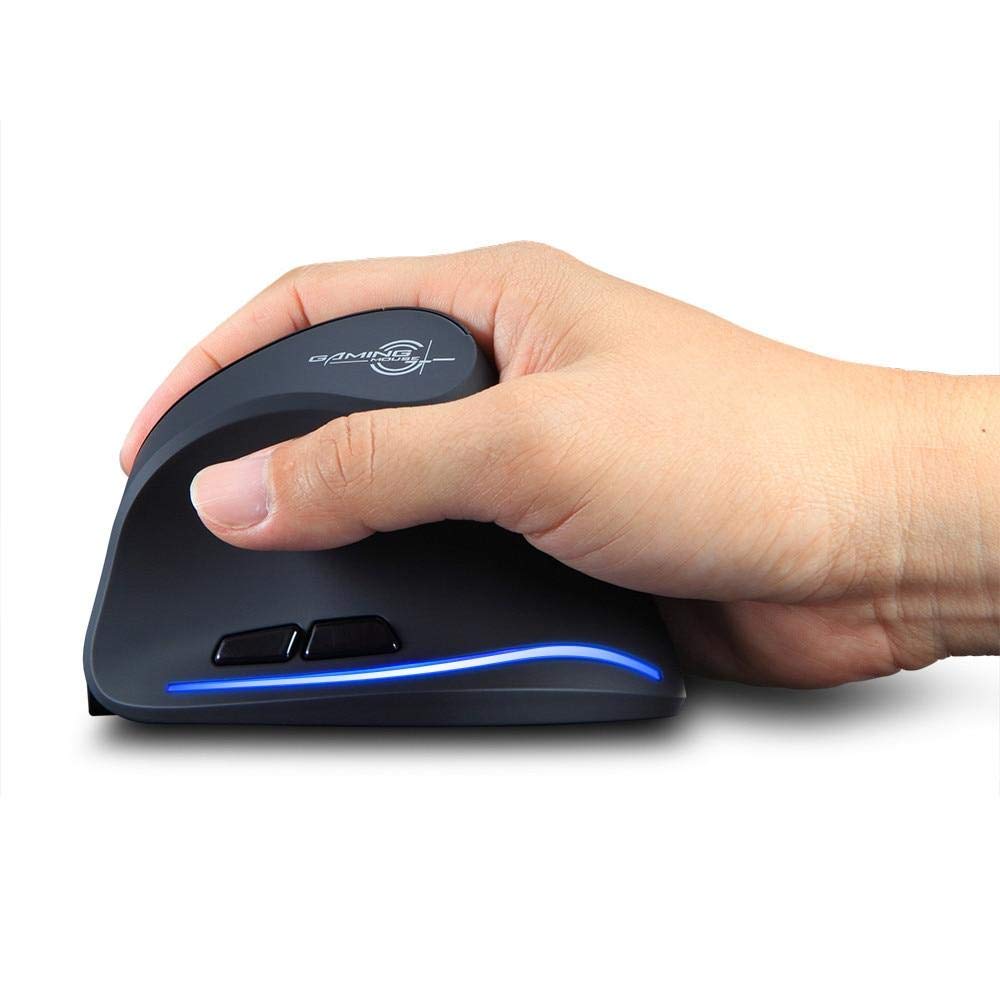
Image: The Zelotes F-35 Vertical Wireless Gaming Mouse, showcasing its unique ergonomic shape and illuminated accents.

Image: A visual comparison illustrating the natural hand position with a vertical mouse versus the twisted wrist position with a traditional horizontal mouse, highlighting the ergonomic benefits.
Instrukcje konfiguracji
- Włączanie: Znajdź przełącznik WŁ./WYŁ. znajdujący się na spodzie myszy i przesuń go do pozycji „WŁ.”.
- Wybierz tryb połączenia: The mouse supports three connection modes: 2.4GHz wireless (via USB dongle), Bluetooth 1, and Bluetooth 2. Use the 'Mode Switch' button on the bottom of the mouse to cycle through these options. The corresponding indicator light will illuminate.
- Połączenie bezprzewodowe 2.4 GHz:
- Remove the USB receiver dongle from its storage slot on the bottom of the mouse.
- Podłącz odbiornik USB do wolnego portu USB w komputerze lub laptopie.
- Mysz powinna połączyć się automatycznie.
- Połączenie Bluetooth (BT1/BT2):
- Switch the mouse to either Bluetooth 1 or Bluetooth 2 mode using the 'Mode Switch'.
- Na komputerze stacjonarnym lub laptopie przejdź do ustawień Bluetooth i wyszukaj nowe urządzenia.
- Select 'Zelotes F-35' from the list of available devices to pair.

Image: The underside of the Zelotes F-35 mouse, highlighting the ON/OFF switch, mode switch, and the integrated storage slot for the 2.4GHz USB receiver dongle.
Instrukcja obsługi
The Zelotes F-35 mouse features 6 buttons designed for intuitive control and enhanced productivity:
- Lewy przycisk myszy: Standardowa funkcja kliknięcia podstawowego.
- Przycisk prawego przycisku myszy: Standardowa funkcja dodatkowego kliknięcia.
- Kółko przewijania: Scroll up or down for navigation. Can also be pressed for a middle-click function.
- Przycisk regulacji DPI: Located near the scroll wheel, press to cycle through different DPI settings (e.g., 800/1200/1600/2400) to adjust cursor sensitivity.
- Przycisk do przodu: Located on the thumb rest, typically navigates forward in web przeglądarki lub file odkrywcy.
- Przycisk Wstecz: Located on the thumb rest, typically navigates backward in web przeglądarki lub file odkrywcy.
Ładowanie i bateria
The Zelotes F-35 mouse is equipped with a rechargeable battery for continuous use.
- Port ładowania: The mouse features a USB-C charging port, typically located at the front base of the mouse.
- Ładowanie: Connect the provided USB-C cable to the mouse and the other end to a USB power source (e.g., computer USB port, wall adapter).
- Wskaźnik baterii: The mouse may have an indicator light to show charging status or low battery. Refer to the product packaging for specific indicator behavior.
- Czas pracy baterii: The average battery life is approximately 12 months, depending on usage.
Konserwacja
- Czyszczenie: Do czyszczenia powierzchni myszy użyj miękkiej, suchej ściereczki. W przypadku uporczywych zabrudzeń, delikatnie przetrzyj powierzchnię.amp Można użyć ściereczki, aby mieć pewność, że do wnętrza podzespołów nie dostanie się wilgoć.
- Pielęgnacja czujnika: Utrzymuj czujnik optyczny znajdujący się na spodzie myszy w czystości i zapobiegaj jego zakurzeniu lub zanieczyszczeniom, aby zapewnić precyzyjne śledzenie ruchów.
- Składowanie: Jeśli nie używasz myszy przez dłuższy czas, wyłącz ją, aby oszczędzać baterię. Przechowuj odbiornik USB w przeznaczonym do tego gnieździe, aby zapobiec jego zgubieniu.
Rozwiązywanie problemów
- Mysz nie odpowiada:
- Sprawdź, czy mysz jest włączona.
- Sprawdź poziom naładowania akumulatora i w razie potrzeby naładuj.
- For 2.4GHz connection, ensure the USB receiver is securely plugged into the computer.
- For Bluetooth connection, ensure Bluetooth is enabled on your device and the mouse is correctly paired. Try re-pairing if issues persist.
- Niedokładne śledzenie:
- Wyczyść czujnik optyczny znajdujący się na spodzie myszy.
- Upewnij się, że używasz myszy na odpowiedniej powierzchni (nieodblaskowej, nieszklanej).
- Adjust the DPI setting to a comfortable level.
- Spadki łączności:
- Ensure the mouse is within the effective range of your device (typically up to 10 meters for wireless).
- Zminimalizuj zakłócenia ze strony innych urządzeń bezprzewodowych.
Specyfikacje
| Funkcja | Szczegół |
|---|---|
| Marka | Zelotes |
| Model | F-35 |
| Typ | Bezprzewodowe 2.4 GHz, Bluetooth |
| Tryb działania | Optoelektroniczny |
| Liczba przycisków | 6 |
| Liczba rolek | 1 |
| Orientacja dłoni | Prawidłowy |
| Typ interfejsu | USB |
| DPI | 2400 |
| Funkcja specjalna | Akumulatorowy, bezprzewodowy |
| Wykrywanie ruchu | Optyczny |
| Kompatybilne urządzenia | Laptop, komputer osobisty |
| System operacyjny | Linux, Windows 7 (and newer) |
| Średnia żywotność baterii | 12 miesięcy |
| Źródło zasilania | Zasilany bateryjnie |
| Kolor | Czarny |
| Kraj pochodzenia | Chiny |
Gwarancja i wsparcie
For warranty information and technical support, please refer to the documentation included with your product or visit the official Zelotes webMożesz również skontaktować się ze sprzedawcą, u którego kupiłeś produkt, aby uzyskać pomoc.