
PatrolEyes DV10 PRO
PatrolEyes DV10 PRO Body Camera User Manual
Model: DV10 PRO
Wstęp
This manual provides detailed instructions for the setup, operation, and maintenance of your PatrolEyes DV10 PRO 1080p WiFi Police Body Camera. The DV10 PRO is a high-definition video recorder designed for law enforcement, featuring 1080p HD video, a 140° wide-angle lens, 64GB of storage, GPS tracking, night vision, and WiFi connectivity. Please read this manual thoroughly to ensure proper use and to maximize the camera's capabilities.
Produkt ponadview
The PatrolEyes DV10 PRO is built for durability and performance, offering essential features for reliable recording in various conditions. Key features include:
- True 1080p HD video recording
- Obiektyw szerokokątny 140°
- Do 12 godzin pracy na baterii
- Wbudowana pamięć masowa 64 GB
- Integrated GPS for embedding location data
- Automatic infrared night vision
- WiFi function for smartphone connectivity and file review
- AES256 file encryption for data security
- Stopień wodoodporności i pyłoszczelności IP67
- EIS 6-axis image stabilization
Komponenty kamery
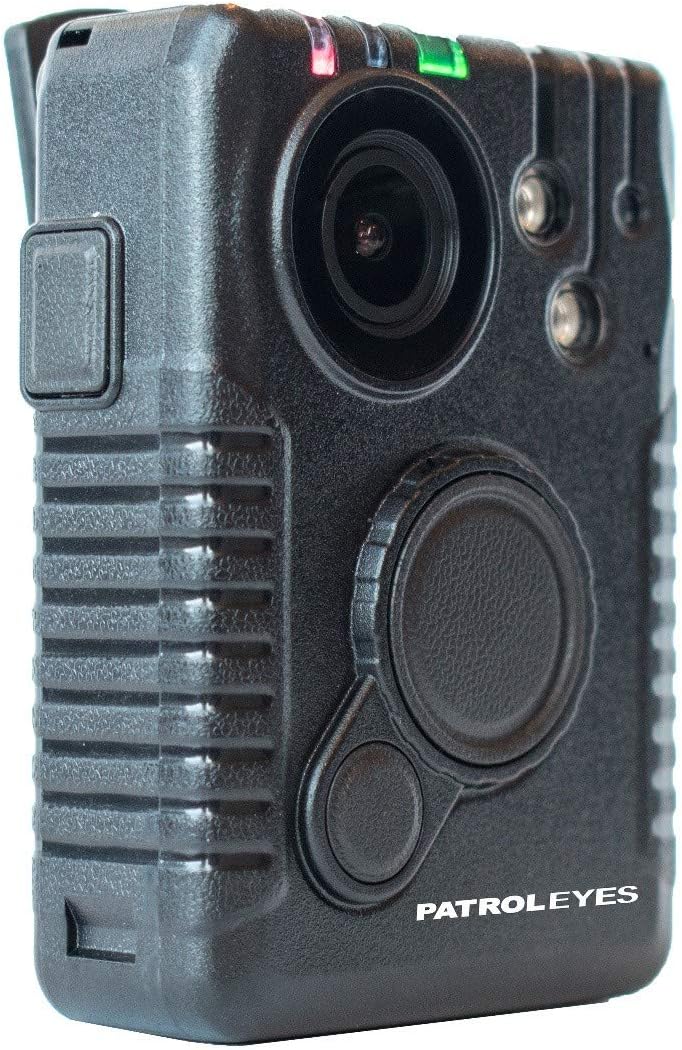
Rycina 1: Przód View. This image displays the front of the DV10 PRO body camera, highlighting the central camera lens, two infrared (IR) lights for night vision, and the primary recording and function buttons.

Rysunek 2: Strona View z portem USB. This image shows the side of the camera, featuring a protective cover over the USB port, used for charging and data transfer.

Rysunek 3: Tył View. The rear of the camera is shown, displaying the PatrolEyes product label and the attachment point for the body clip or mounting accessories.

Rysunek 4: Dół View. This image illustrates the bottom of the camera, revealing the metallic contact pins used for charging the device when placed in a compatible charging dock.
Organizować coś
1. Ładowanie początkowe
Before first use, fully charge the DV10 PRO camera. Connect the camera to a power source using the provided USB cable or charging dock. The battery indicator will show charging status and turn solid when fully charged. A full charge can provide up to 12 hours of recording time.
2. Włączanie/wyłączanie zasilania
- Włączanie: Naciśnij i przytrzymaj przycisk zasilania, aż zaświecą się kontrolki.
- Aby wyłączyć: Naciśnij i przytrzymaj przycisk zasilania, aż kontrolki zgasną.
3. Software Installation (Windows/PC Only)
The DV10 PRO requires specific software for full functionality, including viewing GPS data and managing settings. This software is compatible with Windows/PC operating systems only and will not work with Apple/MAC computers. Refer to the included software CD or the manufacturer's website for download and installation instructions. Install the software before connecting the camera to your computer for the first time.
Obsługa aparatu
1. Nagrywanie wideo
To begin recording, press the dedicated Record button. Recording can start even when the camera is initially off. Press the Record button again to stop recording. The camera will save video files in AVI format to its internal 64GB storage.
2. Wizja nocna
The DV10 PRO features an automatic infrared sensor for night vision. In low-light conditions, the camera will automatically activate its infrared lights to capture clear video. No manual activation is required.
3. Śledzenie GPS
The built-in GPS module automatically embeds location coordinates onto each video file. These coordinates can be viewed on maps using the dedicated software installed on your Windows/PC computer.
4. WiFi Function and Smartphone Connectivity
The camera's WiFi function allows you to connect your smartphone to the camera's WiFi signal. This enables remote control functionalities such as starting/stopping recordings and reviewing saved video, photo, or audio files directly from your smartphone. Consult the software manual for detailed instructions on connecting via WiFi.
5. File Szyfrowanie
The DV10 PRO utilizes AES256 file encryption to secure all recorded data. This ensures that your camera files remain protected. Access to encrypted files typically requires the proprietary software.
Konserwacja
1. Czyszczenie
Regularly clean the camera lens and body with a soft, dry cloth. Avoid using abrasive cleaners or solvents that could damage the device. Ensure the USB port cover is securely closed to maintain the IP67 rating.
2. Przechowywanie
Przechowuj aparat w chłodnym, suchym miejscu, z dala od bezpośredniego światła słonecznego i ekstremalnych temperatur. W przypadku przechowywania przez dłuższy czas, upewnij się, że akumulator jest częściowo naładowany (około 50%), aby wydłużyć jego żywotność.
3. Aktualizacje oprogramowania sprzętowego
Periodically check the PatrolEyes webOdwiedź naszą stronę, aby sprawdzić dostępne aktualizacje oprogramowania sprzętowego. Aktualizowanie oprogramowania sprzętowego aparatu może poprawić jego wydajność i dodać nowe funkcje.
Rozwiązywanie problemów
- Kamera nie włącza się: Ensure the battery is fully charged. If the issue persists, try connecting to a power source and attempting to power on.
- Problemy z nagrywaniem: Sprawdź, czy pamięć wewnętrzna jest pełna. Przenieś files to a computer to free up space.
- GPS data not appearing: Upewnij się, że kamera ma wyraźny obraz view of the sky to acquire a GPS signal. Verify that the viewing software is correctly installed and updated on your Windows/PC.
- WiFi connectivity problems: Ensure the camera's WiFi function is enabled. Check your smartphone's WiFi settings to ensure it is connected to the camera's network.
- Files inaccessible on Mac: The camera's software and file management are designed for Windows/PC only. Direct access or full functionality on Apple/MAC computers is not supported.
Specyfikacje
| Marka | PatrolOczy |
| Numer modelu | DV10 PRO |
| Rozdzielczość przechwytywania wideo | 1080p |
| Pole View | 140 stopni |
| Międzynarodowa Ocena Ochrony | IP67 (wodoodporność i pyłoszczelność) |
| Format przechwytywania wideo | Plik AVI |
| Typ źródła światła | Podczerwony |
| Technologia komunikacji bezprzewodowej | Wi-Fi |
| Technologia łączności | USB, Wi-Fi |
| Kompatybilne urządzenia | Smartphone (for WiFi function) |
| Źródło zasilania | Zasilany bateryjnie |
| Pamięć wewnętrzna | 64 GB |
| Żywotność baterii | Do 12 godzin |
| File Szyfrowanie | AES256 |
| GPS | Built-in, embeds coordinates |
| Zgodność oprogramowania | Windows/PC only |
| Data pierwszej dostępności | 13 września 2019 r. |
| UPC | 683318834330 |
| ASIN | B07XVRTZVV |
Gwarancja i wsparcie
For warranty information, technical support, or service inquiries, please refer to the documentation included with your product or visit the official PatrolEyes webZachowaj paragon jako dowód zakupu na wypadek reklamacji.
Oficjalne filmy produktowe
W tej chwili nie ma żadnych oficjalnych filmów sprzedawców dostępnych do osadzenia.
Ask a question about this manual
Ask about setup, troubleshooting, compatibility, parts, safety, or missing instructions. Manuals+ will review the question and use this page’s manual context to help answer it.