
1. Wprowadzenie
The TechniSat TECHNIRADIO RDR is a portable digital and FM radio designed for on-the-go listening. It features DAB+ digital radio reception for clear, noise-free audio, as well as traditional FM radio with RDS. The device supports MP3 playback from USB storage devices and includes an AUX-IN interface for connecting external audio sources. Its compact design, replaceable battery, and integrated LED torch make it a versatile companion for various environments.
2. Co znajduje się w pudełku
- TechniSat TECHNIRADIO RDR Portable Radio
- Mini kabel ładujący USB
- Rechargeable Lithium-Ion Battery (3.7 V / 800 mAh)
- Instrukcja obsługi
3. Funkcje produktu
- Radio cyfrowe DAB+: Enjoy a wide range of digital radio programs with robust, noise-free reception.
- FM Radio with RDS: Tune into traditional FM stations and receive broadcast information via RDS.
- Wyświetlacz LCD: A two-line LCD provides information about the current radio program and settings.
- Favorite Memory: Store up to 20 DAB+ and 20 FM stations for quick access.
- Direct Dial Buttons: Four freely assignable buttons for instant access to preferred stations.
- Odtwarzanie z USB: Odtwarzaj muzykę MP3 files directly from a connected USB data carrier.
- AUX-IN Interface: Connect external audio sources like smartphones or MP3 players.
- Gniazdo słuchawkowe: Do prywatnego słuchania.
- Integrated LED Torch: Zapewnia oświetlenie w ciemnym otoczeniu.
- Changeable and Rechargeable Battery: Offers up to 10 hours of portable music enjoyment.
- Kompaktowa i przenośna konstrukcja: Easy to carry with dimensions of 12.7 cm x 2.3 cm x 5.8 cm and a weight of 124g.
4. Sterowanie i połączenia
Elementy sterujące na panelu przednim

Obraz: Przód view of the TechniSat TECHNIRADIO RDR. This image displays the LCD screen, the speaker grille on the left, and the control buttons on the right. Buttons include navigation arrows (<, OK, >), numbered direct dial buttons (1-4), and function buttons (MOD, M, I, LED).
- Wyświetlacz LCD: Wyświetla informacje o stacji, czas i opcje menu.
- Głośnik: Wyjście audio.
- < / > Buttons: Poruszaj się po menu, zmieniaj stacje lub dostosowuj ustawienia.
- Przycisk OK: Potwierdź wybór.
- Przyciski 1-4: Direct access to preset favorite stations.
- Przycisk MOD (tryb): Switch between DAB+, FM, USB, and AUX modes.
- M (Menu/Memory) Button: Access menu options or save/recall presets.
- I (Info) Button: Display additional information (e.g., RDS data).
- Przycisk LED: Activate/deactivate the LED torch.
Side and Rear Connections

Obraz: kątowy view of the TechniSat TECHNIRADIO RDR, highlighting the side panel. This image shows the USB port, AUX-in jack, and headphone jack. The wrist strap attachment point is also visible.
- USB Port (Type-A): For connecting USB storage devices to play MP3 files.
- Gniazdo AUX-IN (3.5 mm): Podłącz zewnętrzne urządzenia audio.
- Gniazdo słuchawkowe (3.5 mm): Do prywatnego słuchania dźwięku.
- Mini-USB Port (DC 5V): Do ładowania wewnętrznego akumulatora.
- Komora baterii: Located on the rear, for the replaceable Li-ion battery.
5. Konfiguracja
5.1. Montaż i ładowanie akumulatora
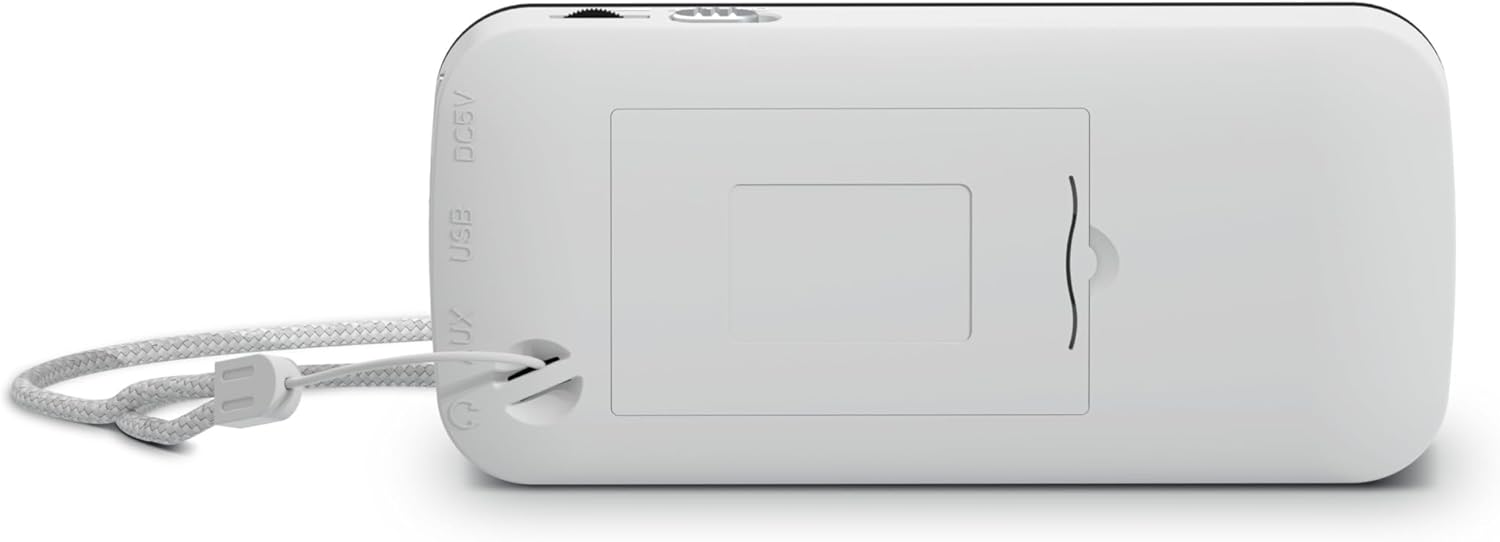
Obraz: Tył view of the TechniSat TECHNIRADIO RDR. This image shows the battery compartment cover, which can be opened to insert or replace the rechargeable Lithium-Ion battery. The DC 5V and USB labels are also visible on the side.
- Znajdź komorę baterii z tyłu urządzenia.
- Otwórz pokrywę komory baterii.
- Insert the provided Lithium-Ion battery, ensuring correct polarity.
- Dokładnie zamknij pokrywę komory baterii.
- Connect the mini USB charging cable to the mini-USB port on the side of the radio and to a suitable USB power adapter (not included) or a computer USB port.
- Wskaźnik baterii na wyświetlaczu pokaże stan ładowania. Pełne naładowanie trwa zazwyczaj kilka godzin.
5.2. Pierwsze włączenie zasilania
- After charging, disconnect the USB cable.
- Press and hold the power button (usually integrated with the MOD button or a dedicated button, refer to specific button layout if available) to turn on the radio.
- Upon first use, the radio may automatically initiate a DAB+ scan.
6. Instrukcja obsługi
6.1. Wybór trybu
Naciśnij MOD button repeatedly to cycle through available modes: DAB+, FM, USB, and AUX.
6.2. Obsługa radia DAB+
- Przełącz się na tryb DAB+ za pomocą MOD przycisk.
- If it's the first time or if stations need to be updated, perform a full scan:
- Naciśnij M (Przycisk MENU.
- Użyj </> przyciski, aby przejść do „Pełnego skanowania” i nacisnąć OK.
- The radio will scan for available DAB+ stations and store them.
- To select a station, use the </> buttons to browse the station list. Press OK aby potwierdzić.
- Aby zapisać ulubioną stację:
- Dostrój się do żądanej stacji.
- Naciśnij i przytrzymaj M Naciskaj przycisk, aż pojawi się napis „Preset Store”.
- Używać </> aby wybrać numer ustawienia wstępnego (1-20) i nacisnąć OK.
- Aby przywołać ulubioną stację, naciśnij krótko przycisk M przycisk, użyj </> aby wybrać ustawienie wstępne i naciśnij OK. Alternatively, use the direct dial buttons 1-4 if assigned.
- Naciśnij I (Info) button to cycle through different information displays (e.g., program type, signal strength).
6.3. Obsługa radia FM
- Przełącz się na tryb FM za pomocą MOD przycisk.
- To auto-scan for stations:
- Naciśnij i przytrzymaj < or > button to automatically search for the next available station.
- Aby dostroić ręcznie, naciśnij krótko przycisk < or > button to adjust the frequency step by step.
- To save a favorite station, follow the same procedure as DAB+ (press and hold M, select preset, OK).
- To recall a favorite station, briefly press M, select preset, OK, or use direct dial buttons 1-4.
- The radio supports RDS (Radio Data System), which displays station name and other information. Press the I (Info) button to cycle through available RDS data.
6.4. Odtwarzanie plików MP3 z USB
- Włóż urządzenie pamięci masowej USB (np. pendrive) zawierające plik MP3 files into the USB Type-A port.
- Switch to USB mode using the MOD przycisk.
- The radio will automatically detect and start playing MP3 files.
- Użyj </> przyciski do pomijania utworów.
- Ten OK button may function as Play/Pause.
6.5. AUX-IN Usage
- Connect an external audio device (e.g., smartphone, MP3 player) to the AUX-IN jack using a 3.5mm audio cable (not included).
- Przełącz się na tryb AUX za pomocą MOD przycisk.
- Steruj odtwarzaniem i głośnością bezpośrednio z podłączonego urządzenia zewnętrznego.
6.6. LED Torch Function
Naciśnij PROWADZONY button to turn the integrated LED torch on or off.
7. Informacje o baterii
- The TECHNIRADIO RDR uses a replaceable 3.7V / 800 mAh Lithium-Ion battery.
- A fully charged battery provides up to 10 hours of operation, depending on usage and volume level.
- Charge the battery using the supplied mini USB cable connected to a 5V USB power source.
- Aby przedłużyć żywotność baterii, należy unikać częstego całkowitego rozładowywania baterii, a jeśli urządzenie nie będzie używane przez dłuższy czas, należy je przechowywać w stanie częściowo naładowanym.
- If the battery needs replacement, use only genuine TechniSat replacement batteries or compatible alternatives with the same specifications.
8. Konserwacja
- Czyszczenie: Use a soft, dry cloth to clean the radio's exterior. Do not use abrasive cleaners, waxes, or solvents.
- Składowanie: Przechowuj radio w chłodnym i suchym miejscu, z dala od bezpośredniego światła słonecznego i ekstremalnych temperatur.
- Narażenie na działanie wody: To urządzenie nie jest wodoodporne. Unikaj narażenia na działanie wody i wysokiej wilgotności.
- Pielęgnacja baterii: Refer to Section 7 for battery maintenance guidelines.
9. Rozwiązywanie Problemów
| Problem | Możliwa przyczyna / rozwiązanie |
|---|---|
| Brak zasilania / Urządzenie nie włącza się. |
|
| Nie znaleziono stacji DAB+. |
|
| Słaby odbiór sygnału FM / Szumy. |
|
| Odtwarzanie USB nie działa. |
|
| No sound from AUX-IN. |
|
10. Specyfikacje
Ogólny
- Nazwa modelu: TECHNIRADIO RDR
- Numer modelu: 0001/3922
- Marka: TechniSat
- Kolor: Biały
- Typ wyświetlacza: LCD (Two-line)
Audio
- Moc RMS: 1 waty
- Speaker Output Channel Quantity: 1 (mono)
- Łączność słuchawkowa: 3.5 mm Jack
Tuner
- Technologia tunera: DAB+ / UKF
- Obsługiwane pasma radiowe: DAB+, UKW (FM)
- Cechy: RDS (Radio Data System) for FM, Favourite Memory (20 DAB+/20 FM)
Łączność
- Łączność USB: Yes (USB Type-A for MP3 playback, Mini-USB for charging)
- Wejście AUX: Yes (3.5 mm Jack)
- Całkowita liczba portów USB: 1 (Type-A for media, Mini-USB for power)
Moc
- Źródło zasilania: Zasilany bateryjnie
- Typ baterii: Lithium Ion (3.7 V / 800 mAh)
- Baterie w zestawie: Tak
- Akumulator: Tak
- Czas działania: Do 10 godzin (w przybliżeniu).
Fizyczny
- Wymiary produktu (szer. x gł. x wys.): Wymiary: 12.7 cm x 2.3 cm x 5.8 cm
- Waga przedmiotu: 124 gram
- Cechy szczególne: LED Torch
11. Gwarancja i wsparcie
Aby uzyskać informacje dotyczące gwarancji i pomocy technicznej, zapoznaj się z kartą gwarancyjną dołączoną do produktu lub odwiedź oficjalną stronę internetową TechniSat webZachowaj dowód zakupu na wypadek roszczeń gwarancyjnych.