
1. Wprowadzenie
The RIGOL DS1202Z-E is a high-performance 200 MHz digital oscilloscope designed for a wide range of applications including research and development, maintenance, and educational laboratory settings. It offers advanced features such as a 1 GSa/s real-time sample rate, 24 Mpts memory depth, and a 7-inch high-definition display, providing clear and detailed waveform analysis.
2. Główne cechy
- Szerokość pasma i Sampmolwa: 200 MHz bandwidth with 1 GSa/s real-time sampstawka.
- Głębokość pamięci: 24 Mpts memory for extended signal capture and detailed analysis.
- Pomiar wielofunkcyjny: Integrates a frequency counter and supports protocol decoding for RS232/UART, I2C, and SPI. Includes FFT analysis and automatic measurement functions.
- Waveform Recording: Features waveform recording and playback to capture signal variations and identify faults or anomalies.
- Wyświetlacz o wysokiej rozdzielczości: Equipped with a 7-inch TFT display offering 256 gray levels, providing a visual effect similar to phosphor screens for clear waveform details.
- Remote Control & Development Support: USB and LAN ports enable remote control from a PC. Compatible with SCPI commands and integrates with LabVIEW, Visual Basic, and Visual C++.
3. Koniec produktuview
3.1 Panel przedni
The front panel of the DS1202Z-E features a 7-inch color display, control buttons, and input connectors. The intuitive layout allows for easy access to all primary functions.

Figure 3.1: Front Panel of the DS1202Z-E Oscilloscope
3.2 Panel tylny
The rear panel provides connectivity options for power, USB, and LAN for remote operation and data transfer.
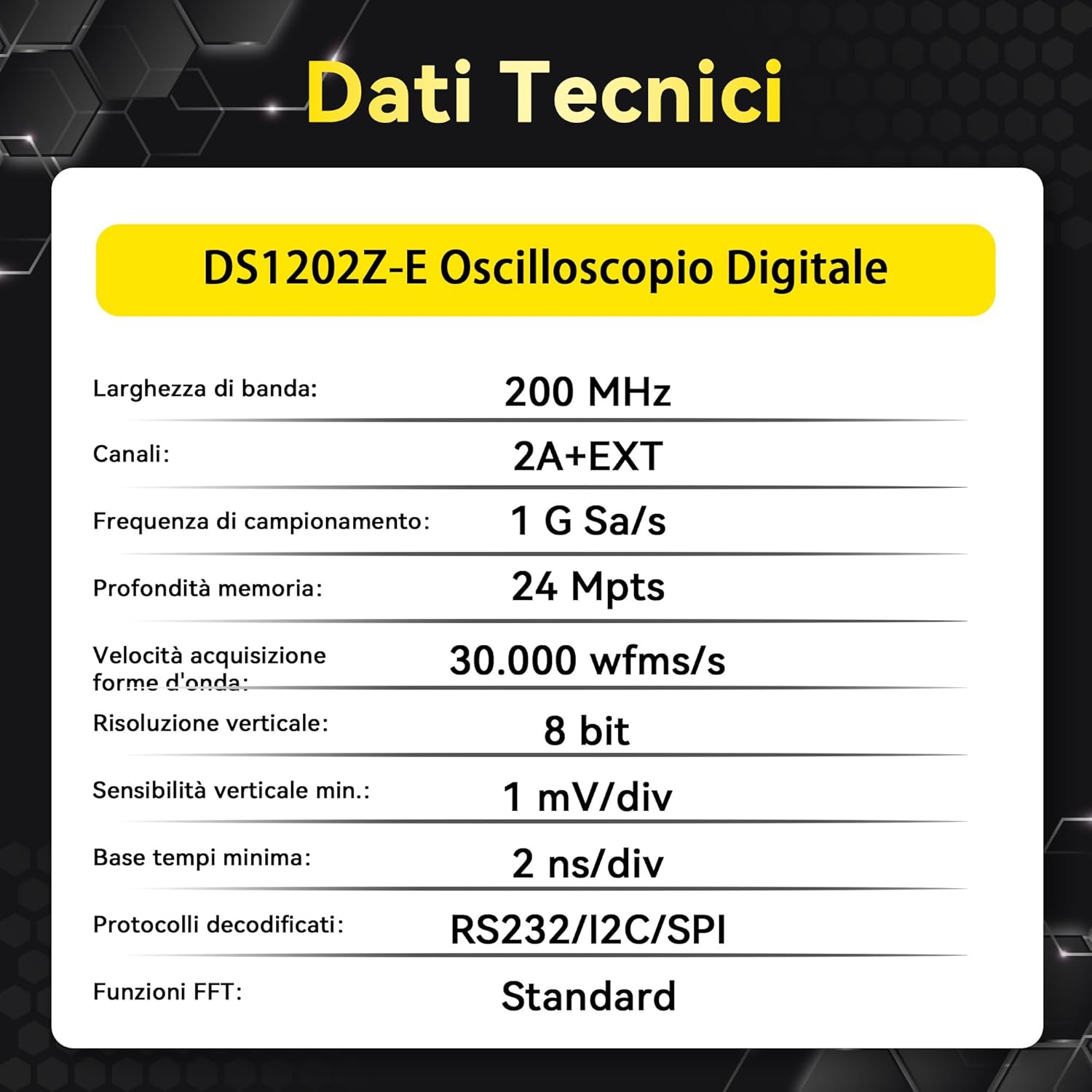
Figure 3.2: Rear Panel of the DS1202Z-E Oscilloscope
3.3 Wymiary
The compact design of the oscilloscope makes it suitable for various workspaces.

Figure 3.3: DS1202Z-E Dimensions
4. Konfiguracja
- Rozpakowywanie: Ostrożnie wyjmij oscyloskop i wszystkie akcesoria z opakowania.
- Podłączenie zasilania: Connect the provided power cord to the oscilloscope's power input on the rear panel and then to a suitable AC power outlet.
- Włączanie: Press the mechanical power button on the front panel to turn on the instrument.
- Połączenie sondy: Connect the oscilloscope probes to the CH1 and CH2 input connectors on the front panel. Ensure a secure connection.
- Kompensacja sondy: Perform probe compensation as described in the detailed user manual to ensure accurate measurements.
5. Instrukcja obsługi
5.1 Podstawowy wyświetlacz przebiegu
After powering on, connect a signal to one of the input channels. Use the vertical scale (Volts/Div) and horizontal scale (Time/Div) knobs to adjust the waveform display. The position knobs allow you to move the waveform vertically and horizontally.

Figure 5.1: Basic Waveform Display
5.2 Wyzwalanie
The trigger system stabilizes repetitive waveforms and captures single-shot events. Use the Trigger Level knob to set the trigger point. Various trigger modes (Edge, Pulse, Video, Slope, etc.) are available via the 'Trigger' menu.
5.3 Serial Bus Decoding
The DS1202Z-E supports decoding of common serial protocols. Access the 'Decode' menu to select the protocol (RS232/UART, I2C, SPI) and configure parameters. The decoded data will be displayed on the screen, simplifying debugging of serial communications.

Figure 5.3: Serial Bus Decoding (I2C Example)
5.4 Waveform Recording and Playback
Utilize the waveform recording feature to capture and store up to 5,000 frames of trigger events. This allows for later review and analysis of intermittent events or long-duration signals.

Figure 5.4: Waveform Recording and Playback Interface
5.5 FFT Analysis
The Fast Fourier Transform (FFT) function allows you to analyze signals in the frequency domain. This is useful for identifying harmonics, noise, and other frequency components. Access FFT from the 'Math' menu.

Figure 5.5: FFT Analysis Display
5.6 Funkcje produktuview Wideo
Wideo 5.6: Krótki przeglądview of the RIGOL DS1202Z-E oscilloscope's key features, including deep memory, capture rate, waveform tracking, and serial bus decoding capabilities.
6. Specyfikacje
| Funkcja | Specyfikacja |
|---|---|
| Marka | Rygol |
| Źródło zasilania | Elektryczny przewodowy |
| Styl | Cyfrowy |
| Kolor | Biały |
| Wymiary produktu (DxSxW) | Wymiary 31.3 x 16.1 x 12.2 cm |
| Minimalna objętość roboczatage | 100 wolty |
| Upper Operating Temperature | 122 stopni Fahrenheita |
| Typ pomiaru | Multimetr |
| Achieved Specifications | FCC, IEC 1010, IEC 61010-1:2000-1 |
| Model | DS1202Z-E |
| UPC | 764560091433 |
| Producent | BRAMKA |
| Globalny numer identyfikacyjny handlu | 00764560091433 |
| Numer części | RIGOL DS1202Z-E |
| Kraj pochodzenia | Chiny |
| Sales Unit Volume/Weight | 1.0 Liczba |
7. Co znajduje się w pudełku
The RIGOL DS1202Z-E package includes the following components:
- Main Unit (DS1202Z-E Digital Oscilloscope)
- 2 x Passive Probes (350MHz)
- Przewód zasilający (UE)
- USB A-B Data Cable
- Karta gwarancyjna
- Certyfikat kalibracji
- Deklaracja zgodności

Rysunek 7.1: Zawartość opakowania
8. Rozwiązywanie Problemów
This section provides general guidance for common issues. For detailed troubleshooting steps, refer to the comprehensive user manual available on the Rigol webstrona.
- Brak zasilania: Ensure the power cord is securely connected to both the oscilloscope and the power outlet. Check the power button.
- Brak wyświetlania przebiegu: Verify that probes are correctly connected to the input channels and the signal source. Adjust vertical and horizontal scales. Check trigger settings.
- Niestabilna forma fali: Dostosuj poziom i tryb wyzwalania. Upewnij się, że źródło wyzwalania jest prawidłowo wybrane.
- Nieprawidłowe pomiary: Perform probe compensation. Check probe attenuation settings on the oscilloscope.
9. Konserwacja
Właściwa konserwacja gwarantuje długowieczność i dokładność oscyloskopu.
- Czyszczenie: Use a soft, dry cloth to clean the exterior of the instrument. Do not use abrasive cleaners or solvents.
- Składowanie: Store the oscilloscope in a clean, dry environment away from direct sunlight and extreme temperatures.
- Kalibrowanie: Aby zachować dokładność pomiarów, zaleca się regularną kalibrację w autoryzowanych punktach serwisowych.
10. Gwarancja i wsparcie
The RIGOL DS1202Z-E Digital Oscilloscope comes with a 3-letnia gwarancja. Rigol offers Całodobowe wsparcie techniczne to assist with any product-related inquiries or issues. For service or support, please contact Rigol customer service or visit the official Rigol webstrona.
Więcej informacji znajdziesz na stronie Rigolna.com.