
Wstęp
Dziękujemy za zakupasing the ThreeH Digital Wooden LED USB Alarm Clock. This elegant and functional clock is designed to provide accurate time, date, and temperature readings, along with convenient alarm and voice control features. Please read this manual carefully to ensure proper setup and operation of your device.

Rycina 1: Przód view of the ThreeH Digital Wooden LED USB Alarm Clock.
Organizować coś
Zasilacz
The ThreeH Digital Wooden LED USB Alarm Clock can be powered by two methods:
- Przewód zasilający USB: Connect the included USB power cord to the DC5V port on the back of the clock and plug the other end into a USB power adapter (not included) or a computer USB port.
- Baterie AAA: For portable use or as a backup, insert 4 x AAA batteries (not included) into the battery compartment on the back of the clock. Ensure correct polarity.

Figure 2: Power supply options for the clock, including USB and AAA batteries.
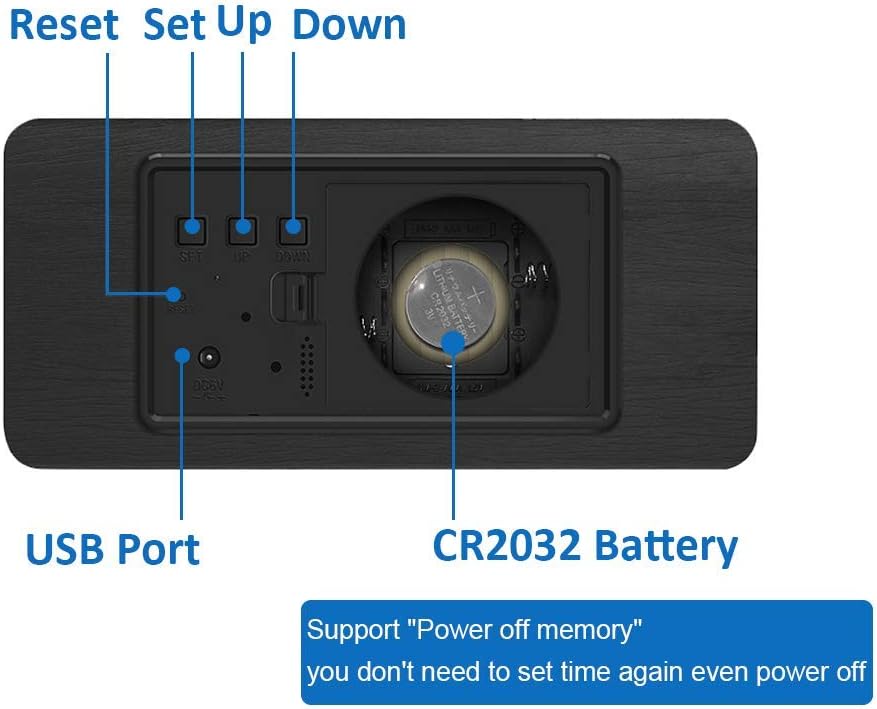
Figure 3: Rear panel of the clock with battery compartment and USB port.
Konfiguracja początkowa (czas i data)
Upon first power-up or after a power reset, you may need to set the time and date. The clock supports a time memory function via a CR2032 battery (included) to retain settings during power outagt.j.
- Locate the 'SET', 'UP', and 'DOWN' buttons on the back of the clock.
- Press the 'SET' button to enter the setting mode. The first setting (e.g., 12/24 hour format) will flash.
- Use the 'UP' and 'DOWN' buttons to adjust the value.
- Press 'SET' again to confirm the current setting and move to the next one (e.g., Hour, Minute, Year, Month, Day).
- Powtarzaj kroki 3 i 4, aż wszystkie ustawienia zostaną skonfigurowane.

Figure 4: Control buttons and ports on the back of the clock.
Operacyjny
Tryby wyświetlania
The clock cycles through different display modes: Time, Date, and Temperature. You can typically adjust the display cycle or set it to show only time by pressing the 'SET' button repeatedly outside of setting mode.
Ustawienia alarmu
Zegar obsługuje do trzech niezależnych alarmów (A1, A2, A3).
- In normal display mode, press 'SET' until 'ON:A1' (or 'ON:A2', 'ON:A3') appears.
- Use 'UP' or 'DOWN' to toggle the alarm ON/OFF.
- Press 'SET' to confirm and proceed to set the alarm hour and minute using 'UP' and 'DOWN'.
- Jeśli zachodzi taka potrzeba, powtórz czynność dla A2 i A3.

Figure 5: Setting multiple alarms (A1, A2, A3).
Funkcja sterowania głosem
This feature allows the display to turn on when a sound louder than 60dBm is detected (e.g., clapping hands, tapping the clock). The display will automatically turn off after a few seconds to save power.
- Press the 'DOWN' button.
- Select 'ON: Sd' to activate voice control mode.
- Select '--: Sd' to deactivate voice control mode.
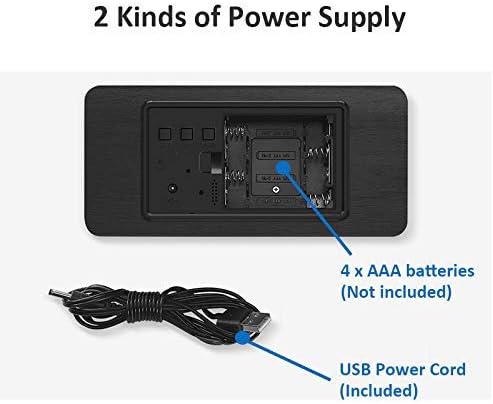
Figure 6: Demonstrating the sound control feature.

Figure 7: Comparison of silent auto-dimming and sound-activated display.
Regulacja jasności
The clock features soft LED lights that are clear at night without glare. The brightness may adjust automatically or can be manually set depending on the specific model version. Refer to the included mini-manual for detailed steps if manual adjustment is desired.

Figure 8: Display brightness variations.
Konserwacja
Czyszczenie
To clean the clock, gently wipe the surface with a soft, dry cloth. Do not use abrasive cleaners, solvents, or immerse the clock in water.
Wymiana baterii
If using AAA batteries, replace all four batteries when the display becomes dim or unresponsive. For the CR2032 memory battery, replace it if the time settings are lost after a power disconnection.
Rozwiązywanie problemów
| Problem | Możliwa przyczyna | Rozwiązanie |
|---|---|---|
| Wyświetlacz jest wyłączony lub przyciemniony. | No power, low batteries, or in power-saving mode. | Check USB connection. Replace AAA batteries. Tap the clock or make a sound to activate display if in voice control mode. |
| Alarm nie włącza się. | Alarm nie został ustawiony lub wyłączony. | Verify alarm settings (ON:A1/A2/A3) and ensure the correct time is set. |
| Time/Date settings are lost after power disconnection. | CR2032 memory battery is dead or missing. | Replace the CR2032 button cell battery on the back of the clock. |
| Sterowanie głosowe nie działa. | Voice control mode is off or ambient noise is too low. | Press 'DOWN' and select 'ON: Sd'. Ensure sound is louder than 60dBm. |
Specyfikacje
- Numer modelu: H-AC11Black_White
- Wymiary produktu (dł. x szer. x wys.): Wymiary 7 x 3.81 x 15 cm
- Waga: 200 gram
- Źródło zasilania: USB (DC5V) or 4 x AAA Batteries (not included)
- Bateria pamięci: 1 x CR2032 (w zestawie)
- Typ wyświetlacza: Cyfrowa dioda LED
- Cechy szczególne: Temperature Display (F/C), Alarm (3 sets), Large Display, Voice Control, Time Memory Function, Power Saving Mode
- Kolor: Black Wood with White LED display
Gwarancja i wsparcie
Informacje o gwarancji
This product comes with a standard manufacturer's warranty. Please retain your purchase receipt as proof of purchase. For specific warranty terms and conditions, refer to the documentation provided at the time of purchase or contact the retailer.
Obsługa klienta
If you encounter any issues or have questions regarding your ThreeH Digital Wooden LED USB Alarm Clock that are not covered in this manual, please contact ThreeH customer support through the retailer's platform or the official ThreeH website. Provide your model number (H-AC11Black_White) and a detailed description of the issue for faster assistance.