
1. Koniec produktuview
The Prolink PRO700SFCU is a single-phase input/single-phase output Line-Interactive Uninterruptible Power Supply (UPS) system designed to provide stable backup power. It features Prolink's Super-Fast Charging technology, enabling the battery to recharge to 90% capacity within 2-4 hours. This UPS is suitable for home and small office applications, protecting devices such as computers, modems, wireless routers, and network equipment from power disruptions.
Główne cechy:
- Superszybkie ładowanie: Battery recharges to 90% capacity within 2-4 hours.
- Ochrona przeciwprzepięciowa: Protects connected equipment from spikes and surges.
- Advanced Early Warning: Alerts users to output overload, high temperature, or low battery conditions, allowing time to save data or shut down systems.
- Zabezpieczenie przed przeciążeniem: Initiates an alarm and automatic shutdown to prevent damage and prolong UPS lifespan.
- Ochrona przed przegrzaniem: Shuts down the power supply if internal temperatures become unacceptably high.
- Inteligentne zarządzanie baterią: Protects the battery from overcharging and deep discharging.
- Automatyczna objętośćtage Rozporządzenie (AVR): Boosts and bucks voltage for stable output.
- Gniazda uniwersalne: Kompatybilny z szeroką gamą urządzeń.
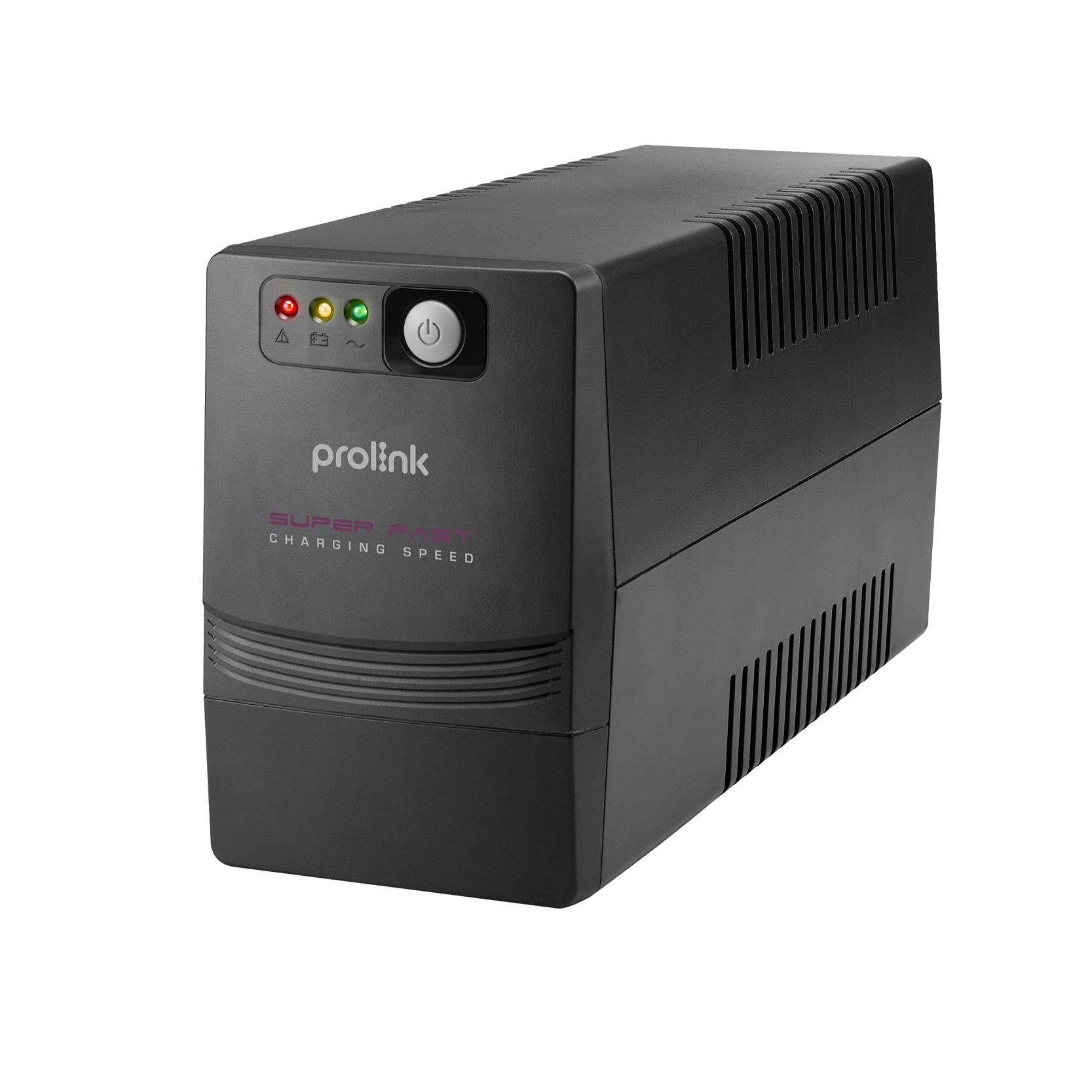
Rycina 1: Przód view of the Prolink PRO700SFCU UPS, showing its compact design.

Figure 2: Prolink PRO700SFCU UPS highlighting key features such as Super Fast Charging, True AVR, and Universal Sockets.
2. Informacje dotyczące bezpieczeństwa
Please read and follow all safety instructions carefully before installing, operating, or servicing the UPS. Keep this manual for future reference.
Ogólne środki ostrożności:
- Nie otwierać UPS-aasing. Wewnątrz nie ma żadnych części, które mogłyby być naprawiane przez użytkownika. W celu naprawy należy zwrócić się do wykwalifikowanego personelu serwisowego.
- Nie należy instalować UPS-a w miejscu narażonym na bezpośrednie działanie promieni słonecznych, w pobliżu źródeł ciepła ani w środowiskach o dużym zapyleniu, wilgotności lub obecności substancji żrących.
- Zapewnij odpowiednią wentylację wokół UPS-a. Nie blokuj otworów wentylacyjnych.
- Connect the UPS to a grounded power outlet.
- Do not connect non-computer related loads such as medical equipment, life support systems, or other critical devices to the UPS.
- W przypadku awarii naciśnij przycisk WYŁ. i odłącz przewód zasilający od źródła zasilania prądem zmiennym, aby wyłączyć UPS.
Bezpieczeństwo baterii:
- Baterie mogą stwarzać ryzyko porażenia prądem i wystąpienia wysokiego prądu zwarciowego. Należy przestrzegać następujących środków ostrożności:
- Nie wrzucaj baterii do ognia; mogą eksplodować.
- Nie otwieraj ani nie niszcz baterii. Uwolniony elektrolit jest szkodliwy dla skóry i oczu.
- Czynności serwisowe akumulatorów powinny być wykonywane lub nadzorowane przez personel posiadający wiedzę na temat akumulatorów i wymaganych środków ostrożności.
- Replace batteries only with the same type and number of batteries as originally installed.
3. Zawartość opakowania
Sprawdź, czy wszystkie wymienione poniżej elementy znajdują się w przesyłce. Jeśli brakuje któregokolwiek z nich lub jest on uszkodzony, skontaktuj się ze sprzedawcą.
- Prolink PRO700SFCU UPS Unit
- Instrukcja obsługi
- Przewód zasilający AC
- Kabel komunikacyjny USB
4. Konfiguracja
Follow these steps to properly set up your Prolink PRO700SFCU UPS.
4.1 Rozpakowanie i rozmieszczenie:
- Ostrożnie wyjmij UPS z opakowania.
- Place the UPS in a clean, dry, and well-ventilated area, away from direct sunlight, heat, and moisture.
- Ensure there is sufficient space around the UPS for proper airflow.
4.2 Podłączanie do zasilania:
- Connect the supplied AC power cord to the UPS input socket (labeled "INPUT 10A max") on the rear panel.
- Podłącz drugi koniec przewodu zasilającego do uziemionego gniazdka ściennego.
4.3 Podłączanie urządzeń:
- Plug your computer, monitor, modem, or other critical equipment into the UPS output sockets (labeled "OUTPUT") on the rear panel.
- For USB communication and monitoring, connect the USB cable from the UPS USB port to your computer's USB port.
4.4 Ładowanie początkowe:
For optimal performance, charge the UPS for at least 4-6 hours before initial use. The UPS will charge automatically when connected to AC power, even if the unit is turned off.
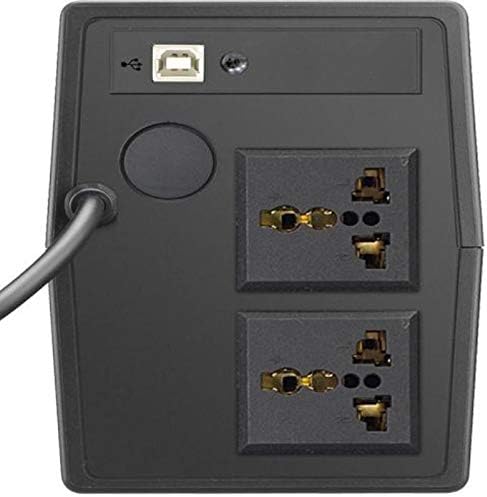
Figure 3: Rear panel of the UPS, illustrating the input power connection, output sockets, and USB port.
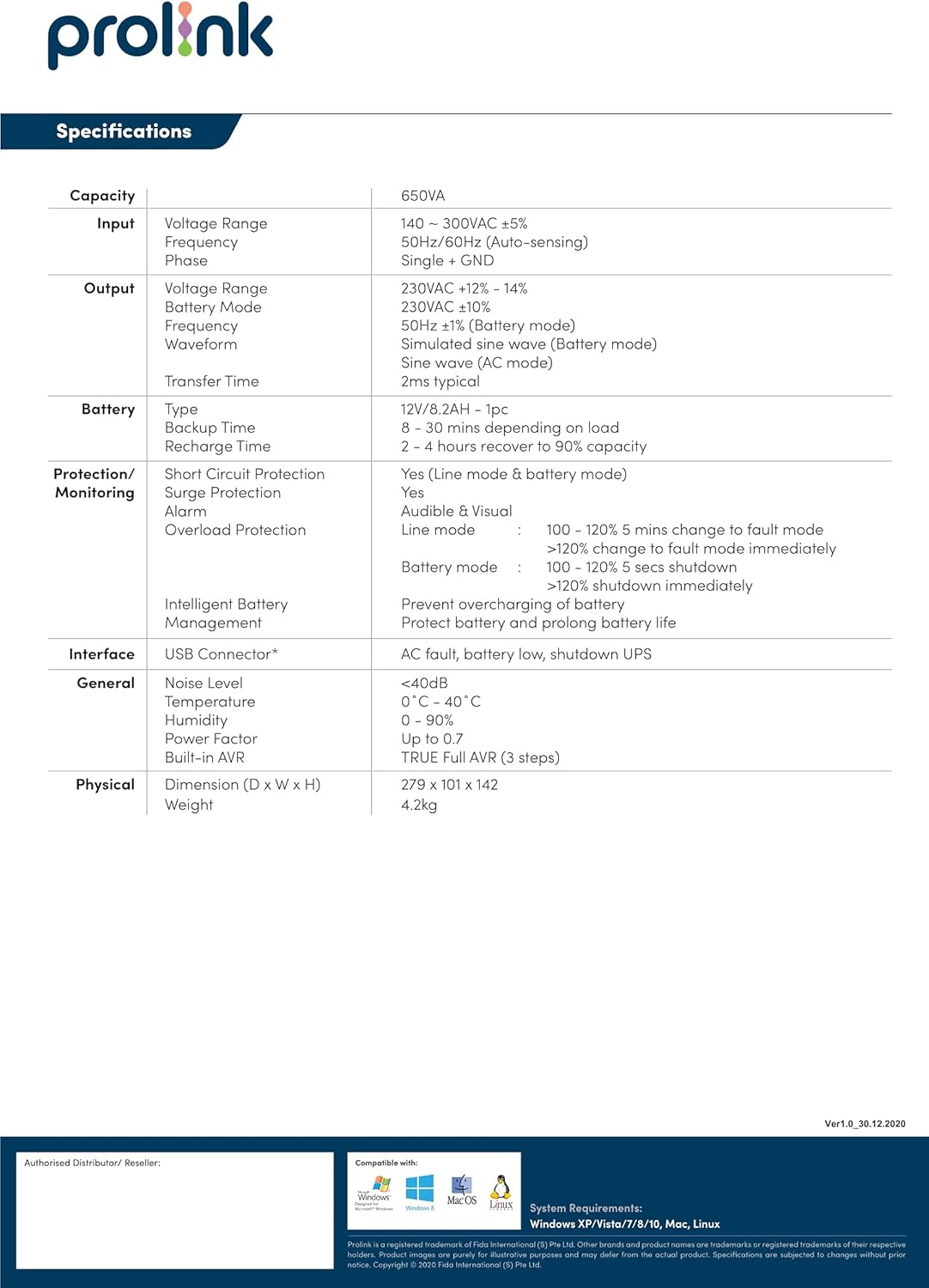
Figure 4: Detailed diagram of the UPS rear panel, indicating Power AC Input, Backup Outlets, and USB Port.
5. Działanie
5.1 Włączanie/wyłączanie:
- Włączanie: Press and hold the 'ON/MUTE' button for approximately 3 seconds until you hear a beep and the LCD display illuminates.
- Aby wyłączyć: Press and hold the 'OFF/ENTER' button for approximately 3 seconds until the LCD display turns off.
5.2 Zrozumienie wyświetlacza LCD:
The comprehensive LCD display panel provides real-time status information about the UPS, including input/output voltage, battery level, load capacity, and operational mode. Refer to the display for current operating conditions.
5.3 Tryb ECO:
The UPS may feature an ECO mode for energy saving. When active, the UPS operates with higher efficiency by bypassing the inverter during stable power conditions. Consult the LCD display or specific model features for activation and status of ECO mode.
5.4 USB Communication:
The USB port allows for software monitoring and control of the UPS. Install the provided monitoring software on your computer to view UPS status, configure settings, and enable automatic shutdown during extended power outagt.j.
6. Konserwacja
Regularna konserwacja zapewnia długowieczność i optymalną wydajność Twojego UPS-a.
6.1 Pielęgnacja baterii:
- Keep the UPS connected to AC power to ensure the battery remains fully charged. This prolongs battery life.
- If the UPS is stored for an extended period, recharge the battery every three months for at least 4-6 hours.
- Wymianę baterii powinien wykonywać wyłącznie wykwalifikowany personel serwisowy.
6.2 Czyszczenie:
- Do czyszczenia zewnętrznej części UPS-a należy używać miękkiej, suchej ściereczki.
- Nie używaj środków czyszczących w płynie ani w aerozolu.
- Upewnij się, że otwory wentylacyjne są wolne od kurzu i zanieczyszczeń.
6.3 Przechowywanie:
- Store the UPS in a cool, dry place.
- Ensure the battery is fully charged before storing.
7. Rozwiązywanie Problemów
W tej sekcji omówiono typowe problemy, które mogą wystąpić z UPS-em. Jeśli problem będzie się powtarzał, skontaktuj się z obsługą klienta.
| Problem | Możliwa przyczyna | Rozwiązanie |
|---|---|---|
| UPS się nie włącza | Brak zasilania prądem zmiennym; Niski poziom naładowania baterii; Usterka UPS | Check AC power connection; Charge battery for 4-6 hours; Contact support if fault persists. |
| UPS wydaje ciągły sygnał dźwiękowy | Overload; Low battery; UPS fault | Reduce connected load; Allow battery to charge; Contact support if fault persists. |
| Krótki czas tworzenia kopii zapasowej | Akumulator nie jest w pełni naładowany; akumulator jest zużyty | Charge battery for 4-6 hours; Consider battery replacement by qualified personnel. |
| Ostrzeżenie o przeciążeniu | Connected load exceeds UPS capacity | Disconnect non-essential equipment to reduce load. |
8. Specyfikacje
Technical specifications for the Prolink PRO700SFCU 650VA UPS.
| Funkcja | Specyfikacja |
|---|---|
| Pojemność | 650VA |
| Wejście Voltage Zakres | 140 - 300VAC ±5% |
| Częstotliwość wejściowa | 50Hz/60Hz (automatyczne wykrywanie) |
| Objętość wyjściatage Zakres | 230VAC ±12% - 14% (Battery Mode: 230VAC ±10%) |
| Częstotliwość wyjściowa | 50Hz ±1Hz (Battery Mode: 50Hz ±1Hz) |
| Przebieg wyjściowy | Simulated Sine Wave (AC Mode: Sine Wave) |
| Czas transferu | 2 ms typowo |
| Typ baterii | 12V/7.2AH x 1pc |
| Czas tworzenia kopii zapasowej | 8 - 30 minutes (depending on load) |
| Czas ładowania | 2 - 4 hours to 90% capacity |
| Ochrona przeciwprzepięciowa | Tak |
| Alarm dźwiękowy | Battery Mode, Low Battery, Overload, UPS Fault |
| Interfejs | Złącze USB |
| Poziom hałasu | <40dB |
| Temperatura pracy | 0°C - 40°C |
| Wilgotność | 0 - 90% (bez kondensacji) |
| Współczynnik mocy | Do 0.7 |
| Wbudowany AVR | PRAWDA Pełny AVR (3 kroki) |
| Wymiary (gł. x szer. x wys.) | Wymiary: 279 x 101 x 142 mm |
| Waga | 4.2 kilogramów |
| Całkowita moc gniazdek | 2 |
| Typ złącza | IEC 320 C13/C14 |
| Typ wtyczki zasilania | Typ G |
9. Gwarancja i wsparcie
Informacje o gwarancji:
This Prolink PRO700SFCU UPS is covered by a manufacturer's warranty. Please refer to the warranty card included in your package or visit the official Prolink webAby zapoznać się ze szczegółowymi warunkami gwarancji obowiązującymi w Twoim regionie, odwiedź naszą witrynę.
Obsługa klienta:
For technical assistance, troubleshooting, or service inquiries, please contact Prolink customer support. You can find contact information on the official Prolink webna stronie internetowej lub za pośrednictwem lokalnego dystrybutora.
Webstrona: www.prolink2u.com