
1. Wprowadzenie
This manual provides detailed instructions for the proper use and maintenance of your ELECTROPRIME SK-892 Mini Digital Voice Recorder. Please read this manual thoroughly before operating the device to ensure optimal performance and longevity. Keep this manual for future reference.
2. Koniec produktuview
The ELECTROPRIME SK-892 is a compact and portable digital voice recorder designed for discreet audio capture and playback. It features 8GB of internal storage and a simple one-switch operation.
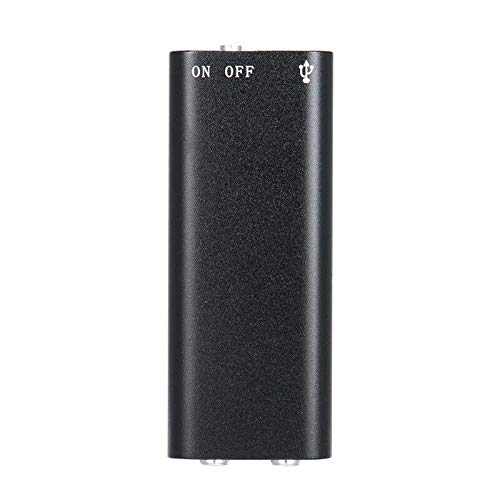
Rysunek 2.1: Szczyt view of the ELECTROPRIME SK-892 Mini Digital Voice Recorder, highlighting the ON/OFF switch and the USB port for connectivity.
Elementy urządzenia:
- Przełącznik włącz / wyłącz: Steruje funkcjami zasilania i nagrywania.
- Port USB: Used for charging the device and connecting to a computer for data transfer.
- Gniazdo słuchawkowe (3.5 mm): For audio playback using earphones.
- Kontrolka: Zapewnia informacje zwrotne o stanie (np. nagrywaniu, ładowaniu).
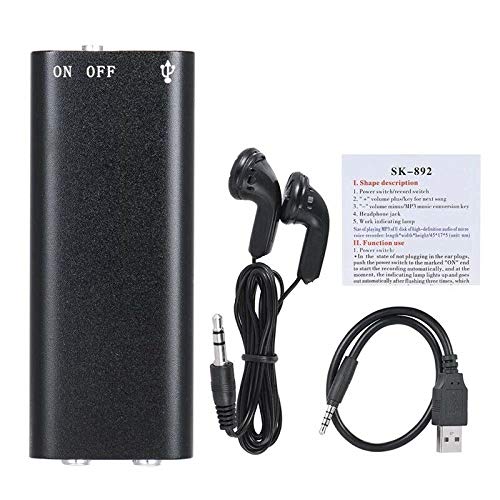
Rysunek 2.2: The SK-892 recorder shown with its accessories, including wired headphones and a USB charging/data cable. The small instruction card is also visible.
3. Konfiguracja
3.1 Ładowanie urządzenia
- Connect the small end of the provided USB cable to the USB port on the recorder.
- Connect the other end of the USB cable to a powered USB port on a computer or a USB wall adapter (not included).
- The indicator light will illuminate during charging. Once fully charged, the light may change color or turn off.
- Pełne naładowanie trwa zazwyczaj około 2–3 godzin.
3.2 Pierwsze włączenie zasilania
To power on the device, slide the ON/OFF switch to the "ON" position. The indicator light will briefly flash, indicating the device is ready for operation.
4. Instrukcja obsługi
4.1 Nagrywanie dźwięku
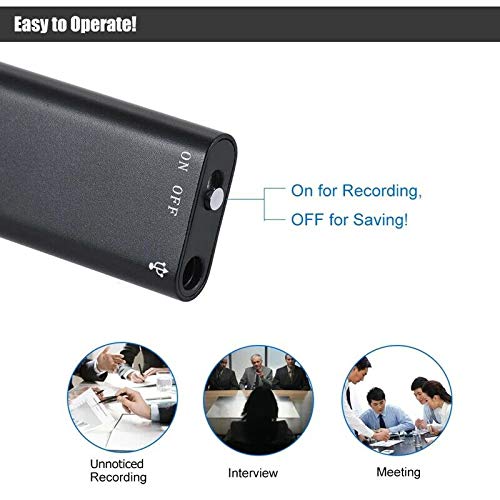
Rysunek 4.1: Detail of the SK-892's ON/OFF switch, illustrating its dual function for initiating recording and saving files.
- Sprawdź, czy urządzenie jest odpowiednio naładowane.
- To begin recording, slide the ON/OFF switch to the "ON" position. The device will automatically start recording. The indicator light will typically flash or remain steadily lit during recording, then turn off to indicate discreet operation.
- To stop recording and save the audio file, slide the ON/OFF switch to the "OFF" position. The indicator light will flash a few times and then turn off, confirming the recording has been saved and the device is powered down.
Notatka: Ensure the switch is fully in the "OFF" position to properly save your recordings and prevent data loss.
4.2 Odtwarzanie nagrań
- Connect the provided headphones (or your own 3.5mm headphones) to the headphone jack on the recorder.
- Slide the ON/OFF switch to the "ON" position. The device will typically begin playing the most recent recording or cycle through recordings.
- Further controls for playback (e.g., next track, volume) may be available through the connected headphones if they feature inline controls, or by briefly toggling the ON/OFF switch (refer to the small instruction card for specific playback controls if available).
- To stop playback, slide the ON/OFF switch to the "OFF" position.
4.3 Podłączanie do komputera
To transfer recordings to your computer or manage files:
- Ensure the recorder is powered "OFF".
- Podłącz rejestrator do komputera za pomocą dołączonego kabla USB.
- Your computer should recognize the device as a removable disk (similar to a USB flash drive).
- Navigate to the device's storage to access your recorded audio files (usually in a folder named "RECORD" or similar).
- Możesz kopiować, przenosić lub usuwać filew razie potrzeby.
- Safely eject the device from your computer before disconnecting the USB cable to prevent data corruption.
5. Konserwacja
- Przechowuj urządzenie w suchym miejscu. Unikaj narażenia na działanie wilgoci i płynów.
- Czyść urządzenie miękką, suchą ściereczką. Nie używaj silnych środków chemicznych ani ściernych środków czyszczących.
- Unikaj upuszczania urządzenia i narażania go na silne uderzenia.
- Przechowuj urządzenie w chłodnym, suchym miejscu, gdy nie jest używane.
- Aby zachować sprawność baterii, ładuj urządzenie regularnie, nawet jeśli nie używasz go często.
6. Rozwiązywanie Problemów
| Problem | Możliwe rozwiązanie |
|---|---|
| Urządzenie nie włącza się. | Ensure the device is fully charged. Connect to a USB power source and check the indicator light. |
| Cannot record audio. | Check if the device has sufficient battery. Ensure the ON/OFF switch is moved fully to the "ON" position. Verify there is enough free storage space. |
| Nagrania nie są zapisywane. | Ensure the ON/OFF switch is moved fully to the "OFF" position to properly save the file. Do not disconnect power during recording or saving. |
| Cannot hear playback. | Ensure headphones are securely connected. Check headphone functionality with another device. Verify the device is powered "ON" for playback. |
| Urządzenie nie zostało rozpoznane przez komputer. | Ensure the recorder is powered "OFF" before connecting to the computer. Try a different USB port or cable. Restart your computer. |
7. Specyfikacje
- Model: SK-892
- Pojemność pamięci: 8 GB
- Format audio: MP3
- Interfejs sprzętowy: USB
- Zgodne urządzenia: MP3 Player (for playback)
- Producent: ELEKTROPRYM
- Numer części przedmiotu: ASHA20BEBUBEB19894
8. Gwarancja i wsparcie
For warranty information or technical support, please refer to the documentation included with your purchase or contact ELECTROPRIME customer service through their official channels. Please have your model number (SK-892) and purchase details ready when contacting support.
Aby uzyskać dalszą pomoc, możesz odwiedzić stronę ELECTROPRIME brand page on Amazon.