
Wstęp
This manual provides essential information for the safe operation and maintenance of your Potensic T35 GPS Drone. Please read this manual thoroughly before operating the drone to ensure proper function and to avoid damage or injury. Keep this manual for future reference.
Wytyczne bezpieczeństwa
- Dronem należy zawsze sterować na otwartej przestrzeni, z dala od ludzi, budynków i przeszkód.
- Podczas lotu utrzymuj bezpieczną odległość od drona.
- Nie lataj przy silnym wietrze lub niesprzyjających warunkach pogodowych.
- Przed każdym lotem upewnij się, że baterie są całkowicie naładowane.
- Follow all local regulations and laws regarding drone operation.
- Trzymaj palce i luźne części odzieży z dala od obracających się śmigieł.
Zawartość opakowania
Sprawdź, czy w przesyłce znajdują się wszystkie elementy:
- Potensic T35 GPS Drone
- Pilot zdalnego sterowania
- 2 x 2500mAh Drone Batteries
- Kabel ładujący USB
- Zapasowe śmigła
- Osłony śmigła
- Śrubokręt
- Instrukcja obsługi
Produkt ponadview
Komponenty drona
Familiarize yourself with the main parts of your T35 drone.

Image: The Potensic T35 GPS Drone, showcasing its overall design with propellers and integrated camera.
Główne cechy
- 1080P HD Camera with 120° FOV: Captures high-definition aerial footage. The camera angle is 90° adjustable. A 4-32G SD card is required for 1080P recording.
- Wideo na żywo FPV: Real-time video transmission to your smartphone via Wi-Fi.
- Dual GPS System: Provides stable flight and precise positioning.
- Powrót do domu przez GPS: Automatically returns the drone to its takeoff point in case of low battery, signal loss, or manual activation.
- Tryb „Podążaj za mną”: The drone follows your movement, capturing footage automatycznie.
- Utrzymywanie wysokości: Maintains a consistent altitude for stable hovering.
- Draw the Dot (Waypoint Flight): Plan a flight path by drawing points on the app screen, and the drone will follow it.
- Bateria 2500mAh: Provides extended flight time. Two batteries are included for longer sessions.
Organizować coś
1. Montaż i ładowanie akumulatora
- Insert the 2500mAh battery into the drone's battery compartment until it clicks into place.
- To charge, remove the battery and connect it to the USB charging cable. Plug the USB cable into a compatible USB power source (e.g., computer, USB wall adapter). The charging indicator will show charging status.

Image: Two 2500mAh drone batteries, ready for charging or installation.
2. Propeller and Propeller Guard Installation
- Attach the propellers to the motor shafts, ensuring correct orientation (A and B propellers).
- Secure the propeller guards to the drone's arms using the provided screws and screwdriver.
3. Konfiguracja pilota zdalnego sterowania
- Włóż 4 baterie AA (nie ma ich w zestawie) do pilota.
- Mount your smartphone onto the controller's phone holder.
4. Instalacja aplikacji
- Download and install the official Potensic drone app from your smartphone's app store (iOS or Android).
- Connect your smartphone to the drone's Wi-Fi network (usually named 'Potensic_XXXXXX') in your phone's Wi-Fi settings.
Instrukcja obsługi
1. Włączanie i parowanie
- Umieść drona na płaskiej, poziomej powierzchni.
- Turn on the drone, then turn on the remote controller.
- Push the left joystick up then down to pair the drone with the controller. The drone's indicator lights will become solid.
2. Kalibracja GPS
- Perform compass calibration as instructed by the app or manual. This typically involves rotating the drone horizontally and vertically.
- Wait for the drone to acquire sufficient GPS satellites (indicated by solid green lights or app status).
3. Start i lądowanie
- Start jednym kluczem: Press the one-key takeoff button on the controller or in the app. The drone will automatically ascend to a safe altitude.
- Start ręczny: Push both joysticks down and outwards to start the motors. Then push the left joystick up to ascend.
- Lądowanie jednym klawiszem: Naciśnij przycisk lądowania. Dron opadnie i wyląduje automatycznie.
- Lądowanie ręczne: Gently pull the left joystick down to descend.
4. Tryby lotu
The Potensic T35 offers several intelligent flight modes:
- Powrót do domu przez GPS: When activated, the drone will fly back to its recorded takeoff point. This feature is also triggered automatically by low battery or signal loss.
- Tryb „Podążaj za mną”: Enable this mode in the app. The drone will use GPS to track your mobile device and follow you, maintaining a set distance and altitude.
- Utrzymywanie wysokości: This mode is active by default, allowing the drone to maintain its current altitude without constant throttle input.
- Draw the Dot (Waypoint Flight): In the app, draw a series of points on the map. The drone will fly along this predefined path while maintaining its altitude.
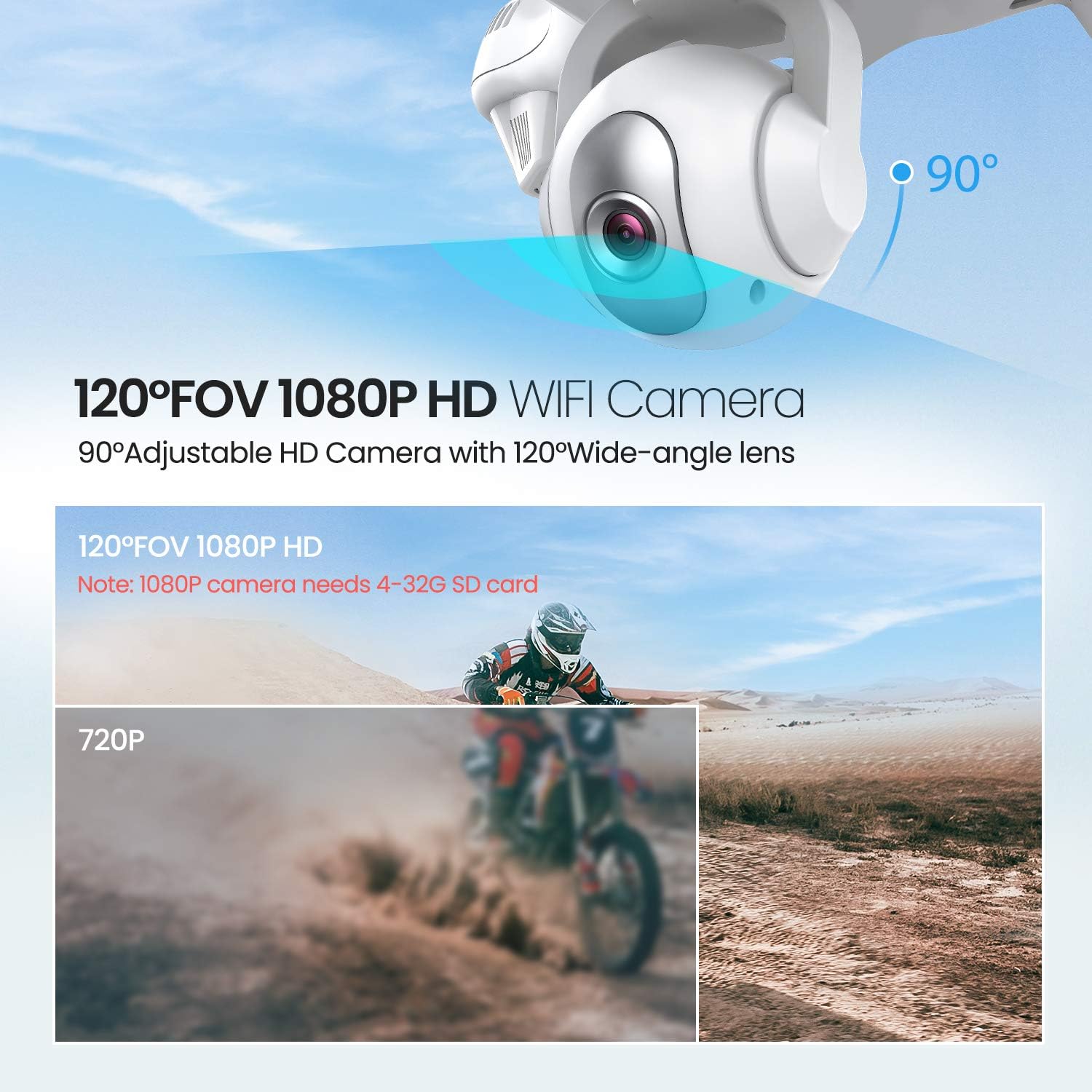
Image: The drone illustrating its GPS Auto Return function, showing a flight path back to a designated home point.

Image: The drone demonstrating its Follow Me Technology, tracking a moving subject.

Image: A user interacting with the 'Draw the Dot' feature on a smartphone, planning the drone's flight path.
Obsługa kamery
1. Kamera HD 1080P
The T35 drone is equipped with a 1080P HD camera with a 120° wide-angle lens. The camera angle can be adjusted by 90° for optimal viewing.

Image: Close-up of the drone's 120° FOV 1080P HD Wi-Fi camera, highlighting its adjustable angle.
2. FPV Live Video
Once connected to the drone's Wi-Fi, open the Potensic app to view FPV (z perspektywy pierwszej osoby) w czasie rzeczywistym View) video directly on your smartphone. This allows for precise framing of photos and videos.
3. Recording and Photos
- Insert a 4-32GB SD card into the drone's camera slot for 1080P video recording and photo storage.
- Use the dedicated buttons on the remote controller or the app interface to start/stop video recording or take photos.
Konserwacja
- Czyszczenie: Do czyszczenia drona i pilota używaj miękkiej, suchej ściereczki. Nie używaj silnych środków chemicznych ani rozpuszczalników.
- Śmigła: Regularly inspect propellers for damage. Replace any bent or chipped propellers immediately.
- Pielęgnacja baterii: Przechowuj baterie w chłodnym i suchym miejscu. Nie przeładowuj ani nie rozładowuj baterii nadmiernie.
- Składowanie: When not in use, store the drone and its components in a protective case to prevent damage.
Rozwiązywanie problemów
| Problem | Możliwa przyczyna | Rozwiązanie |
|---|---|---|
| Dron się nie włącza | Akumulator nie został prawidłowo zainstalowany lub jest rozładowany | Sprawdź, czy akumulator jest całkowicie naładowany i prawidłowo włożony. |
| Drone cannot pair with controller | Incorrect pairing sequence or low controller battery | Follow pairing instructions. Replace controller batteries. |
| Niestabilny lot / Dryfowanie | Improper calibration or strong winds | Perform GPS and gyroscope calibration. Avoid flying in windy conditions. |
| Brak transmisji wideo FPV | Wi-Fi not connected or app issue | Upewnij się, że telefon jest połączony z siecią Wi-Fi drona. Uruchom ponownie aplikację i drona. |
| GPS Return Home not working | Insufficient GPS satellites or no recorded home point | Ensure drone acquires enough GPS signals before takeoff. |
Specyfikacje
| Funkcja | Szczegół |
|---|---|
| Marka | Potencyjny |
| Nazwa modelu | T35 |
| Rozdzielczość przechwytywania wideo | 1080p |
| Technologia łączności | Wi-Fi |
| Pojemność baterii | 2500 mlnamp Godziny |
| Typ sterowania | Zdalne sterowanie |
| Typ nośnika | SD Card (4-32GB recommended for 1080P) |
| Zakres wiekowy (opis) | Dorosły |
Oficjalny film o produkcie
Obejrzyj ten oficjalny film, aby dowiedzieć się więcejview of the Potensic T35 GPS Drone's features and operation.
Wideo: Oficjalny film prezentujący produktasing the Potensic T35 GPS Drone in action, highlighting its various features and capabilities.
Gwarancja i wsparcie
For warranty information, technical support, or service inquiries, please refer to the contact details provided on the Potensic official webwitryny lub dokumentacji zakupu. Zachowaj dowód zakupu na wypadek roszczeń gwarancyjnych.