
1. Wprowadzenie
Dziękujemy za zakupasing the Singsation Professional Karaoke Machine. This portable Bluetooth karaoke system is designed to provide hours of entertainment with its advanced voice effects, dynamic sound effects, and captivating light show. This manual will guide you through the setup, operation, and maintenance of your new karaoke machine, ensuring you get the most out of its features.
2. Informacje dotyczące bezpieczeństwa
- Przed użyciem produktu należy przeczytać wszystkie instrukcje.
- Nie wystawiaj urządzenia na działanie wody ani nadmiernej wilgoci.
- Zapewnij odpowiednią wentylację, nie blokuj żadnych otworów wentylacyjnych.
- Używaj wyłącznie zasilacza dostarczonego wraz z urządzeniem.
- Trzymaj urządzenie z dala od źródeł ciepła, takich jak grzejniki, kratki wentylacyjne, piece lub inne urządzenia (w tym amp(lifiers) wytwarzające ciepło.
- Nie próbuj samodzielnie naprawiać tego produktu. Wszelkie czynności serwisowe należy powierzyć wykwalifikowanemu personelowi serwisowemu.
- Unikaj umieszczania ciężkich przedmiotów na urządzeniu.
3. Zawartość opakowania
Sprawdź, czy w przesyłce znajdują się wszystkie elementy:
- Singsation Professional Karaoke Machine Unit
- 2 x mikrofony
- Zdalne sterowanie
- Zasilacz
- Instrukcja obsługi (ten dokument)
4. Funkcje produktu
The Singsation Professional Karaoke Machine is packed with features to enhance your singing experience:
- 60 Professional-Quality Voice Effects: Transform your voice with various effects like echo, baritone, alien, and more.
- 10 Amazing Sound Effects: Add fun sounds like applause, cheers, and air horn to your performance.
- 25 Room-Filling LED Light Effects: Create a dynamic party atmosphere with multi-color light modes including party, pulse, breathe, and chase.
- Przenośna konstrukcja: Easy to transport for parties anywhere.
- Łączność Bluetooth: Wirelessly stream music from your smartphone or tablet.
- Podwójne wejścia mikrofonowe: Includes two microphones for duet singing.

Rysunek 4.1: Nadview of the Singsation Karaoke Machine's control panel highlighting the extensive light, sound, and voice effects available.

Rysunek 4.2: The Singsation Karaoke Machine supports two microphones, enabling duet performances for enhanced entertainment.
5. Konfiguracja
Follow these steps to set up your Singsation Professional Karaoke Machine:
- Rozpakuj jednostkę: Ostrożnie wyjmij wszystkie elementy z opakowania. Zachowaj opakowanie do późniejszego przechowywania lub transportu.
- Podłączenie zasilania: Connect the supplied power adapter to the DC IN port on the back of the karaoke machine and plug it into a standard electrical outlet. The unit can also operate on its internal battery.
- Podłączenie mikrofonu: Plug the included microphones into the MIC 1 and MIC 2 XLR ports on the side of the unit.
- Umieszczenie: Place the karaoke machine on a stable, flat surface. Ensure there is adequate space around the unit for ventilation.
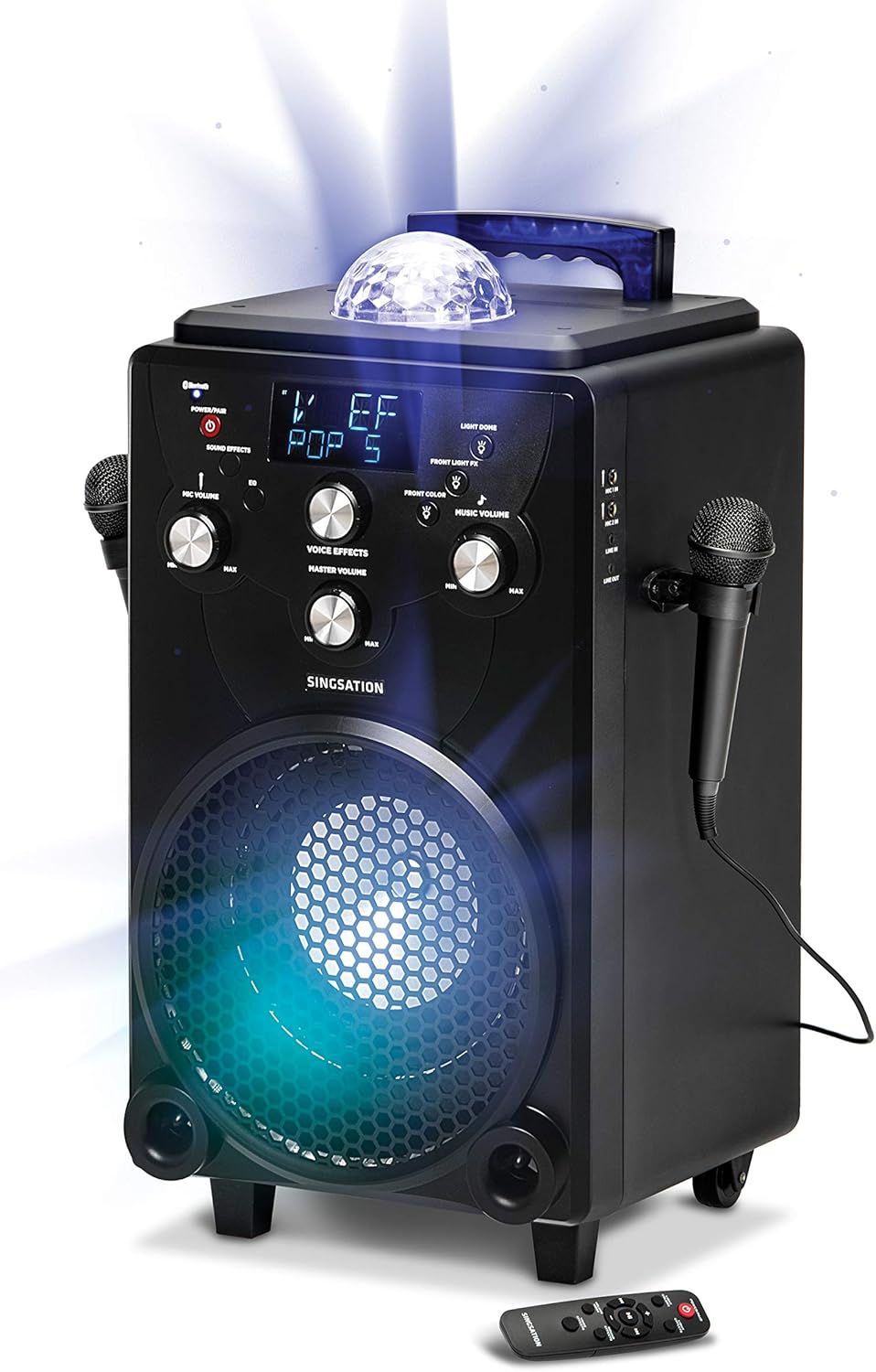
Rysunek 5.1: The main unit of the Singsation Professional Karaoke Machine, showing its overall design and primary components.
6. Instrukcja obsługi
This section details how to operate your karaoke machine's various functions.
6.1. Włączanie/wyłączanie zasilania
- Naciśnij i przytrzymaj MOC/PARA button on the control panel or the remote control to turn the unit ON or OFF.
6.2. Odtwarzanie muzyki
The Singsation Karaoke Machine supports Bluetooth audio streaming and auxiliary input.
6.2.1. Parowanie Bluetooth
- Turn on the karaoke machine. The Bluetooth indicator will flash, indicating it's in pairing mode.
- Na smartfonie lub tablecie włącz Bluetooth i wyszukaj dostępne urządzenia.
- Select "Singsation" from the list of devices. Once paired, the Bluetooth indicator will glow solid.
- Start playing music from your device. Adjust the Music Volume knob on the karaoke machine.
6.2.2. Wejście pomocnicze
- Connect an external audio device (e.g., MP3 player) to the AUX IN port using a 3.5mm audio cable (not included).
- The unit will automatically switch to AUX mode. Adjust the Music Volume knob.
6.3. Użycie mikrofonu
- Głośność mikrofonu: Use the MIC VOLUME knob to adjust the volume of the connected microphones.
- Efekty głosowe: Press the VOICE EFFECTS button repeatedly to cycle through the 60 available voice effects. Use the VOICE EFFECTS knob to fine-tune the effect level.
6.4. Efekty dźwiękowe
- Press the SOUND EFFECTS button to activate one of the 10 built-in sound effects. Press again to cycle through them.
6.5. Pokaz świetlny
- Jasne kolory: Press the LIGHT COLORS button to switch between different color modes for the main speaker light.
- Efekty świetlne: Press the LIGHT EFFECTS button to cycle through the 25 dynamic light effects for the main speaker light and the top disco ball light.
- Front Light FX: Use the FRONT LIGHT FX button to control the front-facing light effects.
6.6. Funkcje pilota
Dołączony pilot zdalnego sterowania zapewnia wygodny dostęp do najważniejszych funkcji:
- Power/Pair: Turns the unit on/off and initiates Bluetooth pairing.
- Jasne kolory: Changes the color of the main speaker light.
- Efekty świetlne: Cycles through light show patterns.
- Tryb głośności: Switches between adjusting music volume and microphone volume.
- Efekty dźwiękowe: Activates and cycles through sound effects.
- Efekty głosowe: Cycles through voice transformation effects.
- Sterowanie odtwarzaniem: Odtwórz/Pauza, Przewiń do przodu, Przewiń do tyłu.

Rysunek 6.1: The Singsation remote control, detailing the functions of each button for convenient operation.
7. Konserwacja
Właściwa pielęgnacja zapewni długowieczność Twojego urządzenia karaoke:
- Czyszczenie: Przetrzyj urządzenie miękką, suchą ściereczką. Nie używaj środków czyszczących o właściwościach ściernych ani rozpuszczalników.
- Składowanie: Gdy urządzenie nie jest używane, należy je przechowywać w chłodnym i suchym miejscu, z dala od bezpośredniego światła słonecznego i ekstremalnych temperatur.
- Pielęgnacja baterii: If the unit is not used for an extended period, charge the battery periodically to maintain its health.
8. Rozwiązywanie Problemów
If you encounter issues with your Singsation Professional Karaoke Machine, refer to the following common problems and solutions:
| Problem | Możliwa przyczyna | Rozwiązanie |
|---|---|---|
| Urządzenie nie włącza się. | Akumulator jest rozładowany lub zasilacz nie jest prawidłowo podłączony. | Connect the power adapter and ensure it's plugged into a working outlet. Allow the unit to charge for a few minutes before attempting to power on again. |
| Brak dźwięku z głośnika. | Music volume is too low, external device volume is low, or incorrect input mode. | Increase the Music Volume knob. Check the volume on your connected Bluetooth device or auxiliary source. Ensure the correct input mode is selected (Bluetooth/AUX). |
| Mikrofon nie działa. | Microphone not plugged in, Mic Volume too low, or microphone is faulty. | Ensure microphones are securely plugged into the MIC ports. Increase the MIC VOLUME knob. Test with another microphone if available. |
| Parowanie Bluetooth nie powiodło się. | Unit is not in pairing mode, or device is too far away. | Press and hold the POWER/PAIR button to enter pairing mode (indicator will flash). Ensure your device is within 30 feet of the karaoke machine. Try unpairing and re-pairing. |
9. Specyfikacje
| Funkcja | Szczegół |
|---|---|
| Marka | śpiewanie |
| Numer modelu | SPKA75 |
| Waga przedmiotu | 20.7 funta |
| Wymiary produktu | 12 x 13 x 25 cala |
| Kolor | Czarny |
| Kompatybilne urządzenia | Smartfon, Tablet |
| Typ złącza | XLR (for microphones) |
| Liczba mówców | 1 |
| Źródło zasilania | Zasilany bateryjnie |
| Tomtage | 12 wolty |
| Funkcja specjalna | Przenośny |
| Zawarte komponenty | Microphone (x2), Remote Control, Power Adapter |
10. Gwarancja i wsparcie
For warranty information or technical support, please refer to the contact details provided on the product packaging or visit the official Singsation webZachowaj paragon jako dowód zakupu na wypadek ewentualnych roszczeń gwarancyjnych.