
1. Wprowadzenie
This manual provides comprehensive instructions for the setup, operation, and maintenance of your iRV Technologies IRV-R2 Wireless Remote Control. The IRV-R2 is designed as a direct replacement and fully compatible remote for iRV Technology Car Stereo models IRV62 and IRV31 Two Zones Wall Mount Car Audio Receivers. Please read this manual thoroughly before using the remote control to ensure proper functionality and longevity.
2. Funkcje
- 100% compatible with IRV Technology IRV62/IRV31 Two Zones Wall Mount Car Audio Receivers.
- Wireless remote control designed to perfectly replace damaged or old units.
- Covers all functions of the original remote control.
- No programming or pairing required; ready to use directly after unpacking.
- High-quality construction with sensitive buttons for comfortable use.
3. Zawartość opakowania
The package for your IRV-R2 Wireless Remote Control should contain the following item:
- 1 x IRV-R2 Wireless Remote Control
Notatka: The required CR2025 cell battery is not included and must be purchased separately.
4. Konfiguracja: Instalacja baterii
The IRV-R2 remote control requires one CR2025 3V lithium coin cell battery for operation. Follow these steps to install the battery:
- Znajdź komorę baterii z tyłu pilota.
- Press the small tab or push the designated area (often marked 'PUSH' or with an arrow) to slide out the battery tray.
- Insert one CR2025 battery into the tray with the positive (+) side facing upwards, as indicated by the diagram inside the compartment.
- Wsuń tackę na baterie z powrotem do pilota, aż zatrzaśnie się na swoim miejscu.


5. Instrukcja obsługi
The IRV-R2 remote control is designed for intuitive use with your compatible iRV Technology car stereo. Point the remote directly at the stereo receiver when operating. No pairing is required.
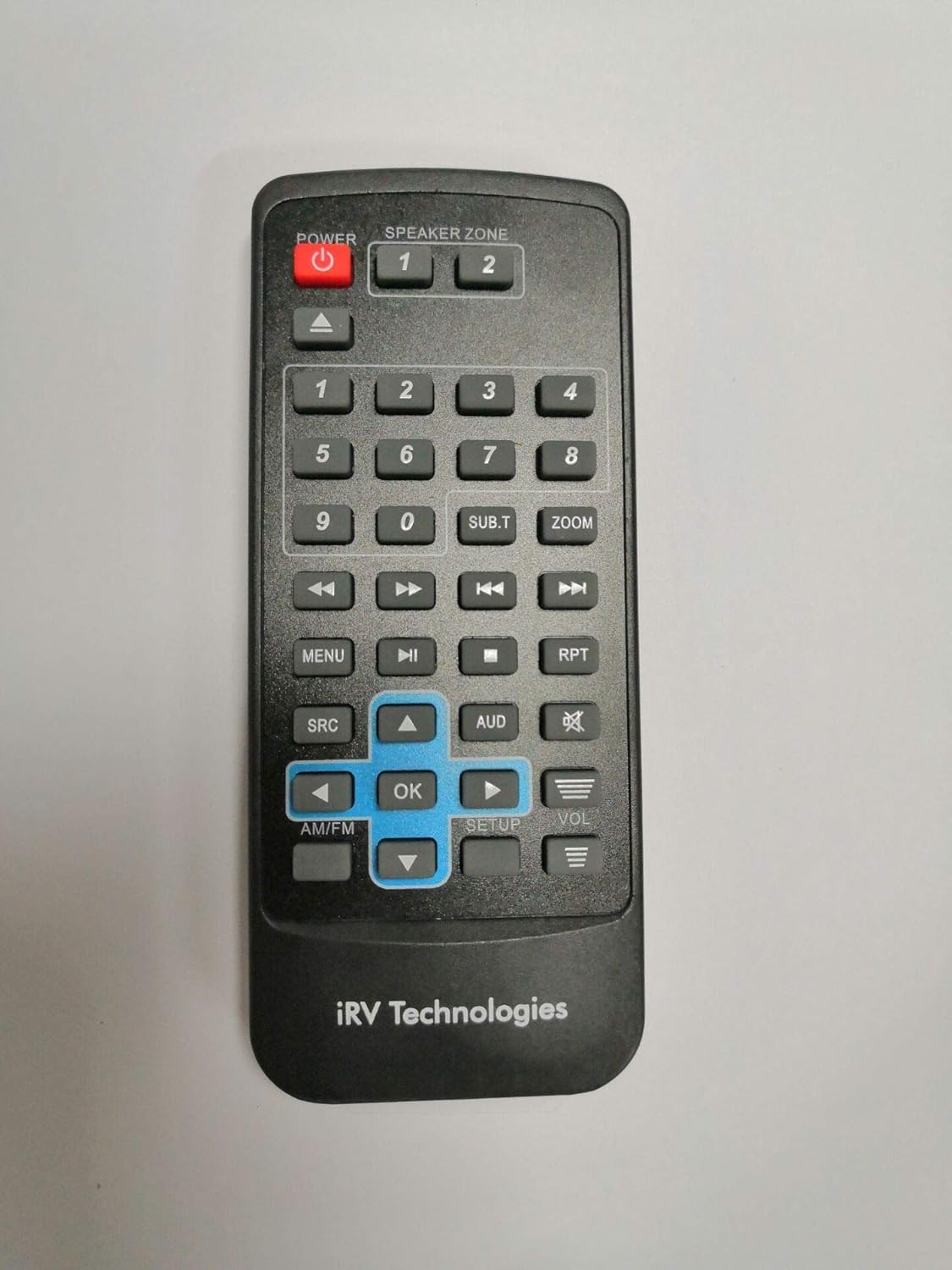
Funkcje przycisków:
- MOC (czerwony przycisk): Turns the stereo system on or off.
- SPEAKER ZONE (1, 2): Selects the audio output zone (e.g., Zone 1 for living area, Zone 2 for bedroom/outdoor).
- Przyciski numeryczne (0-9): Used for direct track selection, radio station input, or menu navigation.
- Przyciski nawigacyjne (w górę, w dół, w lewo, w prawo, OK): Służy do poruszania się po menu i potwierdzania wyborów.
- MENU: Accesses the main menu of the stereo system.
- SRC (Źródło): Cycles through available audio sources (e.g., Radio, CD, USB, Bluetooth).
- AUD (Audio): Accesses audio settings such as bass, treble, balance, and fader.
- GŁOŚNOŚĆ (+/-): Dostosowuje główny poziom głośności.
- Play/Pause, Stop, Skip (Forward/Backward): Steruje odtwarzaniem multimediów.
- RPT (Powtórz): Toggles repeat playback mode for tracks.
- AM/FM: Przełącza między pasmami radiowymi AM i FM.
- USTAWIAĆ: Accesses system setup options.
6. Konserwacja
Wymiana baterii:
When the remote control's range decreases or it becomes unresponsive, it is likely time to replace the battery. Refer to Section 4, "Setup: Battery Installation," for detailed instructions on how to replace the CR2025 battery.
Czyszczenie:
To clean the remote control, wipe it gently with a soft, dry cloth. Do not use abrasive cleaners, waxes, or solvents, as these may damage the finish or internal components. Avoid exposing the remote to excessive moisture.
7. Rozwiązywanie Problemów
If you experience issues with your IRV-R2 remote control, please consult the following common troubleshooting steps:
- Pilot nie odpowiada:
- Ensure the remote has a fresh CR2025 battery installed correctly with the positive (+) side up.
- Check for any obstructions between the remote control and the stereo receiver's infrared sensor.
- Ensure you are within the effective operating range (typically up to 20 feet) and pointing the remote directly at the receiver.
- Limited Range or Intermittent Operation:
- Wymień baterię na nową.
- Ensure there are no strong light sources (like direct sunlight or bright fluorescent lights) interfering with the remote's signal.
- Niektóre przyciski nie działają:
- Clean the remote's surface and buttons to ensure no debris is preventing proper contact.
- If only certain buttons fail, the remote may be damaged. Consider replacing the unit.
8. Specyfikacje
| Funkcja | Opis |
|---|---|
| Numer modelu | IRV-R2 |
| Wymiary produktu | 5 x 2 x 0.5 cala |
| Waga przedmiotu | 3.2 uncji |
| Źródło zasilania | 1 x CR2025 3V Lithium Cell Battery (not included) |
| Kompatybilne urządzenia | IRV Technology Car Stereo IRV62, IRV31 |
| Maksymalna liczba obsługiwanych urządzeń | 1 |
| Kolor | Czarny |
| Funkcja specjalna | Ergonomiczna konstrukcja |
| Producent | ATP Products Inc. |
| Kraj pochodzenia | Chiny |
9. Gwarancja i wsparcie
For information regarding warranty coverage or technical support for your IRV-R2 Wireless Remote Control, please contact the manufacturer, ATP Products Inc., or your original point of purchase. Keep your purchase receipt as proof of purchase for any warranty claims.