
1. Wprowadzenie
This manual provides detailed instructions for the proper use and maintenance of your Zerone AYNEFY0oxm4abc37 USB Endoscope. This device is designed for visual inspection in hard-to-reach areas, offering compatibility with Android smartphones and various computer operating systems. Please read this manual thoroughly before operating the endoscope to ensure optimal performance and longevity.
2. Koniec produktuview
2.1 Główne cechy
- Kompaktowa konstrukcja: Features a slim 5.5mm diameter lens for accessing narrow spaces.
- Stopień wodoodporności: IP67 waterproof-rated, suitable for moist or underwater inspections.
- Regulowane oświetlenie: Equipped with 6 adjustable LED lights to enhance visibility in dark environments.
- Obrazowanie w wysokiej rozdzielczości: 2.0MP CMOS HD camera provides clear and detailed images and videos.
- Trwała konstrukcja: Crafted from high-quality materials for reliability and extended use.
- Szeroka kompatybilność: 3-in-1 USB connector supports Android smartphones (with OTG function) and computers (Windows XP/W7/W8/VISTA/W10).
- Rozszerzony zasięg: Includes a 5-meter USB cable for flexible inspection tasks.
2.2 Składniki

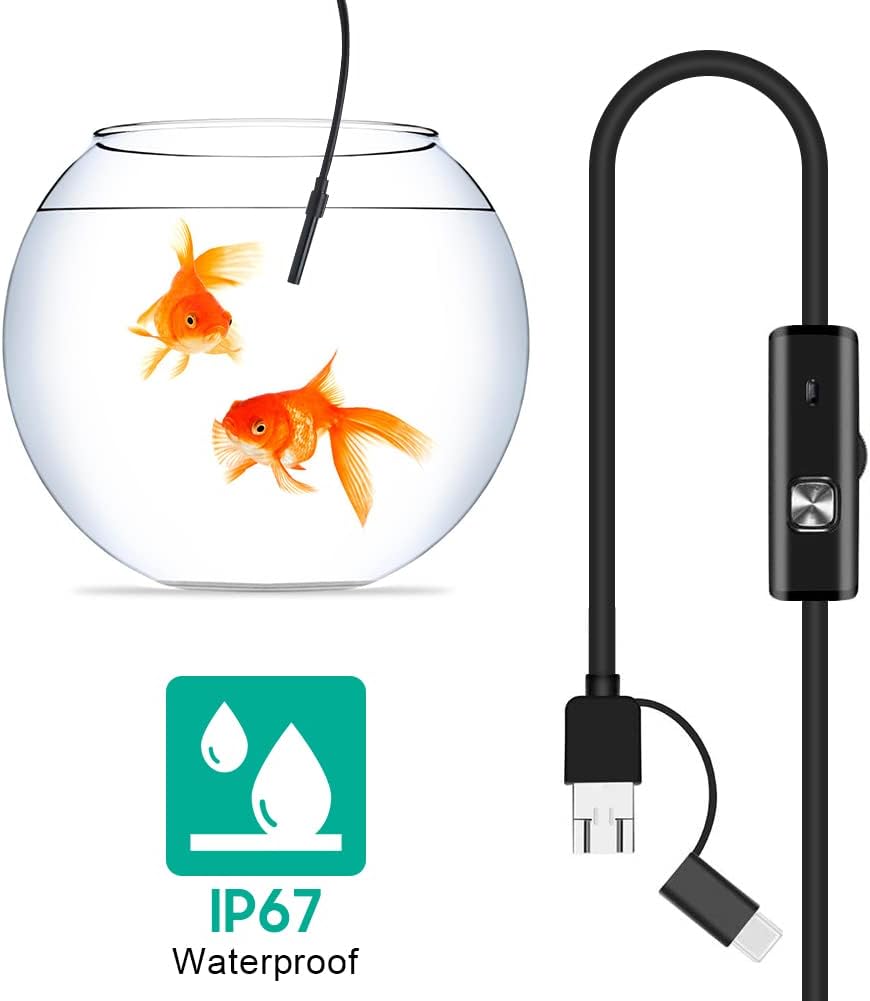


3. Konfiguracja
3.1 Wymagania systemowe
- Urządzenia z systemem Android: Android 4.4 or higher with OTG (On-The-Go) and UVC (USB Video Class) support.
- Komputery: Windows XP, Windows 7, Windows 8, Windows Vista, Windows 10.
3.2 Instalacja oprogramowania
For Android devices, download and install a compatible camera application from the Google Play Store that supports USB OTG endoscopes. Recommended applications include 'USB Camera', 'AN98', or 'CameraFi'. For Windows computers, the device typically functions with the built-in 'Camera' application or other webcam software. Drivers are usually installed automatically upon connection.
3.3 Podłączanie endoskopu
- Dla Androida: Connect the appropriate connector (Micro-USB or USB-C) of the endoscope cable to your smartphone. Ensure your phone's OTG function is enabled in settings if it doesn't automatically detect the device.
- Dla komputera: Connect the standard USB-A connector of the endoscope cable to an available USB port on your computer.
- Open the installed camera application on your device. The endoscope feed should appear.
4. Instrukcja obsługi
4.1 Regulacja jasności diod LED
The control unit on the cable features a wheel or button to adjust the brightness of the 6 LED lights at the camera tip. Rotate the wheel or press the button to increase or decrease illumination as needed for clear vieww różnych środowiskach.
4.2 Korzystanie z akcesoriów
- Lusterko boczne: Attach the side mirror to the camera tip to view objects at a 90-degree angle. This is useful for inspecting walls of pipes or tight corners.
- Magnes: Attach the magnet to the camera tip to retrieve small metallic objects from inaccessible areas.
- Hak: Attach the hook to the camera tip to retrieve small non-metallic objects.
4.3 Robienie zdjęć i nagrywanie filmów
Use the functions within your chosen camera application to capture still images or record video footage from the endoscope. Refer to your application's specific instructions for these features.

5. Konserwacja
5.1 Czyszczenie
- After each use, gently wipe the camera lens and probe with a soft, dry cloth.
- W przypadku uporczywych zabrudzeń, należy użyć lekkiego detergentu.amp cloth can be used, ensuring no liquid enters the control unit or connectors.
- Do not use abrasive cleaners or solvents, as these can damage the lens or casing.
5.2 Przechowywanie
- Przechowuj endoskop w chłodnym i suchym miejscu, z dala od bezpośredniego światła słonecznego i ekstremalnych temperatur.
- Aby zapobiec uszkodzeniom wewnętrznym, należy unikać załamywania i gwałtownego zginania kabla.
- Keep the lens cap on when not in use to protect the lens from dust and scratches.
6. Rozwiązywanie Problemów
- No Image/Device Not Detected:
- Ensure the endoscope is securely connected to your device.
- For Android, verify that OTG function is enabled in your phone's settings.
- Wypróbuj inny port USB na swoim komputerze.
- Ensure the correct camera application is open and selected (if multiple cameras are detected).
- Uruchom ponownie urządzenie i spróbuj jeszcze raz.
- Rozmazany obraz:
- The endoscope has a fixed focal length. Ensure the object being viewed is within the optimal focal range (typically a few centimeters from the lens).
- Clean the camera lens for any smudges or debris.
- Adjust the LED brightness to prevent overexposure or underexposure.
- Oświetlenie LED nie działa:
- Check the LED brightness adjustment wheel/button on the control unit.
- Sprawdź, czy endoskop jest prawidłowo podłączony i ma zasilanie.
- Application Crashes/Freezes:
- Try a different compatible camera application.
- Upewnij się, że system operacyjny Twojego urządzenia jest aktualny.
- Zamknij inne aplikacje działające w tle, aby zwolnić zasoby systemowe.
7. Specyfikacje
| Funkcja | Specyfikacja |
|---|---|
| Numer modelu | AYNEFY0oxm4abc37 |
| Średnica soczewki | 5.5mm |
| Rozdzielczość kamery | 2.0MP CMOS HD (Video Capture Resolution: 1080p) |
| Światła LED | 6 regulowanych diod LED |
| Długość kabla | 5 metrów |
| Stopień wodoodporności | IP67 |
| Łączność | 3-in-1 USB (USB-A, Micro-USB, USB-C) |
| Zgodność | Android (OTG/UVC support), Windows XP/7/8/VISTA/10 |
| Wymiary produktu | 4.72 x 4.72 x 1.38 cala |
| Waga przedmiotu | 4.6 uncji |
| Kolor | Czarny |
| Producent | Zerone |
8. Gwarancja i wsparcie
For warranty information or technical support, please refer to the product packaging or contact the retailer from whom the product was purchased. You may also visit the official Zerone webAby uzyskać dalszą pomoc, odwiedź naszą witrynę.