
Wstęp
This manual provides detailed instructions for the proper use and maintenance of your Ataller Mini Digital Pocket Scale, Model KS-1005. Designed for precision, this scale offers accurate measurements for various items up to 100g with 0.01g readability. Please read this manual thoroughly before operation to ensure optimal performance and longevity of your device.
Informacje dotyczące bezpieczeństwa
- Nie przeciążaj wagi ponad jej maksymalną nośność 100 g, gdyż może to spowodować jej trwałe uszkodzenie.
- Unikaj wystawiania wagi na działanie ekstremalnych temperatur, wilgoci lub bezpośredniego światła słonecznego.
- Trzymaj wagę z dala od silnych pól elektromagnetycznych.
- Ostrożnie obchodź się z wagą. Unikaj jej upuszczania i narażania na silne uderzenia.
- Wyczyść wagę miękką, damp ściereczką. Nie używaj środków czyszczących o właściwościach ściernych ani nie zanurzaj wagi w wodzie.
- Aby zapobiec wyciekowi, wyjmij baterie, jeśli waga nie będzie używana przez dłuższy czas.
Zawartość opakowania
- 1 x Ataller Mini Digital Pocket Scale (Model KS-1005)
- 2 baterie AAA
- 1 x Protective Cover (also functions as a weighing tray)
Produkt ponadview
The Ataller Mini Digital Pocket Scale features a compact design with a stainless steel weighing platform, an LCD display with backlight, and two control buttons for easy operation.
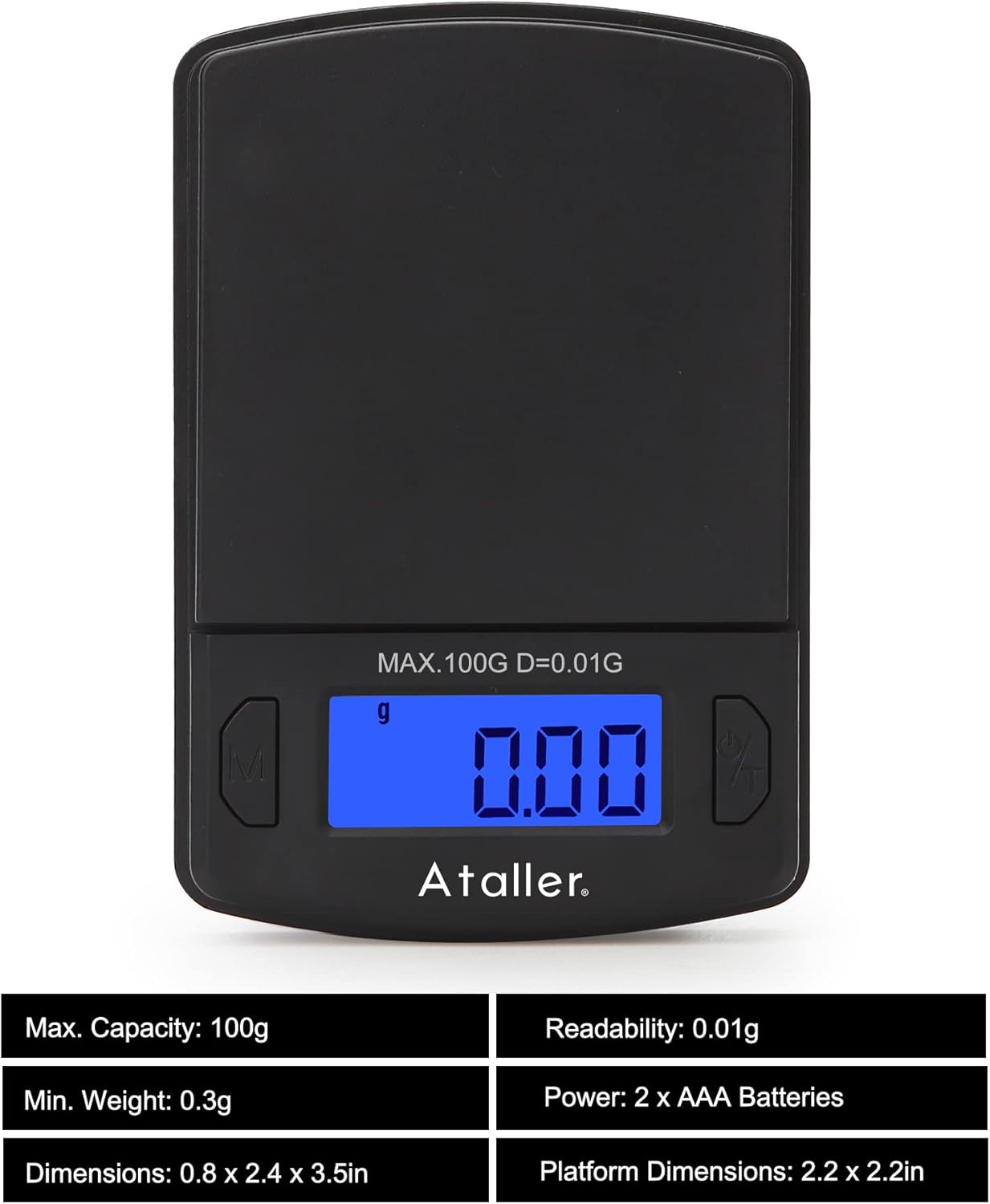
Obraz: Przód view of the Ataller Mini Digital Pocket Scale, displaying '0.00' on the backlit LCD screen. The 'M' (Mode) button is on the left, and the 'Power/Tare' button is on the right. The maximum capacity of 100g and readability of 0.01g are indicated above the display.

Image: Diagram showing the dimensions of the Ataller Mini Digital Pocket Scale (60mm width, 90mm length) and an illustration of two AAA batteries, indicating their inclusion and placement.
Kluczowe komponenty:
- Platforma wagowa: Powierzchnia ze stali nierdzewnej do odkładania przedmiotów.
- Wyświetlacz LCD: Backlit screen showing weight, unit, and status indicators.
- Przycisk „M” (tryb): Used to change weighing units.
- 'Power/Tare' Button: Used to power on/off the scale and activate the tare function.
- Pokrowiec ochronny: Służy również jako tacka ważąca.
Organizować coś
1. Instalacja baterii
- Otwórz pokrywę komory baterii, która znajduje się na spodzie wagi.
- Włóż dwie baterie AAA, zwracając uwagę na prawidłową biegunowość (+/-).
- Dokładnie zamknij pokrywę komory baterii.
2. Początkowe umiejscowienie
Place the scale on a hard, flat, and stable surface. Ensure there is no wind or vibration in the environment, as this can affect measurement accuracy.
Instrukcja obsługi
1. Włączanie/wyłączanie zasilania
- To turn on: Press the 'Power/Tare' button. The display will show '88888' then '0.00g'.
- To turn off: Press and hold the 'Power/Tare' button for approximately 3 seconds. The scale will also automatically shut off after 60 seconds of inactivity to conserve battery life.
2. Konwersja jednostek
The scale supports 7 different weighing units: grams (g), grains (gn), ounces (oz), troy ounces (ozt), carats (ct), taels (tl), and pennyweights (dwt).
- With the scale powered on, press the 'M' (Mode) button repeatedly to cycle through the available units. The selected unit will be displayed on the screen.

Image: A collage of the scale's display showing various units: g, ct, oz, ozt, dwt, tl, and gn, illustrating the unit conversion feature.
3. Funkcja tarowania
Funkcja tarowania pozwala odjąć wagę pojemnika i zmierzyć tylko jego zawartość.

Image: Two panels illustrating the tare function. The first panel shows a hand pressing the 'Power/Tare' button with a container on the scale, zeroing the display. The second panel shows powder being weighed in the container, with the display showing only the powder's weight.
- Place the empty container (e.g., the protective cover) on the weighing platform.
- Press the 'Power/Tare' button. The display will reset to '0.00g'.
- Dodaj do pojemnika przedmioty, które chcesz zważyć. Na wyświetlaczu pojawi się tylko waga netto tych przedmiotów.
4. Kalibracja
Calibration ensures the accuracy of your scale. A 100g calibration weight is required but not included with the scale.

Image: A four-step visual guide for calibrating the Ataller Mini Digital Pocket Scale. It shows the display changes from a random number to 'CAL', then '100.00g', followed by placing a 100g weight, and finally displaying 'PASS' and '100.00g' to confirm successful calibration.
- Turn the scale off.
- Press and hold both the 'M' and 'Power/Tare' buttons simultaneously until the display shows a random number.
- Release the 'Power/Tare' button, then press the 'Power/Tare' button again. The display will show 'CAL' followed by '100.00g'.
- Carefully place a 100g calibration weight onto the center of the weighing platform.
- Press the 'Power/Tare' button again. The display will show 'PASS' and then return to normal weighing mode, indicating successful calibration.
- Remove the calibration weight.
Note: A 100g calibration weight is not included with the scale.
Konserwacja
Czyszczenie
- Wipe the scale with a soft, slightly damp płótno.
- Do not use chemical cleaning agents, as they may damage the scale's finish or internal components.
- Ensure no liquid enters the scale's interior.
Składowanie
- Store the scale in a clean, dry, and stable environment.
- Unikaj umieszczania ciężkich przedmiotów na wadze, gdy nie jest używana.
- If storing for an extended period, remove the batteries to prevent potential leakage and damage.
Rozwiązywanie problemów
| Problem | Możliwa przyczyna | Rozwiązanie |
|---|---|---|
| Na wyświetlaczu pojawia się napis „Lo” | Niski poziom naładowania baterii. | Wymień baterie AAA. |
| Display shows 'OUE2' | Skala jest przeciążona. | Natychmiast pozbądź się nadmiaru kilogramów. Nie przekraczaj 100 g. |
| Niedokładne odczyty | Unstable surface, wind, or need for calibration. | Place the scale on a stable, flat surface. Avoid drafts. Perform calibration as per instructions. |
| Waga się nie włącza | Nieprawidłowo zainstalowane lub rozładowane baterie. | Sprawdź biegunowość baterii. W razie potrzeby wymień baterie. |
Specyfikacje
- Model: KS-1005
- Pojemność: 0.01g - 100g
- Czytelność: 0.01g
- Jednostki: g, gn, oz, ozt, ct, tl, dwt
- Automatyczne wyłączanie: 60 sekund
- Moc: 2 x baterie AAA (w zestawie)
- Tworzywo: Polypropylene, Stainless Steel Platform
- Wymiary produktu: 8.89 x 6.1 x 2.03 cm (3.5 x 2.4 x 0.8 cala)
- Waga przedmiotu: 58.11 g (2.05 uncji)
Informacje o gwarancji
Ten produkt jest objęty standardową gwarancją producenta na wady materiałowe i wykonawcze. Prosimy zachować dowód zakupu na wypadek roszczeń gwarancyjnych. Szczegółowe warunki gwarancji można znaleźć w dokumentacji dołączonej do produktu lub skontaktować się z działem obsługi klienta.
Obsługa klienta
If you encounter any issues or have questions regarding your Ataller Mini Digital Pocket Scale, please refer to the troubleshooting section of this manual. If the problem persists, contact your retailer or the manufacturer's customer service for assistance. Please have your model number (KS-1005) and purchase information ready when contacting support.