
Wstęp
This manual provides comprehensive instructions for the setup, operation, and maintenance of your Zerone Universal Remote Control. This remote is designed to function with various Pioneer DVD player models, offering a convenient replacement or secondary control unit.
Zgodność
The Zerone Universal Remote Control is compatible with the following Pioneer DVD player models:
- Pioneera VXX2811
- Pioneera VXX2914
- Pioneera VXX3218
- Pioneera VXX2801
- Pioneera VXX2800
- Pioneera VXX2913
For optimal performance, ensure your DVD player model is listed above.
Organizować coś
1. Instalacja baterii
- Znajdź komorę baterii z tyłu pilota.
- Aby otworzyć, przesuń pokrywę baterii w dół lub naciśnij zatrzask i unieś.
- Insert two (2) AA 1.5V batteries, ensuring the positive (+) and negative (-) terminals align correctly with the markings inside the compartment.
- Załóż pokrywę baterii, wsuwając ją z powrotem na miejsce, aż do zatrzaśnięcia.
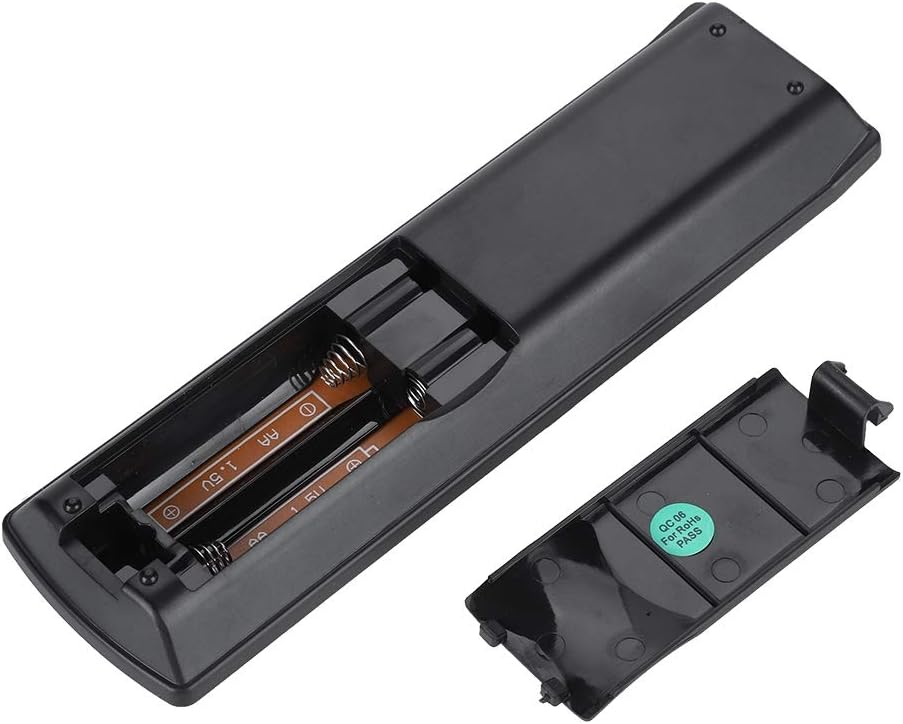
Obraz: Tył view of the Zerone remote control, showing the battery compartment cover.

Image: The battery compartment of the remote control with two AA batteries correctly inserted.
No programming or setup is required. Once batteries are installed, the remote is ready for use with compatible Pioneer DVD players.
Instrukcja obsługi
Point the remote control directly at your Pioneer DVD player. The effective control distance is typically over 8 meters (approximately 26 feet), though this may vary based on environmental factors and the specific DVD player model.

Obraz: Przód view of the Zerone Universal Remote Control, displaying all buttons and their labels.
Główne funkcje:
- GOTOWOŚĆ/WŁĄCZONY: Powers the DVD player on or off.
- OTWARTE ZAMKNIĘTE: Otwiera lub zamyka szufladę na płytę.
- AUDIO: Wybiera ścieżki audio lub języki.
- PODTYTUŁ: Przełącza lub wybiera opcje napisów.
- KĄT: Zmienia viewing angle if supported by the DVD.
- Przyciski numeryczne (0-9): Direct track selection or input.
- JASNE: Clears numerical input.
- WCHODZIĆ: Potwierdza wybór.
- GÓRNE MENU: Accesses the main menu of the DVD.
- MENU: Accesses the disc menu.
- HOME MENU: Navigates to the home menu of the DVD player.
- POWRÓT: Wraca do poprzedniego ekranu lub menu.
- Klawiatura kierunkowa (góra, dół, lewo, prawo) i ENTER: Umożliwia nawigację po menu i potwierdzanie wyborów.
- Playback Controls (Play, Pause, Stop, Fast Forward, Rewind, Skip Forward, Skip Backward): Standardowe funkcje odtwarzania multimediów.
- TRYB GRY: Wybiera tryby odtwarzania (np. powtarzanie, odtwarzanie losowe).
- OTACZAĆ: Adjusts surround sound settings.
- POWIĘKSZENIE: Zooms in or out on the video.
- POKAZ: Wyświetla informacje na ekranie.

Image: A hand holding the Zerone remote control, demonstrating its ergonomic design and ease of use.

Image: The remote control positioned in front of a television displaying content, illustrating its intended use.

Image: A visual representation of the remote control's effective operating distance, indicating a range of over 8 meters.
Konserwacja
- Czyszczenie: Przetrzyj pilota miękką, suchą ściereczką. Nie używaj płynnych środków czyszczących ani materiałów ściernych.
- Wymiana baterii: Replace batteries when the remote's response becomes sluggish or stops working. Always replace both batteries at the same time with new ones.
- Składowanie: Przechowuj pilota w chłodnym, suchym miejscu, z dala od bezpośredniego światła słonecznego i ekstremalnych temperatur.
- Unikaj uszkodzeń: Do not drop the remote or expose it to water.
Rozwiązywanie problemów
- Pilot nie odpowiada:
- Upewnij się, że baterie zostały prawidłowo zainstalowane, z zachowaniem właściwej polaryzacji.
- Wymień stare baterie na nowe baterie AA.
- Check for any obstructions between the remote control and the DVD player's infrared sensor.
- Ensure you are within the effective operating range (typically within 8 meters).
- Niektóre funkcje nie działają:
- Verify that your Pioneer DVD player model is listed in the compatibility section.
- Some advanced functions may be specific to the original remote or not supported by all DVD player models.
Specyfikacje
| Materiał skorupy | High-grade ABS |
| Kontrola odległości | > 8 meters (316 inches) |
| Typ baterii | 2 x AA 1.5V Batteries (Not included) |
| Wymiary | Około 174 x 49 x 20 mm (6.85 x 1.93 x 0.79 cala) |
| Waga | Około 75 g (2.46 uncji) |
| Numer modelu | 743562180017 |
Gwarancja i wsparcie
For warranty information or technical support, please refer to the documentation provided with your purchase or contact the manufacturer, Zerone, directly through their official channels. Keep your purchase receipt as proof of purchase.