
TEKMAGIC 43528-116657
TEKMAGIC 10ATM Waterproof Digital Scuba Diving Watch User Manual
Model: 43528-116657
Wstęp
This manual provides detailed instructions for the operation and maintenance of your TEKMAGIC 10ATM Waterproof Digital Scuba Diving Watch. Please read this manual thoroughly to ensure proper use and to maximize the lifespan of your watch.
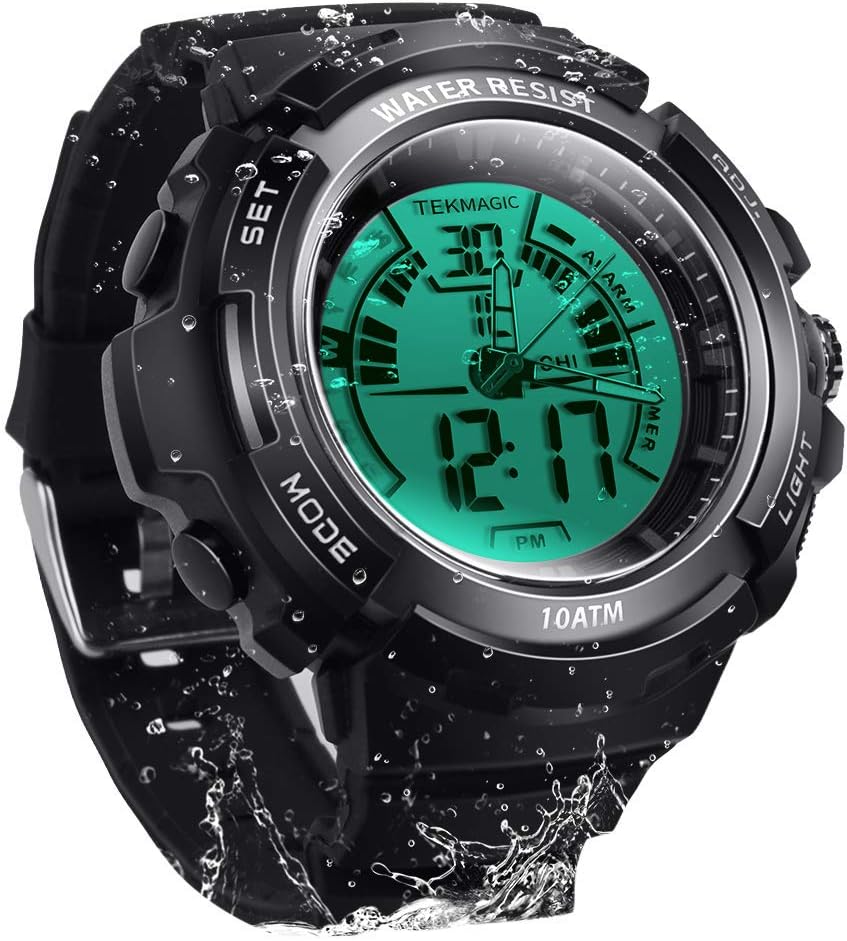
Obraz: Przód view of the TEKMAGIC 10ATM Waterproof Digital Scuba Diving Watch, showcasing its digital and analog display with water droplets.
Główne cechy
- Wodoodporność 10 ATM: Designed for underwater operation up to 100 meters (328 feet), suitable for swimming, snorkeling, and recreational scuba diving.
- Podwójny wyświetlacz czasu: Features both digital and analog movements for versatile timekeeping.
- Wiele funkcji: Includes chronograph (stopwatch), countdown timer, dual time zone, alarm, and hourly gong.
- Wyświetlacz świetlny: Positive electro luminescent backlight and luminous hands for visibility in low-light conditions.
- Opcje formatu czasu: Supports 12-hour and 24-hour time formats.
- Trwała konstrukcja: High transparency resin dial window, ABS plastic case, and comfortable PU band strap.
- Odporny na wstrząsy: Zbudowane tak, aby wytrzymać uderzenia.
Components and Button Functions
Your watch features four primary buttons for navigation and setting. Refer to the image below for button identification.

Obraz: Szczegółowy view of the watch dial, buttons, and strap. Labels indicate "SET", "MODE", "ADJ", and "LIGHT" buttons, along with dial width, thickness, strap width, and total length measurements.
- Przycisk SET (lewy górny róg): Służy do wprowadzania i potwierdzania ustawień.
- Przycisk MODE (lewy dolny róg): Cycles through different watch modes (Time, Chronograph, Countdown, Alarm, Dual Time).
- Przycisk ADJ (prawy górny róg): Adjusts values during setting.
- Przycisk ŚWIATŁO (prawy dolny róg): Włącza podświetlenie.
Konfiguracja: Początkowe ustawienia czasu i daty
- W trybie czasu naciśnij i przytrzymaj USTAWIĆ Naciskaj przycisk, aż sekundy zaczną migać, wskazując tryb ustawień.
- Naciśnij TRYB przycisk, aby przełączać się między ustawieniami: Sekundy → Godzina → Minuta → Rok → Miesiąc → Dzień → Format 12/24 godzinny.
- Użyj PRZYMIOT button to increase the flashing value. Hold PRZYMIOT for faster adjustment.
- Po wprowadzeniu wszystkich prawidłowych ustawień naciśnij przycisk USTAWIĆ przycisk, aby wyjść z trybu ustawień.
- The analog hands will automatically synchronize with the digital time after setting. If they do not, manually adjust them by pulling out the crown (if present, otherwise refer to specific analog adjustment instructions if available, or assume automatic synchronization).
Tryby pracy
1. Tryb czasu
To domyślny tryb wyświetlania, pokazujący aktualną godzinę, datę i dzień tygodnia.

Image: The watch display showing both normal and LED luminous modes, highlighting the "Light Button" for activation.
- Naciśnij ŚWIATŁO button to activate the electro luminescent backlight for approximately 3 seconds.
- To switch between 12-hour and 24-hour format, enter time setting mode (as described in Setup) and use the PRZYMIOT button when the 12/24 hour indicator is flashing.
2. Tryb chronografu (stopera)
Chronograf mierzy upływający czas.

Image: A person running on a track, with an overlay of the watch displaying the stopwatch function, indicating its use for tracking activity.
- W trybie czasu naciśnij TRYB button repeatedly until "STW" or "CHRONO" appears on the display.
- Naciśnij PRZYMIOT przycisk, aby uruchomić stoper.
- Naciskać PRZYMIOT ponownie, aby wstrzymać.
- Naciskać PRZYMIOT wznowić.
- To reset, while paused, press the USTAWIĆ przycisk.
3. Tryb odliczania
Timer odliczający pozwala na ustawienie konkretnego czasu, po upływie którego rozlegnie się alarm.
- W trybie czasu naciśnij TRYB button repeatedly until "TMR" or "COUNTDOWN" appears.
- Aby ustawić czas odliczania, naciśnij i przytrzymaj USTAWIĆ przycisk, aż godziny zaczną migać.
- Użyj TRYB button to select hours, minutes, or seconds. Use the PRZYMIOT przycisk, aby dostosować wartość.
- Naciskać USTAWIĆ to confirm the setting and exit.
- Naciśnij PRZYMIOT przycisk, aby rozpocząć odliczanie.
- Naciskać PRZYMIOT ponownie, aby wstrzymać/wznowić.
- Gdy odliczanie dojdzie do zera, rozlegnie się alarm. Naciśnij dowolny przycisk, aby go wyłączyć.
4. Dual Time Zone Mode
Funkcja ta umożliwia śledzenie drugiej strefy czasowej.

Image: Two watches side-by-side, each displaying a different time, superimposed over images of famous landmarks from different time zones (e.g., Moscow and Paris), illustrating the dual time zone feature.
- W trybie czasu naciśnij TRYB Naciskaj przycisk, aż pojawi się napis „T2” lub „DUAL TIME”.
- Naciśnij i przytrzymaj USTAWIĆ przycisk, aż godziny zaczną migać.
- Użyj TRYB button to select hours or minutes. Use the PRZYMIOT przycisk, aby dostosować wartość.
- Naciskać USTAWIĆ to confirm the setting and exit.
5. Tryb alarmowy
Ustaw codzienny alarm, który będzie dzwonił o określonej godzinie.

Image: A hand reaching for the watch on a bedside table, with lightning bolt icons indicating an alarm sounding, demonstrating the alarm feature.
- W trybie czasu naciśnij TRYB Naciskaj przycisk, aż pojawi się napis „ALM” lub „ALARM”.
- Naciśnij i przytrzymaj USTAWIĆ przycisk, aż godziny zaczną migać.
- Użyj TRYB button to select hours or minutes. Use the PRZYMIOT przycisk, aby dostosować wartość.
- Naciskać USTAWIĆ to confirm the setting and exit.
- Aby włączyć/wyłączyć alarm, naciśnij przycisk PRZYMIOT button while in Alarm Mode (not in setting mode). An alarm icon will appear/disappear on the display.
6. Onurly Dzwonek
Hourly chime provides a short beep every hour on the hour.
- While in Alarm Mode, press the TRYB button once to toggle the hourly chime ON/OFF. A chime icon will appear/disappear.
Water Resistance (10 ATM / 100m)
Your TEKMAGIC watch is rated for 10 ATM (Atmospheres) water resistance, equivalent to 100 meters (328 feet). This means it is suitable for:

Image: The watch submerged in water, with text indicating "100m Underwater Waterproof" and "Diving grade waterproof standard," emphasizing its water resistance.
- Daily use, including hand washing and rain.
- Prysznic i kąpiel.
- Pływanie i nurkowanie.
- Recreational scuba diving.
Ważny: Do not operate any buttons while the watch is submerged in water, as this can compromise the water resistance seal. Avoid exposing the watch to extreme temperature changes (e.g., hot showers followed by cold water) as this can also affect seals.
Konserwacja
Wymiana baterii
The watch uses a CR2025 battery. The operating battery life is approximately 1.5 to 2 years. If the watch stops working or the display becomes unclear, the battery may need replacement.
- Battery replacement should ideally be performed by a qualified watch technician to ensure the water resistance seal is properly maintained.
- If replacing yourself, carefully open the back case, replace the CR2025 battery, and ensure the gasket is correctly seated before securely closing the case.
Czyszczenie
Regularnie czyść zegarek miękką,amp Ściereczką. W przypadku uporczywych zabrudzeń można użyć łagodnego roztworu mydła, a następnie spłukać czystą wodą i dokładnie osuszyć. Unikać stosowania silnych środków chemicznych i materiałów ściernych.
Rozwiązywanie problemów
| Problem | Możliwa przyczyna / rozwiązanie |
|---|---|
| Watch not working / Display unclear | Battery may be low or depleted. Replace the CR2025 battery. |
| Analog hands do not match digital time | Ensure digital time is set correctly. The analog hands should synchronize automatically. If not, check for a manual adjustment crown or consult a technician. |
| Woda wewnątrz zegarka | Water resistance may have been compromised. Avoid pressing buttons underwater. Seek professional repair immediately to prevent further damage. |
| Przyciski nie reagują | Ensure the watch is not in a locked mode (if applicable, though not specified for this model). A low battery can also affect button responsiveness. |
Specyfikacje
| Funkcja | Szczegół |
|---|---|
| Numer modelu | 43528-116657 |
| Odporność na wodę | 10 ATM (100 metrów / 328 stóp) |
| Ruch | Cyfrowe i analogowe |
| Dokładność czasu | ±30 sekund miesięcznie |
| Typ baterii | CR2025 |
| Żywotność baterii | 1.5 do 2 lat |
| Materiał okna tarczy | Żywica o wysokiej przejrzystości |
| Materiał obudowy | Tworzywo ABS |
| Materiał paska | PU Band (Rubber) |
| Średnica koperty | 45 mm |
| Grubość obudowy | 17 mm |
| Przepustowość łącza | 20 mm |
| Maksymalny obwód nadgarstka | 210 mm |
| Minimalny obwód nadgarstka | 155 mm |
| Wymiary produktu | 2.17 x 0.79 x 6.5 cala; 5.6 uncji |

Image: Diagram illustrating the watch's dimensions, including dial width, dial thickness, strap width, total length, and maximum/minimum wrist circumferences.
Gwarancja i wsparcie
For warranty information or technical support, please refer to the documentation included with your purchase or contact TEKMAGIC customer service through their official webZachowaj paragon jako dowód zakupu.
Ask a question about this manual
Ask about setup, troubleshooting, compatibility, parts, safety, or missing instructions. Manuals+ will review the question and use this page’s manual context to help answer it.