
1. Wprowadzenie
This manual provides comprehensive instructions for the Gvirtue Universal Replacement Remote Control, model PN-15+EL. Designed as a direct replacement for various Panasonic TV remote controls, this device offers broad compatibility and essential functions for your television viewing experience. Please read this manual carefully to ensure proper setup and operation.
2. Koniec produktuview
The Gvirtue PN-15+EL remote control is engineered to provide a seamless replacement experience for your Panasonic TV. It features a user-friendly design with essential buttons and a learning function for advanced customization.
2.1 Główne cechy
- Uniwersalna kompatybilność: Works with a wide range of Panasonic LCD, LED, 3D, Smart, and 4K Ultra HD TV models.
- Funkcja uczenia się: Ability to learn functions directly from your original remote control.
- Podświetlane przyciski: Designed for convenient use in low-light conditions.
- Ergonomiczna konstrukcja: Lightweight and comfortable to grip, reducing the chance of slipping.
- Nie wymaga programowania: Often works directly out of the box for basic functions.
- Szybka odpowiedź: Stable performance with a fast response time of 0.2 seconds.
2.2 Zgodność
This remote is compatible with numerous Panasonic TV models and replaces many original Panasonic remote control models. A partial list of compatible TV models includes:
- TC-40AS520, TC-39AS530, TC-55AS530
- TC-42AS630, TC-50AS630, TC-60AS630
- TC-40AS520U, TC-39AS530U, TC-50AS530U, TC-55AS530U, TC-60AS530U
- TC-50AS530UE
- TC-42AS630U, TC-50AS630U, TC-60AS640U
- TC-50ASU534, TC-55LET64
- TC-32LX24, TC-42LD24, TC-42LS24
- TC-50PS24, TC-58PS24, TC-65PS24
- TC-L42ET60, TC-L47ET60, TC-L50ET60, TC-L55ET60
- TC-L32C22, TC-L22X2
- TC-L42U22, TC-L32U22, TC-L37U22, TC-L42U25
- TC-P42C2, TC-P50C2, TC-P46C2
- TC-P42U2, TC-P50U2
- TC-P42X2, TC-P50X2
- TC-P50GT50, TC-P55GT50, TC-P60GT50, TC-P65GT50
- TC-P55ST50, TC-P60ST
This remote also replaces original Panasonic remote models such as N2QAYB000100, N2QAYB000102, N2QAYB000221, N2QAYB000485, N2QAYB000779, and many others.
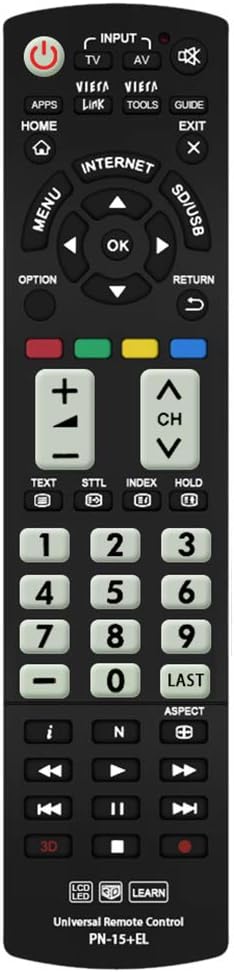
Obraz: Przód view of the Gvirtue PN-15+EL Universal Replacement Remote Control.
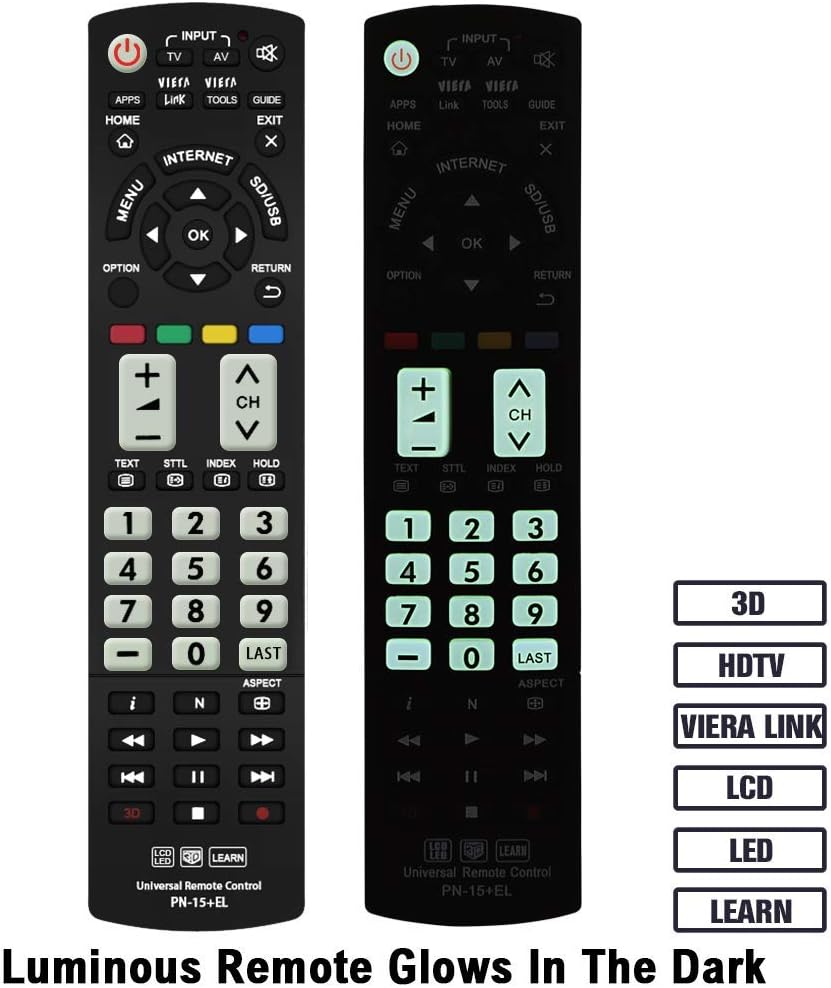
Image: The Gvirtue PN-15+EL remote control highlighting its luminous buttons for use in the dark.

Image: The Gvirtue PN-15+EL remote control shown alongside a list of compatible Panasonic TV models.
3. Konfiguracja
3.1 Instalacja baterii
Do działania pilota zdalnego sterowania potrzebne są dwie (2) baterie AAA (brak w zestawie). Aby zainstalować baterie, wykonaj następujące czynności:
- Znajdź pokrywę komory baterii z tyłu pilota.
- Aby otworzyć komorę, przesuń pokrywę w dół lub naciśnij zatrzask (jeśli jest obecny).
- Insert two fresh AAA batteries, ensuring the positive (+) and negative (-) terminals align correctly with the markings inside the compartment.
- Zamknij pokrywę komory baterii, wsuwając ją z powrotem na miejsce, aż do zatrzaśnięcia.
Note: This remote control does not include batteries. Please purchase them separately.

Image: Illustration showing how to open the battery compartment and insert two AAA batteries into the Gvirtue PN-15+EL remote control.
3.2 Pierwsze użycie
For most compatible Panasonic TV models, the Gvirtue PN-15+EL remote control is designed to work immediately after battery installation without any additional programming or pairing. Simply point the remote at your TV and test its functions.
If the remote does not function correctly out of the box, or if you wish to customize specific buttons, refer to the "Learning Function" section below.
4. Instrukcja obsługi
This section details the functions of the buttons on your Gvirtue PN-15+EL remote control.

Image: Diagram illustrating the various function buttons on the Gvirtue PN-15+EL remote control.
4.1 Funkcje przycisków
- Przycisk zasilania (●): Włącza i wyłącza telewizor.
- INPUT / TV / AV: Selects the TV input source directly.
- Łącze VIERA: Activates Panasonic's Viera Link feature for integrated control of connected devices.
- NARZĘDZIA: Displays frequently used functions or quick settings.
- PRZEWODNIK: Displays the Electronic Program Guide (EPG).
- DOM: Enters the TV's home menu or smart TV interface.
- WYJŚCIE: Wychodzi z bieżącego menu lub aplikacji.
- MENU: Wyświetla główne menu ekranowe.
- OPCJA: Displays available options for the current selection.
- POWRÓT: Powrót do poprzedniego menu lub ekranu.
- Directional Pad (Up, Down, Left, Right) & OK: Umożliwia poruszanie się po menu i potwierdzanie wyborów.
- Kolorowe przyciski (czerwony, zielony, żółty, niebieski): Shortcut keys for interactive functions, often context-dependent.
- GŁOŚNOŚĆ +/-: Dostosowuje poziom głośności.
- CO +/-: Zmienia kanały.
- Niemy: Wycisza lub wyłącza wyciszenie dźwięku telewizora.
- Klawiatura numeryczna (0-9): Bezpośredni wybór kanału.
- OSTATNI: Powrót do poprzedniego viewed kanał.
- 3D: Toggles the 3D function on or off (for compatible 3D TVs).
- Sterowanie odtwarzaniem multimediów (odtwarzanie, pauza, zatrzymanie, przewijanie do tyłu, przewijanie do przodu, pomijanie): Steruje odtwarzaniem multimediów na zgodnych urządzeniach lub funkcjami telewizora.
4.2 Funkcja uczenia się
The Gvirtue PN-15+EL remote control features a learning function, allowing you to program specific buttons to mimic functions from your original remote control. This is useful if certain advanced functions are not pre-programmed or if you want to consolidate controls.
Detailed instructions for activating and using the learning function are typically provided on a separate instruction sheet included with the product. Generally, the process involves:
- Entering a learning mode on the Gvirtue remote.
- Pointing your original remote at the Gvirtue remote.
- Pressing the desired button on the original remote, then the corresponding button on the Gvirtue remote to be programmed.
- Exiting the learning mode.
Refer to the specific learning function instructions provided with your remote for precise steps.
5. Konserwacja
Aby zapewnić długą żywotność i optymalną wydajność pilota, należy przestrzegać poniższych wskazówek dotyczących konserwacji:
- Czyszczenie: Wipe the remote control with a soft, dry cloth. Do not use abrasive cleaners, solvents, or alcohol, as these can damage the surface and buttons.
- Wymiana baterii: Wymień baterie, gdy pilot reaguje wolniej lub przestaje działać. Zawsze wymieniaj obie baterie jednocześnie na nowe tego samego typu (AAA).
- Składowanie: If the remote control will not be used for an extended period, remove the batteries to prevent leakage, which can damage the device. Store in a cool, dry place.
- Unikaj uszkodzeń: Do not drop the remote control, expose it to extreme temperatures, or immerse it in water. Keep it away from direct sunlight and heat sources.
6. Rozwiązywanie Problemów
If you encounter issues with your Gvirtue PN-15+EL remote control, refer to the following troubleshooting tips:
- Pilot nie odpowiada:
- Sprawdź, czy baterie zostały włożone prawidłowo, z zachowaniem właściwej polaryzacji (+/-).
- Wymień stare baterie na nowe baterie AAA.
- Upewnij się, że między pilotem zdalnego sterowania a czujnikiem podczerwieni telewizora nie ma żadnych przeszkód.
- Make sure you are within the effective operating range (approximately 10 meters / 30 feet) and pointing the remote directly at the TV.
- Niektóre przyciski nie działają:
- If you used the learning function, try re-programming the problematic button.
- Some advanced functions might require specific TV settings or may not be supported by all Panasonic TV models.
- Remote Works Intermittently:
- Często oznacza to niski poziom naładowania baterii. Wymień baterie.
- Upewnij się, że styki akumulatora są czyste i wolne od korozji.
If the issue persists after trying these steps, please contact Gvirtue customer support for further assistance.
7. Specyfikacje
| Model | PN-15+EL |
| Marka | Gcnota |
| Tworzywo | ABS & Plastic |
| Technologia łączności | Podczerwieni (IR) |
| Kompatybilne urządzenia | Panasonic Televisions (LCD, LED, 3D, Smart, 4K UHD) |
| Źródło zasilania | Baterie 2 x AAA (brak w zestawie) |
| Wymiary produktu | Około 6 x 2 x 0.7 cala (15.2 x 5.1 x 1.8 cm) |
| Waga przedmiotu | Około 3.2 uncji (90.7 gramów) |
| Cechy specjalne | Backlit buttons, Ergonomic design, Learning function |

Image: Visual representation of the Gvirtue PN-15+EL remote control's key specifications.

Obraz: przód, bok i tył views of the Gvirtue PN-15+EL remote control with dimensions indicated.
8. Gwarancja i wsparcie
Gvirtue products are designed for reliability and performance. While specific warranty details may vary, please retain your proof of purchase for any warranty claims.
For technical support, troubleshooting assistance, or inquiries regarding your Gvirtue PN-15+EL remote control, please contact Gvirtue customer service through their official channels or the retailer from whom you purchased the product.
You may find additional support resources by visiting the Gvirtue Store on Amazon.