
1. Koniec produktuview
The PERLESMITH PSFS02 Swivel Floor TV Stand is designed to provide a stable and versatile mounting solution for most 32-75 inch flat-panel, plasma, and curved LCD/LED TVs. It features a sturdy steel pillar and tempered glass base, offering both durability and a modern aesthetic. The stand includes a swivel function for optimal viewing angles, height adjustment for the TV brackets and a media shelf, and integrated cable management to maintain a tidy appearance.

Image 1.1: The PERLESMITH PSFS02 Swivel Floor TV Stand in a typical living room setup, showcasing jego designu i funkcjonalności.
Główne cechy:
- Szeroka kompatybilność: Supports TVs from 32" to 75" with VESA patterns from 100x100mm to 600x400mm.
- Funkcjonalność obrotowa: Allows for 25° left or right swivel (total 50°), providing flexible viewkąty.
- Regulacja wysokości: TV brackets offer 3 mounting height options, and the media shelf has 2 height adjustment settings.
- Zintegrowane zarządzanie kablami: Cable holders on the back of the pillar help organize and conceal wires.
- Solidna konstrukcja: Features a solid tempered glass base and steel pillar, supporting TVs up to 99 lbs and the shelf up to 22 lbs.
2. Zawartość opakowania
Przed rozpoczęciem montażu należy sprawdzić, czy wszystkie elementy są kompletne i nieuszkodzone. W przypadku braku lub uszkodzenia jakiejkolwiek części prosimy o kontakt z obsługą klienta.
- 1 x Floor TV Stand Main Unit
- 1 x Mounting Hardware Kit (various screws, washers, spacers)
- 1 x Instrukcja obsługi

Obraz 2.1: Example of mounting hardware components.
3. Instalacja i montaż
Follow these steps carefully to assemble your PERLESMITH PSFS02 TV Stand. It is recommended to have a second person assist with lifting the TV.
Krok 3.1: Złóż podstawę i słupek
- Attach the main pillar to the tempered glass base using the provided screws and tools. Ensure all connections are secure.
- Install the media shelf onto the pillar at your desired height. The shelf has two adjustable height settings.

Image 3.1: Illustration of attaching the pillar to the base.
Krok 3.2: Zamontuj uchwyty telewizora na telewizorze
- Identify the correct screws and spacers for your TV's VESA mounting holes.
- Attach the vertical TV brackets to the back of your television. Ensure they are securely fastened and level.

Image 3.2: Attaching the TV brackets to the television's VESA holes.
Krok 3.3: Zamontuj telewizor na stojaku
- With assistance, carefully lift the TV and hook the attached brackets onto the main mounting plate of the stand.
- Secure the TV to the stand using the safety screws or clips provided.
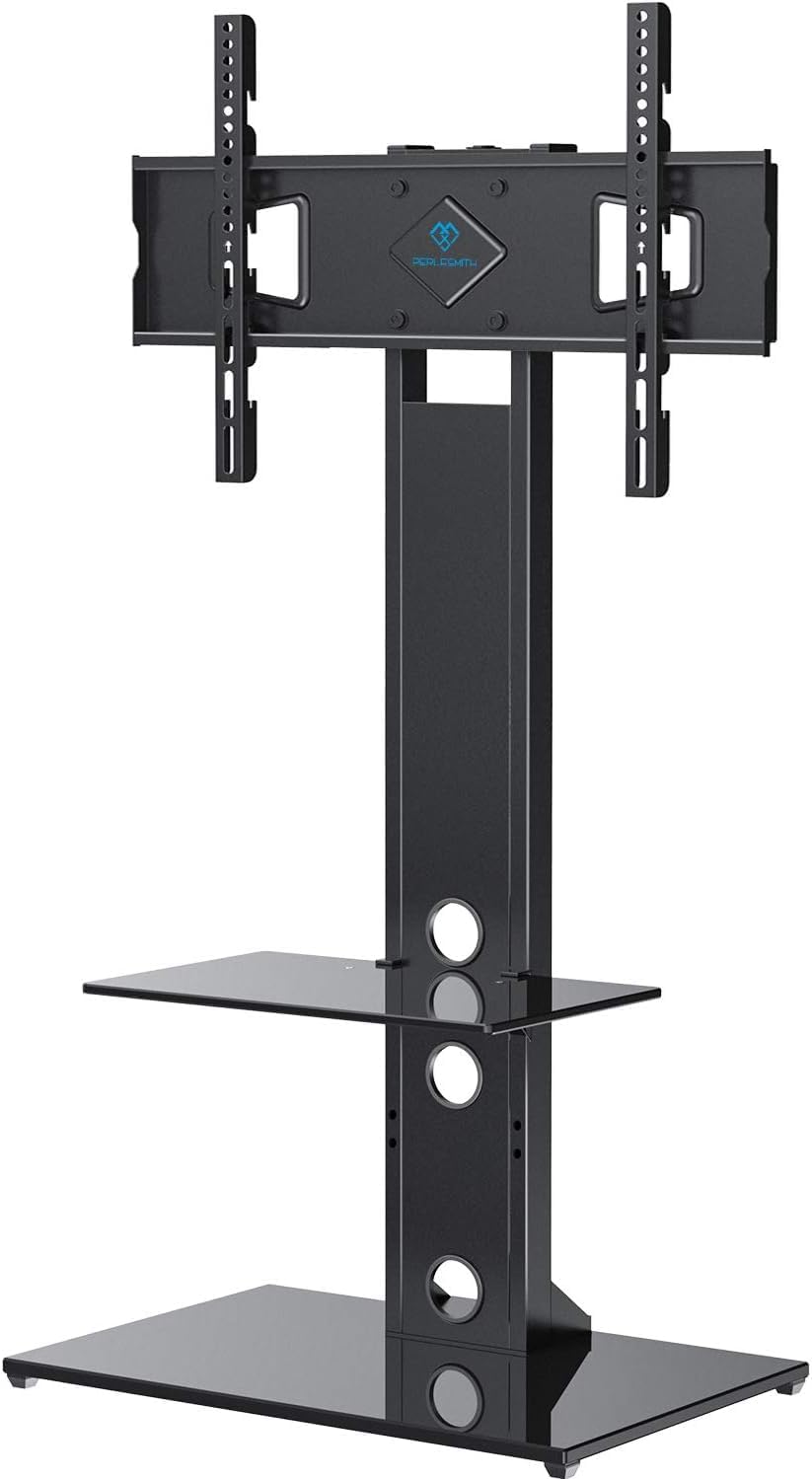
Image 3.3: The fully assembled TV stand with a television mounted.
Instrukcja montażu w formie filmu:
Video 3.1: Official PERLESMITH video demonstrating the assembly process for the PSFS02 Floor TV Stand.
4. Instrukcja obsługi
4.1 Funkcja obrotowa
The TV stand allows for a 25° swivel to the left or right, providing a total of 50° of rotation. Gently push the sides of the TV to adjust its angle to your preferred viewpozycja.

Image 4.1: Visual representation of the TV stand's swivel range.
4.2 Regulacja wysokości
The TV brackets offer three different height settings to position your television at an optimal viewing level. The media shelf can also be adjusted to two different heights to accommodate your audio/video components.

Image 4.2: Details on how to adjust the height of the TV and the media shelf.
4.3 Zarządzanie kablami
Utilize the integrated cable holders located on the back of the stand's pillar to route and conceal your TV and device cables. This helps maintain a clean and organized entertainment area.

Obraz 4.3: Example of cable management in use, keeping wires tidy.
5. Konserwacja
To ensure the longevity and proper function of your TV stand, follow these maintenance guidelines:
- Czyszczenie: Użyj miękkiego, damp cloth to clean the glass and metal surfaces. Avoid abrasive cleaners or harsh chemicals that could damage the finish.
- Sprawdź połączenia: Periodically inspect all screws and bolts to ensure they remain tight and secure. Loose connections can affect stability.
- Ograniczenia wagowe: Do not exceed the maximum weight capacities for the TV (99 lbs) and the media shelf (22 lbs).
6. Rozwiązywanie Problemów
Jeśli napotkasz jakiekolwiek problemy ze stojakiem pod telewizor, zapoznaj się z poniższymi typowymi problemami i ich rozwiązaniami:
- Telewizor nie jest wypoziomowany: Ensure the TV brackets are installed evenly on the back of the TV and that the stand's base is on a flat surface. Re-check all connections.
- Stojak wydaje się niestabilny: Verify that all assembly screws are tightened securely. Ensure the stand is placed on a firm, level floor. Do not exceed weight limits.
- Difficulty swiveling: Check for any obstructions behind the TV or around the stand's pillar. Ensure the TV is properly centered on the mount.
For further assistance, please contact PERLESMITH customer support.
7. Specyfikacje
| Numer modelu | PSFS02 |
| Kompatybilne rozmiary telewizorów | 32 - 75 cali |
| Zgodność ze standardem VESA | 100x100mm do 600x400mm |
| Maksymalna nośność telewizora | 99 funta (45 kg) |
| Maksymalna nośność półki | 22 funta (10 kg) |
| Kąt obrotu | ±25° (łącznie 50°) |
| Tworzywo | Szkło hartowane, stal |
| Wymiary produktu | 44.09 x 18.03 x 5.31 cala (w opakowaniu) |
| Waga przedmiotu | 34.5 funta |

Image 7.1: Dimensional drawing of the PERLESMITH PSFS02 TV Stand.
8. Gwarancja i wsparcie
PERLESMITH stands behind the quality of its products. This TV stand is constructed with high-quality steel to ensure safety and stability. For any questions, concerns, or assistance with your product, please reach out to our US-based product support team. Contact information can typically be found on the product packaging or the official PERLESMITH webstrona.
Proszę zachować dowód zakupu na potrzeby roszczeń gwarancyjnych.